
GRV FC1
GRV Smart Watch Band Replacement Strap FC1 Smart Watch (Purple)
Instruction Manual
1. Introduction
This manual provides essential information for the proper installation, usage, and maintenance of your GRV Smart Watch Band Replacement Strap. Please read this manual thoroughly before use to ensure optimal performance and longevity of your product.
2. Product Overview
The GRV Smart Watch Band Replacement Strap is designed to provide a comfortable and durable alternative for your compatible smart watch. Made from premium silicone material, it offers flexibility and resilience for daily wear. The strap features a secure stainless steel clasp for reliable fastening.


3. Compatibility
This replacement strap is compatible with smart watches that utilize a 19mm spring bar. It is specifically designed for GRV Veryfitpro smart watches, including models:
- ID205L
- ID205U
- ID215G
- ID205
- ID216
- ID205S
The adjustable design accommodates wrist sizes ranging from 5.5 to 8.7 inches (139 mm to 220 mm).

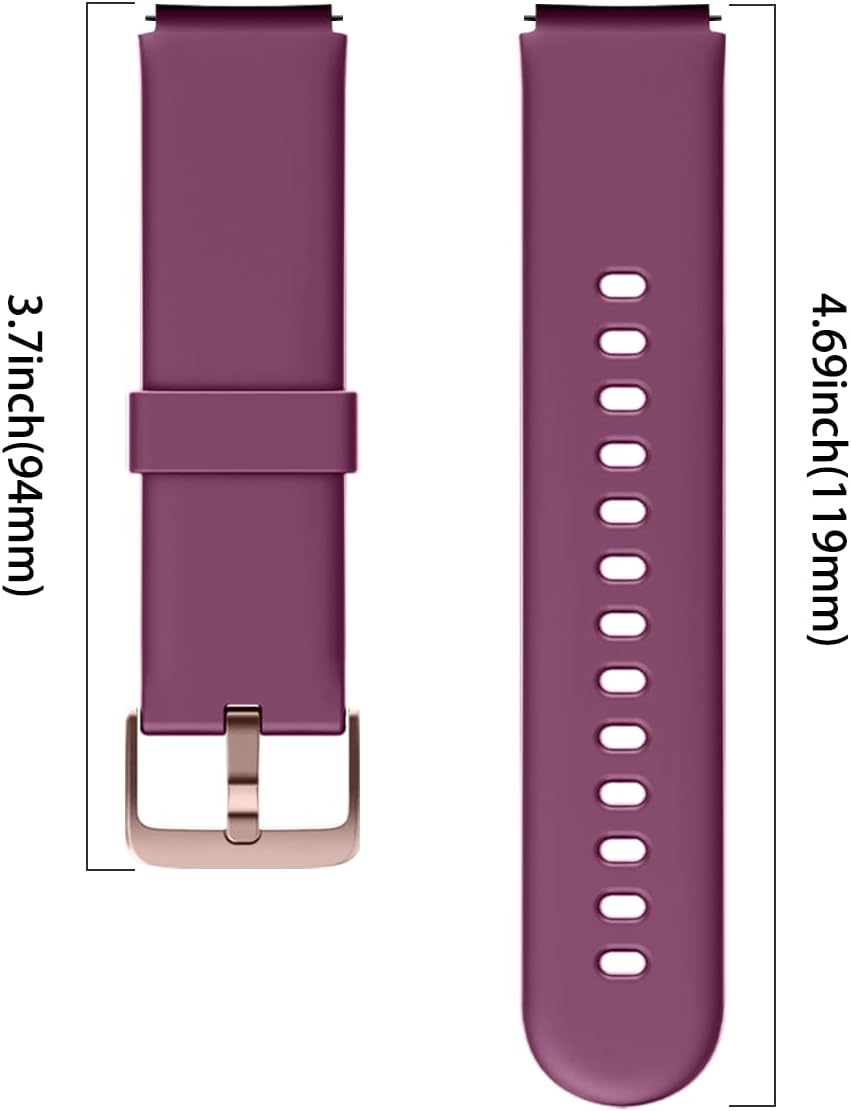
4. Installation
The GRV Smart Watch Band is designed for easy installation and removal, requiring no additional tools. Follow these steps to replace your watch band:
- Locate the spring bars on the underside of your smart watch where the current band attaches.
- Gently push the spring bar lever inward to release one side of the existing band.
- Carefully remove the old band from the watch lug.
- Align one end of the new GRV replacement strap with the watch lug, inserting one side of the spring bar into the lug hole.
- While holding that side in place, push the spring bar lever inward again and guide the other end of the spring bar into the opposite lug hole.
- Release the lever and gently tug on the band to ensure it is securely fastened.
- Repeat the process for the other side of the watch band.
Ensure both ends of the band are firmly attached before wearing the watch.

5. Usage
Once installed, the GRV Smart Watch Band is ready for daily use. Adjust the strap to a comfortable fit on your wrist using the stainless steel buckle. A proper fit ensures accurate heart rate monitoring and comfortable wear throughout the day.
6. Maintenance
To maintain the quality and appearance of your GRV Smart Watch Band, follow these simple guidelines:
- Cleaning: Wipe the band regularly with a soft, damp cloth to remove dirt, sweat, and oils. For deeper cleaning, use mild soap and water, then rinse thoroughly and dry completely before reattaching to your watch.
- Avoid Harsh Chemicals: Do not expose the band to strong chemicals, solvents, or abrasive cleaners, as these can damage the silicone material.
- Storage: When not in use, store the band in a cool, dry place away from direct sunlight to prevent discoloration or degradation of the material.
- Inspection: Periodically inspect the band and spring bars for any signs of wear, tear, or damage. Replace the band if any significant damage is observed to ensure secure attachment to your watch.
7. Troubleshooting
| Problem | Possible Cause | Solution |
|---|---|---|
| Band does not attach securely. | Spring bar not fully engaged; incorrect band size for watch lugs. | Ensure spring bars click into place. Verify your watch uses 19mm spring bars. |
| Band feels too tight or too loose. | Incorrect buckle hole selection. | Adjust the buckle to a different hole for a more comfortable fit. Refer to Section 3 for wrist size compatibility. |
| Band shows signs of wear or discoloration. | Exposure to harsh conditions or lack of regular cleaning. | Follow maintenance guidelines in Section 6. Consider replacing the band if wear is significant. |
8. Specifications
| Feature | Detail |
|---|---|
| Product Name | GRV Smart Watch Band Replacement Strap |
| Model Compatibility | FC1 Smart Watch, ID205L, ID205U, ID215G, ID205, ID216, ID205S (19mm spring bar) |
| Material | Premium Silicone |
| Clasp Material | Stainless Steel |
| Color | Purple |
| Adjustable Wrist Size | 5.5 to 8.7 inches (139 mm to 220 mm) |
| Package Dimensions | 6.14 x 2.24 x 0.31 inches |
| Item Weight | 0.352 ounces |
9. Warranty and Support
For any questions, concerns, or support regarding your GRV Smart Watch Band Replacement Strap, please contact GRV customer service. Refer to the product packaging or the official GRV website for contact information.
Please note that specific warranty details may vary. It is recommended to retain your purchase receipt for warranty claims.
Related documentsFC1


Ask a question about this manual
Ask about setup, troubleshooting, compatibility, parts, safety, or missing instructions. Manuals+ will review the question and use this page’s manual context to help answer it.