
1. Product Overview
The PRUNUS J15WB is a versatile portable radio designed for reliable reception across multiple bands, including FM, AM, Shortwave (SW), and NOAA Weather Band (WB). It features a powerful DSP chip and a 31-inch telescopic antenna to enhance signal reception. This radio is equipped with a built-in flashlight for emergency situations and offers flexible power options, making it suitable for both household use and outdoor activities.
Key features include access to 7 NOAA weather stations for critical weather alerts, a high-quality dynamic speaker for clear audio, and a simple, user-friendly interface.
2. Setup and Power Sources
The PRUNUS J15WB radio offers two primary power methods:
- AC Power: For indoor use, connect the provided AC power cord to the radio and a standard 110V wall outlet.
- Battery Power: For portability and emergency situations, the radio operates on 3 x D-cell batteries (not included). Ensure batteries are inserted with correct polarity.

Image: The PRUNUS J15WB radio demonstrating its two power options: AC plug-in for indoor use and D-cell batteries for outdoor or portable use. The battery compartment is visible, showing where three D-cell batteries would be inserted.
3. Operating Instructions
3.1 Basic Controls
The radio features intuitive controls for ease of use:
- On-Off-Volume Wheel: Located on the top right, this wheel turns the radio on/off and adjusts the volume.
- Band Switch: A slider switch on the front allows selection between FM, AM, SW, and WB bands.
- Tuning Knob: A large, flexible knob on the right side is used to tune into desired stations.
- Light On/Off Switch: A switch on the front activates or deactivates the built-in flashlight.
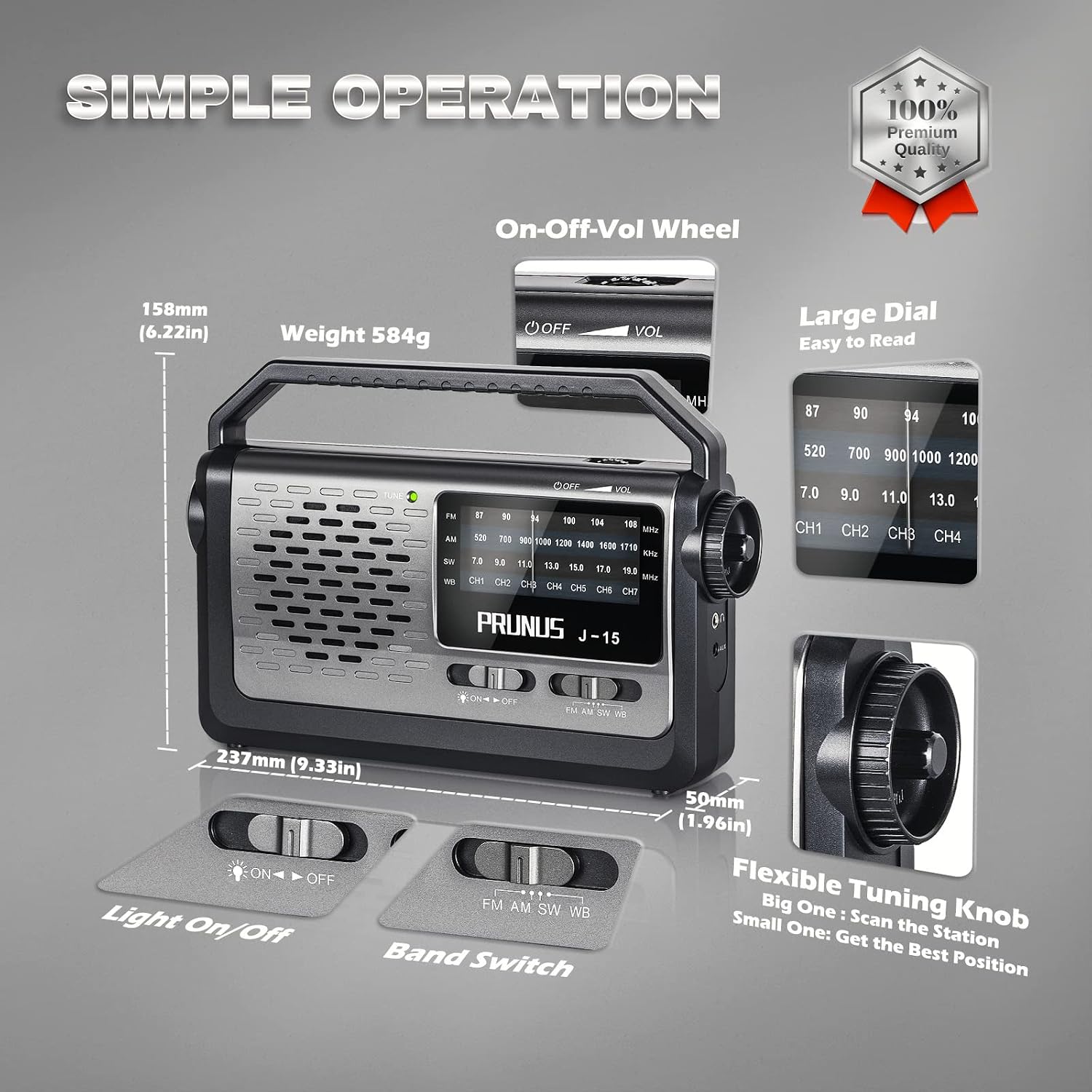
Image: A detailed diagram of the PRUNUS J15WB radio, illustrating the location and function of its main controls, including the On-Off-Volume wheel, band switch, light switch, and tuning knob, emphasizing its simple operation.
3.2 Tuning to Stations
- Turn the On-Off-Volume wheel clockwise to power on the radio and set your desired volume.
- Select the desired band (FM, AM, SW, or WB) using the band switch.
- Extend the telescopic antenna for optimal reception, especially for FM and SW bands.
- Slowly rotate the tuning knob until you hear your desired station clearly. The large dial provides easy frequency reading.
Video: An official product video demonstrating the simple tuning process of the PRUNUS J15WB radio, showing how to adjust the tuning knob to find radio stations across different bands.
3.3 Using the Flashlight
To activate the built-in flashlight, slide the 'Light On/Off' switch to the 'On' position. This feature is useful during power outages or in low-light conditions.

Image: The PRUNUS J15WB radio with its integrated flashlight turned on, illustrating its utility as a portable light source in dark environments.
4. Key Features
- NOAA Weather Band: Provides access to 7 NOAA weather stations (CH1-CH7) for real-time weather alerts and emergency information.
- Superior Reception: Equipped with a DSP chip and a 31-inch telescopic antenna for enhanced signal capture across all bands.
- Crystal Clear Sound: Features a high-quality dynamic speaker for clear and enjoyable audio.
- Auxiliary Input: Connect external audio devices via the AUX cable to use the radio as a loudspeaker.
- Portable Design: Lightweight with a convenient handle for easy transport.
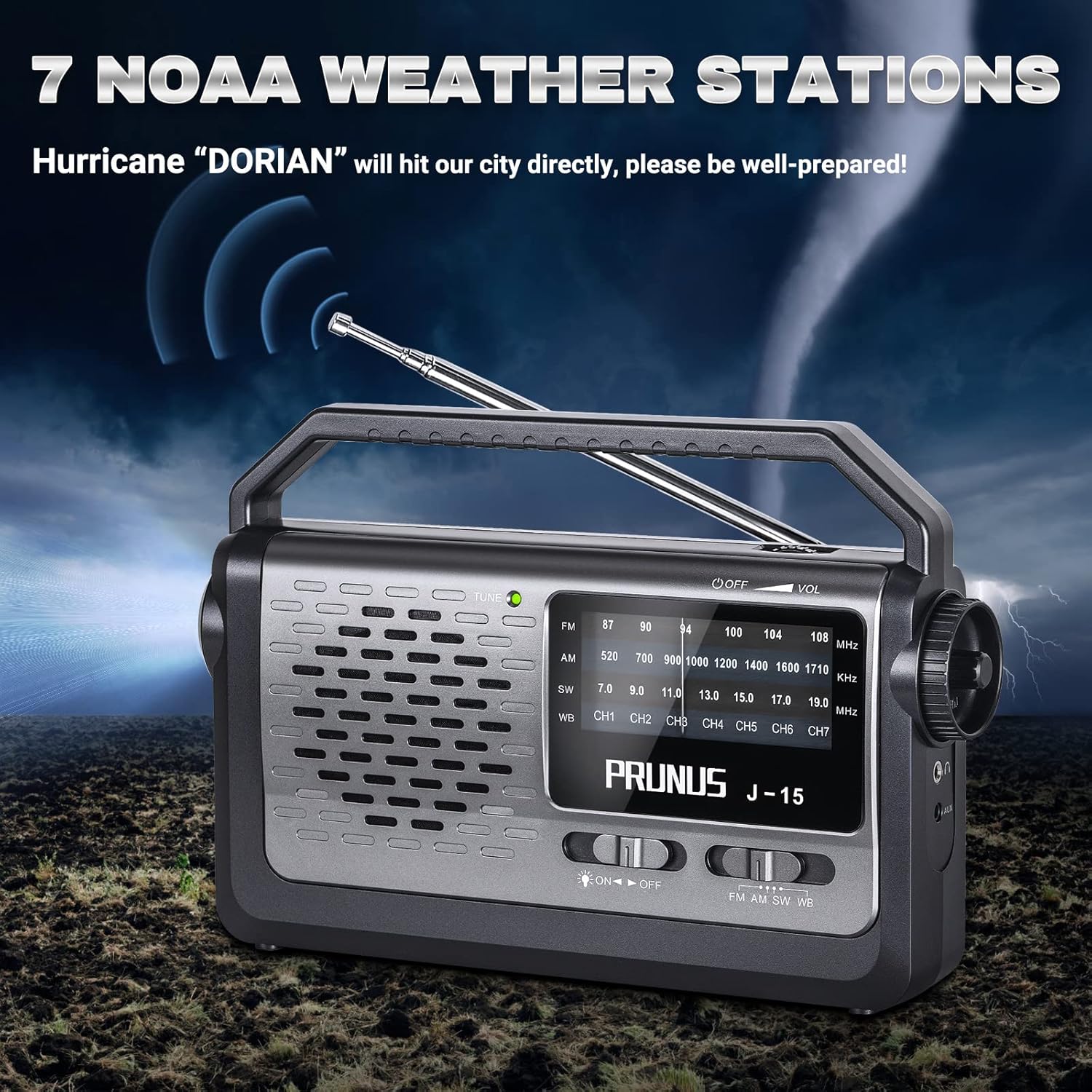
Image: The PRUNUS J15WB radio highlighting its capability to receive 7 NOAA weather stations, crucial for emergency preparedness.

Image: The PRUNUS J15WB radio showcasing its powerful DSP chip and super long telescopic antenna, which contribute to its excellent reception across AM, FM, SW, and WB bands.

Image: The PRUNUS J15WB radio positioned on a piano, with musical notes depicted, to emphasize its crystal clear sound output from its high-quality dynamic speaker.
5. Maintenance
To ensure the longevity and optimal performance of your PRUNUS J15WB radio, follow these maintenance guidelines:
- Cleaning: Wipe the radio with a soft, dry cloth. Avoid using abrasive cleaners or solvents.
- Battery Care: If the radio will not be used for an extended period, remove the D-cell batteries to prevent leakage and potential damage to the device.
- Storage: Store the radio in a cool, dry place away from direct sunlight and extreme temperatures.
- Antenna: Handle the telescopic antenna gently to avoid bending or breaking. Retract it when not in use.
6. Troubleshooting
If you encounter issues with your radio, refer to the following common problems and solutions:
- No Power:
- Ensure the AC power cord is securely plugged in, or that D-cell batteries are correctly inserted and not depleted.
- Check the On-Off-Volume wheel is turned clockwise to the 'On' position.
- Poor Reception / Static:
- Fully extend the telescopic antenna.
- Adjust the radio's position or orientation.
- Fine-tune the tuning knob slowly to find the clearest signal.
- For AM reception, try rotating the radio as the internal antenna is directional.
- No AM or SW Reception:
- Ensure the band switch is correctly set to AM or SW.
- Shortwave reception can be highly dependent on time of day, atmospheric conditions, and location. Try tuning at different times or in different areas.
- Unusual Odor or Overheating:
- Immediately turn off the radio and remove all batteries.
- Do not attempt to use the radio again. Contact customer support for assistance. This may indicate a battery or internal component issue.
7. Specifications
| Model Number | J15WB |
| Brand | PRUNUS |
| Product Dimensions | 2.2 x 6.42 x 10.12 inches |
| Item Weight | 1.3 pounds |
| Tuner Technology | AM/FM/WB |
| Radio Bands Supported | AM, FM, SW |
| Power Source | Battery Powered (3x D-cell), AC Power (110V) |
| Special Feature | Flashlight, NOAA Weather Band, Earphone Jack |
| Connectivity Technology | Auxiliary |
8. What's in the Box
Upon opening your PRUNUS J15WB package, you should find the following items:
- PRUNUS J15WB Portable Radio
- AC Charging Plug
- Owner's Manual (this document)
9. Warranty and Support
For any questions, technical assistance, or warranty inquiries regarding your PRUNUS J15WB radio, please contact PRUNUS Customer Support. While specific warranty details are not provided in this manual, PRUNUS offers 24/7 customer support to assist you.
Please refer to the contact information provided on the product packaging or the official PRUNUS website for the most up-to-date support channels.
