
1. Introduction
This manual provides essential instructions for the safe operation, installation, and maintenance of your BN-LINK Outdoor 6-Outlet Power Stake, Model BNC-60/U13K. Please read this manual thoroughly before using the product and retain it for future reference.

Figure 1.1: The BN-LINK Outdoor 6-Outlet Power Stake, featuring its 6-foot cord and weatherproof design.
2. Safety Instructions
To reduce the risk of electric shock, fire, or injury, always follow basic safety precautions when using electrical products. This product is designed for outdoor use and features an IP44 weatherproof rating, but proper handling is crucial.
- Grounding: This product must be grounded. If it should malfunction or break down, grounding provides a path of least resistance for electric current to reduce the risk of electric shock.
- Power Source: Connect the product only to a grounded outdoor outlet with the correct voltage (125V) and current (15A max).
- Overload Protection: The built-in overload protector will trip and cut off power if the total current exceeds 15A. Do not attempt to bypass or disable this safety feature.
- Water Exposure: While weatherproof (IP44), avoid submerging the unit in water. Ensure all outlet covers are securely closed when not in use to prevent water ingress.
- Cord Care: Do not run the cord through doorways, windows, or across walkways where it could be damaged or create a tripping hazard. Inspect the cord for damage before each use.
- Children and Pets: Keep the product out of reach of children and pets.
- Disconnection: Always unplug the unit from the power source before performing any maintenance or when not in use for extended periods.
- Modifications: Do not attempt to modify or repair the product. Refer all servicing to qualified personnel.
3. Product Features
The BN-LINK Outdoor Power Stake is designed for convenience and safety in outdoor electrical applications.
- 6 Grounded Outlets: Provides power for multiple outdoor devices.
- 6-Foot Extension Cord: Offers flexibility in placement.
- Weatherproof Design (IP44): Clear covers protect outlets from dust and water splashes.
- Overload Protection: Built-in 15A circuit breaker for safety.
- Durable Stake: Easy to install in the ground.
- ETL Certified: Ensures product safety and quality standards.
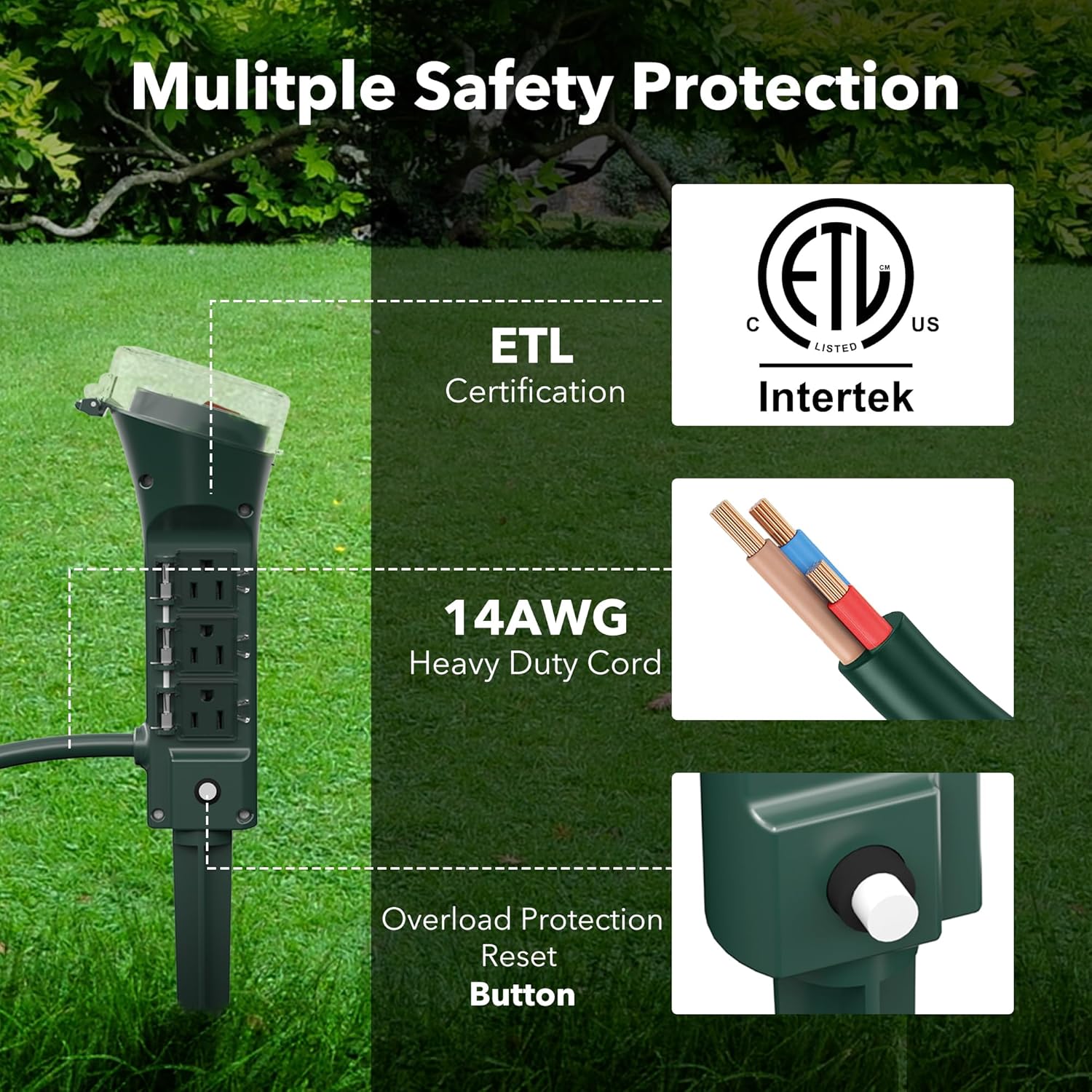
Figure 3.1: Key safety features including ETL certification, 14AWG heavy-duty cord, and the overload protection reset button.
4. Package Contents
Verify that all items are present in the package:
- BN-LINK Outdoor 6-Outlet Power Stake unit with 6ft cord
- Ground Stake (may include extension pieces)
- Instruction Manual (this document)

Figure 4.1: The power stake unit, its integrated 6-foot cable, and the ground stake components.
5. Setup and Installation
Follow these steps to set up your outdoor power stake:
- Assemble the Stake: If the ground stake comes in multiple pieces, screw them together firmly. Attach the assembled stake to the bottom of the power stake unit.
- Choose a Location: Select a suitable outdoor location for the power stake. Ensure it is on stable ground and within reach of a grounded outdoor electrical outlet. The 6-foot cord provides some flexibility. Avoid placing it in areas prone to standing water.
- Insert into Ground: Firmly push the stake into the ground until the power stake unit is stable and upright. The green color is designed to blend with outdoor landscapes.
- Connect Devices: Plug your outdoor electrical devices (e.g., lights, sprinklers) into the 6 grounded outlets. Ensure the total current draw does not exceed 15A. Close the clear weatherproof covers over any unused outlets.
- Plug into Power Source: Plug the power stake's 3-prong plug into a grounded outdoor electrical outlet.

Figure 5.1: The power stake installed in an outdoor setting, ready for use.
6. Operation
Operating the BN-LINK Outdoor Power Stake is straightforward:
- Power On/Off: The main power switch (typically a red button under a clear cover) controls power to all 6 outlets. Press it to turn the unit on or off.
- Connecting Devices: Lift the clear cover of an available outlet, plug in your device, and ensure the connection is secure. Close the cover over the plug if possible, or ensure the outlet cover is closed when not in use.
- Overload Protection Reset: If the power to your devices suddenly cuts off, the overload protector may have tripped. Unplug some devices to reduce the load, then press the reset button (usually a small white or black button near the base of the unit) to restore power.

Figure 6.1: Examples of devices that can be powered by the 6 outlets, such as sprinklers, holiday decorations, and landscape lighting.

Figure 6.2: The power stake facilitating the connection of multiple strands of string lights for outdoor illumination.
7. Maintenance
Regular maintenance ensures optimal performance and longevity of your power stake:
- Cleaning: Disconnect the unit from the power source before cleaning. Wipe the exterior with a damp cloth. Do not use harsh chemicals or abrasive cleaners.
- Inspection: Periodically inspect the power cord, plug, and outlets for any signs of damage, fraying, or corrosion. Ensure all weatherproof covers are intact and functioning correctly.
- Storage: If storing the unit for an extended period, clean it thoroughly and store it in a dry, protected area away from extreme temperatures.
8. Troubleshooting
If you encounter issues with your BN-LINK Outdoor Power Stake, refer to the following common problems and solutions:
| Problem | Possible Cause | Solution |
|---|---|---|
| No power to outlets. |
|
|
| Water inside outlet covers. |
|
|
| Unit feels hot. |
|
|
If the problem persists after attempting these solutions, contact BN-LINK customer service for assistance.
9. Specifications
- Model: BNC-60/U13K
- Input Voltage: 125V AC, 60Hz
- Max Current: 15A
- Max Power: 1875W
- Outlets: 6 Grounded Outlets
- Cord Length: 6 feet
- Weatherproof Rating: IP44
- Certifications: ETL Listed
- Product Dimensions: 3.35 x 3.78 x 9.49 inches
- Item Weight: 1.63 pounds
10. Warranty and Support
BN-LINK products are ETL certified for safety and come with a 12-month coverage period. For any questions or assistance regarding your Outdoor Power Strip, please contact BN-LINK customer service. Our team is available to provide support and address any concerns you may have.
For further information or to contact support, please visit the official BN-LINK website or refer to the contact details provided with your purchase.