
Satechi ST-U4MA3M

Satechi USB4 Multiport Adapter User Manual
Model: ST-U4MA3M
Introduction
Thank you for choosing the Satechi USB4 Multiport Adapter. This comprehensive guide provides detailed instructions for setting up, operating, and maintaining your device to ensure optimal performance. This adapter is designed to expand the connectivity of your USB-C enabled devices, offering a wide range of ports for various peripherals and display needs.

Image: The Satechi USB4 Multiport Adapter, a compact gray device with a short integrated USB-C cable, showcasing its sleek design and multiple ports.
Key Features
- Cutting-Edge USB4 Innovation: Experience enhanced bandwidth for seamless video and data transmission, lightning-fast transfer rates of up to 40Gbps, and remarkable backward compatibility with USB 3.2, USB 3.1, USB 3.0, USB 2.0, and Thunderbolt 3.
- 8K HDMI Display: Enjoy stunning visuals with ultra-high-resolution 8K HDMI video output. Requires direct HDMI connection and 8K compatibility. Note: macOS supports up to 4K @ 60Hz.
- Comprehensive Connectivity Hub: Includes USB-C Power Delivery (PD) charging up to 100W, Gigabit Ethernet, USB 3.2 data transfer up to 10Gbps, USB 2.0, and versatile Micro/SD Card Readers.
- Sleek & Modern Design: Engineered with rugged construction for superior heat dissipation, safeguarding your devices from overheating. Its plug-and-play design offers seamless functionality and on-the-go convenience.
- Universal Compatibility: Compatible with a wide range of devices including tablets, laptops, iPhone 15, and more. Note: For iPhone 15, data transfer speeds are limited to USB 2.0.
Package Contents
Upon opening your Satechi USB4 Multiport Adapter package, you should find the following items:
- Satechi USB4 Multiport Adapter (1 unit)
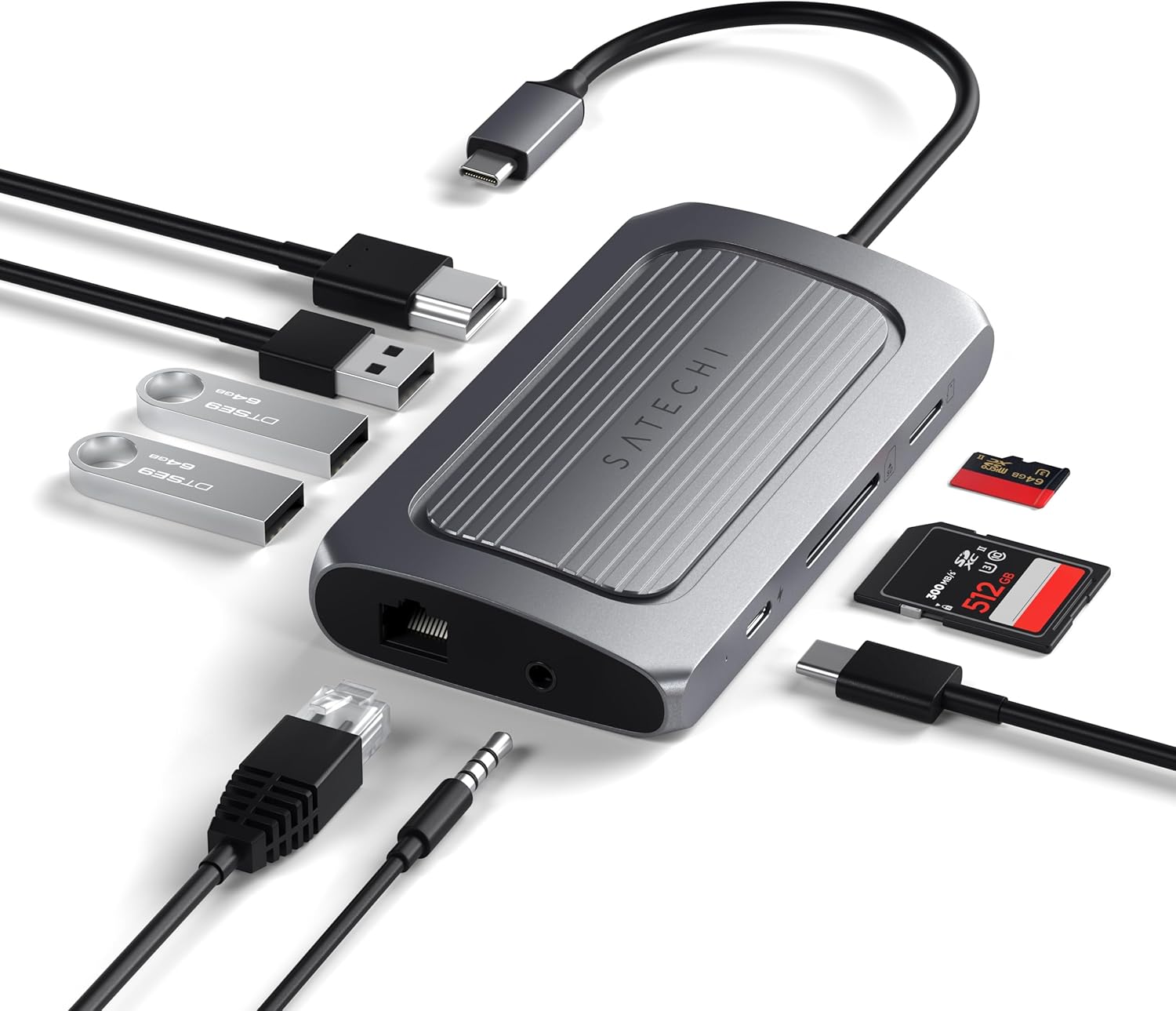
Image: The Satechi USB4 Multiport Adapter shown alongside various cables, USB drives, and memory cards, illustrating its connectivity options.
Setup Guide
Follow these steps to set up your Satechi USB4 Multiport Adapter:
- Connect to Host Device: Plug the integrated USB-C cable of the Satechi Multiport Adapter into an available USB-C or Thunderbolt 3/4 port on your laptop, tablet, or compatible smartphone.
- Connect Power (Optional but Recommended): For optimal performance and to charge your host device, connect a USB-C Power Delivery (PD) charger (up to 100W) to the USB-C PD port on the adapter.
- Connect Peripherals:
- HDMI Display: Connect an HDMI cable from your monitor to the 8K HDMI port on the adapter.
- USB Devices: Plug your USB-A devices (e.g., keyboard, mouse, external hard drive, USB flash drives) into the available USB 3.2 Gen 2 (10Gbps) or USB 2.0 ports.
- Ethernet: Connect an Ethernet cable from your router or network switch to the Gigabit Ethernet port for a stable wired internet connection.
- Audio: Plug your 3.5mm headphones or speakers into the audio jack.
- Memory Cards: Insert your SD or MicroSD cards into the corresponding slots.

Image: The Satechi USB4 Multiport Adapter in a desktop setup, connected to a laptop and extending connectivity to an external monitor, keyboard, mouse, and other peripherals.
Operating Instructions
The Satechi USB4 Multiport Adapter is designed for plug-and-play functionality. Once connected, your operating system should automatically detect the connected peripherals.
Port Functions:
- 8K HDMI Port: Supports video output up to 8K resolution (7680x4320) at 30Hz or 4K (3840x2160) at 60Hz. For macOS, the maximum supported resolution is 4K at 60Hz. Ensure your display and HDMI cable support the desired resolution.
- USB 3.2 Gen 2 Ports (10Gbps): Two USB-A ports for high-speed data transfer, ideal for external hard drives, SSDs, and other demanding peripherals.
- USB 2.0 Port: One USB-A port suitable for connecting standard peripherals like keyboards, mice, or USB flash drives.
- USB-C PD Port (Up to 100W): Allows power passthrough to charge your host device. Actual charging output depends on the connected power adapter. Note: This port is for power delivery only and does not support data transfer.
- Gigabit Ethernet Port: Provides a stable and fast wired network connection up to 1000 Mbps.
- Micro/SD Card Readers: Supports SD/SDHC/SDXC and SD3.0 UHS-I cards with speeds up to 104MB/s and capacities up to 2TB. Insert cards face up until they click into place.
- 3.5mm Headphone Jack: For connecting standard audio output devices like headphones or speakers.
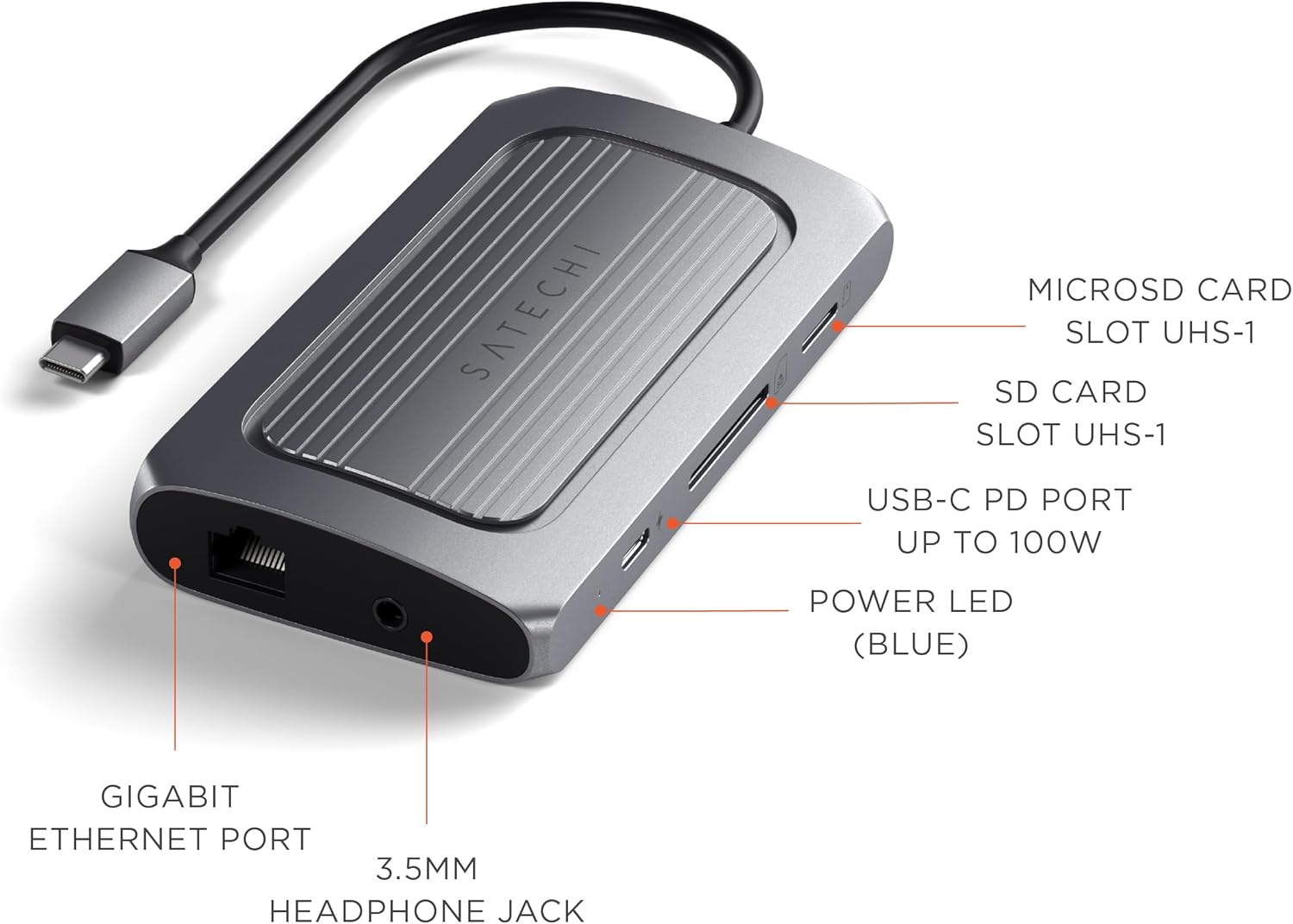
Image: Side view of the adapter highlighting the Gigabit Ethernet port, 3.5mm headphone jack, MicroSD card slot, SD card slot, USB-C PD port, and Power LED.

Image: Other side view of the adapter highlighting the 8K HDMI port, USB 2.0 port, and two USB 3.2 Gen 2 (10Gbps) ports.

Image: The Satechi USB4 Multiport Adapter connected to a laptop, with USB flash drives and memory cards inserted, demonstrating its expanded connectivity.
Care and Maintenance
- Cleaning: Use a soft, dry cloth to clean the adapter. Avoid using harsh chemicals or abrasive materials.
- Storage: Store the adapter in a cool, dry place away from direct sunlight and extreme temperatures.
- Handling: Handle the adapter with care. Avoid dropping it or subjecting it to strong impacts.
- Heat Dissipation: The adapter's aluminum casing is designed to dissipate heat efficiently. It is normal for the device to feel warm during extended use, especially when multiple ports are active or when charging. Ensure adequate ventilation around the adapter.
Troubleshooting
| Issue | Possible Solution |
|---|---|
| No display on external monitor. | Ensure the HDMI cable is securely connected to both the adapter and the monitor. Verify the monitor input source is set correctly. Check if your host device supports external display output via USB-C. For macOS, ensure the resolution is set to 4K@60Hz or lower. |
| Host device is not charging via PD port. | Confirm your USB-C PD charger and cable are functional and capable of delivering sufficient wattage (up to 100W). Ensure the charger is connected to the adapter's USB-C PD port, not a data port. |
| USB devices or memory cards are not recognized. | Try reconnecting the device or card. Ensure the adapter is firmly connected to your host device. Test the device directly with your host device if possible to rule out a peripheral issue. Restart your host device. |
| Adapter feels warm during use. | This is normal. The aluminum casing is designed to dissipate heat generated during operation, especially under heavy load (e.g., 8K video output, multiple connected devices, or fast charging). Ensure adequate airflow around the adapter. |
| USB-C port on the adapter does not work for data transfer. | The USB-C port on this adapter is exclusively for Power Delivery (PD) and does not support data transfer. Please use the USB-A ports for data peripherals. |
| The connection to the laptop feels loose. | Ensure the USB-C connector from the adapter is fully inserted into your laptop's port. While the design is robust, a loose connection can sometimes occur if not fully seated. If the issue persists, try connecting to a different USB-C port on your laptop if available. |
Specifications
| Attribute | Detail |
|---|---|
| Brand | Satechi |
| Model Number | ST-U4MA3M |
| Color | Space Gray |
| Item Weight | 5.6 ounces |
| Product Dimensions (LxWxH) | 4.53 x 2.4 x 0.73 inches |
| Operating System Compatibility | macOS, Windows, iPadOS |
| Hardware Interface | USB Type C (USB4) |
| HDMI Output | 8K @ 30Hz (Windows), 4K @ 60Hz (macOS) |
| USB-C PD Charging | Up to 100W (Power Delivery only) |
| USB-A Data Ports | 2x USB 3.2 Gen 2 (10Gbps), 1x USB 2.0 |
| Ethernet | Gigabit Ethernet |
| Card Readers | Micro/SD Card Readers (SD/SDHC/SDXC, SD3.0 UHS-I, up to 104MB/s, 2TB capacity) |
| Audio Jack | 3.5mm |
Warranty and Support
Satechi products are covered by a 2-year limited warranty against defects in materials and workmanship under normal use. For customer service and support, please refer to the contact information provided in your product packaging or visit the official Satechi website.
A digital version of the user guide is available for download: User Guide (PDF)