
1. Introduction
Thank you for choosing the Maclean MCE442 Solar LED Spotlight. This device is a solar-powered LED floodlight equipped with a PIR motion sensor and a twilight sensor, designed to provide efficient and automatic illumination for various outdoor and indoor applications. Its independent solar panel allows for flexible placement to maximize sun exposure.
2. Safety Information
- Read all instructions carefully before installation and use.
- Do not attempt to disassemble or modify the product. This may void the warranty and pose safety risks.
- Ensure the mounting surface is stable and can support the weight of the unit.
- Keep the solar panel clean to ensure optimal charging performance.
- This product is rated IP44, providing protection against splashing water from all directions. While suitable for outdoor use, avoid submerging the unit in water.
- The built-in Li-ion battery is not user-replaceable.
3. Setup and Installation
The Maclean MCE442 is designed for easy installation on walls or ceilings. The solar panel and spotlight are connected by a 5-meter cable, allowing for flexible placement.
3.1 Package Contents
- 1x LED Spotlight with Motion Sensor
- 1x Solar Panel with 5m Cable
- Mounting Hardware (screws, wall plugs)
3.2 Installation Steps
- Choose a Location: Select a mounting location for the LED spotlight that provides the desired illumination area. For the solar panel, choose a location that receives direct sunlight for at least 7-8 hours daily to ensure optimal charging. The 5-meter cable allows the solar panel to be placed separately from the spotlight.
- Mount the Spotlight: Securely attach the LED spotlight to your chosen wall or ceiling using the provided mounting hardware. The adjustable handle allows you to set the desired inclination angle for the light.
- Mount the Solar Panel: Install the solar panel in its chosen sunny location. The joint of the solar panel offers rotation capability to optimize its angle towards the sun, even after initial installation.
- Connect the Cable: Connect the 5-meter cable from the solar panel to the input port on the LED spotlight. Ensure the connection is secure.
- Initial Charge: Allow the solar panel to charge the built-in battery for at least 7-8 hours in direct sunlight before first use.


4. Operation
The Maclean MCE442 operates automatically using its integrated sensors and solar power.
4.1 Solar Charging
During daylight hours, the solar panel converts sunlight into electrical energy, which is stored in the internal Li-ion battery. A full charge typically takes 7-8 hours of direct sunlight and provides up to 6 hours of illumination.
4.2 Automatic Illumination
The spotlight features both a twilight sensor and a PIR motion sensor:
- Twilight Sensor: Detects ambient light levels. The light will only activate when it is dark enough, according to the LUX setting.
- PIR Motion Sensor: Once activated by the twilight sensor, the motion sensor detects movement within its detection area (180-degree angle, 2-10 meters range). The light will turn on automatically when motion is detected and remain on for the duration set by the TIME knob.
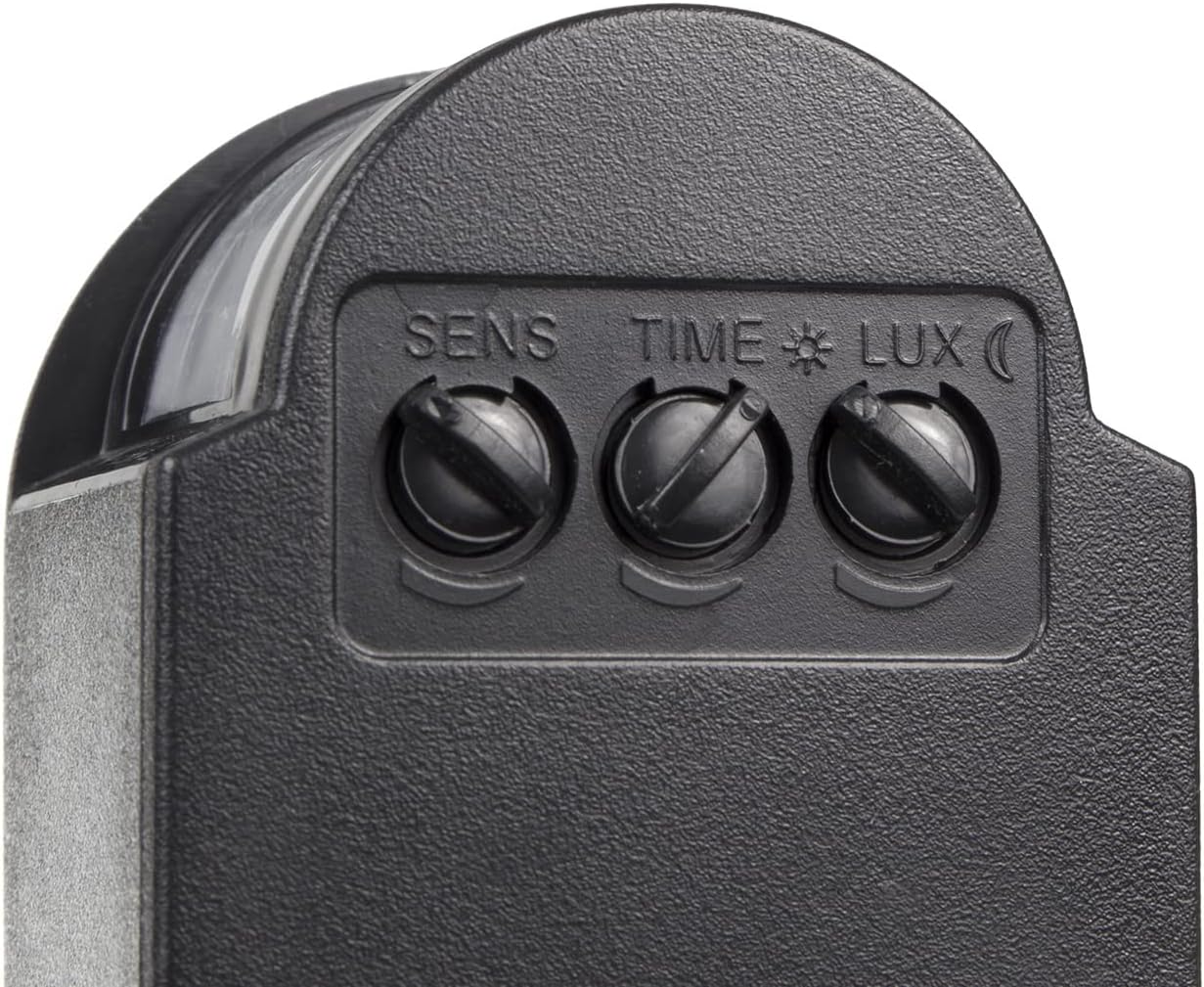
4.3 Sensor Adjustments
Three adjustable knobs are located on the sensor unit to customize the light's behavior:
- SENS (Sensitivity): Adjusts the detection range of the motion sensor from approximately 2 meters to 10 meters. Turn clockwise for higher sensitivity/longer range.
- TIME (Duration): Sets how long the light remains on after motion is detected and no further motion is sensed. Adjustable from 8 seconds to 8 minutes. Turn clockwise for longer duration.
- LUX (Light Sensitivity): Determines the ambient light level at which the motion sensor becomes active. Turn towards the sun icon for activation only in very dark conditions. Turn towards the moon icon for activation in brighter conditions (e.g., during overcast days or even daytime, if desired).
5. Maintenance
Regular maintenance ensures optimal performance and longevity of your solar LED spotlight.
- Clean Solar Panel: Periodically wipe the solar panel with a soft, damp cloth to remove dust, dirt, leaves, or snow. A clean panel ensures maximum sunlight absorption and charging efficiency.
- Inspect Connections: Occasionally check the cable connection between the solar panel and the spotlight to ensure it remains secure and free from damage.
- Clean Spotlight Lens: Keep the LED lens clean for unobstructed light output.
- Battery: The internal Li-ion battery is designed for long-term use and does not require user maintenance or replacement.
6. Troubleshooting
If your Maclean MCE442 Solar LED Spotlight is not functioning as expected, refer to the following common issues and solutions:
| Problem | Possible Cause | Solution |
|---|---|---|
| Light does not turn on at night. | Insufficient solar charge. | Ensure the solar panel is in direct sunlight for 7-8 hours daily. Clean the solar panel. |
| LUX setting is too low (set to activate only in very dark conditions). | Adjust the LUX knob towards the moon icon to increase sensitivity to ambient light. | |
| Motion sensor not detecting movement. | Check SENS setting; increase sensitivity. Ensure no obstructions block the sensor's view. | |
| Light stays on constantly or turns on during the day. | LUX setting is too high (set to activate in brighter conditions). | Adjust the LUX knob towards the sun icon to decrease sensitivity, so it only activates in darker conditions. |
| Light is dim or only stays on for a short period. | Insufficient solar charge. | Ensure the solar panel receives adequate direct sunlight. Clean the solar panel. |
| Battery capacity reduced due to extreme temperatures or age. | Ensure the product is used within recommended temperature ranges. Battery performance may naturally degrade over time. |
7. Technical Specifications
| Feature | Specification |
|---|---|
| Model | MCE442 |
| Rated Power / Luminous Flux | 6 W / 360 lumens (max. 600 lumens) |
| Light Temperature | 6000 K (Cool White) |
| Motion Sensor Detection Range | 2 - 10 m (adjustable) |
| Motion Sensor Detection Angle | 180 degrees |
| Time Setting (Light Duration) | 8 seconds - 8 minutes (adjustable) |
| Twilight Sensor Sensitivity (LUX) | Adjustable |
| Battery | Li-ion 3.7 V 2400 mAh (built-in) |
| Charging Time | 7-8 hours (direct sunlight) |
| Lighting Duration (Full Charge) | Up to 6 hours |
| Solar Panel Cable Length | 5 m |
| Protection Class | IP44 (protection against splashing water from all directions) |
| Material | Aluminum |
| Spotlight Dimensions (approx.) | 135 x 210 x 95 mm |
| Solar Panel Dimensions (approx.) | 160 x 190 x 14 mm |
| Maximum Service Life | Up to 20,000 hours |

8. Warranty Information
Maclean products are designed and manufactured to the highest quality standards. For specific warranty terms and conditions, please refer to the warranty card included with your product or contact your retailer. Keep your purchase receipt as proof of purchase.
9. Customer Support
If you have any questions, require technical assistance, or encounter issues not covered in this manual, please contact your retailer or the Maclean customer support service. Contact details can typically be found on the product packaging or the manufacturer's official website.