
PT Lining Brush Hybrid Cover
Contents
User Manual: PT Lining Brush Hybrid Cover Phone Case
Model: Coolpad Haylo CP3320AS2 Compatible
1. Product Overview
The PT Lining Brush Hybrid Cover Phone Case is designed to provide robust protection and a personalized aesthetic for your Coolpad Haylo CP3320AS2 smartphone. This premium quality cover safeguards your device from scratches, scuffs, and general wear and tear, while maintaining a trim and trendy profile. The package also includes a versatile universal sticker stand for enhanced usability.

Image 1.1: PT Lining Brush Hybrid Cover Phone Case (Blue) for Coolpad Haylo CP3320AS2.
2. Package Contents
Upon opening your package, please verify that all the following items are included:
- 1 x PT Lining Brush Hybrid Cover Phone Case (Blue)
- 1 x PhoneTastic Universal Sticker Stand

Image 2.1: PhoneTastic Universal Sticker Stand.
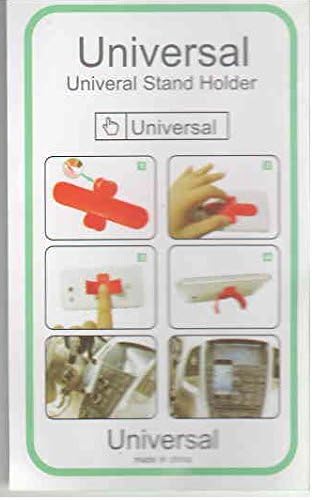
Image 2.2: Universal Stand Holder Packaging with usage diagrams.
3. Setup and Installation
3.1 Installing the Phone Case
- Ensure your Coolpad Haylo CP3320AS2 phone is clean and free of dust or debris.
- Align the phone with the bottom section of the case, ensuring the charging port and speaker cutouts match.
- Gently press the phone into the case, starting from one corner and working your way around, ensuring all edges are securely seated within the case's frame.
- Verify that all buttons (power, volume) and ports (charging, headphone jack) are accessible and functional through the case's precise cutouts.
3.2 Attaching the Universal Sticker Stand
- Clean the desired surface on the back of your phone case where you wish to attach the stand. Ensure it is dry and free of oil or dust.
- Peel off the protective backing from the adhesive side of the PhoneTastic Universal Sticker Stand.
- Carefully position the stand on the cleaned surface, pressing firmly for several seconds to ensure strong adhesion.
- Allow the adhesive to set for a few minutes before using the stand.
4. Operating Instructions
Once installed, the PT Lining Brush Hybrid Cover Phone Case allows full access to all phone features and functions. The case provides an enhanced grip and a protective barrier against daily impacts and abrasions.
The universal sticker stand can be used to prop your phone up in landscape or portrait orientation, providing a convenient viewing angle for media consumption, video calls, or hands-free operation. Simply adjust the stand to your desired angle.
5. Maintenance and Care
To maintain the appearance and integrity of your phone case, follow these simple care instructions:
- Clean the case regularly with a soft, damp cloth.
- Avoid using harsh chemicals, abrasive cleaners, or solvents, as these may damage the case material or finish.
- If the case becomes wet, dry it thoroughly before re-installing your phone.
6. Troubleshooting
If you encounter any issues with your PT Lining Brush Hybrid Cover Phone Case, consider the following:
- Case Fit: Ensure that your phone is indeed a Coolpad Haylo CP3320AS2 model. This case is specifically designed for this model. Incorrect phone models may result in a poor fit or obstructed ports/buttons.
- Button Responsiveness: If buttons are stiff or unresponsive, gently re-seat the phone within the case to ensure proper alignment.
- Stand Adhesion: If the universal sticker stand loses adhesion, ensure the surface it was applied to was clean and dry. Re-application may require new adhesive if the original has lost its stickiness.
7. Specifications
| Feature | Detail |
|---|---|
| Brand | PT |
| Compatible Model | Coolpad Haylo CP3320AS2 |
| Item Weight | 3 ounces |
| Form Factor | Bumper |
| Color | Blue |
| Style | Hybrid Case |
| Manufacturer | PT |
8. Warranty and Support
For warranty information or technical support regarding your PT Lining Brush Hybrid Cover Phone Case, please refer to the contact information provided by your retailer or the manufacturer, PT. Keep your purchase receipt as proof of purchase.
Documents and downloads
Ask a question about this manual
Ask about setup, troubleshooting, compatibility, parts, safety, or missing instructions. Manuals+ will review the question and use this page’s manual context to help answer it.