
DUDAO FM-Transmission Gold
DUDAO R2PRO 3.1A Car Charge Handsfree Call, Wireless Bluetooth FM Transmitter Radio Receiver
User Manual
1. Introduction
Thank you for choosing the DUDAO R2PRO 3.1A Car Charge Handsfree Call, Wireless Bluetooth FM Transmitter Radio Receiver. This device is designed to enhance your in-car experience by providing seamless audio streaming, hands-free calling, and convenient charging capabilities. Please read this manual carefully to ensure proper use and optimal performance of your new device.
This manual provides detailed instructions on setting up, operating, maintaining, and troubleshooting your DUDAO R2PRO.
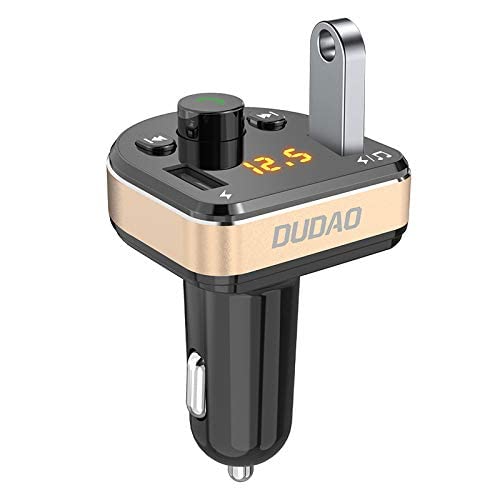
Figure 1: DUDAO R2PRO Car FM Transmitter. This image shows the compact design of the device, featuring dual USB ports, a digital display, and control buttons, designed to plug into a car's cigarette lighter socket.
2. Safety Information
- Do not expose the device to extreme temperatures, direct sunlight, or moisture.
- Avoid dropping or subjecting the device to strong impacts.
- Do not disassemble or attempt to repair the device yourself. Contact customer support for assistance.
- Ensure the device is securely plugged into the car's cigarette lighter socket to prevent dislodging during driving.
- Keep out of reach of children.
3. Product Features
The DUDAO R2PRO offers a range of features for a convenient in-car experience:
- Fast Dual USB Car Charger: Equipped with 5V/3.1A output, capable of charging two devices simultaneously.
- Hands-Free Function: Built-in microphone for automatic switching to hands-free mode during calls. Answer, reject, hang up, and recall functions via a single keypad.
- Music Playing Function: Supports Bluetooth music streaming and MP3 format playback. Features power-off memory function to resume playback from where it stopped.
- Real-time Voltage Monitoring: Digital display shows car battery voltage, lighting up softly for easy visibility at night.
- Vibration and Shake Proof Design: Non-slip knob on both sides ensures stable charging even on bumpy roads.
- Phone Navigation Voice Announcement: One-button Bluetooth connection for mobile navigation voice broadcast, aiding in more accurate navigation.

Figure 2: Vibration and Shake Proof Design. This image highlights the non-slip knobs on the side of the car charger, indicating a robust design for stable connection and continuous charging even on uneven terrain.

Figure 3: Real-time Voltage Monitoring. The image displays the digital screen of the DUDAO R2PRO showing a voltage reading of 12.5V, indicating normal car battery voltage, with a table explaining voltage ranges for 12V and 24V cars.
4. Setup and Installation
- Insert into Car Cigarette Lighter: Plug the DUDAO R2PRO firmly into your car's 12V/24V cigarette lighter socket. The device will power on automatically, and the digital display will show the current car battery voltage.
- Set FM Frequency:
- Press the FM button (often indicated by a musical note or FM icon) on the device.
- Use the navigation buttons (e.g., previous/next track buttons) to adjust the FM frequency.
- Tune your car's FM radio to the same frequency as displayed on the DUDAO R2PRO. Choose a frequency that is clear and free from interference.
- Bluetooth Pairing:
- On your mobile device, enable Bluetooth.
- Search for available Bluetooth devices. The DUDAO R2PRO will typically appear as "DUDAO R2PRO" or a similar name.
- Select the device to pair. Once paired, a voice prompt or indicator on the device will confirm the connection.
5. Operating Instructions
5.1 Music Playback
The DUDAO R2PRO supports music playback via Bluetooth and USB drive.
- Bluetooth Music: Once your phone is paired, open your music player app. Audio will be transmitted wirelessly to the DUDAO R2PRO and then to your car's FM radio. Use the device's buttons or your phone to control playback (play/pause, next/previous track).
- USB Drive Playback: Insert a USB flash drive containing MP3/WAV/APE/WMA audio files into the designated USB port (often marked with a music note or USB icon). The device will automatically detect and play the music.

Figure 4: USB Device Plug and Play. This image illustrates how the DUDAO R2PRO supports MP3/WAV/APE/WMA formats for high-quality, noise-free music playback directly from a USB device.
5.2 Hands-Free Calling
When a call comes in, the device will automatically switch from music playback to hands-free mode.
- Answer Call: Short press the call button (usually a phone icon).
- Reject Call: Long press the call button.
- End Call: Short press the call button during a conversation.
- Redial Last Number: Double-click the call button.

Figure 5: Bluetooth Hands-Free One Touch Answering. This image illustrates how to answer or reject calls using the DUDAO R2PRO's call button, with a phone screen showing an incoming call, emphasizing the built-in HD microphone and noise reduction for clear calls.
5.3 Charging Devices
Utilize the dual USB ports to charge your mobile devices.
- Connect your device's charging cable to one of the USB ports on the DUDAO R2PRO.
- The 3.1A output ensures fast charging for compatible devices.

Figure 6: Dual USB Smart Output. This image shows the DUDAO R2PRO with two smartphones connected via USB cables, demonstrating its ability to charge two devices simultaneously without affecting charging speed.
5.4 Phone Navigation Voice Announcement
Once connected via Bluetooth, your phone's navigation voice prompts will be broadcast through your car's speakers via the FM transmitter.

Figure 7: Phone Navigation Voice Announcement. This image illustrates the DUDAO R2PRO's function of broadcasting mobile navigation voice prompts through the car's audio system, showing a smartphone with a map application and example voice commands.
6. Maintenance and Care
- Clean the device regularly with a soft, dry cloth. Do not use liquid cleaners or aerosols.
- Ensure the cigarette lighter socket is clean and free of debris for optimal connection.
- Store the device in a cool, dry place when not in use for extended periods.
7. Troubleshooting
| Problem | Possible Cause | Solution |
|---|---|---|
| No power/Device not turning on | Loose connection; Car cigarette lighter socket issue; Car battery low. | Ensure the device is firmly plugged in. Check if the car's cigarette lighter socket is working (test with another device). Check car battery voltage. |
| Poor audio quality/Static noise | FM frequency interference; Incorrect FM frequency; Volume too low/high. | Change to a clear, unused FM frequency on both the device and car radio. Adjust volume levels on both the device and car stereo. Ensure no strong radio signals are nearby. |
| Bluetooth not connecting | Bluetooth not enabled on phone; Device not in pairing mode; Already connected to another device. | Ensure Bluetooth is enabled on your phone. Restart both the phone and the DUDAO R2PRO. Forget the device from your phone's Bluetooth list and re-pair. |
| Charging is slow or not working | Cable issue; Device not fully inserted; Device drawing too much power. | Try a different USB cable. Ensure the DUDAO R2PRO is fully inserted into the car socket. Check if the device being charged is compatible with 3.1A output. |
8. Specifications
| Feature | Detail |
|---|---|
| Brand | DUDAO |
| Model Name | FM-Transmission Gold |
| Product Dimensions | 8.1 x 5.4 x 2.7 cm |
| Item Weight | 100 g |
| Hardware Interface | Bluetooth, Bluetooth 4.0 |
| Compatible Devices | Oppo, Vivo, Xiomi, MI, Tablet, Samsung, iPhone, Smartwatches (and other compatible devices) |
| Audio Output Type | Bluetooth, FM Radio |
| Wattage | 10 Watts |
| Power Source | Corded Electric (Car Cigarette Lighter) |
| Wireless Type | Bluetooth |
| Number of Ports | 2 (Dual USB) |
| Connector Type | Wireless |
| Compatible Media Type | Bluetooth 4.0, MP3 |
| Material | Plastic |
9. Warranty and Support
This product comes with a 12 Month Warranty from the date of purchase. Please retain your proof of purchase for warranty claims.
For any compatibility issues, technical support, or warranty inquiries, please contact DUDAO customer care:
- Email: customercare@dudao.in
- Phone: +91 9310681651
You can also visit the official DUDAO store on Amazon for more information: DUDAO Store
Ask a question about this manual
Ask about setup, troubleshooting, compatibility, parts, safety, or missing instructions. Manuals+ will review the question and use this page’s manual context to help answer it.