
1. Introduction
This manual provides essential instructions for the safe and effective use of your InBody BP170 Automatic Blood Pressure Monitor. Please read this manual thoroughly before using the device and retain it for future reference. The InBody BP170 is designed for convenient and accurate blood pressure measurement at home or in a professional setting.

The InBody BP170 monitor and its accompanying arm cuff.
2. Package Contents
Verify that all components are present in the package:
- InBody BP170 Blood Pressure Monitor
- Medium Arm Cuff
- 4 AA Batteries
- Product Manual (this document)
3. Setup
3.1 Battery Installation
- Open the battery compartment cover on the back of the monitor.
- Insert the four AA batteries, ensuring correct polarity (+/-).
- Close the battery compartment cover securely.
3.2 Cuff Attachment and Sizing
Proper cuff sizing and placement are crucial for accurate readings.
- Connect the air tube from the cuff to the air jack on the side of the monitor.
- Ensure the cuff size is appropriate for your arm circumference. Refer to the chart below.
A table detailing recommended cuff sizes (Medium: 9-13 inches, Large: 13-17 inches) for accurate blood pressure measurement.
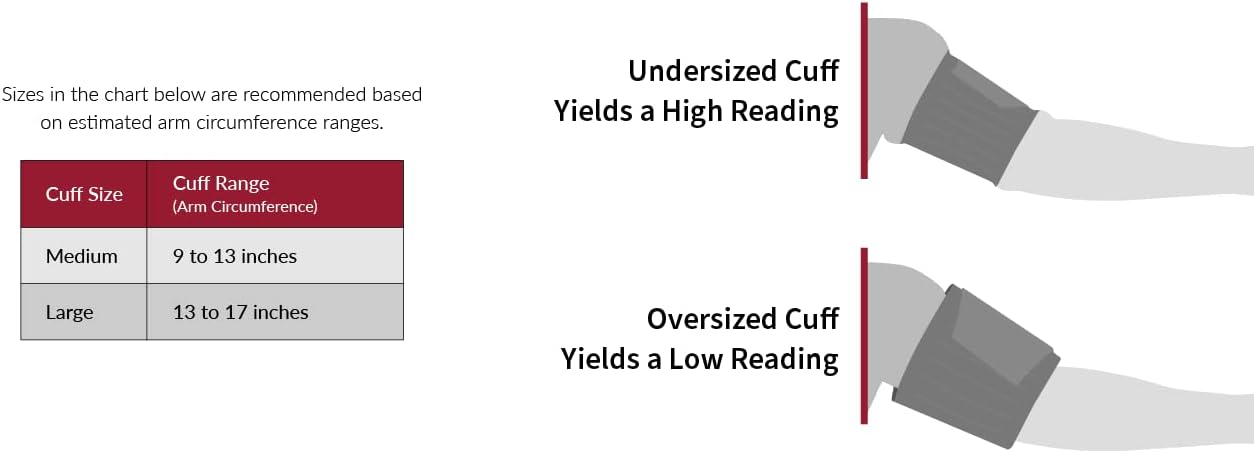
Visual representation showing how an undersized cuff can lead to high readings and an oversized cuff can lead to low readings.
- Place the cuff on your bare upper arm, approximately 1-2 cm above the elbow joint. The air tube should run down the inside of your arm.
- Wrap the cuff snugly around your arm. The one-touch cuff design allows for easy self-application: simply place it on your arm and press with your palm for it to wrap itself.
- Ensure the cuff is not too tight or too loose.

A user applying the one-touch cuff, highlighting the device's clinical validation.

A visual guide to the simple, one-touch application of the InBody BP170 blood pressure cuff.
3.3 Bluetooth Pairing (Optional)
The InBody BP170 can connect to the InBody mobile application via Bluetooth for data tracking and management.
- Download the InBody app from your smartphone's app store.
- Enable Bluetooth on your smartphone.
- Follow the in-app instructions to pair your InBody BP170 monitor.

The InBody BP170 monitor and cuff, illustrating its Bluetooth connectivity to the InBody mobile application for data tracking.
4. Operating Instructions
4.1 Taking a Measurement
- Sit comfortably with your back supported and feet flat on the floor. Avoid talking or moving during the measurement.
- Rest your arm on a table so the cuff is at heart level.
- Press the START/STOP button to begin the measurement. The cuff will inflate automatically.
- Remain still and quiet until the measurement is complete and the results are displayed.
- The monitor will automatically deflate the cuff and display your systolic pressure (SYS), diastolic pressure (DIA), and pulse rate (P.R.).

An individual demonstrating the proper application of the InBody BP170 arm cuff for a home blood pressure measurement.

An individual using the InBody BP170 monitor in a home setting, emphasizing convenient self-monitoring.
4.2 Understanding the Display
The large digital display shows your readings clearly:
- SYS (Systolic Pressure): The top number, indicating the pressure in your arteries when your heart beats.
- DIA (Diastolic Pressure): The bottom number, indicating the pressure in your arteries between beats.
- P.R. (Pulse Rate): Your heart rate in beats per minute.
- Color Scale: A color-coded bar on the right side of the display provides an immediate visual indication of your blood pressure category (e.g., green for normal, yellow/orange for elevated, red for high).

The digital display of the InBody BP170, showing systolic, diastolic, pulse rate, date, and time, along with a color-coded indicator.
4.3 Advanced Features
- Irregular Pulse Rate Detection: The monitor can sense irregular pulse rates during measurement.
- Movement and Cuff Posture Detection: The device helps ensure accurate readings by detecting movement and incorrect cuff posture.
- Early Morning Hypertension Detection: The monitor is equipped to detect indicators of early morning hypertension.

An infographic summarizing the main features of the BP170, including one-touch cuff, large display, detection of early morning hypertension, irregular pulse rate, movement, and cuff posture, plus storage for two users.
4.4 Memory Function and User Profiles
The InBody BP170 can store up to 100 measurements for two distinct users (M1 and M2).
- Press the M1 or M2 button to view stored readings for the respective user.
- Use the arrow buttons to navigate through past measurements.
4.5 InBody App Integration
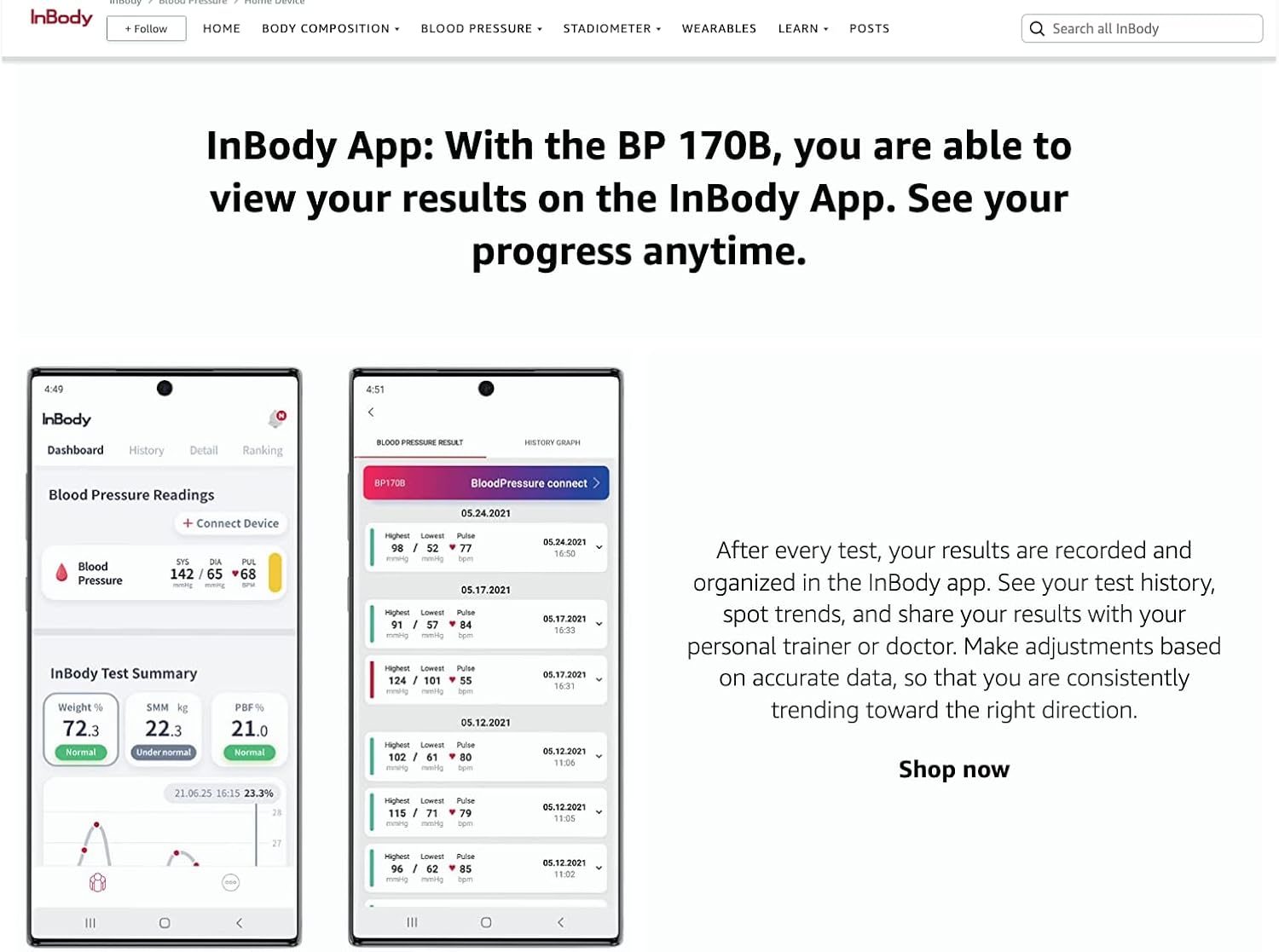
After each test, your results can be recorded and organized within the InBody app. This allows you to:
- View your test history over time.
- Spot trends in your blood pressure readings.
- Share your results with healthcare professionals or personal trainers.
5. Maintenance
5.1 Cleaning
- Wipe the monitor and cuff with a soft, dry cloth.
- If necessary, use a cloth lightly dampened with water or a mild detergent. Do not use abrasive cleaners or immerse the device in water.
5.2 Storage
- Store the monitor and cuff in a clean, dry place away from direct sunlight, extreme temperatures, and humidity.
- Remove batteries if the device will not be used for an extended period.

The InBody arm cuff rolled up for storage.
5.3 Battery Replacement
When the low battery indicator appears on the display, replace all four AA batteries with new ones. Refer to section 3.1 for installation instructions.
6. Troubleshooting
If you encounter issues with your InBody BP170, refer to the following common problems and solutions:
| Problem | Possible Cause | Solution |
|---|---|---|
| Inaccurate or inconsistent readings |
|
|
| Monitor does not power on |
|
|
| Cuff does not inflate or inflates weakly |
|
|
| Bluetooth pairing issues |
|
|
7. Specifications
| Feature | Detail |
|---|---|
| Model | BP170 |
| Product Dimensions | 7.51 x 3.89 x 1.02 inches |
| Item Weight | 0.88 Kilograms (1.94 Pounds) |
| Power Source | Battery Powered |
| Batteries | 4 AA batteries (included) |
| Display Type | LCD |
| Age Range (Description) | 18-99 years |
| Manufacturer | InBody |
| UPC | 190637000563 |
8. Warranty and Support
For detailed warranty information, please refer to the official documentation included with your product or visit the InBody official website. If you require technical support or have questions not covered in this manual, please contact InBody customer service through their official channels.
9. Important Safety Information
- This device is intended for home use and is not a substitute for professional medical advice or treatment.
- Consult your physician before making any medical decisions based on your blood pressure readings.
- Do not self-diagnose or self-medicate based on the measurement results.
- Keep the device out of reach of children and pets.
- Use only authorized parts and accessories.
10. Official Product Videos
No official seller-created product videos were provided in the product data for embedding in this manual.


