
1. Product Overview
The Sony VPL-FHZ85 is a 7300 lumens WUXGA 3LCD laser projector designed for clear image projection in various lighting conditions. It incorporates Sony's Bright View technology to maintain image clarity and color fidelity even in brightly lit environments. Features such as Reality Creation and Intelligent Settings with Ambiance work to optimize image and text sharpness, automatically adjusting settings for optimal viewing.
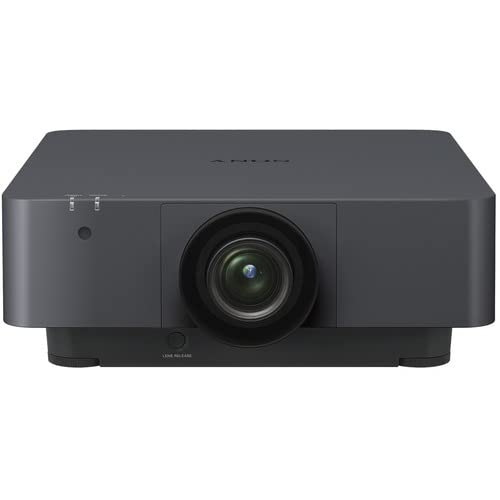
Figure 1: Front view of the Sony VPL-FHZ85 3LCD Laser Projector. This image shows the projector's main body and lens assembly.
2. What's in the Box
Verify that all items are present in the packaging before proceeding with installation.
- Sony VPL-FHZ85 Projector Unit
- Power Cord
- User Manual (this document)
- Projector Lens Cover
- HDMI Cable
3. Setup
3.1 Placement
The VPL-FHZ85 projector can be placed on a flat surface or mounted to the ceiling. Ensure the projector is positioned to achieve the desired screen size and aspect ratio (16:10 native). Maintain adequate ventilation around the unit to prevent overheating.
3.2 Power Connection
- Connect the supplied power cord to the projector's AC inlet.
- Plug the other end of the power cord into a suitable electrical outlet.
- Ensure the power indicator light on the projector illuminates, indicating standby mode.
3.3 Input Connections
Connect your video source devices (e.g., computer, Blu-ray player) to the projector using appropriate cables. The VPL-FHZ85 supports HDMI and DVI inputs.
- For HDMI connections, use the provided HDMI cable or a certified HDMI cable.
- For DVI connections, use a DVI cable (not included).
- Ensure cables are securely connected to both the source device and the projector.
4. Operating the Projector
4.1 Power On/Off
- To power on: Press the power button on the projector or the remote control. The power indicator will change from amber (standby) to green.
- To power off: Press the power button again. Confirm shutdown if prompted. The projector will enter standby mode.
4.2 Input Selection
Use the "Input" button on the projector or remote control to cycle through available input sources (HDMI, DVI, etc.) until your desired source is displayed.
4.3 Image Adjustment
- Focus: Adjust the focus ring on the lens until the image appears sharp.
- Zoom: Adjust the zoom ring on the lens to achieve the desired image size.
- Lens Shift: Use the lens shift controls (if available on your model) to vertically or horizontally adjust the image position without moving the projector.
- Picture Mode: Access the projector's menu to select various picture modes or adjust settings like brightness, contrast, and color. The projector's Bright View technology helps maintain image quality in ambient light, while Reality Creation enhances detail and sharpness. Intelligent Settings with Ambiance automatically optimizes settings based on the room environment.
5. Maintenance
5.1 Cleaning the Projector
- Exterior: Wipe the projector's exterior with a soft, dry cloth. For stubborn dirt, use a cloth lightly dampened with water and a mild detergent, then wipe dry.
- Lens: Gently clean the lens with a lens cleaning cloth or lens paper. Avoid touching the lens surface directly.
- Air Vents: Periodically check and clean the air vents to ensure proper airflow and prevent dust buildup. Use a soft brush or compressed air.
5.2 Laser Light Source
The VPL-FHZ85 utilizes a laser light source, offering a Long Lamp Life of up to 20,000 hours in normal mode and 30,000 hours in economy mode. This significantly reduces the need for frequent maintenance and replacement compared to traditional lamp-based projectors.
6. Troubleshooting
If you encounter issues with your projector, refer to the following common troubleshooting steps:
- No Image:
- Ensure the projector is powered on and the power indicator is green.
- Verify that the input source is correctly selected.
- Check all cable connections between the projector and the source device.
- Confirm the source device is powered on and outputting a signal.
- Dim or Poor Image Quality:
- Adjust focus and zoom settings.
- Check the projector's picture mode and brightness/contrast settings.
- Ensure the lens is clean.
- Reduce ambient light in the room if possible.
- Projector Overheating:
- Ensure air vents are not blocked and there is sufficient space around the projector for ventilation.
- Clean any dust from the air vents.
- No Sound:
- The VPL-FHZ85 typically relies on external audio systems. Ensure your audio source is connected to an amplifier or speakers, not directly to the projector unless an audio output is specifically used.
If problems persist, consult the detailed troubleshooting section in the full user manual or contact Sony customer support.
7. Specifications
| Feature | Detail |
|---|---|
| Brand Name | Sony |
| Item Model Number | VPL-FHZ85 |
| Display Technology | 3LCD |
| Display Resolution | 1920 x 1200 (WUXGA) |
| Brightness | 7300 lumens |
| Aspect Ratio | 16:10 |
| Light Source Life (Normal Mode) | 20,000 hours |
| Light Source Life (Economy Mode) | 30,000 hours |
| Connectivity Technology | HDMI, DVI, USB |
| Color | Black |
| Item Weight | 38 pounds |
| Product Dimensions | 24.9 x 37.5 x 13 inches |
| Mounting Type | Ceiling Mountable |
8. Warranty and Support
For detailed warranty information, please refer to the warranty card included with your product or visit the official Sony support website. For technical assistance, product registration, or service inquiries, please contact Sony customer support through their official channels.
Online Support: www.sony.com/electronics/support