
1. Product Overview and Features
The InBody BP170 is an automatic blood pressure monitor designed for convenient and accurate blood pressure and pulse rate measurement at home or on the go. It features a one-touch cuff for easy application and a large digital display for clear reading of results.
Key Features:
- Convenient Home Monitoring: Easily track blood pressure and pulse. Highly portable for home or travel use.
- One-Touch Cuff: Simple application; place the cuff on your arm, press, and it wraps itself.
- Widescreen Digital Display: Large display with a color scale for clear and safe readings.
- Accurate Measurement: Detects irregular pulse rates, movement, and cuff posture to ensure reliable readings.
- Data Storage: Stores up to 100 test results for two users, facilitating long-term blood pressure tracking.

Image: The InBody BP170 monitor displaying blood pressure (SYS, DIA) and pulse rate (P.R.) readings, along with date and time.
2. Important Safety Information
Please read all instructions carefully before using the InBody BP170 monitor. Keep this manual for future reference.
- Consult your physician before using this device if you have any medical conditions or are taking medications.
- Do not use this device for diagnosis or treatment of any health problem or disease. Always consult your doctor for medical advice.
- Measurements should be taken in a quiet environment. Avoid talking or moving during measurement.
- Ensure the cuff is applied correctly and fits properly to obtain accurate readings.
- Do not use the device on an injured arm or an arm undergoing medical treatment.
- Keep the device out of reach of children.
3. What's Included
Your InBody BP170 package should contain the following items:
- InBody BP170 Blood Pressure Monitor
- Medium Arm Cuff
- 4 AA Batteries
- Product Manual (this document)
- Packaging Material

Image: The InBody BP170 monitor connected to its arm cuff, ready for use.

Image: A close-up view of the InBody BP170 arm cuff, showing its design and material.
4. Setup
4.1. Installing Batteries
- Open the battery compartment cover on the back of the monitor.
- Insert the 4 AA batteries, ensuring correct polarity (+/-).
- Close the battery compartment cover.
Upon first battery installation, the monitor will prompt you to set the date and time. Use the arrow buttons to adjust values and the START/STOP button to confirm and move to the next setting. If the date or time is incorrect, remove and reinsert the batteries to restart the setting process.
4.2. Connecting the Arm Cuff
Insert the air plug of the arm cuff firmly into the air jack on the side of the monitor.
5. Operating Instructions
5.1. Proper Cuff Application
Correct cuff placement is essential for accurate readings. Follow these steps:
- Sit comfortably with your feet flat on the floor, and your arm resting on a table at heart level.
- Locate the cuff so that the red arrow is aligned on the inside of your upper arm, over your brachial artery.
- Bend the cuff gently and wrap it around your arm. Ensure the cuff is snug but not too tight. The white arrow on the cuff should be located within the "measurable arm circumference" range indicated on the cuff.
- Do not wrap the cuff upside-down; the tube should be facing down during the measurement.
- Choose the proper size cuff. An undersized cuff can yield a high reading, while an oversized cuff can yield a low reading. Refer to the cuff size chart below.
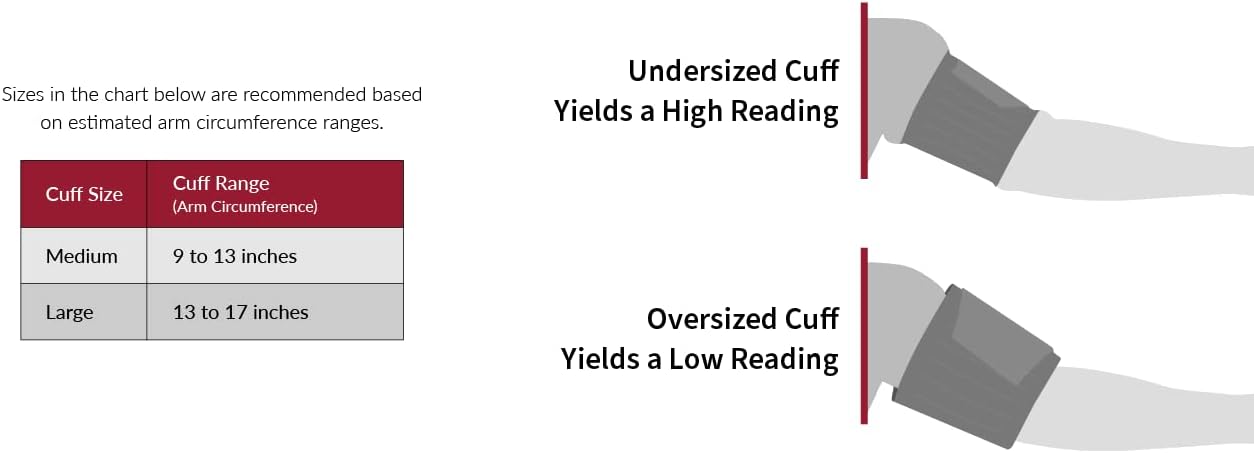
Image: A chart showing recommended cuff sizes based on arm circumference, and illustrations demonstrating how undersized or oversized cuffs can lead to inaccurate readings.
Video: "BP 170 - How to Apply Cuff". This video demonstrates the correct method for applying the InBody BP170 arm cuff to ensure accurate blood pressure measurements.
Video: "BP 170 - Incorrect Cuff Placement". This video illustrates common mistakes in cuff placement that can lead to inaccurate blood pressure readings, helping users avoid them.
5.2. Taking a Measurement
- After applying the cuff correctly, press the START/STOP button.
- The cuff will automatically inflate and then slowly deflate. Remain still and silent during this process.
- Once the measurement is complete, your Systolic Blood Pressure (SYS), Diastolic Blood Pressure (DIA), and Pulse Rate (P.R.) will be displayed on the screen.
- The result will be automatically stored under the selected user profile (M1 or M2).

Image: A person comfortably seated, taking a blood pressure measurement using the InBody BP170 monitor at home.
5.3. Understanding Your Readings
The InBody BP170 displays three key measurements:
- Systolic Blood Pressure (SYS): The amount of pressure in your arteries during the contraction of your heart.
- Diastolic Blood Pressure (DIA): The amount of pressure in your arteries during the retraction (relaxation) of your heart.
- Pulse Rate (P.R.): The number of heartbeats per minute.
The monitor also features a color scale to help you interpret your readings at a glance. Consult your healthcare professional for a complete understanding of your blood pressure values.
Video: "InBody BP 170". This video provides a general overview of the InBody BP170, including its features and how to interpret the displayed blood pressure and pulse rate readings.
5.4. Recalling Stored Measurements
The InBody BP170 can store up to 100 measurements for two users (M1 and M2). To view past readings:
- Press the M1 or M2 button to select the desired user profile.
- Use the Up and Down arrow buttons to scroll through the stored measurements.
6. Maintenance
6.1. Cleaning the Monitor and Cuff
- Wipe the monitor and cuff with a soft, dry cloth.
- If necessary, use a cloth lightly dampened with water or a mild detergent. Do not use abrasive cleaners or immerse the device in water.
6.2. Storage
- Store the device in a clean, dry place away from direct sunlight, extreme temperatures, and humidity.
- Remove batteries if the device will not be used for an extended period.
7. Troubleshooting
- Inaccurate Readings: Ensure the cuff is applied correctly and is the proper size for your arm. Avoid movement or talking during measurement. Readings can vary if taken too frequently.
- Date/Time Setting Issues: If the date or time setting process is interrupted or incorrect, remove and reinsert the batteries to reset and try again.
- Noisy Operation: Some noise during inflation/deflation is normal for automatic blood pressure monitors. If the noise is excessive or unusual, contact customer support.
- No Display/Power: Check battery installation and replace batteries if needed.
8. Specifications
| Feature | Detail |
|---|---|
| Model | BP170 |
| Brand | InBody |
| Product Dimensions | 7.51 x 3.89 x 1.02 inches |
| Item Weight | 1.94 Pounds (0.88 Kilograms) |
| Power Source | Battery Powered (4 AA Batteries included) |
| Display Type | LCD |
| Age Range (Description) | 18-99 |
| Included Components | Blood Pressure Monitor, Medium Cuff, (4) AA Batteries, Product Manual, Packaging Material |
| Manufacturer | InBody |
| ASIN | B09PGS81JW |
| UPC | 190637000556 |
9. Warranty and Support
For warranty information or technical support, please contact InBody customer service. Refer to the product packaging or the official InBody website for contact details.
Online Support: Visit the InBody Store on Amazon