
1. Product Overview
The ATOTO A6-PF is a double DIN car stereo media system designed to enhance your in-car entertainment and navigation experience. It features a full HD 7-inch IPS screen, an 8-core ARM Cortex-A55 processor, and runs on Android 10.0. This unit supports both wireless and wired Apple CarPlay and Android Auto, along with MirrorLink. It offers multiple internet access options and advanced audio processing capabilities, including a Digital Signal Processor (DSP) with Time Correction and a 32-band EQ.

Figure 1.1: ATOTO A6-PF Car Stereo with its primary features highlighted, including the included rear view camera and compatibility with Apple CarPlay and Android Auto.
2. Setup and Installation
This section provides guidance for the physical installation and initial setup of your ATOTO A6-PF car stereo. Professional installation is recommended.
2.1 Physical Installation
The A6-PF is a standard double DIN car stereo. Its chassis is designed to be shorter than conventional units, providing more space for cabling. Ensure your vehicle's dashboard opening is compatible with the unit's dimensions (172 mm x 97 mm for the screen, with an extra frame adapter for 178 mm x 101.5 mm if needed).

Figure 2.1: Physical dimensions of the ATOTO A6-PF unit and a visual representation of the included accessories in the packaging.
Note: Extra accessories such as a dash frame kit, wiring harness, radio antenna adapter, or data interface may be required for specific vehicle models and are not included in the package. It is the buyer's responsibility to prepare these if applicable.
2.2 Wiring Connections
Carefully follow the wiring diagram to connect the power, speakers, and other peripherals. Ensure all connections are secure to prevent damage to the unit or vehicle's electrical system.

Figure 2.2: Comprehensive wiring diagram illustrating all input and output ports, including power, speaker, camera, and accessory connections. Pins 1-4 and 9-12 can be connected to an external amplifier.
- Power Cable: Connect to vehicle's power supply (Constant, Accessory, Ground).
- Speaker Outputs: Connect to vehicle's speakers (Front Left/Right, Rear Left/Right).
- Rear View Camera Input (RCIN): For connecting the included ATOTO AC-HD01LR rear view camera.
- Phone Link Port: For wired CarPlay, Android Auto, and MirrorLink.
- USB Ports: For external storage, USB tethering, and connecting compatible accessories.
- Antenna Inputs: FM/AM radio antenna and GPS antenna.
- External Microphone Input: For hands-free calling and voice commands.
- Steering Wheel Control: Connect to your vehicle's steering wheel controls for convenient operation.
2.3 Internet Access Options
The A6-PF offers three methods for internet connectivity:
- Wi-Fi Hotspot (2.4 GHz & 5 GHz): Connect to your phone's hotspot for stable and fast internet access. The 5.0 GHz band provides better performance in congested areas.
- Bluetooth Tethering: A power-saving option suitable for low-bandwidth tasks like online maps or music streaming.
- USB Network Tethering: An exclusive ATOTO feature that provides bandwidth similar to Wi-Fi hotspot while potentially charging your phone. Requires the CarbitLink app (preinstalled).
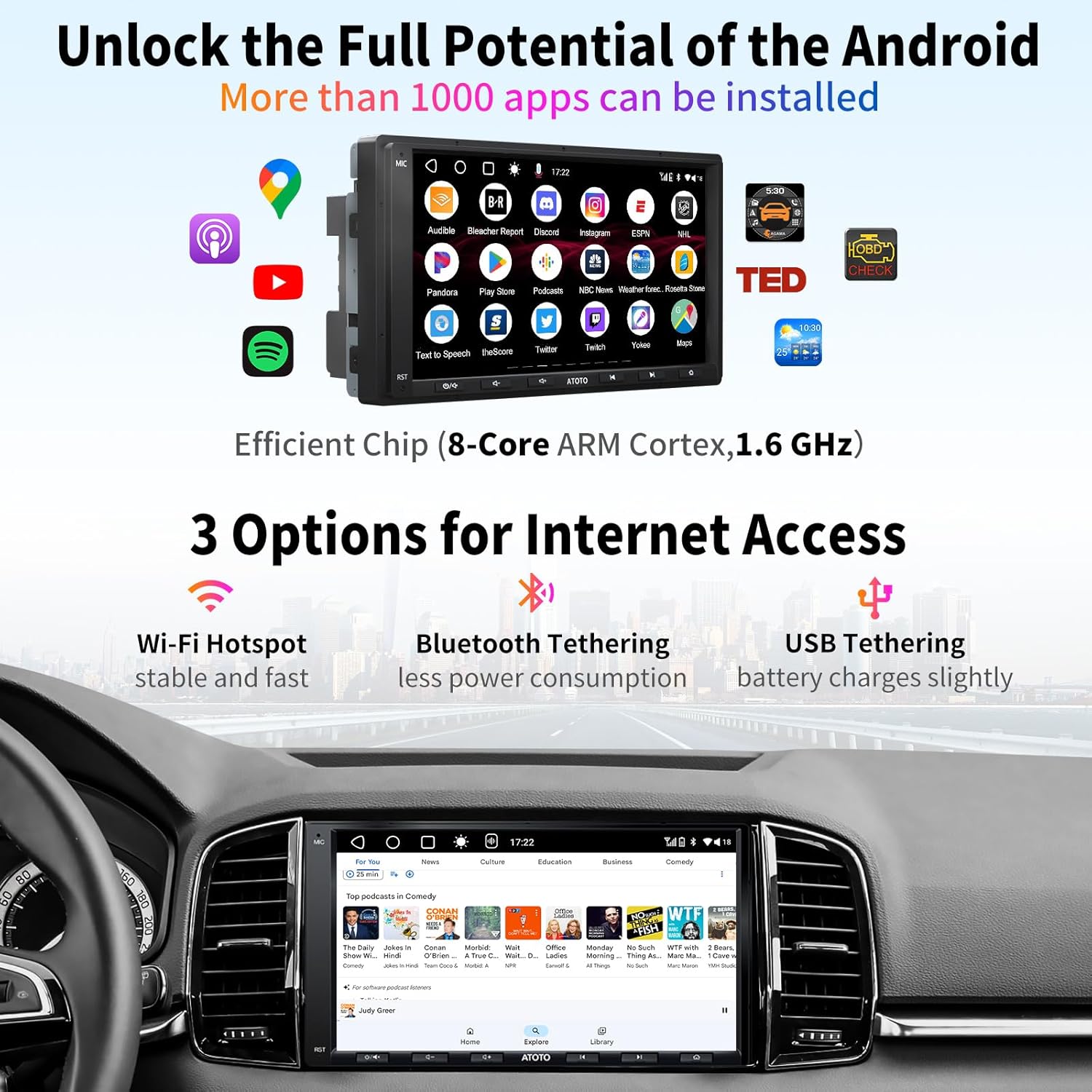
Figure 2.3: Visual representation of the three internet access methods available on the ATOTO A6-PF: Wi-Fi hotspot, Bluetooth tethering, and USB tethering.
3. Operating Instructions
3.1 User Interface and Navigation
The A6-PF runs on Android 10.0, providing a familiar and intuitive interface. Navigate through menus and applications using the 5-touch capacitive touchscreen. The unit also features 6 responsive physical buttons for quick access to common functions.

Figure 3.1: The ATOTO A6-PF display showcasing its AI Voice Assistant feature and the layout of its responsive physical buttons for easy control.
3.2 Smartphone Integration (CarPlay, Android Auto, MirrorLink)
The A6-PF supports seamless integration with your smartphone for navigation, communication, and entertainment.
- Wireless CarPlay & Android Auto: For automatic connection, ensure Bluetooth is enabled on your phone and the A6-PF. After initial pairing, connection will be automatic.
- Wired CarPlay & Android Auto: Connect your iPhone/Android phone to the "Phone Link" USB port using an original USB cable. Connection typically takes about 3 seconds.
- MirrorLink (CarbitLink): Supports both wireless and wired mirroring for compatible iOS and Android phones. Note that some video streaming services may not support MirrorLink.

Figure 3.2: Examples of Apple CarPlay, Android Auto, and MirrorLink interfaces as displayed on the ATOTO A6-PF, demonstrating seamless smartphone integration.
Compatibility:
- Wired CarPlay: iPhone 5 or later with iOS 7.1+.
- Wireless CarPlay: iPhone 5 or later with iOS 9.0+.
- Wired Android Auto: Phones with Android 6.0+.
- Wireless Android Auto: Phones with Android 11.0+, Google/Samsung phones with Android 10.0, and selected Samsung phones with Android 9.0.
3.3 Audio Features (DSP)
The integrated Digital Signal Processor (DSP) provides advanced audio customization and enhancement.
- Time Correction: Adjusts audio signal timing from individual speakers to ensure sound reaches your ears simultaneously, optimizing the listening experience.
- Speed Compensated Volume: Automatically adjusts the system volume based on vehicle speed to compensate for ambient noise.
- 32-Band EQ: A highly customizable equalizer allowing precise tuning of audio frequencies. Can be switched to graphic mode for broad adjustments.
- Crossover Points: Set crossover points between the subwoofer and speakers, and boost low-end frequencies.

Figure 3.3: Explanations of the DSP features: 36-Band EQ for detailed sound customization, Time Alignment for synchronized audio, and Speed Compensated Volume for dynamic volume adjustment.
3.4 Rear View Camera and Live Rear-View (LRV)
The A6-PF supports HD 720P rear view video input and includes the ATOTO AC-HD01LR rear view camera. The Live Rear-View (LRV) feature allows you to view the traffic behind your vehicle even when driving forward.

Figure 3.4: Demonstration of the HD 720P Rear View Camera input and the Live Rear View (LRV) feature, providing a clear view behind the vehicle.
3.5 App Installation and Expansion
Over 1,000 apps from the Google Play Store have been tested for compatibility with the A6-PF, particularly media/entertainment and navigation apps. Note that some developers, like Netflix, may restrict installation on Android car stereos.
Figure 3.5: The ATOTO A6-PF display showcasing a variety of compatible Android applications, highlighting the system's expandability.
The A6-PF supports various ATOTO accessories for expanded functionality:
- ATOTO AC-44P2 USB On-dash 1080P DVR camera: For video recording and playback.
- ATOTO AC-UTP1 USB TPMS tire pressure monitor system: To monitor tire temperature and pressure.
- ATOTO AC-4450 OBD II Diagnostic Scanner/Engine Code Reader: Connects via Bluetooth for vehicle diagnostics.
- Headrest Monitors: Via ATOTO Video Output Adaptors (AC-AHV68 USB to HDMI; AC-AHV48 USB to RCA). The A6-PF is dual-zone capable, allowing different content on the main unit and headrest monitors.
- ATOTO AC-44F8 IR remote: For convenient operation when steering wheel controls are unavailable.
- Game pads: Can be connected via Bluetooth (check compatibility).
4. Maintenance
4.1 System Updates
ATOTO continuously provides system updates to improve performance and add new features. To update your A6-PF, download the update file to a USB stick and follow the instructions provided by ATOTO's official support channels.
4.2 Cleaning
To clean the screen and unit, use a soft, lint-free cloth. For stubborn marks, slightly dampen the cloth with water or a screen-safe cleaner. Avoid abrasive materials or harsh chemicals that could damage the display or finish.
5. Troubleshooting
This section addresses common issues you might encounter with your ATOTO A6-PF.
| Problem | Possible Cause | Solution |
|---|---|---|
| Unit does not power on. | Incorrect wiring; Blown fuse; Vehicle power issue. | Check all power connections (Constant, Accessory, Ground). Verify vehicle fuses. Consult a professional installer if unsure. |
| No sound from speakers. | Speaker wiring incorrect; Volume too low; Mute enabled; DSP settings. | Check speaker connections. Increase volume. Disable mute. Review DSP settings (EQ, Time Correction). |
| CarPlay/Android Auto connection issues. | Non-original USB cable; Phone compatibility; Software glitch. | Use original/factory USB cables. Verify phone compatibility (iOS/Android version). Restart both phone and head unit. |
| Poor Wi-Fi/Bluetooth performance. | Interference; Distance from hotspot; Congested frequency band. | Ensure phone is close to the unit. Try 5 GHz Wi-Fi band if available. Consider USB tethering for more stable connection. |
| Rear view camera not displaying. | Camera not connected; Incorrect wiring; Camera malfunction. | Check camera input connection (RCIN). Ensure reverse gear signal is correctly wired. Verify camera functionality. |
If you encounter issues not listed here or if the suggested solutions do not resolve the problem, please contact ATOTO customer support for further assistance.
6. Specifications
Key technical specifications for the ATOTO A6-PF car stereo:
- Brand: ATOTO
- Model: A6G2A7PF-S01
- CPU: 8 Core ARM Cortex-A55, 1.6 GHz
- Operating System: Android 10.0
- Memory: 2 GB RAM + 32 GB Storage
- Display: Full HD 7-inch IPS screen, 1024 x 600 resolution, 600cd/m2 brightness, 178° viewing angle, 5-touch capacitive touchscreen
- Audio Output: Max. 4*45W & RMS 4*24W preamp, Digital Signal Processor (DSP) with Time Correction, Speed Compensated Volume, 32-band EQ
- GPS/Navigation: Built-in GPS, supports online (via CarPlay/Android Auto) or offline maps.
- Smartphone Connectivity: Wireless/Wired Apple CarPlay, Wireless/Wired Android Auto, Wireless/Wired MirrorLink (CarbitLink)
- Internet Access: Wi-Fi hotspot (2.4 GHz & 5 GHz), Bluetooth tethering, USB tethering
- Bluetooth: Dual Bluetooth (BT 1 for hands-free/music, BT 2 for internet access)
- Rear View Display: HD 720P with Live Rear-View (LRV) feature (requires ATOTO AC-HD01LR camera, included)
- Radio: FM/AM radio with RDS
- Multimedia Playback: Supports up to 2TB (2048 GB) USB SSD for music/video (up to 1080P video resolution)
- Dimensions: 22.7 x 14.5 x 14.5 cm; 1.72 kg (Product)
- Screen Size: True 7-inch (172 mm x 97 mm, with adapter for 178 mm x 101.5 mm)
7. Warranty and Support
For warranty information, product registration, and technical support, please refer to the official ATOTO website or contact their customer service directly. Keep your purchase receipt as proof of purchase for warranty claims.
ATOTO continuously provides system updates to improve the system. For the latest updates and support resources, visit the ATOTO Store on Amazon or their official support portal.


