
1. Product Overview
The LGIDTECH FUT007 Miboxer 2.4G CCT WW+CW 4-Zone Wireless Remote Control is designed for managing Mi.Light/Miboxer CCT WW/CW series LED bulbs (FUT017, FUT019) and strip controllers (FUT035, FUT036). This remote allows for wireless control of up to four distinct zones of lighting, offering adjustments for brightness and color temperature (Warm White to Cool White).
Key features include:
- 2.4GHz wireless transmission for reliable control.
- Control distance of up to 30 meters (98 feet).
- Ability to control 4 independent lighting zones.
- Adjustable brightness and color temperature (CCT).
- Night light mode for convenience.
- Powered by 2 AAA batteries (not included).

Figure 1: Front view of the LGIDTECH FUT007 Miboxer 4-Zone Wireless Remote Control. It features a sleek white design with clearly labeled buttons for power, brightness, color temperature, and four zone controls.
2. Specifications
| Parameter | Value |
|---|---|
| Product Name | 2.4GHz 4-Zone RF CCT Remote Control |
| Model Number | FUT007 |
| Working Voltage | DC 3V (2x AAA batteries, excluded) |
| Transmission Frequency | 2.4 GHz |
| Modulation Method | GFSK |
| Emitting Power | 6 dBm |
| Standby Power Consumption | 20 µA |
| Control Distance | 30 meters (98 feet) |
| Dimensions (L x W x H) | 110 x 53 x 21.5 mm (4.33 x 2.09 x 0.85 inches) |
| Working Temperature | -10 to 40°C |

Figure 2: Detailed view of the remote control, illustrating its dimensions and listing key technical specifications.
3. Setup and Installation
3.1. Battery Installation
- Locate the battery compartment on the back of the remote control.
- Slide open the battery cover.
- Insert two AAA batteries, ensuring correct polarity (+/-).
- Close the battery cover securely.
Note: Batteries are not included with the remote control.
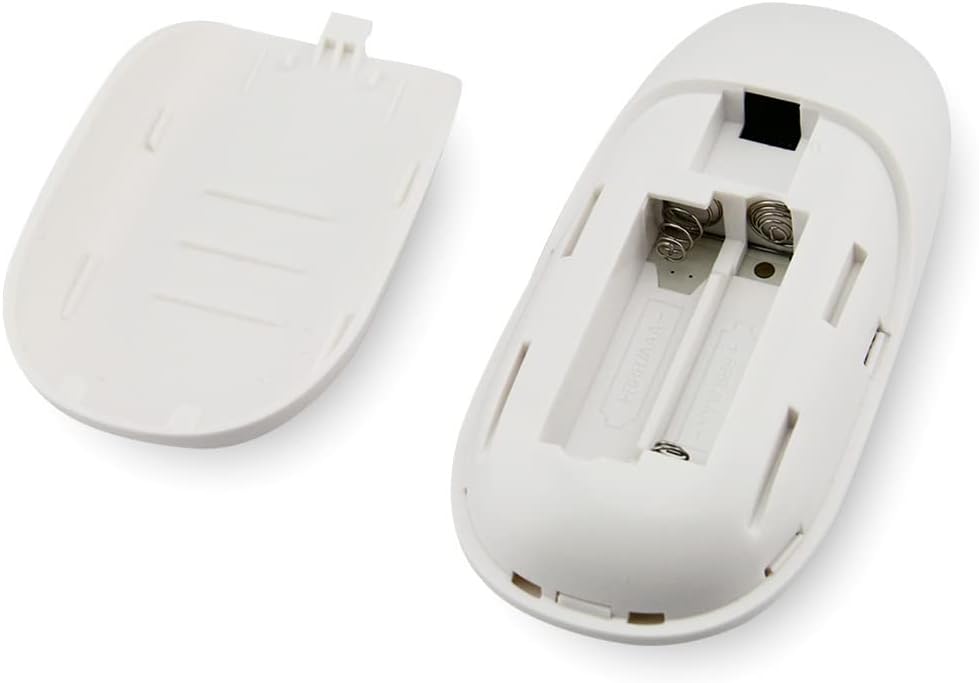
Figure 3: View of the remote control with the battery compartment open, showing the slots for two AAA batteries.
3.2. Linking the Remote to Lights
Before controlling your lights, the remote must be linked to the desired Mi.Light/Miboxer CCT WW/CW series LED bulbs or strip controllers. This process assigns lights to one of the four available zones.
- Ensure the lights you wish to link are powered off.
- Select the desired zone (1 to 4) on the remote control where you want to link the lights.
- Power on the lights.
- Within 3 seconds of powering on the lights, press the "Zone ON" button for the selected zone on the remote control.
- The light(s) will flash 3 times to indicate successful linking.
Important: If the linking fails, power off the lights for 10 seconds and repeat the process.
3.3. Unlinking the Remote from Lights
To remove a light or group of lights from a specific zone:
- Identify which zone (1 to 4) the light(s) are currently linked to.
- Ensure the light(s) you wish to unlink are powered off.
- Power on the light(s).
- Within 3 seconds of powering on the lights, press the "Zone ON" button for the selected zone 5 times rapidly.
- The light(s) will flash 9 times to indicate successful unlinking.
4. Operating Instructions
The FUT007 remote control provides intuitive control over your Mi.Light/Miboxer CCT WW/CW lighting system. Familiarize yourself with the button layout:

Figure 4: Diagram illustrating the functions of each button on the LGIDTECH FUT007 Miboxer remote control.
4.1. Button Functions
- Master ON (I): Turns all linked lights ON.
- Master OFF (O): Turns all linked lights OFF.
- Brightness + (Up Arrow): Increases the brightness of the selected zone or all lights.
- Brightness - (Down Arrow): Decreases the brightness of the selected zone or all lights.
- Warmer White (Left Arrow): Adjusts the color temperature towards warmer white for the selected zone or all lights.
- Cooler White (Right Arrow): Adjusts the color temperature towards cooler white for the selected zone or all lights.
- Zone ON (1-4, top button): Turns on the lights in the corresponding zone. Also used for linking.
- Zone OFF (1-4, bottom button): Turns off the lights in the corresponding zone.
4.2. Controlling Zones
To control a specific zone, first press the "Zone ON" button for that zone (e.g., "1 ON"). Once a zone is active, you can adjust its brightness and color temperature independently using the central control ring buttons.
To control all zones simultaneously, use the "Master ON" and "Master OFF" buttons. Adjustments made with the central control ring will then apply to all active zones.
4.3. Night Light Mode
- To activate night light mode for a specific zone: Long press the "Zone OFF" button for that zone.
- To activate night light mode for all lights: Long press the "Master OFF" button.
4.4. Control Range
The remote operates using 2.4GHz wireless transmission, allowing control of lights within a 30-meter (98-foot) range. This range can be affected by obstacles such as walls and other electronic devices.

Figure 5: Diagram illustrating the 2.4GHz wireless transmission capability of the remote, showing its ability to control lights across multiple rooms within a 30-meter range.
5. Maintenance
- Cleaning: Wipe the remote control with a soft, dry cloth. Do not use abrasive cleaners or solvents.
- Battery Replacement: Replace batteries when the remote's performance degrades or it stops responding. Always use two new AAA batteries.
- Storage: Store the remote in a dry place, away from direct sunlight and extreme temperatures. If storing for extended periods, remove the batteries to prevent leakage.
- Water Exposure: This remote is not waterproof. Avoid exposure to water or high humidity.
6. Troubleshooting
| Problem | Possible Cause | Solution |
|---|---|---|
| Remote not responding to lights. |
|
|
| Lights flash but do not link/unlink. |
|
|
| Brightness or color temperature adjustment is erratic. |
|
|
7. Warranty and Support
Specific warranty information for this product is not provided in the available documentation. Please refer to the retailer or manufacturer's website for details regarding warranty coverage and customer support.
For further assistance, please contact LGIDTECH customer support or your product retailer.