
1. Introduction
Thank you for choosing the Studiomaster ISMA150 Line Mixer Amplifier. This manual provides essential information for the safe and efficient operation of your device. The ISMA150 is a versatile audio solution designed for PA and stage applications, featuring multiple inputs, zone outputs, and integrated media playback capabilities.
Key features of the Studiomaster ISMA150 include:
- 2 microphone inputs and 3 line inputs for diverse audio sources.
- 150W output power with 100V line and 6 zone selectable outputs.
- Built-in MP3/USB/SD card playback with FM tuner facility.
- 2-band equalizer on the output for tone control.
- Stable power handling with low output noise and distortion.
- High efficiency design with an intelligent fan cooling system.
- Mic1 mute override function for priority broadcasting.
- Independent volume control for each input.
- 5-LED bargraph level display for output monitoring.
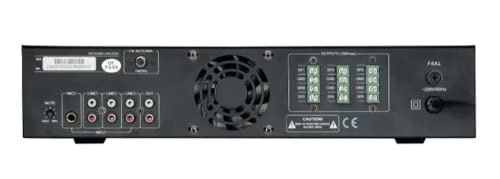
This image presents a bulleted list of the Studiomaster ISMA150's main features, including its 2 mic, 3 line inputs, 150W 100V line 6 zone outputs, built-in MP3/USB/SD card playback with FM tuner, 2-band EQ, stable power handling, high efficiency cooling, Mic1 mute override, independent volume control, and 5 LED bargraph level display.
2. Safety Instructions
Please read and follow these safety instructions carefully to prevent damage to the unit and ensure user safety.
- Power Source: Connect the unit only to the specified AC power supply (AC220V/50Hz). Ensure the power cord is not damaged or pinched.
- Ventilation: Do not block ventilation openings. Ensure adequate airflow around the unit to prevent overheating. Do not install near heat sources.
- Water and Moisture: Do not expose this appliance to rain or moisture. Do not place objects filled with liquids, such as vases, on the apparatus.
- Servicing: Do not attempt to service this product yourself. Refer all servicing to qualified service personnel.
- Cleaning: Clean only with a dry cloth. Do not use liquid cleaners or aerosol cleaners.
- Grounding: Ensure the unit is properly grounded to prevent electric shock.
- Placement: Place the unit on a stable, level surface. Avoid placing it in direct sunlight or areas with excessive dust or vibrations.
3. Setup
Follow these steps to set up your Studiomaster ISMA150 Line Mixer Amplifier.
- Unpacking: Carefully remove the amplifier from its packaging. Inspect the unit for any signs of damage during transit. Retain the packaging for future transport or storage.
- Placement: Position the amplifier in a well-ventilated area, away from direct heat sources and moisture. Ensure there is sufficient space around the unit for proper airflow.
- Connecting Inputs:
- Microphones: Connect your microphones to the MIC1 and MIC2 input jacks on the rear panel.
- Line Inputs: Connect external audio sources (e.g., CD players, mixers) to the LINE1, LINE2, and LINE3 inputs.
- USB/SD Card: Insert a USB drive or SD card into the respective slots on the front panel for MP3 playback.
- Connecting Outputs (100V Line / 6 Zones): Connect your 100V line speakers to the designated zone output terminals on the rear panel. Ensure correct polarity and impedance matching for each zone. The ISMA150 supports 6 selectable zones.
- Power Connection: Ensure the amplifier's power switch is in the OFF position. Connect the supplied AC power cord to the power inlet on the rear panel and then to a suitable AC220V/50Hz power outlet.
- Initial Power-On: After all connections are made, switch on the power. The LED indicators should illuminate.
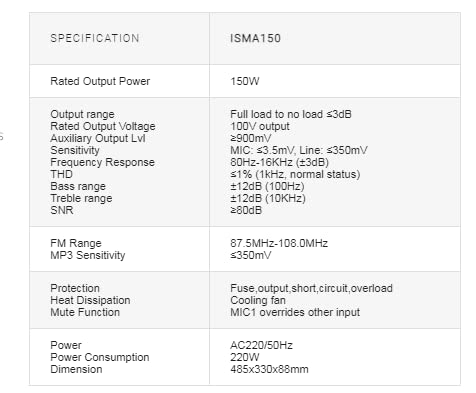
This image displays the rear panel of the ISMA150 amplifier, highlighting the various input and output terminals. On the left, you can see the MIC, LINE, and AUX inputs. Towards the right are the 100V line 6-zone selectable outputs and the AC power input.
4. Operating Instructions
This section details the operation of the Studiomaster ISMA150 Line Mixer Amplifier.
- Power On/Off: Use the main power switch to turn the unit on or off.
- Input Volume Control: Each input (MIC1, MIC2, LINE1, LINE2, LINE3, USB/SD/FM) has an independent volume control knob. Adjust these to achieve the desired level for each source.
- MP3/USB/SD Card Playback & FM Tuner:
- Insert a USB drive or SD card. The unit will automatically detect and begin playing compatible audio files.
- Use the control buttons on the front panel to play, pause, skip tracks, or switch between USB/SD/FM modes.
- For FM radio, use the tuning controls to scan and select stations.
- Output Equalizer (EQ): The 2-band EQ (Bass and Treble) controls allow you to adjust the overall tone of the output. Turn the knobs to increase or decrease the bass and treble frequencies.
- Zone Selection: Use the zone selector switches to direct the audio output to specific speaker zones. You can activate or deactivate individual zones as needed.
- Mic1 Mute Override: The MIC1 input has a priority broadcast function. When activated, audio from MIC1 will automatically mute or significantly reduce the volume of other active inputs, ensuring clear announcements.
- LED Bargraph Level Display: Monitor the output signal level using the 5-LED bargraph display. Ensure the signal does not consistently peak into the red zone to avoid distortion.
5. Maintenance
Proper maintenance ensures the longevity and optimal performance of your amplifier.
- Cleaning: Regularly wipe the exterior of the unit with a soft, dry, lint-free cloth. Do not use abrasive cleaners, solvents, or waxes.
- Ventilation: Periodically check that the ventilation grilles are free from dust and debris. Use a soft brush or compressed air to clear any blockages. Ensure the intelligent fan cooling system operates without obstruction.
- Connections: Occasionally check all input and output connections to ensure they are secure and free from corrosion.
- Storage: If storing the unit for an extended period, disconnect it from power, clean it, and store it in its original packaging in a cool, dry place.
6. Troubleshooting
If you encounter issues with your Studiomaster ISMA150, refer to the following common problems and solutions:
| Problem | Possible Cause | Solution |
|---|---|---|
| No power | Power cord disconnected; Power outlet faulty; Unit fuse blown | Check power cord connection; Test power outlet; Contact qualified service personnel for fuse replacement. |
| No sound output | Input volume too low; Output volume too low; Speaker connections faulty; Incorrect zone selected | Increase input/output volume; Check all speaker connections; Verify correct zones are active. |
| Distorted sound | Input signal too high (clipping); Output overloaded; Faulty cables | Reduce input volume; Check speaker impedance; Replace faulty cables. |
| MP3/USB/SD card not playing | Incorrect file format; USB/SD card not inserted correctly; Device not recognized | Ensure files are in compatible format (e.g., MP3); Reinsert USB/SD card; Try a different USB/SD card. |
| FM tuner not working | Poor signal reception; Antenna not connected | Adjust antenna position; Ensure FM antenna is properly connected. |
If the problem persists after attempting these solutions, please contact Studiomaster customer support or a qualified service technician.
7. Specifications
The following table details the technical specifications of the Studiomaster ISMA150 Line Mixer Amplifier:
| Specification | Detail |
|---|---|
| Brand | Studiomaster |
| Model Number | ISMA150 |
| Rated Output Power | 150W |
| Output Range | Full load to no load ≤3dB |
| Rated Output Voltage | 100V output |
| Auxiliary Output Level | ≥900mV |
| Sensitivity (MIC) | ≤3.5mV |
| Sensitivity (Line) | ≤350mV |
| Frequency Response | 80Hz-16KHz (±3dB) |
| THD (Total Harmonic Distortion) | ≤1% (1KHz, normal status) |
| Bass Range | ±12dB (100Hz) |
| Treble Range | ±12dB (10KHz) |
| SNR (Signal-to-Noise Ratio) | ≥80dB |
| FM Range | 87.5MHz-108.0MHz |
| MP3 Sensitivity | ≤350mV |
| Protection | Fuse, output short, circuit, overload |
| Heat Dissipation | Cooling fan |
| Mute Function | MIC1 overrides other input |
| Power Supply | AC220V/50Hz |
| Power Consumption | 220W |
| Dimensions (L x W x H) | 485 x 330 x 88mm |
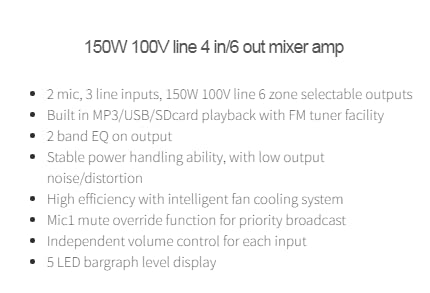
This table details the technical specifications of the Studiomaster ISMA150, including Rated Output Power (150W), Output Range, Rated Output Voltage (100V), Auxiliary Output Level, Sensitivity (MIC: ≤3.5mV, Line: ≤350mV), Frequency Response (80Hz-16KHz), THD (≤1%), Bass/Treble range (±12dB), SNR (≥80dB), FM Range (87.5MHz-108.0MHz), MP3 Sensitivity (≤350mV), Protection features (Fuse, output short, circuit, overload), Heat Dissipation (Cooling fan), Mute Function (MIC1 overrides other input), Power (AC220/50Hz), Power Consumption (220W), and Dimensions (485x330x88mm).
8. Warranty and Support
Studiomaster products are manufactured to high standards and undergo rigorous quality control. For warranty information, please refer to the warranty card included with your product or visit the official Studiomaster website. In case of technical issues or service requirements, please contact your authorized Studiomaster dealer or customer support.
Please have your model number (ISMA150) and purchase details ready when contacting support.

