
1. Introduction
Thank you for purchasing the hobbyant P47 5.0 Wireless Headset. This headset features Bluetooth 5.0 technology for stable audio transmission, luminous cat ears, and a comfortable over-ear design. It is suitable for various uses including home, office, travel, and sports. Please read this manual carefully to ensure proper use and optimal performance of your device.
2. Package Contents
Please check the package for the following items:
- 1 x hobbyant P47 Wireless Headset
- 1 x USB Charging Cable
- 1 x User Manual
- Note: An audio cable may be included for wired connection, depending on the specific product variant.
3. Product Features
- Bluetooth 5.0 Technology: Provides high-speed, stable, and strong anti-interference audio transmission.
- Luminous Cat Ears: Unique and stylish LED light effect on the cat ears.
- Long Battery Life: Equipped with a 400mAh battery for extended use.
- Ergonomic Design: Comfortable over-ear fit for prolonged wearing.
- Durable Construction: Made from premium ABS and electronic components.
- Foldable Design: For easy portability and storage.
- Multiple Connectivity Options: Supports Bluetooth wireless, wired audio cable connection, and TF card playback.
- Active Noise Cancellation: Reduces ambient noise for an immersive audio experience.
4. Setup
4.1 Charging the Headset
Before first use, fully charge the headset. Connect the provided USB charging cable to the headset's charging port and the other end to a USB power source (e.g., computer, wall adapter). The LED indicator will show charging status and turn off or change color when fully charged.
4.2 Powering On/Off
- To Power On: Press and hold the Power button for approximately 3 seconds until the LED indicator lights up.
- To Power Off: Press and hold the Power button for approximately 3-5 seconds until the LED indicator turns off.
4.3 Bluetooth Pairing
- Ensure the headset is powered off.
- Press and hold the Power button for about 5-7 seconds until the LED indicator flashes blue and red alternately, indicating pairing mode.
- On your device (smartphone, tablet, PC), enable Bluetooth and search for available devices.
- Select "P47" from the list of found devices.
- Once paired, the LED indicator will flash blue slowly.
4.4 Wired Connection
To use the headset with a wired connection, insert a 3.5mm audio cable (not always included) into the headset's audio jack and the other end into your audio source's 3.5mm port. The headset will automatically switch to wired mode.
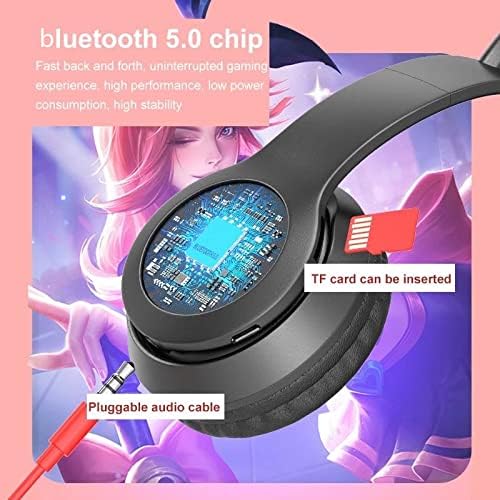
Image: The side of the headset, illustrating the TF card slot and the port for a pluggable audio cable. This allows for versatile audio input options.
4.5 TF Card Playback
Insert a TF (MicroSD) card with pre-loaded audio files into the designated TF card slot on the headset. The headset will automatically detect and begin playing music from the card.
5. Operating Instructions
5.1 Music Playback
- Play/Pause: Press the Play/Pause button once.
- Next Track: Press and hold the Volume Up (+) button.
- Previous Track: Press and hold the Volume Down (-) button.
- Volume Up: Short press the Volume Up (+) button.
- Volume Down: Short press the Volume Down (-) button.
5.2 Call Handling
- Answer Call: Press the Play/Pause button once when an incoming call rings.
- End Call: Press the Play/Pause button once during a call.
- Reject Call: Press and hold the Play/Pause button for 2 seconds when an incoming call rings.
- Redial Last Number: Double-press the Play/Pause button.
5.3 LED Light Control
The luminous cat ears feature an LED light effect. Specific controls for the LED lights (e.g., on/off, mode change) are typically integrated with a dedicated button or a long press of a function button. Refer to the physical buttons on your headset for this functionality.

Image: The hobbyant P47 headset in its foldable configuration, highlighting the glowing LED cat ears. This design allows for easy storage and adds a unique visual element.
6. Maintenance
- Cleaning: Use a soft, dry cloth to clean the headset. Do not use abrasive cleaners or solvents.
- Storage: Store the headset in a cool, dry place away from direct sunlight and extreme temperatures.
- Avoid Water: This headset is not waterproof. Avoid exposure to water or excessive moisture.
- Handle with Care: Do not drop, disassemble, or modify the headset.
7. Troubleshooting
| Problem | Possible Cause | Solution |
|---|---|---|
| Headset does not power on. | Low battery. | Charge the headset fully. |
| Cannot pair via Bluetooth. | Headset not in pairing mode; device Bluetooth off; too far from device. | Ensure headset is in pairing mode (flashing red/blue). Turn on device Bluetooth. Move headset closer to device (within 10 meters). |
| No sound. | Volume too low; incorrect audio source; headset not connected. | Increase headset and device volume. Check if headset is properly paired/connected. Ensure correct audio output is selected on your device. |
| Sound quality is poor. | Interference; low battery; distance from device. | Move away from sources of interference. Charge the headset. Reduce distance between headset and device. |
8. Specifications
| Feature | Detail |
|---|---|
| Product Type | Wireless Headset |
| Bluetooth Version | v5.0 |
| Battery Capacity | 400mAh |
| Working Time | Approximately 10 hours |
| Standby Time | Approximately 120 hours |
| Transmission Distance | Up to 10 meters (33 feet) |
| Material | Premium ABS Plastic, Electronic Components |
| Dimensions (Folded) | Approx. 17cm (Length) x 10cm (Width) x 6cm (Thickness) |
| Connectivity | Wireless (Bluetooth), Wired (3.5mm audio cable), TF Card |
| Noise Control | Active Noise Cancellation |
| Manufacturer | Antkay |
| Model Number | LZL1856027-1 |
9. Warranty and Support
Specific warranty information for the hobbyant P47 Wireless Headset is not provided in this manual. Please refer to the retailer or manufacturer's website for details regarding warranty coverage and customer support. For technical assistance or inquiries, please contact the point of purchase or the manufacturer directly.