
1. Introduction
This manual provides comprehensive instructions for the INIU USB C Charger Cable (Model DI-D5C), a high-quality braided USB-A to USB-C cable designed for efficient fast charging and reliable data transfer. Please read this manual carefully to ensure proper usage and to maximize the lifespan of your cable.
What's in the Box:
- 1 x 2M USB-C Cable
- 1 x Cable Clamp
- 1 x User Manual

Image: The INIU USB C Charger Cable, featuring both USB-A and USB-C connectors, designed for versatile connectivity.
2. Setup
Using your INIU USB C Charger Cable is straightforward. Follow these steps to begin charging or transferring data:
- Connect to Power Source: Insert the USB-A end of the cable into a compatible USB-A power adapter (e.g., wall charger, car charger) or a computer's USB-A port.
- Connect to Device: Insert the USB-C end of the cable into the USB-C charging port of your device (e.g., smartphone, tablet, laptop, gaming console).
- Verify Connection: The cable features a small LED indicator on the USB-C connector that illuminates when a connection is established and power is flowing, confirming proper operation.

Image: The INIU USB C Charger Cable connected to a smartphone, highlighting the illuminated LED indicator on the USB-C connector, signifying a successful connection.
3. Operating Instructions
Fast Charging
This cable supports 3.1A fast charging and is compatible with Quick Charge (QC) 3.0 technology, allowing for rapid power delivery to your devices. For optimal fast charging performance, ensure your power adapter and device also support QC 3.0 or similar fast charging protocols.

Image: A visual comparison demonstrating the fast charging capabilities of the INIU cable, showing an iPhone 15 reaching 80% and a Samsung S22 reaching 90% charge in one hour.

Image: A graphic illustrating the rapid charging speed, showing a phone's battery level increasing from 5% to 70% in just 30 minutes, based on internal lab data.
Data Synchronization
The cable supports fast data synchronization speeds of up to 485Mbps. This allows for quick transfer of large files, such as movies, documents, and music, between your compatible devices and a computer.

Image: The INIU USB C Charger Cable facilitating data transfer between a laptop and a smartphone, with an overlay indicating a transfer speed of 480Mbps.

Image: A close-up view of the cable connecting a smartphone to a laptop, emphasizing its capability for 480Mbps data transfer.
4. Maintenance
To ensure the longevity and optimal performance of your INIU USB C Charger Cable, follow these maintenance guidelines:
- Handle with Care: Avoid excessive bending, twisting, or pulling on the cable, especially near the connectors. The cable is designed with a durable FLYWEAVE braided jacket and flexible couplings to withstand over 45,000 bends, but proper handling extends its life.
- Protect Connectors: The precision 3D laser welded aluminum alloy connectors are reinforced for durability (50,000+ plug lifespan). Avoid forcing the connectors into ports or exposing them to liquids or dust.
- Storage: When not in use, coil the cable neatly and secure it with the included cable clamp to prevent tangles and damage.
- Cleaning: If the cable or connectors become dirty, gently wipe them with a soft, dry cloth. Do not use harsh chemicals or abrasive materials.

Image: The INIU USB C Charger Cable showcasing its robust design, capable of withstanding over 45,000 bends, indicating superior durability compared to standard cables.

Image: A detailed view of the cable's Flyweave Nylon braiding, highlighting its robust construction designed to resist damage, including from pet bites.

Image: A graphic illustrating the cable's exceptional durability, boasting over 50,000 plug insertions and 45,000 bending cycles without failure.
5. Troubleshooting
If you encounter issues with your INIU USB C Charger Cable, refer to the following common problems and solutions:
- Cable Not Charging:
- Ensure both ends of the cable are securely plugged into the power source and your device.
- Verify that the power source (wall adapter, computer port) is functional.
- Test the cable with a different device or power source to isolate the issue.
- Check if your device's charging port is clean and free of debris.
- Slow Charging:
- Confirm that your power adapter supports fast charging (e.g., QC 3.0) and provides sufficient output for your device.
- Ensure your device itself supports fast charging.
- Avoid using your device intensively while charging, as this can slow down the charging process.
- Data Transfer Issues:
- Ensure the cable is properly connected to both the computer and the device.
- Check your device's settings to ensure it is set to allow data transfer (e.g., 'File Transfer' mode on Android devices).
- Try connecting to a different USB port on your computer.

Image: A cutaway view of the INIU USB C Charger Cable's reinforced plug, illustrating its robust construction designed to prevent common connection failures and ensure a stable connection.

Image: The INIU USB C Charger Cable featuring the SmartProtect 2.0 Chip, emphasizing its safety features for fast charging and protection against overcurrent or overheating.

Image: A graphic illustrating Temp°Guard 2.0 technology, which continuously monitors battery temperature during charging to ensure safety and prevent overheating.
6. Specifications
| Feature | Detail |
|---|---|
| Model Number | DI-D5C |
| Product Dimensions | 23.4 x 1.6 x 7.7 cm; 70 g |
| Connector Type | USB Type C, USB Type A |
| Cable Type | USB |
| Fast Charging | 3.1A, QC 3.0 Support |
| Data Transfer Speed | Up to 485Mbps |
| Special Features | Braided, LED Indicator Light, EMark 2.0 Charging Protection, SmartProtect 2.0 Chip, Temp°Guard 2.0 |
| Durability | 45,000+ Bending Life, 50,000+ Plug Lifespan |
| Compatible Devices | MacBook Air/Pro, Dell XPS, ThinkPad, Lenovo Legion/Yoga, HP Spectre/EliteBook, Google Pixelbook, Microsoft Surface, ASUS ROG/ZenBook/VivoBook, Razer Blade, iPad Pro/Air/mini, Samsung Galaxy Tab S/A series, iPhone 15 series, Samsung Galaxy S/Note/Z Fold/Flip/A series, Google Pixel series, Xiaomi series, Nintendo Switch/OLED/Lite, Steam Deck, Bose Headphones, Sony Headphones, AirPods Pro, Beats Studio Buds+, Galaxy Watch, Huawei Watch, Kindle Scribe/Paperwhite. |

Image: A comprehensive compatibility chart for the INIU USB C Charger Cable, listing various compatible devices including smartphones, tablets, laptops, and gaming consoles from different brands.
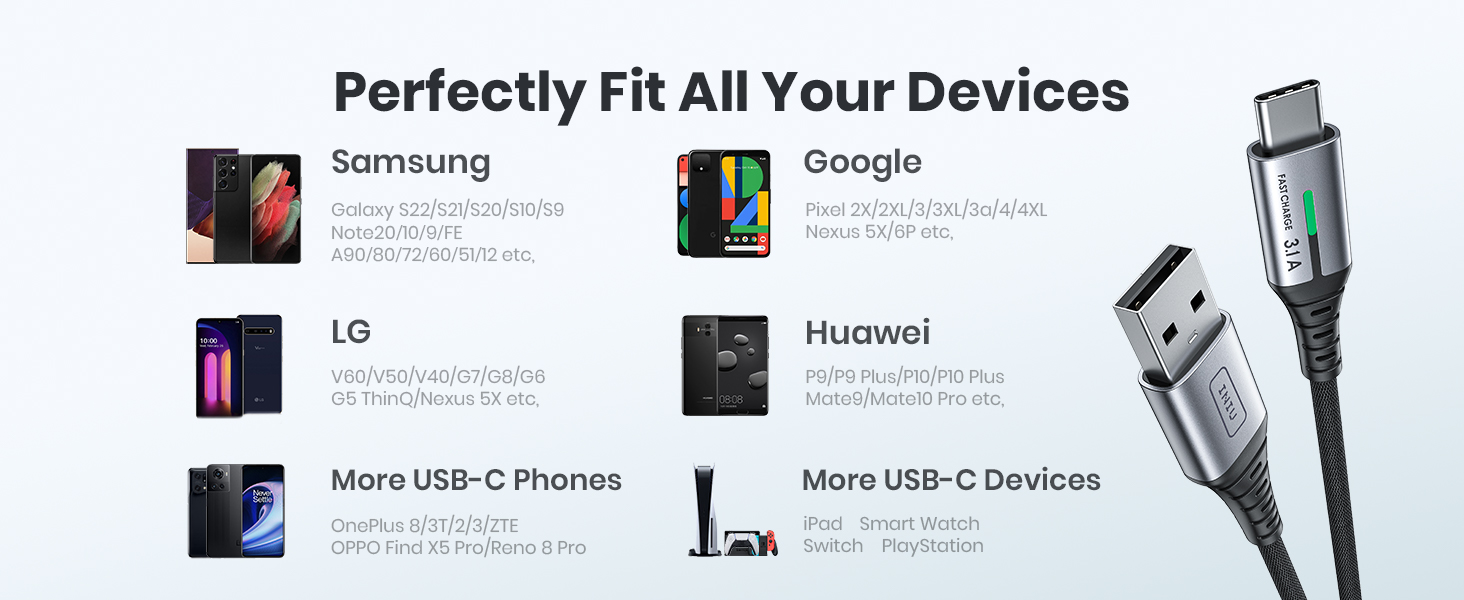
Image: A visual representation of the INIU USB C cable's broad compatibility, showcasing its ability to connect with a wide range of devices from different manufacturers.
7. Warranty and Support
INIU stands behind the quality of its products. The INIU USB C Charger Cable comes with an industry-leading 3-year iNiu Care warranty.
For any product inquiries, technical support, or warranty claims, please refer to the contact information provided on the product packaging or visit the official INIU website for assistance.

Image: The product packaging and included welcome guide, highlighting the 3-year product care warranty provided by INIU.


