
Introduction
The MIFA WildBox is a portable Bluetooth speaker designed for robust outdoor and indoor use. It features powerful audio output, dynamic LED lighting, and a durable waterproof and dustproof design. This manual provides essential information for setting up, operating, maintaining, and troubleshooting your MIFA WildBox speaker to ensure optimal performance and longevity.

Figure 1: MIFA WildBox Bluetooth Speaker showcasing its waterproof design and power bank feature.
What's in the Box
Upon unboxing your MIFA WildBox, please ensure all the following items are present:
- 1 x MIFA WildBox Bluetooth Speaker
- 1 x USB-C Charging Cable
- 1 x User Guide Manual
Features
- Powerful Audio Output: 60W total output with 2x20W RMS woofers and 2x10W RMS tweeters for loud sound and deep bass.
- IP67 Waterproof & Dustproof: Designed to withstand immersion in water up to 1 meter for 30 minutes and fully protected against dust ingress. The speaker is also floatable.
- Dynamic LED Lights: Features 16 million dynamic LED lights with multiple modes to enhance your listening experience.
- TWS & Partyadd Function: Allows pairing of two MIFA WildBox speakers for true stereo sound, or connecting over 100 MIFA WildBox speakers for a synchronized party experience.
- Versatile Connectivity: Supports Bluetooth 5.3 for stable wireless connection up to 197ft, Aux input, and Micro SD card slot for various audio sources.
- Built-in Power Bank: Equipped with a 10000mAh battery that can charge external devices via its USB-A output port.
- Long Playtime: Up to 24 hours of continuous music playback on a single charge.
- Portable Design: Integrated carrying handle for easy transport.

Figure 2: Overview of MIFA WildBox key features.
Setup
1. Initial Charging
Before first use, fully charge your MIFA WildBox speaker. Connect the provided USB-C cable to the speaker's USB-C input port (labeled 'IN') and the other end to a compatible USB power adapter (not included). The charging indicator will show the charging status. A full charge takes approximately 4 hours.
2. Powering On/Off
- To Power On: Press and hold the Power button (
 ) for 2-3 seconds until you hear an audible prompt and the LED lights activate.
 - To Power Off: Press and hold the Power button again for 2-3 seconds.
3. Bluetooth Pairing
- Power on the MIFA WildBox speaker. It will automatically enter Bluetooth pairing mode, indicated by a flashing blue LED.
- On your mobile device (smartphone, tablet, etc.), enable Bluetooth and search for available devices.
- Select "MIFA WildBox" from the list of devices.
- Once successfully paired, the blue LED will remain solid, and you will hear a confirmation tone.
4. TWS (True Wireless Stereo) Pairing
To pair two MIFA WildBox speakers for a stereo experience:
- Ensure both MIFA WildBox speakers are powered on and not connected to any Bluetooth device.
- On one speaker, press the TWS button (
 ). It will search for the second speaker.
 - The speakers will automatically connect to each other. Once connected, the main speaker's LED will flash blue (ready to pair with a device), and the secondary speaker's LED will be solid blue.
- Connect your mobile device to the main speaker via Bluetooth as described in step 3. Audio will now play in stereo through both speakers.

Figure 3: Multiple speakers connected via Partyadd for an immersive audio experience.
5. Aux Input & Micro SD Card Usage
The MIFA WildBox supports audio playback via a 3.5mm AUX cable and a Micro SD card.
- Aux Input: Connect a 3.5mm audio cable (not included) from your audio source to the AUX-in port on the speaker. The speaker will automatically switch to AUX mode.
- Micro SD Card: Insert a Micro SD card (up to 32GB, not included) with your music files into the Micro SD card slot. The speaker will automatically switch to Micro SD mode and begin playback.

Figure 4: Connectivity options including Bluetooth, Micro SD, and AUX.
Operating Instructions
1. Button Functions
The control panel on top of the speaker provides easy access to various functions:
- Power Button (): Press and hold to power on/off.
- Mode Button (M): Short press to switch between Bluetooth, AUX, and Micro SD card modes.
- Volume Down (-): Short press to decrease volume.
- Play/Pause Button (
 ): Short press to play or pause music. Long press for next track.
 - Volume Up (+): Short press to increase volume.
- Light Button (
 ): Short press to cycle through different LED light modes. Long press to turn lights off/on.
 - Bass Button: Press to activate or deactivate the extra bass effect.
- TWS Button (): Press to initiate TWS or Partyadd pairing.
2. LED Light Modes
The MIFA WildBox features 6 distinct RGB light modes. Use the Light button to switch between them or turn the lights off completely.
3. Power Bank Function
To use the speaker as a power bank:
- Open the rubber flap on the back of the speaker to access the ports.
- Connect your device's charging cable to the USB-A output port (labeled 'OUT') on the MIFA WildBox.
- Charging will begin automatically.

Figure 5: The MIFA WildBox functioning as a power bank.
Maintenance
- Waterproof & Dustproof Care: Ensure the rubber flap covering the ports is securely closed before exposing the speaker to water or dust. While IP67 rated, avoid prolonged submersion or exposure to high-pressure water jets.
- Cleaning: Use a soft, damp cloth to clean the speaker's exterior. Do not use harsh chemicals or abrasive cleaners.
- Storage: Store the speaker in a cool, dry place away from direct sunlight and extreme temperatures when not in use for extended periods.
- Battery Care: To prolong battery life, avoid fully discharging the speaker frequently. Charge it regularly, even if not in constant use.

Figure 6: The MIFA WildBox is designed to be waterproof and floatable.
Troubleshooting
| Problem | Possible Cause | Solution |
|---|---|---|
| Speaker does not power on. | Low battery. | Charge the speaker fully (approx. 4 hours). |
| Cannot pair via Bluetooth. | Speaker is already connected to another device or out of range. | Ensure the speaker is in pairing mode (flashing blue LED). Disconnect from other devices. Move speaker closer to your device. |
| No sound from speaker. | Volume too low, incorrect mode, or audio source issue. | Increase speaker and device volume. Check if the correct input mode (Bluetooth, AUX, SD card) is selected. Ensure audio source is playing. |
| TWS pairing fails. | Speakers are too far apart or already connected to other devices. | Ensure both speakers are disconnected from other devices. Place them close to each other during TWS pairing. |
| LED lights are not working. | Lights are turned off or in a static mode. | Short press the Light button to cycle modes. Long press to turn lights on/off. |
Specifications
| Feature | Detail |
|---|---|
| Model Name | MIFA WildBox |
| Speaker Type | Outdoor / Portable Bluetooth Speaker |
| Speaker Maximum Output Power | 60 Watts |
| Woofer Diameter | 2.75 Inches (70mm) x 2 |
| Tweeter Diameter | 0.79 Inches (20mm) x 2 |
| Passive Radiators | 85mm x 2 |
| Connectivity Technology | Bluetooth 5.3, Auxiliary (3.5mm), USB (for power bank) |
| Wireless Range | Up to 197 feet (60 meters) |
| Water Resistance Level | IP67 (Waterproof & Dustproof) |
| Battery Capacity | 10000 mAh |
| Playtime | Up to 24 Hours |
| Charging Time | Approx. 4 Hours |
| Product Dimensions (L x W x H) | 12" x 7" x 5" |
| Item Weight | 4 Pounds |
| Material | Plastic |
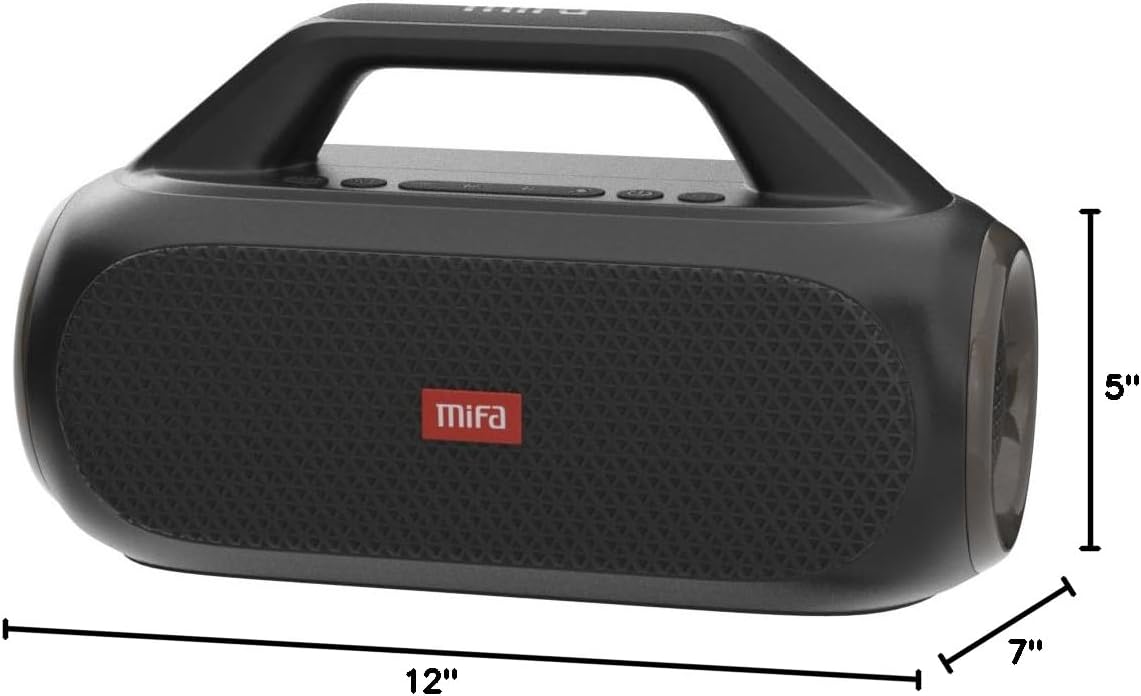
Figure 7: MIFA WildBox dimensions.
Warranty and Support
The MIFA WildBox Bluetooth Speaker comes with a limited warranty. For specific details regarding warranty coverage, duration, and terms, please refer to the warranty information provided in the packaging or contact MIFA customer support directly.
For technical assistance, troubleshooting beyond this manual, or warranty claims, please visit the official MIFA website or contact their customer service team. Contact information can typically be found on the product packaging or the MIFA brand store on Amazon.


