
Product Overview
The Godox TT685II-N is a versatile camera flash speedlite designed for Nikon cameras, featuring E-TTL II autoflash compatibility and a built-in Godox 2.4G Wireless X System. This manual provides detailed instructions for its setup, operation, and maintenance to ensure optimal performance and longevity.
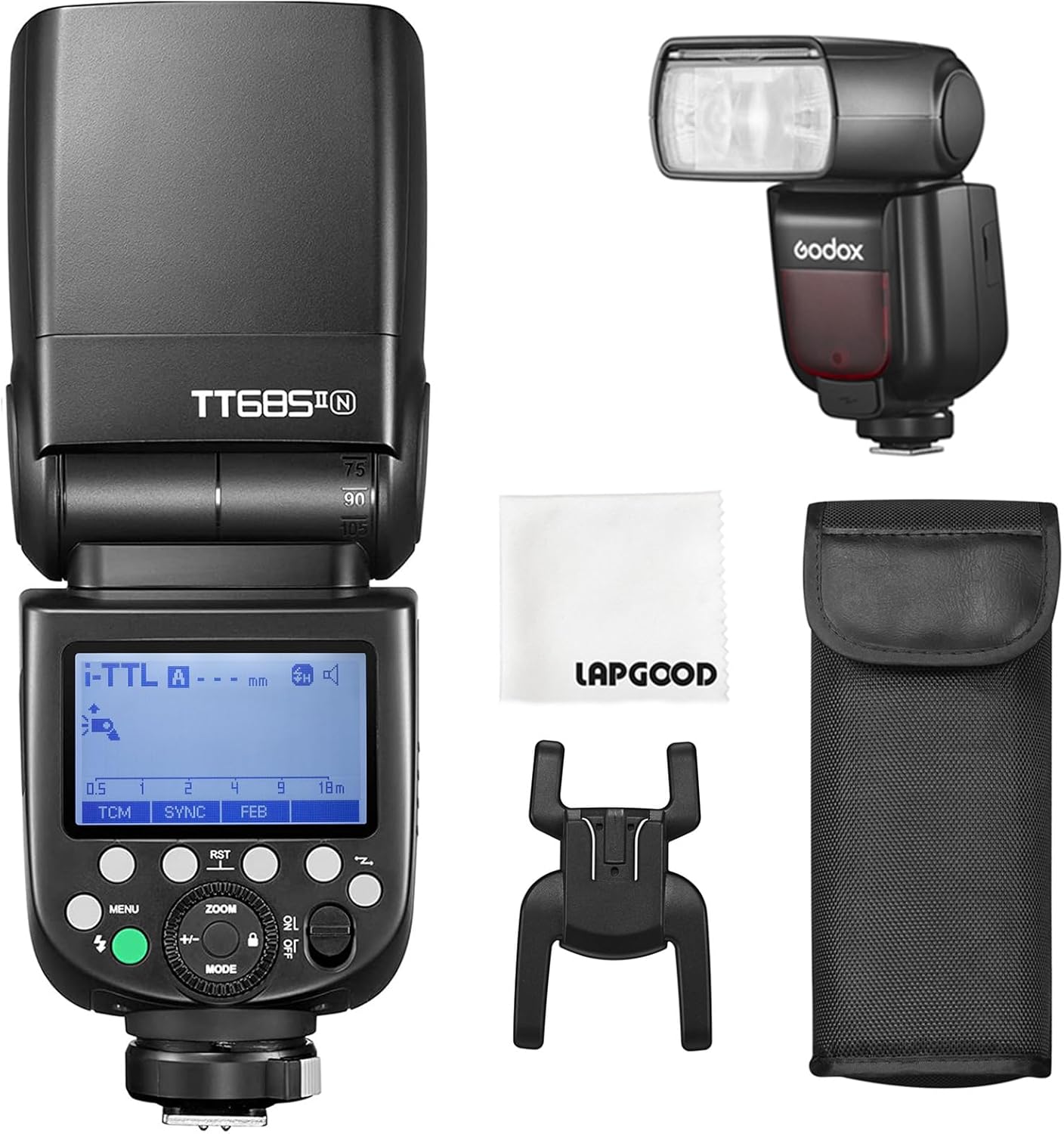
Figure 1: Godox TT685II-N Flash with included accessories, including the flash unit, mini stand, protective case, color filters, and white diffuser.
Safety Precautions
- Do not disassemble or modify the flash unit. High voltage components are present.
- Keep the flash unit dry. Do not expose to rain or moisture.
- Avoid direct eye exposure to the flash.
- Use only specified batteries (4x AA batteries).
- Do not operate the flash in the presence of flammable gases or liquids.
Setup and Installation
1. Battery Installation
The TT685II-N flash requires four (4) AA batteries for operation. Ensure batteries are inserted with correct polarity.

Figure 2: Open the battery compartment and insert four AA batteries, ensuring correct polarity. Close the compartment securely.
2. Mounting on Camera
Attach the flash to your Nikon camera's hot shoe using the quick-release lock mechanism.

Figure 3: The quick-release lock ensures secure and rapid attachment to the camera hot shoe.
3. External Power Supply (Optional)
For extended use and faster recycling times, the TT685II-N can be connected to an external lithium-ion power pack like the Godox PB960 (sold separately).

Figure 4: The power port allows connection to an external power pack for enhanced performance.
Operating Modes and Functions
The Godox TT685II-N offers various flash modes and functions to suit different photographic needs.
Video 1: An operational tutorial demonstrating key features and functions of the Godox TT685II-N E-TTL Speedlite.
1. TTL Autoflash Mode
In TTL (Through-The-Lens) mode, the flash automatically adjusts its output to achieve correct exposure. Functions such as HSS (High-Speed Sync), FEC (Flash Exposure Compensation), FEB (Flash Exposure Bracketing), and rear-curtain sync are available.
- HSS (High-Speed Sync): Allows the flash to synchronize with shutter speeds up to 1/8000s, enabling flash use in bright ambient light or with wide apertures.
- FEC (Flash Exposure Compensation): Adjusts the flash output relative to the camera's metered exposure. Use the +/- button and dial to set the FEC amount.
- FEB (Flash Exposure Bracketing): Automatically takes three shots, changing the flash output for each shot from -1.3 to +1.3 in 1/3rd stops.
2. Manual Flash Mode (M)
In Manual mode, you set the flash output power manually from 1/1 (full power) to 1/128. This provides precise control over lighting.
- TCM Function: Converts the TTL flash value into a manual output value, allowing for quick transitions from automatic to manual control while retaining the exposure.
3. Multi Flash Mode (Stroboscopic)
Multi flash mode fires a series of rapid flashes to capture multiple movements of a subject in a single image. You can set the flash output, frequency (Hz), and number of flashes (Times).
4. 2.4G Wireless X System
The built-in 2.4G Wireless X System allows the TT685II-N to function as both a transmitter (TX) and a receiver (RX) unit, enabling wireless control and triggering with other Godox X System devices. The system offers a transmission distance of up to 100 meters.

Figure 5: The 2.4G Wireless X System allows the TT685II-N to integrate seamlessly with other Godox flash triggers and lights.
- Transmitter Unit (TX): When set as a transmitter, the flash can control other receiver units. Ensure the channel and ID match the receiver units.
- Receiver Unit (RX): When set as a receiver, the flash is triggered by a transmitter unit. Ensure the channel and ID match the transmitter unit.
Control Panel Introduction
The control panel provides access to all flash settings and modes. Familiarize yourself with the buttons and dial for efficient operation.

Figure 6: The control panel features a clear LCD screen, function buttons, a test button/flash ready indicator, power switch, and a select dial for navigation and setting adjustments.
- Function Buttons (1-4): Context-sensitive buttons for various settings displayed on the LCD.
- Menu Button: Accesses the main menu for advanced settings.
- Test Button/Flash Ready Indicator: Fires a test flash and indicates when the flash is ready to fire.
- Power Switch: Turns the unit on/off.
- Select Dial: Navigates menus and adjusts values.
- Mode Selection Button: Cycles through E-TTL, Manual, and Multi flash modes.
- Set Button: Confirms selections.
- Lock Button: Locks/unlocks the control panel to prevent accidental changes.
- Wireless Selection Button: Toggles between transmitter and receiver modes for wireless operation.
- Zoom Button: Adjusts the flash coverage (focal length).
Maintenance and Care
- Clean the flash unit regularly with a soft, dry cloth. Avoid using solvents or abrasive cleaners.
- Remove batteries if the flash will not be used for an extended period to prevent leakage.
- Store the flash in a cool, dry place, away from direct sunlight and extreme temperatures.
- Protect the flash tube from impact and contamination.
Troubleshooting
| Problem | Possible Cause | Solution |
|---|---|---|
| Flash does not fire. | Low battery, incorrect settings, flash not securely mounted. | Check battery level, verify flash mode and wireless settings, ensure secure hot shoe connection. |
| Flash output is too dark/bright. | Incorrect FEC, manual power setting, or TTL metering issue. | Adjust FEC, change manual power output, or re-evaluate lighting conditions for TTL. |
| Wireless trigger not working. | Mismatched channel/ID, flash not in RX mode, out of range. | Ensure matching channels and IDs, set flash to RX mode, reduce distance to trigger. |
Specifications
| Feature | Detail |
|---|---|
| Model Number | TT685II-N |
| Guide Number (GN) | GN60 (m ISO100) |
| Flash Coverage | 20-200mm (Auto/Manual Zoom) |
| High-Speed Sync (HSS) | Up to 1/8000s |
| Recycle Time | Approx. 0.1-2.6 seconds |
| Full Power Flashes | Approx. 330 times |
| Wireless Function | Transmitter, Receiver, Off |
| Wireless Range | Approx. 100 meters |
| Power Source | 4x AA batteries (Ni-MH or Alkaline recommended) |
| Dimensions | 1.81 x 7.48 x 2.52 inches |
| Weight | 1.26 pounds (without batteries) |
Warranty and Support
Godox products are covered by a limited warranty. For detailed warranty information, technical support, or service inquiries, please visit the official Godox website or contact their customer service. Keep your purchase receipt as proof of purchase.
Official Godox Website: www.godox.com