
1. Introduction
Thank you for choosing the ORACURA OC200 Dental PRO Smart PLUS Water Flosser. This device is designed to enhance your daily oral hygiene routine by effectively removing plaque and food particles from between teeth and below the gumline. Please read this manual thoroughly before initial use to ensure proper operation and maintenance.
2. Product Overview
The ORACURA OC200 Dental PRO Smart PLUS Water Flosser features advanced technology for comprehensive oral care. Key features include:
- Effective Plaque Removal: Provides a powerful solution for removing plaque and tartar, promoting healthier gums.
- 8 Adjustable Water Pressure Modes: Customize your cleaning experience to suit different preferences and sensitivities.
- Rapid Lithium-Ion Battery Charging: Offers up to 10-15 days of use from a 4-5 hour charge.
- 4 Low-Noise Modes: Normal, Shoot, Pulse, and Custom modes for efficient and comfortable cleaning.
- 0.6mm Ultra-Fine Water Jet Spray: Ensures precise cleaning between teeth and along the gumline.
- 200ml Tank Capacity: Sufficient volume for a complete flossing session.
- IPX7 Waterproof Rating: Ensures safe use in wet environments.
- 360° Rotary Nozzle: Allows for easy access to all areas of the mouth.
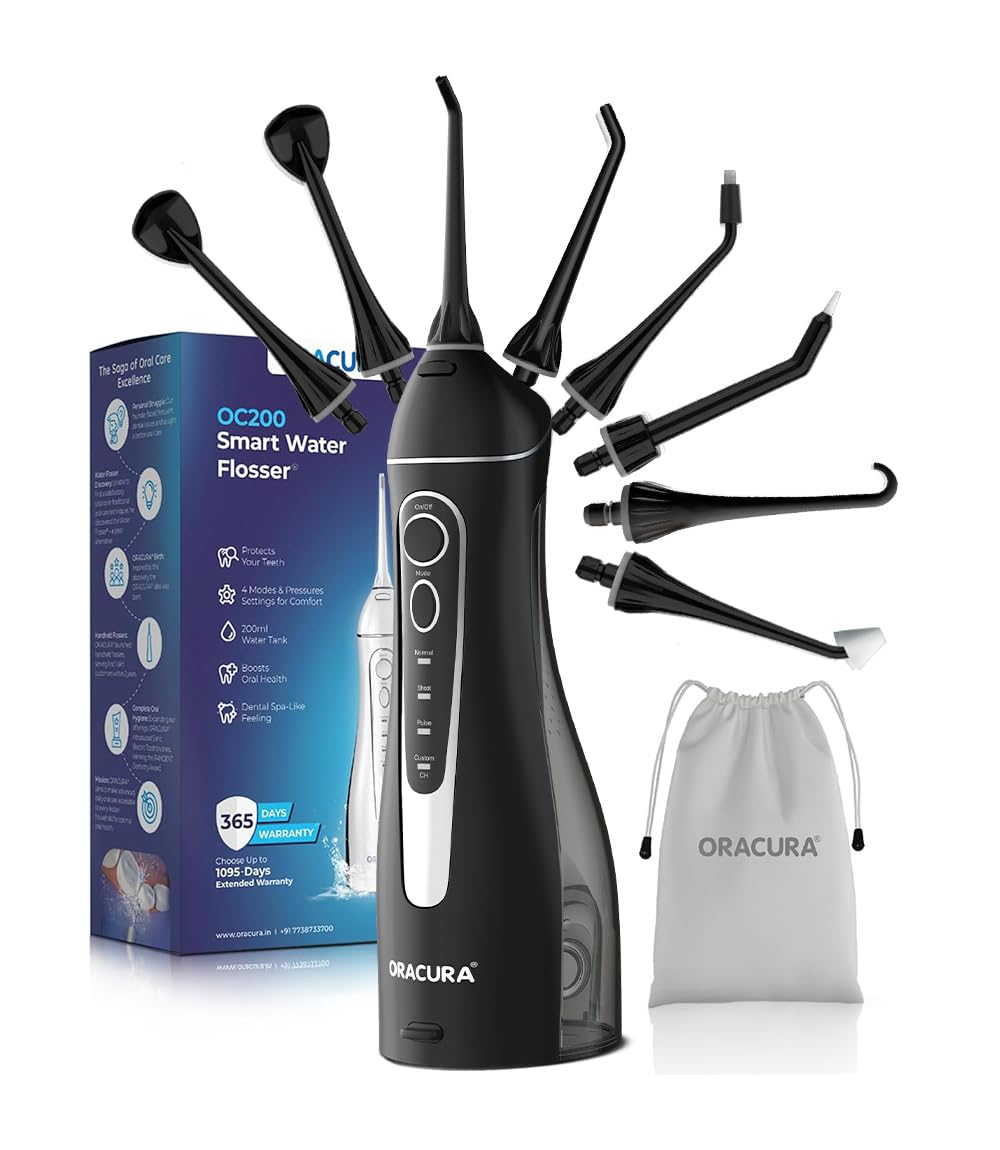
Figure 1: ORACURA OC200 Dental PRO Smart PLUS Water Flosser.

Figure 2: Key features of the ORACURA OC200 Water Flosser.
3. Included Components
Your ORACURA OC200 Dental PRO Smart PLUS Water Flosser package includes the following items:
- Main Unit: 1 Set (White & Blue colour)
- Water Tank: 1 Piece (200 ml capacity)
- Standard Nozzle: 2 pieces
- Tongue Scraper: 2 pieces
- Orthodontic Tip: 1 piece
- Pocket Tip: 1 piece
- Implant Tip: 1 piece
- Nasal Tip: 1 piece
- USB Cable: 1 unit (for charging)
- Operation Manual: 1 set

Figure 3: Contents of the ORACURA OC200 Dental PRO package.
4. Initial Setup
4.1. Charging the Device
Before first use, fully charge the water flosser. Connect the provided USB cable to the charging port on the device and to a compatible USB power adapter (not included). The charging indicator will illuminate during charging and turn off when fully charged. A full charge typically takes 4-5 hours.
4.2. Filling the Water Tank
The OC200 features both top and side filling options for convenience.
- Top Filling: Open the small cap on the top of the water tank and fill with lukewarm water.
- Side Filling: Detach the water tank from the main unit, open the side cap, fill with lukewarm water, and reattach securely.
Ensure the tank is securely closed after filling to prevent leaks.

Figure 4: Water tank filling methods (top and side).
4.3. Attaching a Nozzle Tip
Select the desired nozzle tip for your oral care needs. Insert the tip into the opening at the top of the main unit until it clicks into place. To remove, press the release button on the side of the unit and pull the tip out.

Figure 5: Available nozzle tips for specialized cleaning.
5. Operating Instructions
5.1. Powering On/Off
Press the On/Off button to start the water flosser. Press it again to turn the device off.
5.2. Selecting a Mode
Press the Mode button to cycle through the available cleaning modes: Normal, Shoot, Pulse, and Custom. The corresponding indicator light will illuminate to show the selected mode.
- Normal Mode: For daily cleaning.
- Shoot Mode: For controlled, targeted flossing sessions.
- Pulse Mode: Massages gums for improved gum health.
- Custom Mode: Allows for personalized water pressure settings.
5.3. Adjusting Water Pressure (Custom Mode)
In Custom Mode, you can adjust the water pressure through 8 different settings. Use the pressure adjustment buttons (usually integrated with the mode selection or separate) to increase or decrease the intensity of the water stream.

Figure 6: Control panel with mode and pressure indicators.
5.4. Flossing Technique
For best results, lean over a sink and place the nozzle tip in your mouth. Start with the lowest pressure setting and gradually increase as you become comfortable. Direct the water stream at a 90-degree angle to your gumline, moving along the teeth and pausing briefly between each tooth. Allow the water to flow into the sink. For optimal cleaning, follow the contours of your teeth and gums.
6. Maintenance
6.1. Cleaning the Unit
After each use, empty any remaining water from the tank. Rinse the tank with clean water. Wipe the exterior of the main unit with a soft, damp cloth. Do not immerse the main unit in water, as this may damage internal components, despite its IPX7 rating.
6.2. Cleaning Nozzle Tips
Rinse nozzle tips under running water after each use. For deeper cleaning, tips can be soaked in a solution of 2 parts water to 1 part white vinegar for 5-10 minutes, then rinsed thoroughly. Replace nozzle tips every 3-6 months, or sooner if they show signs of wear.
7. Troubleshooting
If you encounter any issues with your ORACURA OC200 Water Flosser, please refer to the table below for common problems and solutions.
| Problem | Possible Cause | Solution |
|---|---|---|
| Device does not turn on. | Low battery or no charge. | Charge the device fully. |
| Weak water pressure. | Water tank is low or empty; Nozzle tip is clogged; Incorrect mode selected. | Refill the water tank; Clean or replace the nozzle tip; Select a higher pressure mode. |
| Water leaks from the unit. | Water tank not securely attached; Tank cap not closed properly. | Ensure the water tank is firmly attached; Close all caps securely. |
| Nozzle tip detaches during use. | Nozzle not securely clicked into place. | Ensure the nozzle tip is fully inserted until it clicks. |
If the problem persists after attempting these solutions, please contact customer support.
8. Specifications
| Feature | Detail |
|---|---|
| Model Number | OC200PRO |
| Power Source | Battery Powered (Rechargeable) |
| Water Tank Capacity | 200 ml |
| Water Pressure Settings | 8 Custom Settings |
| Operation Modes | Normal, Shoot, Pulse, Custom |
| Nozzle Type | 360° Rotary Nozzle, 0.6mm Ultra-Fine Water Jet |
| Waterproof Rating | IPX7 |
| Battery Life | 10-15 days per charge (approx.) |
| Charging Time | 4-5 hours |
| Product Dimensions (LxWxH) | 8.5 x 6.5 x 27.2 cm |
| Item Weight | 410 g |
| Country of Origin | India |
9. Warranty and Support
9.1. Warranty Information
The ORACURA OC200 Dental PRO Smart PLUS Water Flosser comes with a 365-day warranty from the date of purchase. This warranty covers manufacturing defects and malfunctions under normal use. Please retain your proof of purchase for warranty claims.
9.2. Customer Support
For any questions, technical assistance, or warranty claims, please contact ORACURA customer support:
- Phone: +91 7738733700
- Manufacturer Address: ORACURA, Navi Mumbai, Maharashtra, India- 410210