1. Introduction
This manual provides essential instructions for the installation, adjustment, and maintenance of your Supreme Trimmer TB531 Zero-Gap Adjustable Replacement Blade. Designed for precision and durability, this stainless steel blade is compatible with Supreme Trimmer T-Shaper models ST5200, ST5210, and ST5220.
2. Safety Information
Please read and understand all safety warnings before using or handling the replacement blade.
- Always keep the trimmer away from water sources.
- Do not use on infants or near the face without extreme caution.
- Exercise caution when using on sensitive skin to prevent irritation.
- Always unplug the trimmer before cleaning or replacing any parts.
- Keep the trimmer and blade away from heat sources.
- Store the trimmer and blade out of reach of children.
3. Package Contents
Verify that all items are present in your package:
- 1x TB531 T Blade (Gold)
- 2x Screws
- 1x Spring
- 1x Bracket
- 1x Oil Bottle
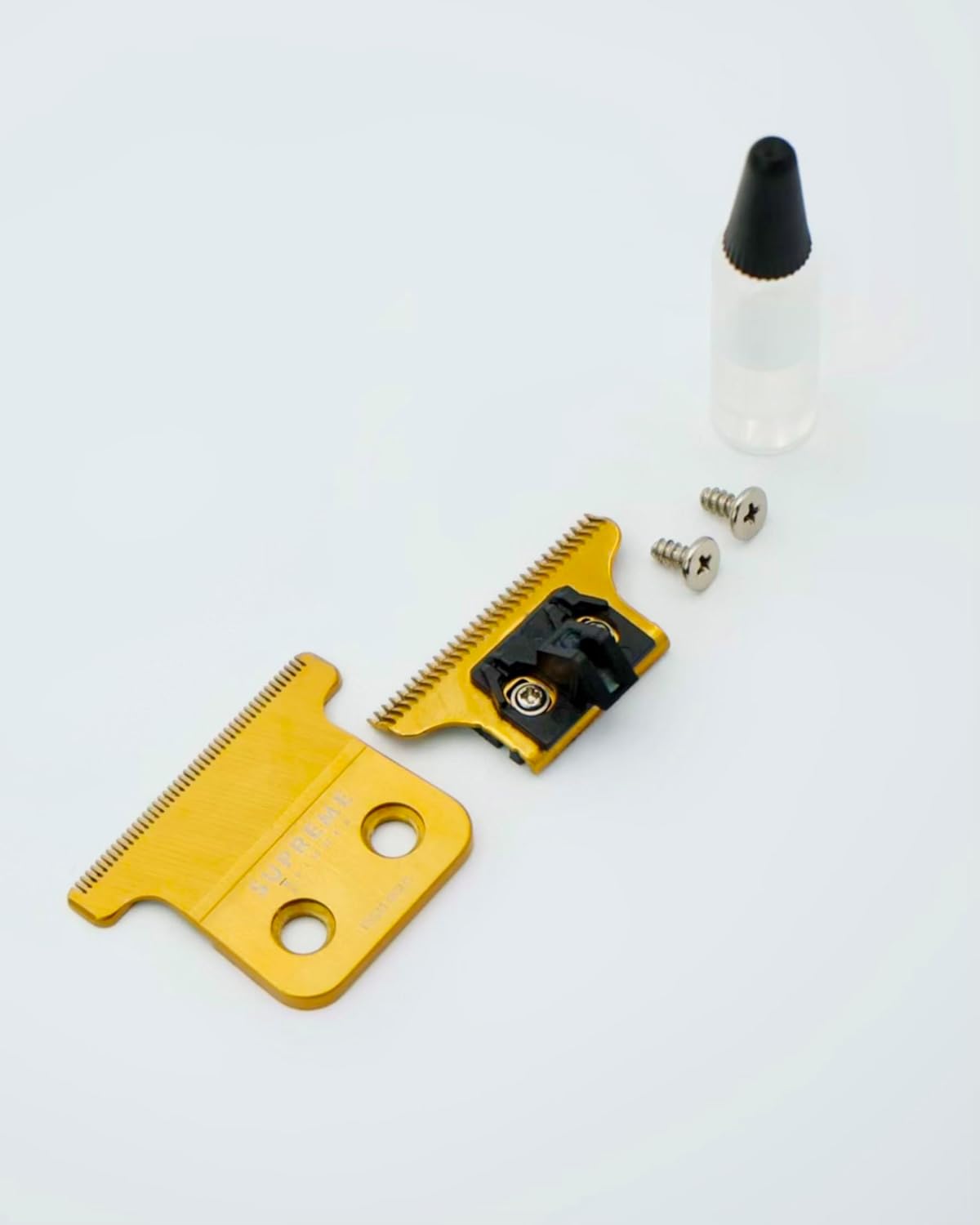
Figure 3.1: Contents of the TB531 Replacement Blade package.
4. Compatibility
The TB531 Replacement Blade is specifically designed for use with the following Supreme Trimmer T-Shaper models:
- ST5200
- ST5210
- ST5220
A screwdriver is required for installation.

Figure 4.1: Visual guide for T-Shaper compatibility.
5. Installation Instructions
Follow these steps to replace the blade on your T-Shaper trimmer:
- Power Off: Ensure your trimmer is turned off and unplugged from any power source.
- Remove Old Blade: Using a small screwdriver, carefully unscrew the two screws holding the existing blade assembly to the trimmer head. Remove the old blade and spring.
- Insert New Spring and Blade: Place the new spring into its designated slot on the trimmer. Then, position the new TB531 blade onto the trimmer head, aligning it with the spring and screw holes.
- Secure Blade: Insert the two new screws through the blade and into the trimmer head. Tighten the screws securely, but do not overtighten.
- Test: Turn on the trimmer briefly to ensure the blade moves smoothly and is properly seated.

Figure 5.1: Components of the TB531 blade assembly.
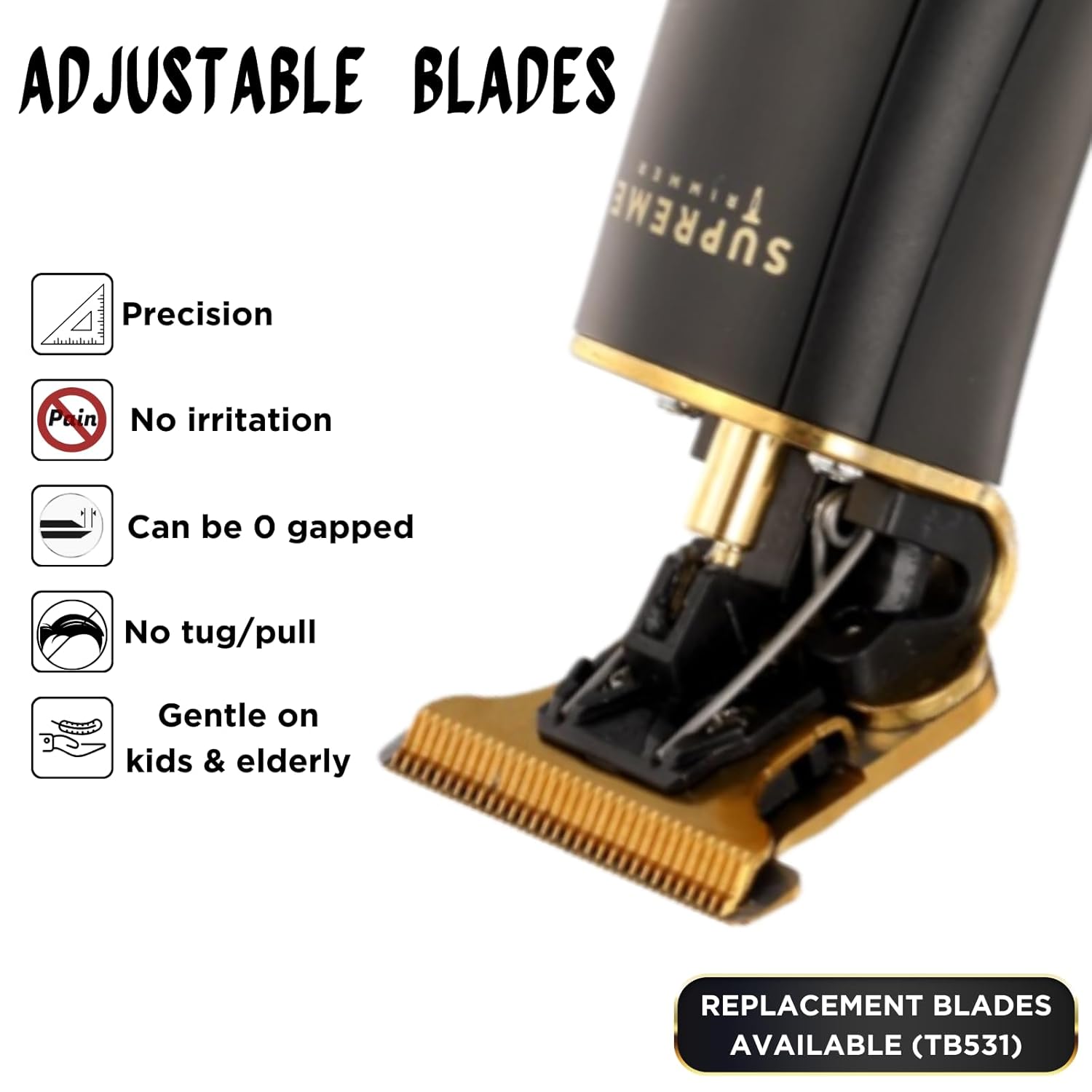
Figure 5.2: TB531 blade installed on a T-Shaper trimmer.
6. Zero-Gap Adjustment
The TB531 blade is designed for zero-gap adjustment, allowing for extremely close cuts. Adjusting the blade to a zero-gap setting requires precision and care to avoid skin irritation or cuts.
- Understanding Zero-Gap: Zero-gapping means aligning the cutting blade as close as possible to the stationary blade without overlapping, for the closest possible shave without cutting the skin.
- Adjustment Process: Loosen the two screws holding the blade assembly slightly. Carefully slide the cutting blade forward until it is perfectly aligned with the stationary blade. Ensure there is no overlap. Once aligned, gently tighten the screws.
- Caution: Improper zero-gapping can lead to nicks, cuts, or skin irritation. If you are unfamiliar with this process, it is recommended to consult online tutorials or a professional barber for guidance.

Figure 6.1: Close-up view of the TB531 blade, highlighting its fine teeth for close cutting.
7. Usage Guidelines
For optimal performance and to ensure a comfortable experience:
- Clean Skin: Ensure the skin is clean and dry before trimming.
- Gentle Pressure: Apply light, even pressure. The sharp, self-sharpening stainless steel blades are designed to cut efficiently without excessive force.
- Direction of Hair Growth: For the closest cut, trim against the direction of hair growth. For less aggressive trimming, move with the hair growth.
- Sensitive Areas: Use extra care around sensitive areas such as the neck, ears, and facial contours.

Figure 7.1: Professional use of the T-Shaper for precise necklines.

Figure 7.2: Personal grooming with the T-Shaper and TB531 blade.
8. Maintenance
Proper maintenance extends the life and performance of your TB531 blade:
- Cleaning: After each use, brush off any loose hair from the blade. For a more thorough cleaning, remove the blade (refer to Installation Instructions) and rinse under running water, ensuring the trimmer body does not get wet. Allow the blade to dry completely before reattaching.
- Oiling: Apply a few drops of the included oil (or a suitable clipper oil) to the blade teeth before and after each use. This lubricates the blades, reduces friction, and helps maintain their sharpness and self-sharpening properties. Run the trimmer for a few seconds to distribute the oil.
- Storage: Store the trimmer and blade in a clean, dry place.
9. Specifications
| Feature | Detail |
|---|---|
| Model Number | TB531 |
| Material | Stainless Steel |
| Blade Type | T-Blade, Zero-Gap Adjustable, Self-Sharpening |
| Color | Gold |
| Compatibility | Supreme Trimmer T-Shaper Models ST5200, ST5210, ST5220 |
| Package Dimensions | 3.74 x 2.48 x 0.67 inches |
| Item Weight | 1.13 ounces |
10. Warranty and Support
For warranty information, product support, or to inquire about other Supreme Trimmer products, please visit the official Supreme Trimmer website or contact their customer service. Keep your purchase receipt for any warranty claims.
Manufacturer: Supreme Trimmer
Seller: Supreme Trimmer USA


