
JZAQ BT40
JZAQ Motorcycle Helmet Bluetooth Headset User Manual
Model: BT40
Bluetooth 5.0 Waterproof Sports Headset Music Control, 80 Hours Playtime, Ultra Thin Earphones for Cycling/Skiing/Riding
1. Introduction
Thank you for choosing the JZAQ BT40 Motorcycle Helmet Bluetooth Headset. This manual provides detailed instructions for the proper installation, operation, and maintenance of your device. Please read this manual thoroughly before use to ensure optimal performance and safety. Keep this manual for future reference.
2. Product Overview
2.1 Key Features
- Ultra-thin Design: Only 0.35 inches thick, designed to fit comfortably in all helmet types without squeezing the ears.
- Bluetooth 5.0 Connectivity: Ensures a strong, stable signal connection and automatic pairing. Can connect wirelessly to two mobile devices simultaneously.
- Extended Playtime: Built-in 600mAh rechargeable Li-ion battery provides up to 80 hours of continuous talking/playing time and 500 hours of standby time. Full charge in approximately 2 hours.
- IPX7 Waterproof & Dustproof: Nano coating technology protects the headset from rain, snow, and dust, making it suitable for various outdoor conditions.
- Clear Sound Quality: Features DSP noise-canceling technology and windproof foam pads for crystal-clear stereo music and calls.
- Simple Operation: Easy-to-use controls for music, calls, and voice assistant. Automatic answering for safer riding.
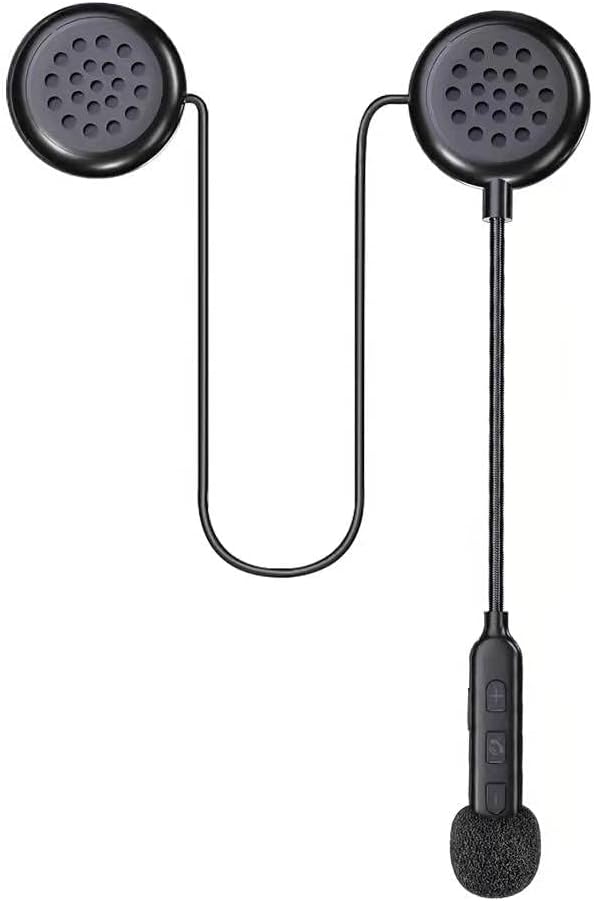
Figure 1: The JZAQ BT40 Motorcycle Helmet Bluetooth Headset, showcasing its compact design with two earpieces, a flexible microphone boom, and integrated control buttons.

Figure 2: Image highlighting the ultra-thin profile of the headset speakers, measuring 0.35 inches (8.7mm), ensuring they do not press against the ears inside a helmet.
2.2 What's Included
- Helmet Headset
- USB Cable
- User Manual (this document)
- Reflective sticker
3. Setup
3.1 Installation into Helmet
- Identify suitable locations within your helmet for the speakers. Most helmets have designated pockets or areas near the ears.
- Attach the speakers to the helmet's interior using the provided detachable Velcro pads. Ensure the speakers are positioned directly over your ears for optimal sound and comfort.
- Route the microphone boom and control unit to a convenient location near your mouth, ensuring it does not obstruct your vision or helmet closure. Secure any loose wires.

Figure 3: An illustration demonstrating the simple installation process of the headset into a helmet, emphasizing the ease of attaching the components.
3.2 Charging the Headset
Before first use, fully charge the headset. Connect the provided USB cable to the charging interface on the control unit and plug the other end into a USB power source (e.g., computer, wall adapter). The charging time is approximately 2 hours. The headset supports displaying battery status on your connected phone.

Figure 4: A smartphone screen displaying the battery level indicator for the connected JZAQ BT40 headset, allowing users to monitor charge status.
3.3 Bluetooth Pairing
- Ensure the headset is charged and powered off.
- Press and hold the Power ON/Play/Pause button on the control unit until the indicator light flashes, indicating pairing mode.
- On your mobile device, enable Bluetooth and search for available devices. Select "JZAQ BT40" (or similar name) from the list.
- Once connected, the indicator light will change, and you will hear an audible confirmation. The headset can connect to two mobile phones simultaneously.

Figure 5: The JZAQ BT40 headset shown connected simultaneously to two different mobile phones, illustrating its smart connection capability.
4. Operating Instructions

Figure 6: A detailed diagram illustrating the components of the JZAQ BT40 headset, including earpiece dimensions, speaker, microphone hole, charging interface, and the functions of each control button (Power ON/Play/Pause, Volume +/Previous Song, Volume -/Next Song).
4.1 Power On/Off
- Power On: Press and hold the central button (Power ON/Play/Pause) until the indicator light illuminates and you hear a power-on prompt.
- Power Off: Press and hold the central button (Power ON/Play/Pause) until the indicator light turns off and you hear a power-off prompt.
4.2 Music Control
- Play/Pause: Short press the central button (Power ON/Play/Pause).
- Volume Up: Short press the "+" button.
- Volume Down: Short press the "-" button.
- Next Song: Long press the "-" button.
- Previous Song: Long press the "+" button.
4.3 Call Management
- Answer Call: Short press the central button (Power ON/Play/Pause) when an incoming call is received. The headset supports automatic answering.
- End Call: Short press the central button (Power ON/Play/Pause) during a call.
- Reject Call: Long press the central button (Power ON/Play/Pause) when an incoming call is received.
4.4 Voice Assistant
- Activate Voice Assistant: Double-click the central button (Power ON/Play/Pause) to activate your phone's voice assistant (e.g., Siri, Google Assistant).
5. Maintenance
5.1 Cleaning
Wipe the headset and control unit with a soft, damp cloth. Do not use harsh chemicals or abrasive cleaners. Ensure the charging port is dry before charging.
5.2 Waterproofing
The JZAQ BT40 headset features IPX7 waterproofing, protecting it from immersion in water up to 1 meter for 30 minutes. While it is designed to withstand rain and snow, avoid prolonged submersion. Always ensure the charging port cover is securely closed when not charging to maintain water resistance.

Figure 7: The JZAQ BT40 headset shown with water droplets, emphasizing its IPX7 waterproof capability, suitable for use in wet conditions.
5.3 Storage
Store the headset in a cool, dry place away from direct sunlight and extreme temperatures. When storing for extended periods, ensure the battery is partially charged (around 50%) to prolong its lifespan.
6. Troubleshooting
- No Power: Ensure the headset is fully charged. Connect to a power source and check the charging indicator.
- Cannot Pair: Make sure the headset is in pairing mode (indicator light flashing). Turn off and on your phone's Bluetooth. If issues persist, try resetting the headset (refer to manufacturer's website for specific reset instructions if not in manual).
- Low Volume/Poor Sound Quality: Adjust the volume on both the headset and your connected device. Ensure speakers are correctly positioned over your ears inside the helmet. Check for obstructions or damage to the speakers.
- Intermittent Connection: Ensure your device is within the Bluetooth range (up to 20 meters). Avoid environments with strong electromagnetic interference.
- Microphone Not Working: Ensure the microphone is positioned correctly and not obstructed. Check your phone's privacy settings for microphone access.
7. Technical Specifications
| Feature | Specification |
|---|---|
| Model Name | BT40 |
| Bluetooth Version | 5.0 |
| Bluetooth Range | 20 Meters |
| Battery Capacity | 600mAh Li-ion |
| Battery Life (Playtime) | Up to 80 Hours |
| Standby Time | 500 Hours |
| Charging Time | 2 Hours |
| Water Resistance Level | IPX7 |
| Noise Control | Active Noise Cancellation (DSP) |
| Earphone Thickness | 0.35 inches (9mm) |
| Connectivity Technology | Wireless |
| Compatible Devices | Cellphones |
| Material | Plastic, Thermoplastic Elastomer (TPE) |
| Item Weight | 3.84 ounces |
8. Warranty and Support
This JZAQ product is covered by a standard manufacturer's warranty. For specific warranty details, duration, and terms, please refer to the product packaging or contact JZAQ customer support directly. If you encounter any issues or require assistance, please reach out to the retailer where you purchased the product or visit the official JZAQ website for support resources and contact information.
Ask a question about this manual
Ask about setup, troubleshooting, compatibility, parts, safety, or missing instructions. Manuals+ will review the question and use this page’s manual context to help answer it.