
1. Introduction
Thank you for choosing the DUDAO K6Pro 10000 mAh Portable Charger. This device is designed to provide reliable power for your mobile devices on the go. With its integrated cables and compact design, it offers versatile charging solutions for a wide range of smartphones, smartwatches, earphones, and other portable electronics.
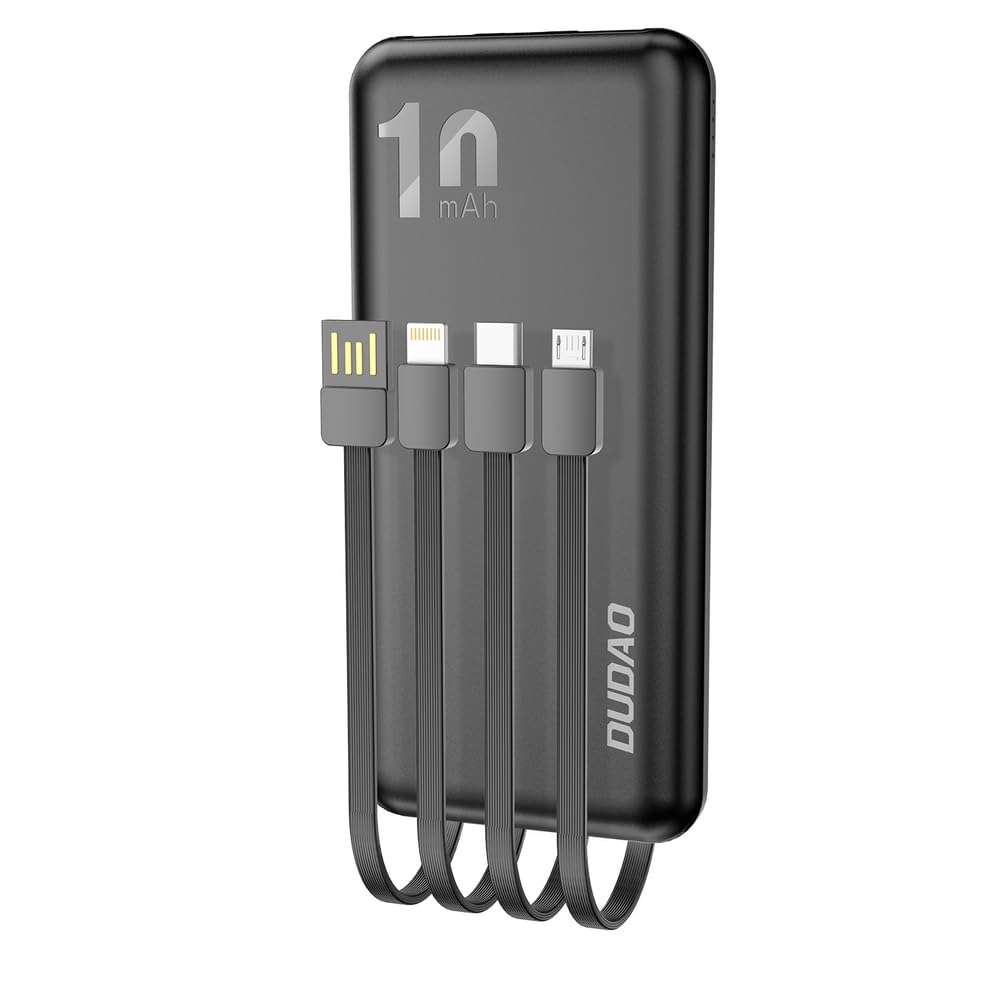
Image 1.1: Front and back view of the DUDAO K6Pro Portable Charger, showcasing its compact design and integrated charging cables.
2. Product Features
- High Capacity: 10000 mAh battery provides multiple charges for most smartphones.
- Integrated Cables: Features built-in Micro USB, USB Type-C, and Lightning cables for direct charging of various devices without needing extra cables.
- Universal Compatibility: Compatible with a wide range of portable devices including mobile phones, smartwatches, earphones, fitness trackers, and e-readers.
- Multiple Input Options: Can be recharged via integrated USB-A cable, Micro USB port, or USB Type-C port.
- LED Indicator: Displays remaining battery level for convenient monitoring.
- Compact and Portable: Slim and lightweight design for easy carrying in bags or pockets, suitable for travel.

Image 2.1: Top view of the power bank, highlighting the integrated USB-A input cable, Micro USB, USB Type-C, and Lightning output cables, along with additional input/output ports.
3. Package Contents
- DUDAO K6Pro 10000 mAh Portable Charger
- User Manual

Image 3.1: Example of DUDAO K6Pro product packaging.
4. Setup
4.1 Initial Charge
Before first use, it is recommended to fully charge your DUDAO K6Pro portable charger. This ensures optimal battery performance and longevity.
4.2 Identifying Ports and Cables
Familiarize yourself with the integrated cables and ports:
- Integrated USB-A Cable: Used for recharging the power bank.
- Integrated Micro USB Cable: Used for charging devices with a Micro USB port.
- Integrated USB Type-C Cable: Used for charging devices with a USB Type-C port.
- Integrated Lightning Cable: Used for charging Apple devices with a Lightning port.
- Micro USB Input Port: Alternative port for recharging the power bank.
- USB Type-C Input Port: Alternative port for recharging the power bank.
5. Operating Instructions
5.1 Checking Battery Level
The DUDAO K6Pro features an LED indicator on its side. Press the power button once to illuminate the LEDs, which indicate the remaining battery capacity. The number of lit LEDs corresponds to the charge level.
5.2 Charging the Power Bank
You can recharge the DUDAO K6Pro using one of three methods:
- Connect the integrated USB-A cable to a USB wall adapter, computer USB port, or other compatible power source.
- Connect a Micro USB cable (not included) to the Micro USB input port and a USB wall adapter.
- Connect a USB Type-C cable (not included) to the USB Type-C input port and a USB wall adapter.
During charging, the LED indicators will flash to show the charging progress. Once fully charged, all LEDs will remain solid.

Image 5.1: The DUDAO K6Pro power bank being recharged using its integrated USB-A cable connected to a wall adapter.
5.3 Charging External Devices
To charge your device:
- Select the appropriate integrated cable (Micro USB, USB Type-C, or Lightning) for your device.
- Connect the cable to your device's charging port.
- The power bank will automatically begin charging your device. If not, press the power button once to initiate charging.
You can charge multiple devices simultaneously using the integrated cables.

Image 5.2: A white DUDAO K6Pro power bank demonstrating its integrated cables ready for device charging.
6. Maintenance
- Cleaning: Use a soft, dry cloth to clean the surface of the power bank. Avoid using harsh chemicals or abrasive materials.
- Storage: Store the power bank in a cool, dry place away from direct sunlight and extreme temperatures.
- Battery Care: To maintain battery health, fully charge the power bank at least once every three months if not in regular use.
- Avoid Damage: Do not drop, disassemble, or expose the power bank to water or moisture.
7. Troubleshooting
- Power bank not charging: Ensure the charging cable is securely connected to both the power bank and the power source. Try a different cable or power adapter.
- Device not charging from power bank: Ensure the integrated cable is correctly connected to your device. Press the power button on the power bank to activate charging. Check if the power bank has sufficient charge.
- Slow charging: Ensure your device and the power bank are using compatible charging standards. Some devices may charge slower if multiple devices are connected simultaneously.
- LED indicators not working: The power bank might be completely discharged. Try charging it for a few minutes. If the issue persists, contact customer support.
8. Specifications
| Brand | DUDAO |
| Model | K6Pro |
| Battery Capacity | 10000 Milliampere-hour (mAh) / 37 Wh |
| Input Type | Integrated USB-A cable, Micro USB, USB Type-C |
| Output Type | Integrated Micro USB, USB Type-C, Lightning cables |
| Voltage | 5 Volts |
| Amperage | 2 A |
| Compatible Devices | Smartphone, Smartwatch, Earphone |
| Item Weight | 23 Grams |
Note: The listed item weight of 23 grams is unusually low for a 10000 mAh power bank and may be a data entry error. Typical weights for similar devices range from 180-250 grams.
9. Safety Information
- Do not expose the power bank to extreme temperatures (above 60°C or below 0°C), direct sunlight, or fire.
- Do not immerse the power bank in water or expose it to rain or moisture.
- Do not disassemble, modify, or attempt to repair the power bank yourself.
- Avoid dropping or subjecting the power bank to strong impacts.
- Keep out of reach of children.
- Dispose of the power bank responsibly according to local regulations. Do not dispose of it with household waste.
- The power bank's capacity of 37 Wh is generally permitted for carry-on luggage on most airlines. Always check with your specific airline before traveling.
10. Warranty and Support
For warranty information or technical support, please refer to the documentation provided at the time of purchase or contact your retailer/seller directly. Please have your product model number (K6Pro) and purchase details ready when seeking support.
