
TTfone TT190
TTfone TT190 Mobile Phone Instruction Manual
Model: TT970
Introduction
This instruction manual provides detailed information on how to set up, operate, and maintain your TTfone TT190 mobile phone. Please read this manual carefully to ensure proper use and to maximize the phone's features.
Package Contents
Before you begin, please check that your package contains the following items:
- TTfone TT190 Mobile Phone
- Battery
- USB Charging Cable
- User Manual
Product Overview
The TTfone TT190 is an unlocked mobile phone designed with ease of use in mind, particularly for seniors. It features large, separated buttons, a clear display, and essential functions like an SOS emergency button and a loud speaker.
Key Features
- SOS Emergency Button: A dedicated button for quick access to emergency contacts.
- Simple Keypad: Large, separated buttons for easy dialing and navigation.
- Loud Speaker: Enhanced volume for calls and speakerphone function.
- Clear Display: User-friendly menu with large fonts and clear icons.
- Handy Flashlight: Integrated flashlight with a dedicated switch.
Phone Layout

Image: Front and back view of the TTfone TT190 mobile phone, showing the large keypad and the SOS button on the rear.
Setup
Inserting the SIM Card and Battery
- Remove the back cover of the phone by gently prying it open from the notch.
- Insert your SIM card(s) into the designated slot(s) with the gold contacts facing down. Ensure it is correctly seated.
- Insert the battery into the battery compartment, aligning the contacts.
- Replace the back cover, pressing firmly until it clicks into place.
Charging the Phone
Before first use, fully charge the phone's battery.

Image: The TTfone TT190 mobile phone connected to a USB charging cable, indicating the charging process.
- Connect the small end of the USB charging cable to the phone's charging port (Micro USB).
- Connect the other end of the USB cable to a compatible USB power adapter or a computer's USB port.
- The battery indicator on the screen will show the charging status. Disconnect the charger once the battery is full.
Operating Instructions
Power On/Off
To power on, press and hold the red End Call/Power button until the screen lights up. To power off, press and hold the same button until the power off option appears, then confirm.
Making Calls
Enter the phone number using the keypad. Press the green Call button to initiate the call. To end a call, press the red End Call button.

Image: A hand holding the TTfone TT190, highlighting its large, easy-to-use keypad for simple operation.
Receiving Calls
When an incoming call rings, press the green Call button to answer. To reject a call, press the red End Call button.
Sending and Receiving Messages
Navigate to the 'Messages' menu. Select 'Write message' to compose a new SMS. Enter the recipient's number and your message. To read received messages, select 'Inbox'.
Using the SOS Emergency Button
The SOS button is located on the back of the phone. In an emergency, press and hold this button for a few seconds. The phone will automatically call and send an emergency SMS to pre-set contacts.

Image: The back of the TTfone TT190 showing the prominent red SOS button, with an illustration of a person in distress, indicating its emergency function.
Loud Speaker Function
The TT190 features an extra loud speaker for clear audio during calls. During a call, you can activate the speakerphone function for even louder volume.
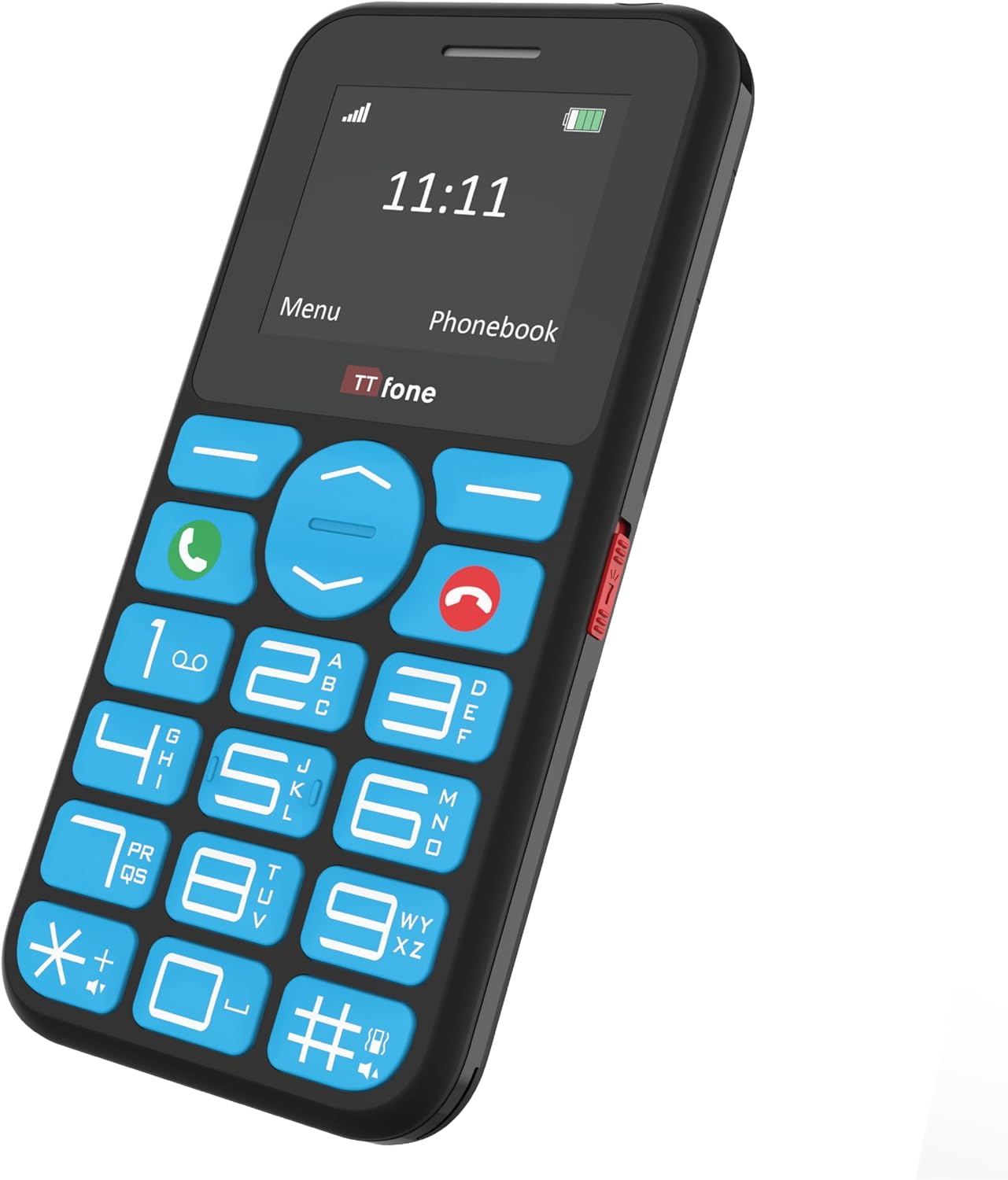
Image: An elderly person using the TTfone TT190, with visual cues indicating the loud speaker output from the phone's earpiece and rear speaker.
Using the Flashlight
A dedicated switch on the side of the phone controls the built-in flashlight. Slide the switch to turn the flashlight on or off.

Image: The TTfone TT190 phone emitting a beam of light from its top, illustrating its handy flashlight feature in a dark setting.
Phonebook / Contacts
To save a new contact, navigate to the 'Phonebook' or 'Contacts' menu, select 'Add new contact', and enter the name and number. To call a saved contact, select their name from the phonebook and press the green Call button.
Menu Navigation
Use the navigation keys (up, down, left, right) to move through the menu options. Press the 'OK' or 'Select' button (usually the center button) to confirm a selection. Press the 'Back' or 'Clear' button to return to the previous screen.
Maintenance
Cleaning
Wipe the phone with a soft, dry cloth. Do not use liquid cleaners or aerosols. Keep the charging port free of dust and debris.
Battery Care
To prolong battery life, avoid exposing the phone to extreme temperatures. Do not leave the battery fully discharged for extended periods. Use only the original or approved charging accessories.
Troubleshooting
| Problem | Possible Solution |
|---|---|
| Phone does not turn on. | Ensure the battery is correctly inserted and charged. Try charging the phone for at least 30 minutes. |
| Cannot make or receive calls. | Check if the SIM card is properly inserted and activated. Ensure you have network signal. Contact your service provider if issues persist. |
| No sound during calls. | Check the volume settings. Ensure the speaker is not blocked. |
| SOS button not working. | Verify that emergency contacts are correctly set up in the phone's settings. |
Specifications
| Feature | Detail |
|---|---|
| Brand | TTfone |
| Color | Black |
| Product Type | Bar |
| Operating System | TTfone |
| Screen Size | 1.7 Inches |
| Connectivity | Bluetooth Cellular |
| Charging Port | Micro USB |
| Memory Slot | 1 slot |
| Special Features | Large buttons, SOS emergency key, Phone for Seniors, USB |
| Battery Composition | Lithium-ion |
| Manufacturer Warranty | 2 Years |
| Spare Parts Availability | 2 Years |
| Software Updates Guaranteed Until | Information not available |
| Item Model Number | TT970 |
| Battery(ies) | 1 Lithium-ion - included |
| Manufacturer | TTfone |
| Country of Origin | China |
| Installed RAM Size | 32 MB |
| CPU Model | Other |
| CPU Speed | 1 Hz |
| Resolution | 128*160 |
| Model Name | TT190 |
| Wireless Carrier | All carriers |
| Cellular Technology | 2G |
Warranty and Support
Manufacturer's Warranty
The TTfone TT190 comes with a 2-year manufacturer's warranty. This warranty covers defects in materials and workmanship under normal use. Please retain your proof of purchase for warranty claims.
Customer Support
For technical assistance, troubleshooting, or warranty inquiries, please visit the official TTfone website or contact their customer support. Refer to the packaging or the official website for the most up-to-date contact information.
Note: Availability of spare parts is guaranteed for 2 years.
Related documentsTT190


Ask a question about this manual
Ask about setup, troubleshooting, compatibility, parts, safety, or missing instructions. Manuals+ will review the question and use this page’s manual context to help answer it.