
1. Introduction
Thank you for choosing the F&D W9 5W Bluetooth Speaker. This manual provides essential information for the proper setup, operation, and maintenance of your device. Please read it thoroughly before use to ensure optimal performance and longevity of your speaker.
The F&D W9 is a compact and portable Bluetooth speaker designed for high-quality audio streaming. It features Bluetooth V5.0 for stable wireless connectivity, a 1.75-inch full-range neodymium driver for clear sound, and an IPX5 water-resistant design, making it suitable for various environments. It also supports TF card playback and AUX input for versatile music options.
2. Package Contents
Please check the box for the following items:
- F&D W9 Bluetooth Speaker
- USB Cable (for charging)
- User Manual (this document)
3. Product Features
- Bluetooth V5.0 Audio Streaming: Ensures stable and efficient wireless connection with compatible devices.
- Slim and Portable Design: Compact form factor for easy carrying.
- IPX5 Water-Resistant Design: Protects against splashes and light rain, suitable for outdoor use.
- 1.75-inch Full Range Neodymium Driver: Delivers clear and dynamic audio.
- Cloth Grill with Elegant Design: Enhances aesthetic appeal while protecting the speaker.
- Crystal and Natural Sound: Optimized audio output for an immersive listening experience.
- Passive Radiator Design: Provides enhanced, springy bass performance.
- TF Card Support: Directly access and play music from a TransFlash (microSD) card.
- 3.5mm Aux Input: Connects to any music device using a standard audio cable.
4. Controls and Indicators
Familiarize yourself with the speaker's controls and indicators for seamless operation.

Figure 4.1: Top View with Control Buttons
- Power Button (O): Press and hold to power on/off. Short press to play/pause in Bluetooth/TF mode.
- Volume Down / Previous Track Button (-): Short press to decrease volume. Long press to go to the previous track.
- Volume Up / Next Track Button (+): Short press to increase volume. Long press to go to the next track.
- Mode Button (M): Short press to switch between Bluetooth, TF Card, and AUX modes.
- LED Indicator: Displays status (e.g., pairing, connected, charging).
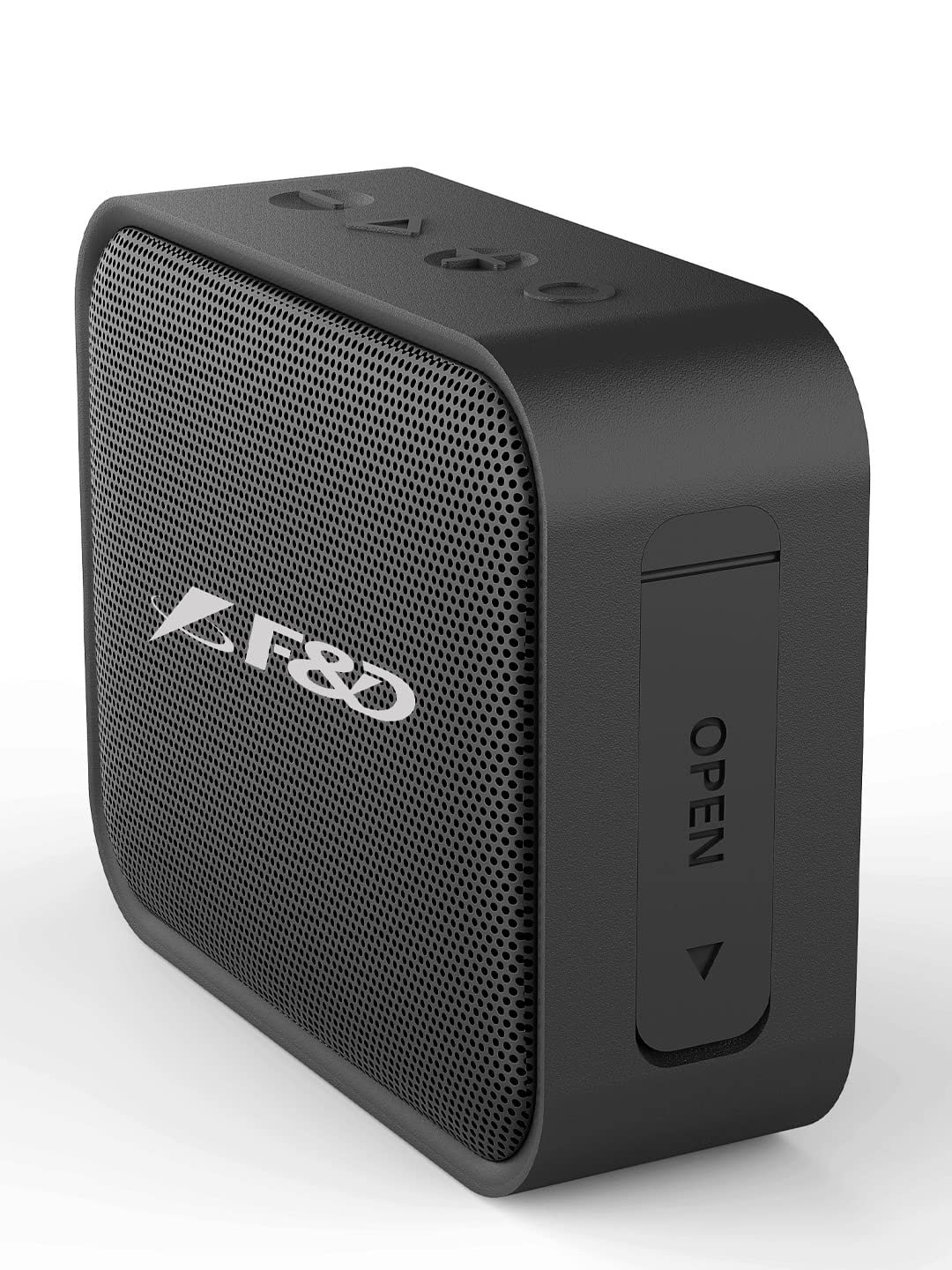
Figure 4.2: Side View with Port Cover
- Charging Port (USB): For connecting the USB charging cable.
- TF Card Slot: For inserting a TransFlash (microSD) card.
- AUX Input (3.5mm): For connecting external audio devices via a 3.5mm audio cable.
- Note: The charging port, TF card slot, and AUX input are located under a protective flap to maintain water resistance. Ensure the flap is securely closed when not in use, especially near water.
5. Setup
5.1 Initial Charging
- Before first use, fully charge the speaker.
- Open the protective flap on the side of the speaker.
- Connect the provided USB cable to the speaker's charging port and the other end to a USB power adapter (not included) or a computer's USB port.
- The LED indicator will show charging status (e.g., red while charging, off when fully charged).
- Once fully charged, disconnect the cable and securely close the protective flap.
5.2 Powering On/Off
- To Power On: Press and hold the Power button (O) for approximately 3 seconds until you hear an audible prompt and the LED indicator lights up.
- To Power Off: Press and hold the Power button (O) for approximately 3 seconds until you hear an audible prompt and the LED indicator turns off.
6. Operating Instructions
6.1 Bluetooth Pairing
- Power on the F&D W9 speaker. It will automatically enter Bluetooth pairing mode, indicated by a flashing LED.
- On your Bluetooth-enabled device (smartphone, tablet, etc.), go to the Bluetooth settings and enable Bluetooth.
- Search for available devices. You should see "F&D W9" in the list.
- Select "F&D W9" to connect. Once successfully paired, the speaker will give an audible confirmation, and the LED indicator will stop flashing and remain solid.
- You can now play audio from your device through the F&D W9 speaker.
6.2 TF Card Playback
- Ensure the speaker is powered on.
- Open the protective flap on the side of the speaker.
- Insert a TF (microSD) card with MP3 audio files into the TF card slot.
- The speaker will automatically switch to TF card mode and begin playing music. If it does not, short press the Mode button (M) to switch to TF card mode.
- Use the Volume Up/Down buttons (+ / -) for track navigation (long press) and volume control (short press).
- Securely close the protective flap when done.
6.3 AUX Input
- Ensure the speaker is powered on.
- Open the protective flap on the side of the speaker.
- Connect one end of a 3.5mm audio cable (not included) to the AUX input port on the speaker.
- Connect the other end of the 3.5mm audio cable to the audio output jack of your external device (e.g., MP3 player, computer).
- Short press the Mode button (M) to switch to AUX mode.
- Play audio from your external device. Volume can be controlled via the speaker or the connected device.
- Securely close the protective flap when done.
7. Maintenance
Proper care ensures the longevity of your F&D W9 speaker:
- Cleaning: Use a soft, dry cloth to clean the speaker. Do not use abrasive cleaners, waxes, or solvents.
- Water Resistance: The speaker is IPX5 water-resistant, meaning it can withstand splashes and light rain. Do not submerge the speaker in water or expose it to strong jets of water. Always ensure the protective flap covering the ports is securely closed when near water.
- Storage: Store the speaker in a cool, dry place away from direct sunlight and extreme temperatures.
- Battery Care: To preserve battery life, avoid fully discharging the battery frequently. If storing for a long period, charge the speaker to about 50% every few months.
- Avoid Impacts: Do not drop or subject the speaker to strong impacts, as this can damage internal components.
8. Troubleshooting
If you encounter issues with your F&D W9 speaker, refer to the following common problems and solutions:
| Problem | Possible Cause | Solution |
|---|---|---|
| Speaker does not power on. | Low battery. | Charge the speaker fully using the provided USB cable. |
| No sound. | Volume too low; Incorrect mode; Device not connected. | Increase speaker and source device volume. Ensure correct mode (Bluetooth, TF, AUX). Re-pair Bluetooth or check AUX cable connection. |
| Bluetooth pairing fails. | Speaker not in pairing mode; Device Bluetooth off; Too far from speaker. | Ensure speaker is in pairing mode (flashing LED). Turn Bluetooth on/off on your device. Move device closer to speaker (within 10 meters). |
| TF card not playing. | Card not inserted correctly; Unsupported file format; Speaker not in TF mode. | Re-insert TF card firmly. Ensure files are MP3 format. Press Mode button to switch to TF mode. |
| Sound distortion. | Volume too high; Low battery; Interference. | Reduce volume on speaker and source device. Charge the speaker. Move away from other electronic devices. |
If the problem persists after trying these solutions, please contact F&D customer support.
9. Specifications
| Model Name | W9 |
| Speaker Type | Satellite |
| Connectivity Technology | Bluetooth V5.0, Auxiliary |
| Wireless Communication Technology | Bluetooth |
| Wattage | 5 Watts |
| Speaker Size | 1.75 Inches (Full Range Neodymium Driver) |
| Water Resistance Level | IPX5 (Water Resistant) |
| Power Source | Battery Powered (Lithium Polymer) |
| Control Method | Touch (Buttons) |
| Compatible Devices | Smartphone, Tablet, other audio devices with 3.5mm output |
| Item Weight | 220 Grams |
| Product Dimensions (LxWxH) | 9.6 x 3.8 x 7.8 cm |
| Included Components | USB Cable |
| Manufacturer | Fenda, SHENZHEN FENDA TECHNOLOGY CO.,LTD. |
| Importer | FENDA AUDIO (INDIA) PVT. LTD. |
10. Warranty and Support
The F&D W9 Bluetooth Speaker comes with a 1 Year Warranty from the date of purchase. Please retain your purchase receipt as proof of warranty.
This warranty covers manufacturing defects and issues arising from normal use. It does not cover damage caused by misuse, accidents, unauthorized modifications, or failure to follow the instructions in this manual.
For warranty claims, technical support, or any inquiries regarding your F&D W9 speaker, please contact:
FENDA AUDIO (INDIA) PVT. LTD.
8/41, 1st & 2nd Floor, Kirti Nagar Indl. Area,
New Delhi-110015, India
Please visit the official F&D website or contact their customer service for the most up-to-date support information.


