
1. Introduction
This manual provides detailed instructions for the proper use and maintenance of your Annadue Universal DG11R2-01 Remote Control. This remote is designed as a replacement for various Hisense air conditioner models. Please read this manual thoroughly before operating the device to ensure optimal performance and longevity.
2. Product Overview
The Annadue Universal DG11R2-01 Remote Control is a high-quality replacement remote for Hisense air conditioning units. It is constructed from durable ABS material, ensuring a long lifespan. Designed for ease of use, it operates immediately after battery installation without requiring any complex programming or pairing procedures. Its sensitive buttons provide a responsive user experience, and its lightweight, portable design makes it comfortable to handle.
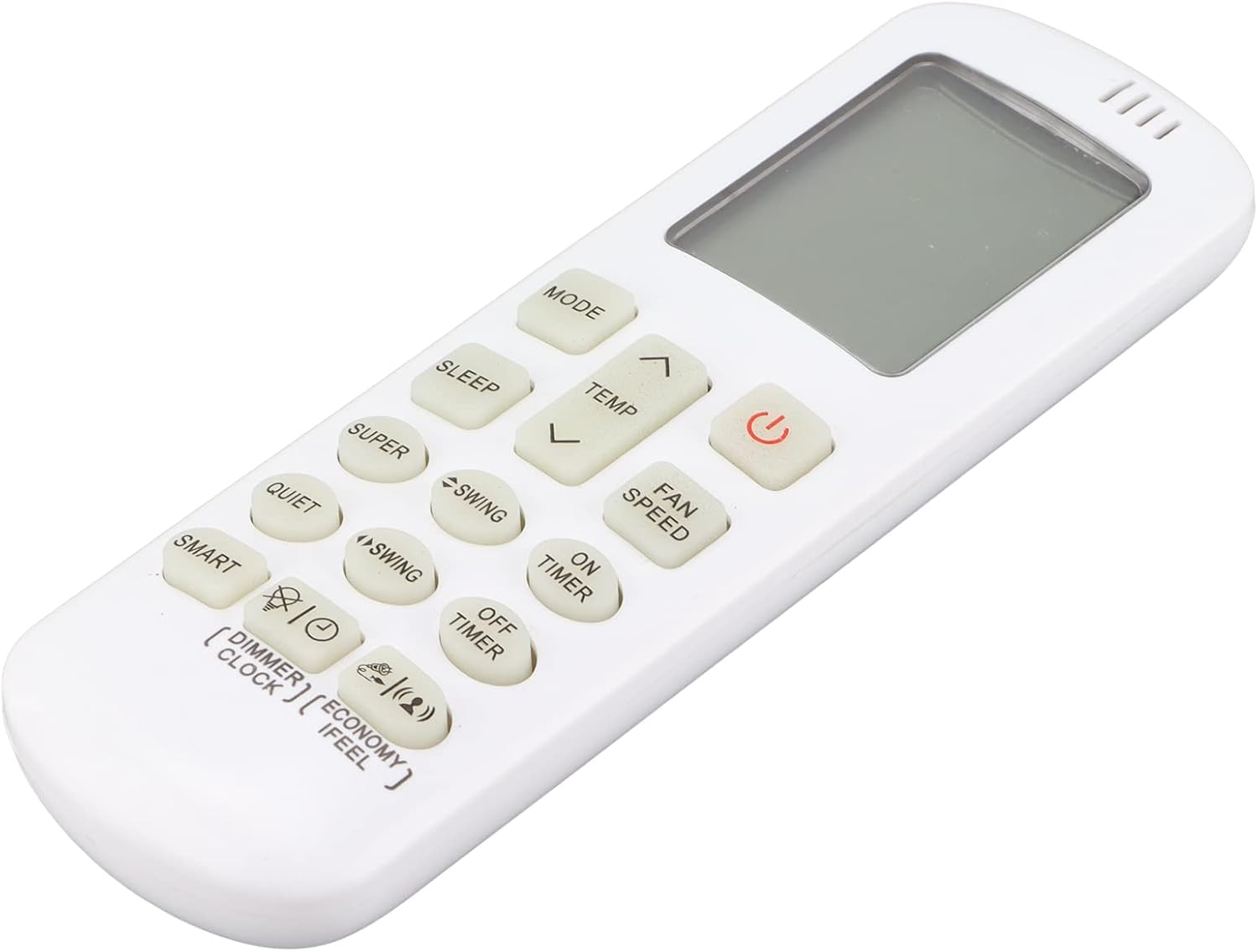
Figure 2.1: Front view of the Annadue DG11R2-01 Remote Control, showing all buttons and the display screen.
3. Setup
3.1 Battery Installation
The remote control requires two AAA batteries (not included). Follow these steps to install the batteries:
- Locate the battery compartment cover on the back of the remote control.
- Slide the cover downwards or press the latch and lift to open the compartment.
- Insert two AAA batteries, ensuring the positive (+) and negative (-) terminals align correctly with the markings inside the compartment.
- Replace the battery compartment cover by sliding it back into place until it clicks securely.
Once batteries are installed, the remote control is ready for immediate use with compatible Hisense air conditioners, requiring no additional programming.

Figure 3.1: Battery compartment with two AAA batteries inserted.
4. Operating Instructions
To operate your air conditioner, point the remote control directly at the air conditioner's receiver window and press the desired button. The maximum effective range is approximately 10 meters.
4.1 Basic Functions
- Power Button (⏻): Turns the air conditioner ON or OFF.
- MODE Button: Cycles through operating modes (e.g., Auto, Cool, Dry, Fan, Heat).
- TEMP ▲/▼ Buttons: Adjusts the temperature setting up or down.
- FAN SPEED Button: Adjusts the fan speed (e.g., Auto, Low, Med, High).
- SWING Button: Controls the louver swing direction.
- ON TIMER / OFF TIMER Buttons: Sets the timer for automatic power on or off.
- SLEEP Button: Activates or deactivates sleep mode for comfortable night operation.
- SMART Button: Activates intelligent operating mode.
- QUIET Button: Activates quiet operation mode.
- SUPER Button: Activates rapid cooling or heating.
- DIMMER Button: Adjusts the brightness of the air conditioner's display.
- ECONOMY Button: Activates energy-saving mode.
- I FEEL Button: Activates the 'I Feel' function, which senses the temperature at the remote's location.
- CLOCK Button: Sets the current time.

Figure 4.1: Operating the remote control with an air conditioner.

Figure 4.2: Infrared emitter for signal transmission.
5. Maintenance
5.1 Cleaning
To clean the remote control, wipe it gently with a soft, dry cloth. Do not use liquid cleaners, abrasive materials, or chemical solvents, as these may damage the surface or internal components.
5.2 Battery Replacement
Replace the batteries when the remote control's response becomes sluggish or if the display fades. Always replace both batteries at the same time with new AAA batteries. Do not mix old and new batteries or different types of batteries. Dispose of used batteries responsibly according to local regulations.
6. Troubleshooting
| Problem | Possible Cause | Solution |
|---|---|---|
| Remote not responding | Dead or incorrectly installed batteries. Obstruction between remote and AC unit. Remote out of range. | Check and replace batteries. Ensure correct polarity. Remove any obstructions. Move closer to the AC unit (within 10 meters). |
| Limited operating range | Weak batteries. Strong light interference. | Replace batteries. Avoid direct sunlight or strong artificial light sources pointing at the AC unit's receiver. |
| Display is dim or blank | Low battery power. | Replace batteries. |
7. Specifications
| Feature | Detail |
|---|---|
| Brand | Annadue |
| Model Name | DG11R2-01 |
| Connectivity Technology | Infrared |
| Compatible Devices | Hisense Air Conditioners |
| Maximum Supported Devices | 1 |
| Maximum Range | 10 Meters |
| Number of Buttons | 40 |
| Controller Type | Button Control |
| Battery Type | AAA (2 required) |
| Material | ABS |

Figure 7.1: Back view of the remote control with model number.
8. Warranty and Support
Specific warranty information for the Annadue Universal DG11R2-01 Remote Control is not provided in the product data. For details regarding warranty coverage, returns, or technical support, please refer to the purchase documentation or contact the seller directly. Keep your purchase receipt as proof of purchase.