
1. Introduction
This manual provides essential instructions for the proper setup, operation, and maintenance of your NBCP R900 Racing Wheel. Please read this guide thoroughly before using the product to ensure optimal performance and longevity.
2. Package Contents
- NBCP R900 Racing Wheel Unit
- Pedal Unit
- Gear Shifter Unit
- Mounting Clamps (2x C-shaped)
- USB Connection Cable
- User Manual (this document)

Image 2.1: Complete NBCP R900 Racing Wheel package contents including the steering wheel, pedal unit, and gear shifter.
3. Product Overview
The NBCP R900 Racing Wheel is designed to provide an immersive driving simulation experience across multiple gaming platforms. Key features include:
- Universal Connectivity: Compatible with Xbox Series X|S, Xbox One, PS4, PS4 Slim, PS4 Pro, PS3, Nintendo Switch, PC (Windows 7/8/10), and Xbox 360.
- Adjustable Rotation: Offers 270° and 900° lock-to-lock rotation for diverse gaming experiences.
- Dual-Motor Vibration Feedback: Enhances realism during gameplay.
- Quality Construction: 28cm (11-inch) diameter wheel with rubber texture coating for improved grip.
- Responsive Pedals: Separate floor pedal unit for realistic braking and acceleration, with customizable sensitivity. Features 4 powerful suction cups for stability.
- Responsive Gear Shifter & Handbrake: Manual gear shift lever (can be placed on left or right) and integrated handbrake for enhanced control.
- Strong Fixation: Equipped with 4 large suction cups and 2 C-shaped fixing frames for secure mounting to a table or racing rig.

Image 3.1: The racing wheel is compatible with multiple gaming platforms including Xbox, PlayStation, PC, and Switch.

Image 3.2: The large 10-inch diameter steering wheel provides a comfortable and immersive experience.

Image 3.3: The wheel supports 900-degree steering for realistic turns in driving simulation games.
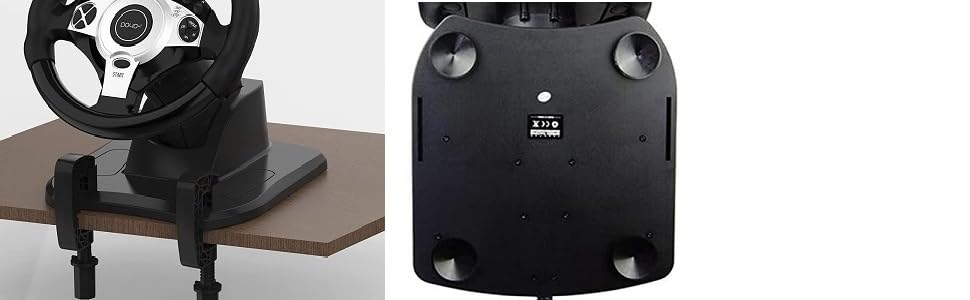
Image 3.4: Visual representation of 270° rotation for competitive racing and 900° rotation for truck simulation games.

Image 3.5: The included gear lever allows for manual gear shifting, enhancing the driving experience.

Image 3.6: The foot pedals offer customizable input sensitivity for precise acceleration and braking.
4. Setup Instructions
Follow these steps to set up your NBCP R900 Racing Wheel. Ensure all components are connected securely before powering on your console or PC.
4.1 General Setup
- Mount the Racing Wheel: Place the racing wheel unit on a stable, flat surface. Use the provided C-shaped clamps to secure it to a table or desk. Alternatively, the suction cups on the base can provide additional stability on smooth surfaces.
- Connect Pedals: Plug the USB cable from the pedal unit into the designated USB port on the back of the racing wheel unit. This port is typically marked with a pedal icon.
- Connect Gear Shifter: Plug the USB cable from the gear shifter unit into the designated USB port on the back of the racing wheel unit. This port is typically marked with a gear shift icon. The gear shifter can be positioned on either the left or right side of the wheel unit.
- Connect to Console/PC: Connect the main USB cable from the racing wheel unit to an available USB port on your gaming console (Xbox, PlayStation, Switch) or PC.

Image 4.1: The racing wheel can be securely fixed to a table using the included clamps or suction cups.
4.2 Nintendo Switch Setup
For Nintendo Switch, ensure your console is in TV mode and connected to the dock. Plug the racing wheel's USB cable into an available USB port on the Switch dock. After connecting, press the 'PS' button on the racing wheel to initiate recognition by the console.
Video 4.2: Installation guide for the Doyo 900 Racing Wheel on Nintendo Switch. This video demonstrates connecting the wheel to the Switch dock and activating it.
4.3 PlayStation 4 Setup
For PS4, connect the racing wheel's main USB cable to a front USB port on your PS4 console. Additionally, connect your official PS4 controller to the racing wheel unit using the provided micro USB cable. The racing wheel requires the PS4 controller to be connected to function. After connections, press the 'PS' button on the racing wheel to activate it.
Video 4.3: Installation guide for the Doyo 900 Racing Wheel on PlayStation 4. This video illustrates connecting the wheel and the PS4 controller for proper functionality.
4.4 Xbox One Setup
For Xbox One, connect the racing wheel's main USB cable to a front USB port on your Xbox One console. Similar to PS4, connect your official Xbox One controller to the racing wheel unit using the provided micro USB cable. The racing wheel requires the Xbox One controller to be connected to function. After connections, press the 'PS' button on the racing wheel to activate it.
Video 4.4: Installation guide for the Doyo 900 Racing Wheel on Xbox One. This video demonstrates connecting the wheel and the Xbox One controller for proper functionality.
5. Operating Instructions
5.1 Adjusting Steering Rotation (270°/900°)
The NBCP R900 Racing Wheel supports two rotation modes: 270 degrees and 900 degrees. The 270-degree mode is ideal for competitive racing games requiring quick, sharp turns. The 900-degree mode provides a more realistic steering experience, suitable for driving simulation games like truck simulators.
- To switch between modes, locate the 'ANGLE' button on the steering wheel.
- Press the 'ANGLE' button to cycle through 270° and 900° rotation settings. The current mode may be indicated by an LED or on-screen display (if supported by the game).

Image 5.1: The 'ANGLE' button allows switching between 270° and 900° steering rotation modes.
5.2 Sensitivity Adjustment
The racing wheel features 7-level sensitivity adjustments. This allows you to fine-tune the responsiveness of the steering to match your preference and the game's requirements.
- To adjust sensitivity, locate the 'SEN' button on the steering wheel.
- Press the 'SEN' button to cycle through the 7 sensitivity levels.
5.3 Gear Shifter and Handbrake Usage
The external gear shifter unit provides manual gear control and an integrated handbrake. The gear lever supports pushing forward to increase gear and pulling back to reduce gear. Note that the gear lever is primarily designed for truck simulation modes.
Video 5.2: A demonstration of the R900 racing wheel in a video game, showcasing the gear shifter and pedal functionality.
5.4 Pedal Unit Usage
The separate pedal unit allows for realistic control over acceleration and braking. The pedals are designed for a comfortable and natural driving position. Ensure the pedal unit is placed on a stable surface, utilizing its suction cups for firm attachment.
6. Maintenance
- Cleaning: Use a soft, dry cloth to clean the racing wheel, pedals, and gear shifter. Avoid using abrasive cleaners or solvents that could damage the surfaces.
- Storage: When not in use, store the racing wheel and its components in a dry, dust-free environment. Avoid extreme temperatures.
- Cable Management: Ensure cables are not kinked or excessively bent to prevent damage.
7. Troubleshooting
- Wheel Not Responding:
- Ensure all USB connections are secure.
- For PS4/Xbox One, verify that the official console controller is connected to the racing wheel unit.
- Press the 'PS' button on the racing wheel to ensure it is activated and recognized by the console/PC.
- Try connecting the racing wheel to a different USB port on your console/PC.
- Restart your console/PC.
- No Vibration Feedback:
- Check game settings to ensure vibration feedback is enabled.
- Verify that the racing wheel is properly connected and recognized.
- Pedals/Gear Shifter Not Working:
- Ensure the pedal and gear shifter units are securely plugged into their respective ports on the racing wheel.
- Check game settings for proper input configuration.
- Wheel Feels Loose/Unstable:
- Ensure the mounting clamps are tightened securely.
- Verify that the suction cups on the base are clean and firmly attached to a smooth surface.
8. Specifications
| Model | R900 |
| Brand | NBCP |
| Rotation Angle | 270° / 900° (Adjustable) |
| Vibration Feedback | Dual-Motor |
| Wheel Diameter | 28 cm (11 inches) |
| Pedal Unit | Separate unit with customizable sensitivity |
| Gear Shifter | Manual (forward/reverse), integrated handbrake |
| Fixation | 4 Suction Cups, 2 C-shaped Clamps |
| Compatibility | Xbox Series X|S, Xbox One, PS4, PS4 Slim, PS4 Pro, PS3, Nintendo Switch, PC (Windows 7/8/10), Xbox 360 |
| Item Weight | 7.63 pounds |
| Package Dimensions | 13.75 x 12 x 11.2 inches |
9. Warranty and Support
The NBCP R900 Racing Wheel comes with a 12-month warranty. If you encounter any issues or are not satisfied with your product, please contact NBCP customer support for assistance. Refer to your purchase documentation for specific contact details.
