
Introduction
This manual provides essential information for the setup, operation, maintenance, and troubleshooting of your Jackson X Series Concert Bass CBXNT DX V 5-String Electric Bass Guitar. Please read this manual thoroughly to ensure proper use and to maximize the lifespan of your instrument.
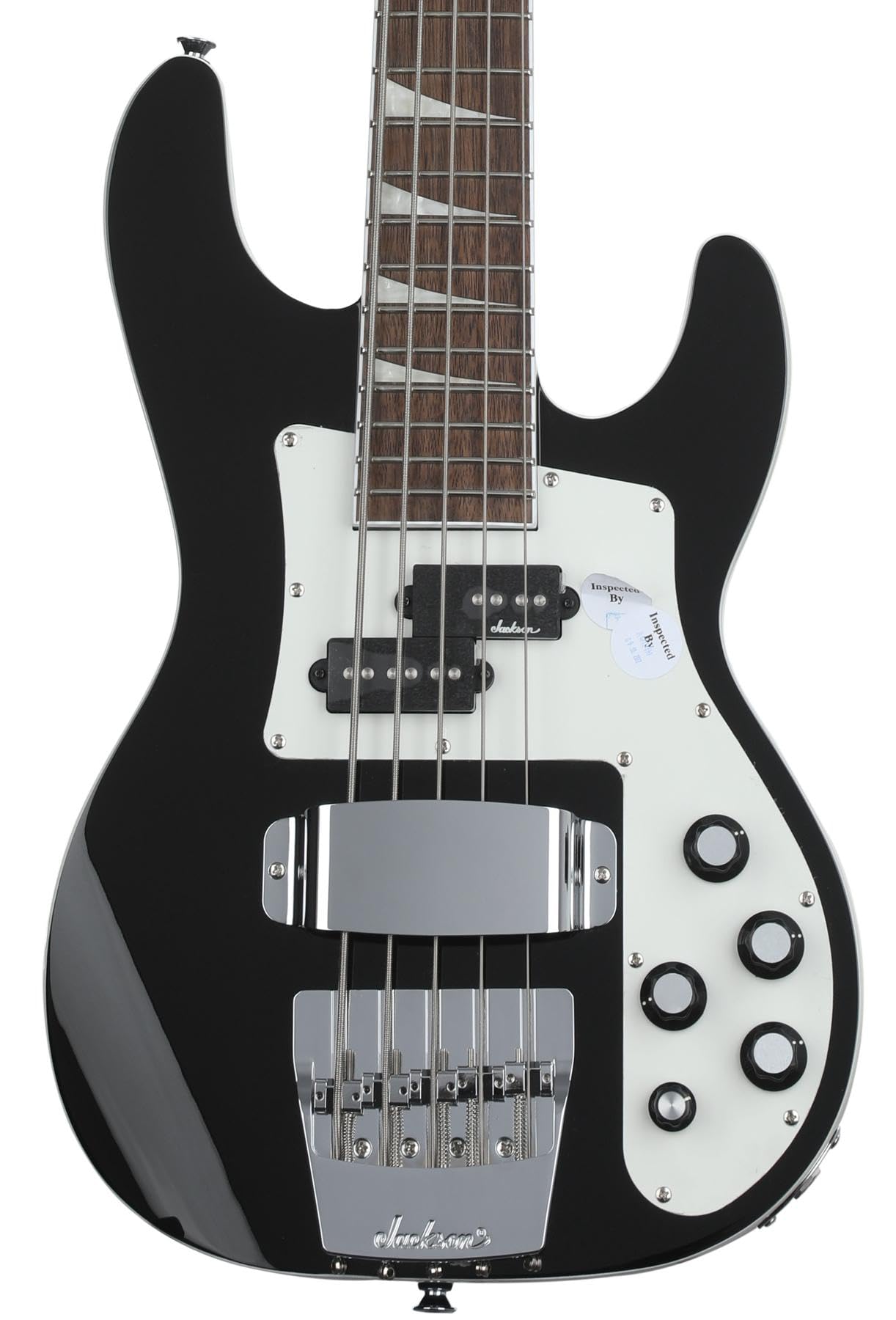
Image 1: The Jackson X Series Concert Bass CBXNT DX V in Gloss Black. This image displays the full body of the 5-string electric bass guitar, highlighting its sleek finish and hardware.
Setup
- Unpacking: Carefully remove the bass guitar from its packaging. Inspect for any signs of damage during shipping.
- Initial Inspection: Check the neck, body, and hardware for any visible defects.
- String Installation/Check: Your bass comes with factory-installed alloy steel strings. Ensure they are properly seated at the bridge and tuning machines.
- Tuning: Use an electronic tuner to tune the 5 strings to standard bass tuning (B-E-A-D-G, low to high).
- Connecting to an Amplifier: Use a standard 6.35mm (1/4 inch) instrument cable to connect the bass to a bass amplifier. Insert one end into the output jack on the bass and the other into the input jack of your amplifier.
Operating Instructions
Controls Overview
The Jackson X Series Concert Bass CBXNT DX V features P/J pickups and an active 3-band equalizer for versatile tone shaping.
- Volume Knob: Controls the overall output level of the bass.
- Blend Knob: Mixes the output between the P-style (neck) and J-style (bridge) pickups. Turn towards the neck for more P-pickup tone, and towards the bridge for more J-pickup tone.
- 3-Band EQ Knobs: These active controls allow you to boost or cut specific frequency ranges:
- Bass: Adjusts low frequencies for warmth and depth.
- Mid: Adjusts mid-range frequencies for punch and presence.
- Treble: Adjusts high frequencies for clarity and brightness.
Playing the Instrument
Once connected to an amplifier and tuned, adjust the volume and EQ controls to achieve your desired sound. Experiment with the blend knob to find the right mix of the P and J pickups. The graphite-reinforced maple neck and laurel fingerboard are designed for comfortable playability across all 24 frets.
Maintenance
- Cleaning: After each use, wipe down the strings, neck, and body with a soft, dry cloth to remove sweat and oils. For the Gloss Black finish, use a guitar-specific polish sparingly if needed.
- String Replacement: Replace strings regularly to maintain optimal tone and playability. Refer to a guitar technician or online resources for proper string changing techniques.
- Fretboard Care: The laurel fingerboard may benefit from occasional conditioning with a suitable fretboard oil to prevent drying and cracking. Consult a guitar technician for recommendations.
- Storage: Store the bass in a stable environment, away from extreme temperature changes and humidity fluctuations, preferably in a gig bag or hard case.
- Battery Replacement: The active electronics (3-band EQ) require a 9V battery. If the sound becomes weak or distorted, replace the battery. The battery compartment is typically located on the back of the bass.
Troubleshooting
| Problem | Possible Cause | Solution |
|---|---|---|
| No sound or weak sound |
|
|
| Buzzing or humming noise |
|
|
| Strings buzz against frets |
|
|
Specifications
- Model: Jackson X Series Concert Bass CBXNT DX V
- Body Material: Poplar
- Neck Material: Maple, Graphite Reinforced
- Fingerboard Material: Laurel
- Number of Strings: 5
- Pickups: P/J Configuration
- Electronics: Active 3-Band EQ
- Bridge: Jackson JTB Hardtail
- Finish: Gloss Black
- Dimensions (L x W x H): Approximately 52.11 x 20.96 x 4.79 inches
- Weight: Approximately 17 Pounds
- Connector Type: 6.35mm (1/4 inch) Jack
Warranty Information
This Jackson X Series Concert Bass CBXNT DX V is covered by a 2-year warranty from the date of purchase. This warranty covers manufacturing defects in materials and workmanship. It does not cover damage resulting from misuse, accidents, modifications, normal wear and tear, or improper maintenance. Please retain your proof of purchase for warranty claims. For detailed warranty terms and conditions, please refer to the official Jackson website or contact customer support.
Support
For further assistance, technical support, or service inquiries regarding your Jackson X Series Concert Bass CBXNT DX V, please visit the official Jackson website or contact their customer service department.
- Official Jackson Website: www.jacksonguitars.com
- Customer Service: Refer to the website for contact information specific to your region.