
Ansmann 1700-0147
Contents
Ansmann Powerbank 20,000 mAh PB320PD USB-C User Manual
Model: 1700-0147
Introduction
Thank you for choosing the Ansmann Powerbank 20,000 mAh PB320PD USB-C. This portable power bank is designed to provide reliable and fast charging for your mobile devices, including smartphones, tablets, and other USB-powered gadgets. With its high capacity and versatile USB-C input/output, it ensures your devices stay powered throughout the day. Please read this manual carefully before using the product to ensure safe and optimal performance.
Safety Instructions
- Do not expose the power bank to extreme temperatures (above 45°C or below 0°C), direct sunlight, or high humidity.
- Avoid dropping, hitting, or disassembling the device. Unauthorized repairs can void the warranty and pose safety risks.
- Keep the power bank away from water and other liquids.
- Do not use the power bank if it is damaged, swollen, or leaking.
- Use only certified charging cables and adapters.
- Keep out of reach of children.
- Dispose of the power bank responsibly according to local regulations. Do not dispose of it with household waste.
Package Contents
Please check the package for the following items:
- Ansmann Powerbank 20,000 mAh PB320PD USB-C (Model: 1700-0147)
- USB-A to Micro USB Charging Cable
- User Manual
Product Overview
Familiarize yourself with the different parts of your Ansmann Powerbank:

Figure 1: Angled view of the Ansmann Powerbank, showing its sleek black design and the LED indicator lights on the top surface.
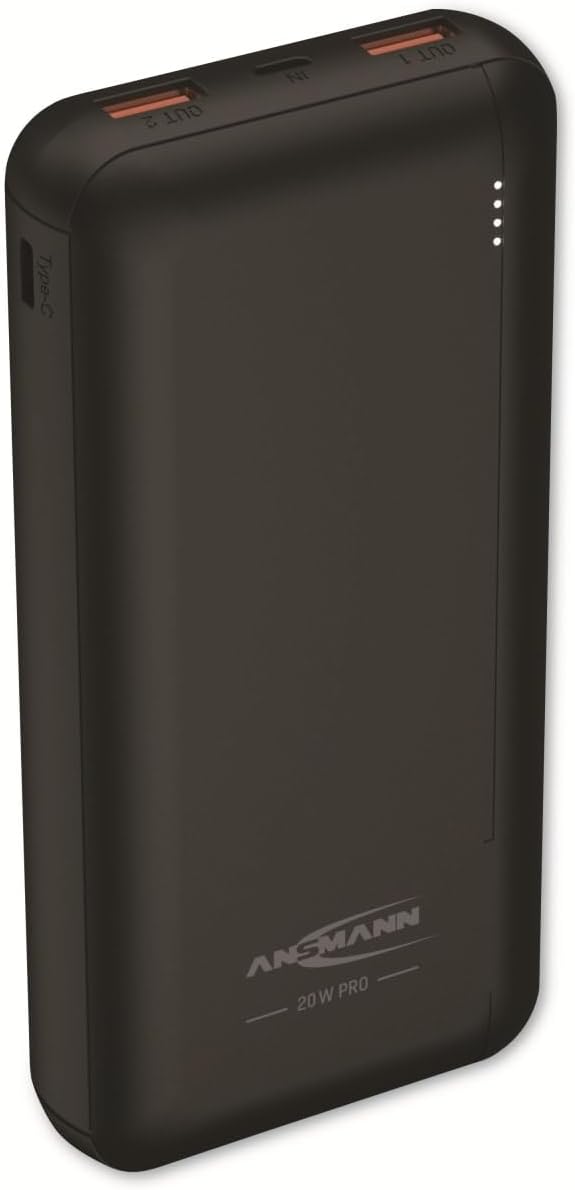
Figure 2: Front view of the power bank, highlighting the two USB-A output ports (OUT 1, OUT 2), one Micro USB input port (IN), and one USB-C port (Type-C) which functions as both input and output.

Figure 3: A detailed close-up of the power bank's ports, clearly showing the two USB-A output ports, the Micro USB input port, and the USB-C port. Labels for QC3.0 are also visible.

Figure 4: Rear view of the power bank, displaying the model number (1700-0147), battery capacity (20000mAh / 74Wh Li-Po), and detailed input/output specifications for Micro USB, USB-C PD, and USB-A ports.
Components:
- LED Indicators: Four small LED lights on the top surface indicate the remaining battery charge level. Each light represents approximately 25% of the total capacity.
- USB-A Output Ports (OUT 1 & OUT 2): Used to charge external devices. Supports Quick Charge 3.0.
- Micro USB Input Port (IN): Used to charge the power bank itself.
- USB-C Port (Type-C): Functions as both an input for charging the power bank and an output for charging devices. Supports Power Delivery (PD).
- Power Button: (If applicable, based on images, there isn't a clear button, but power banks usually have one to check charge or initiate charging. Assuming it's integrated or automatic.)
Setup
First Use:
Before using your Ansmann Powerbank for the first time, it is recommended to fully charge it. This ensures optimal battery performance and longevity.
Charging the Power Bank:
- Connect the provided USB-A to Micro USB cable to the Micro USB input port (IN) on the power bank. Alternatively, use a USB-C to USB-C cable (not included) and connect it to the USB-C port.
- Connect the other end of the cable to a USB wall charger (5V/2A or higher recommended for faster charging) or a computer's USB port.
- The LED indicators will light up and blink to show the charging progress. When all four LEDs are solid, the power bank is fully charged.
Note: Charging time varies depending on the power source. Using a Power Delivery (PD) compatible USB-C charger will significantly reduce charging time.
Operating
Charging Your Devices:
The Ansmann Powerbank can charge up to three devices simultaneously using its two USB-A ports and one USB-C port.
- Connect your device's charging cable to one of the USB-A output ports (OUT 1 or OUT 2) or the USB-C port on the power bank.
- Connect the other end of the cable to your device.
- The power bank should automatically begin charging your device. If not, briefly press the power bank's button (if present, otherwise it's automatic).
- The LED indicators will show the remaining charge level of the power bank during discharge.
Important: For optimal charging speed, use the appropriate port for your device. The USB-C port supports Power Delivery for fast charging compatible devices, while the USB-A ports support Quick Charge 3.0.
Checking Battery Level:
To check the remaining battery level of the power bank, briefly press the power button (if present). The LED indicators will light up to show the current charge:
- 4 LEDs solid: 75% - 100% charge
- 3 LEDs solid: 50% - 75% charge
- 2 LEDs solid: 25% - 50% charge
- 1 LED solid: 0% - 25% charge (recharge soon)
Maintenance
- Cleaning: Wipe the power bank with a soft, dry cloth. Do not use harsh chemicals or abrasive cleaners.
- Storage: Store the power bank in a cool, dry place away from direct sunlight and extreme temperatures. For long-term storage, charge the power bank to about 50-75% every 3-6 months to maintain battery health.
- Battery Care: Avoid fully discharging the power bank frequently, as this can reduce its lifespan.
Troubleshooting
| Problem | Possible Cause | Solution |
|---|---|---|
| Power bank not charging | Cable or adapter issue; power bank fully charged; faulty port. | Try a different cable and wall adapter. Ensure the power bank is not already full. Try a different input port (Micro USB or USB-C). |
| Device not charging from power bank | Power bank empty; cable issue; device not compatible; power bank in standby. | Check power bank's charge level and recharge if necessary. Try a different charging cable. Ensure your device is compatible with USB charging. Briefly press the power button on the power bank to activate output. |
| Slow charging | Using a low-power adapter/cable; device not supporting fast charge; multiple devices connected. | Use a high-quality, fast-charging adapter (e.g., 5V/2A or PD compatible). Ensure your device supports fast charging. Disconnect other devices to maximize output to one device. |
| LEDs not lighting up | Power bank completely discharged; internal fault. | Try charging the power bank for an extended period (several hours). If still unresponsive, contact customer support. |
Specifications
| Feature | Detail |
|---|---|
| Model Number | 1700-0147 |
| Battery Capacity | 20,000 mAh / 74 Wh Li-Po |
| Micro USB Input | 5.0V = 2.0A | 9.0V = 2.0A |
| USB-C PD Input | 5.0V = 3.0A | 9.0V = 2.0A | 12.0V = 1.5A (18.0W) |
| USB-A Output (OUT 1 & OUT 2) | 5.0V = 3.0A | 9.0V = 2.0A | 12.0V = 1.5A (QC3.0) |
| USB-C PD Output | 5.0V = 3.0A | 9.0V = 2.22A | 12.0V = 1.5A (20.0W) |
| Dimensions | 14 x 3 x 7 cm (approx.) |
| Weight | 417 g (approx.) |
| Color | Multicolor (typically black) |
Warranty and Support
Ansmann products are manufactured with high-quality materials and undergo strict quality control. For warranty information and technical support, please refer to the warranty card included with your product or visit the official Ansmann website. Keep your purchase receipt as proof of purchase for warranty claims.
For further assistance, you may contact Ansmann customer service through their official channels. Please have your model number (1700-0147) and purchase details ready.
Ask a question about this manual
Ask about setup, troubleshooting, compatibility, parts, safety, or missing instructions. Manuals+ will review the question and use this page’s manual context to help answer it.