
1. Introduction
This manual provides comprehensive instructions for the proper use, setup, and maintenance of your Xiaomi Redmi Buds 3 Lite Wireless Earbuds. Please read this manual thoroughly before using the product to ensure optimal performance and longevity.
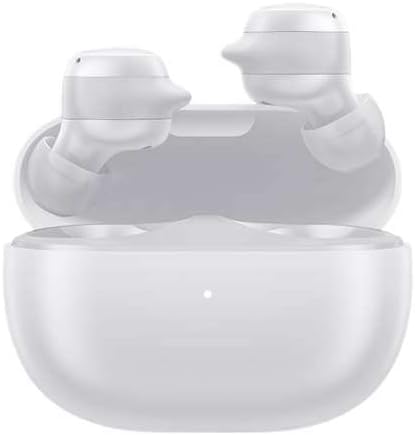
Image 1.1: Xiaomi Redmi Buds 3 Lite earbuds in their charging case. The earbuds are white and rest securely within the open case, which also features a small indicator light.
2. Setup
2.1 Package Contents
- Xiaomi Redmi Buds 3 Lite Earbuds (Left and Right)
- Charging Case
- USB-C Charging Cable
- Ear Tips (various sizes)
- User Manual
2.2 Charging
Before first use, fully charge the earbuds and the charging case. Place the earbuds into the charging case and connect the USB-C cable to the charging port on the case and a power source. The indicator light on the case will show charging status.
2.3 Pairing with a Device
- Ensure the earbuds are charged.
- Open the charging case. The earbuds will automatically enter pairing mode.
- On your device (smartphone, tablet, etc.), enable Bluetooth.
- Search for available Bluetooth devices and select "Redmi Buds 3 Lite".
- Once connected, you will hear a confirmation sound from the earbuds.
The Redmi Buds 3 Lite utilize Bluetooth 5.2 for stable and efficient connections.

Image 2.1: Illustration of easy connection. Hands are shown removing the earbuds from their charging case, with text indicating an automatic connection sound.
3. Operating Instructions
3.1 Wearing the Earbuds
Gently insert the earbuds into your ear canal and rotate them slightly until they fit snugly and comfortably. Choose the appropriate ear tips for the best sound quality and secure fit.

Image 3.1: A person wearing a Redmi Buds 3 Lite earbud, highlighting its ergonomic design for a secure and comfortable fit during activities.
3.2 Touch Controls
The Redmi Buds 3 Lite feature sensitive touch controls on each earbud for various functions:
- Double tap left/right earbud: Answer incoming call / Play next song
- Triple tap left/right earbud: Reject/end call / Activate voice assistant
- Press and hold left/right earbud: Play/Pause audio
- Press and hold both earbuds: Enter/exit low latency mode

Image 3.2: Visual guide to the touch operations on the Redmi Buds 3 Lite, showing gestures for calls, music, voice assistant, and low latency mode.
3.3 Low Latency Mode
The low latency mode is designed to reduce audio delay, which is beneficial for gaming and video playback. To activate or deactivate this mode, press and hold both earbuds simultaneously.

Image 3.3: Redmi Buds 3 Lite earbuds shown with a smartphone, illustrating their use for gaming with low latency mode.
4. Maintenance
4.1 Cleaning
Regularly clean your earbuds and charging case to maintain optimal performance and hygiene. Use a soft, dry, lint-free cloth. Do not use abrasive cleaners or immerse the devices in liquid.
4.2 Storage
When not in use, store the earbuds in their charging case to protect them and ensure they remain charged. Store in a cool, dry place away from direct sunlight and extreme temperatures.
4.3 Water Resistance
The Redmi Buds 3 Lite are rated as waterproof, offering protection against sweat and splashes. However, they are not designed for swimming or prolonged submersion in water.

Image 4.1: A close-up view of a Redmi Buds 3 Lite earbud with water droplets, demonstrating its water-resistant design suitable for sports and exercise.
5. Troubleshooting
| Issue | Possible Solution |
|---|---|
| Earbuds not pairing | Ensure earbuds are charged. Place them back in the case, close, then reopen. Check your device's Bluetooth settings and try reconnecting. |
| No sound from one earbud | Check battery level of both earbuds. Try resetting the earbuds (refer to manufacturer's website for specific reset instructions if needed). |
| Charging issues | Ensure the charging cable is securely connected. Try a different USB-C cable or power adapter. Clean the charging contacts on both earbuds and case. |
| Low volume or poor sound quality | Adjust volume on your connected device. Ensure ear tips are properly sealed in your ear. Clean any debris from the earbud speakers. |
6. Specifications
- Model Name: Buds 3 Lite
- Connectivity Technology: Wireless
- Wireless Communication Technology: Bluetooth
- Bluetooth Version: 5.2
- Bluetooth Range: 10 Meters
- Battery Life: 11.5 Hours (earbuds + case)
- Audio Driver Type: Dynamic Driver
- Control Method: Touch
- Water Resistance Level: Waterproof (Sweatproof)
- Item Weight (Earbuds + Case): 36 Grams
- Product Dimensions: 6 x 3 x 1 inches
- Special Features: Microphone Included, Sweatproof, Sports-and-Exercise, Water-Resistant, Wireless
- Manufacturer: Xiaomi

Image 6.1: An exploded view diagram of an earbud, illustrating the dynamic driver component responsible for audio output.
7. Warranty and Support
Your Xiaomi Redmi Buds 3 Lite are covered by a manufacturer's warranty. For detailed warranty information, please refer to the warranty card included in your package or visit the official Xiaomi website. For technical support or service inquiries, please contact Xiaomi customer service through their official channels.
EU Spare Part Availability Duration: 3 Years.


