
1. Introduction
Thank you for choosing the LOTFUN CADA Technik C51301W RC and APP Programmable Racing Car. This manual provides essential information for the assembly, operation, maintenance, and troubleshooting of your new racing car. Please read these instructions carefully before use to ensure proper function and enjoyment.
2. Product Overview
The CADA Technik C51301W is a 419-piece building block set that constructs a remote-controlled racing car. It features dual-mode control via a 2.4G remote control and a dedicated mobile application. The car includes functional LED lights and movable parts such as the steering wheel, seat, and rear spoiler, enhancing the interactive experience.
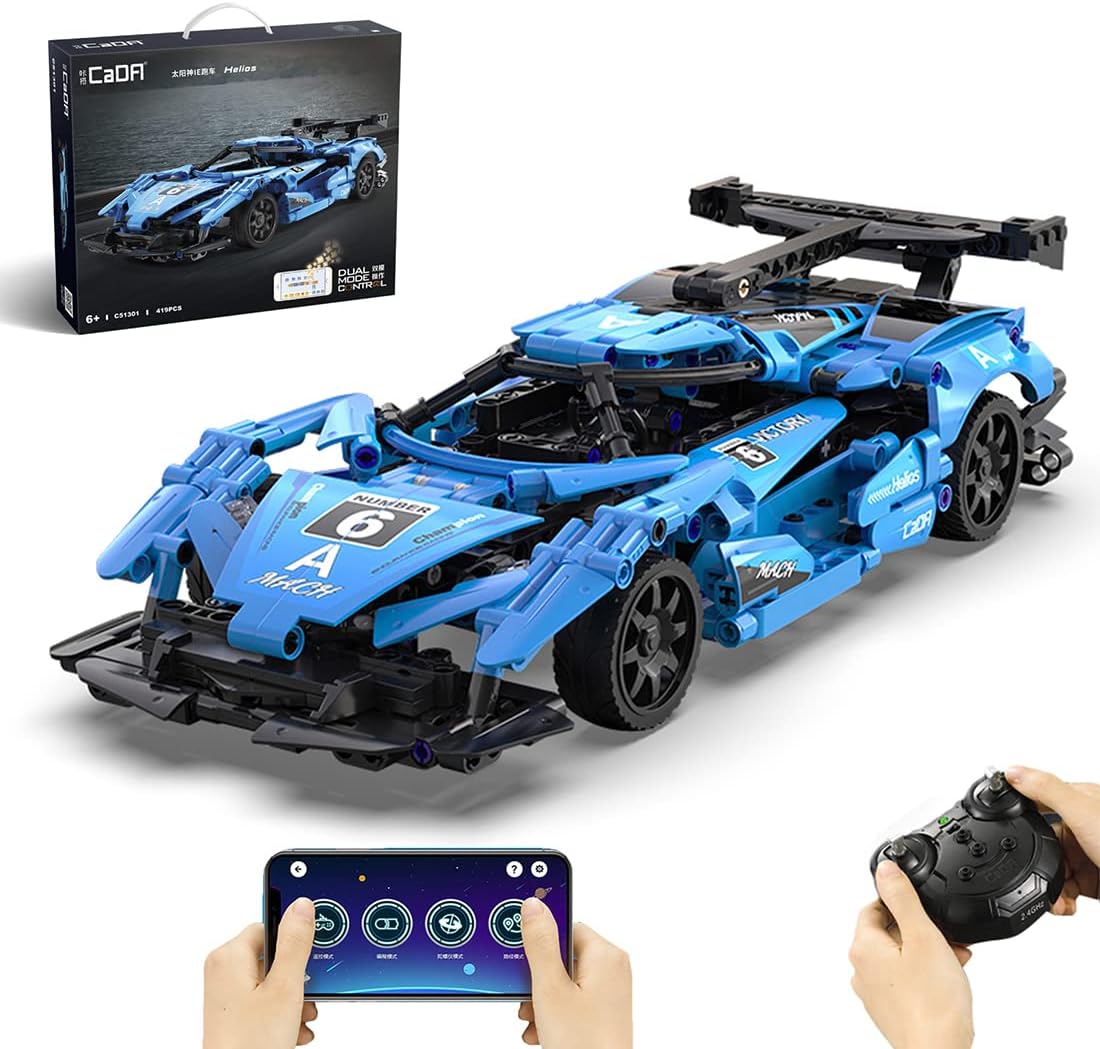
Image 2.1: The LOTFUN CADA Technik C51301W RC Racing Car, showcasing its design, packaging, and dual control methods (remote control and smartphone app).

Image 2.2: Close-up view highlighting key features such as the manual hood, detailed cockpit, and the operational front and rear LED lights.

Image 2.3: A side profile of the fully assembled racing car, demonstrating its aerodynamic design and structural details.
3. Setup and Assembly
The LOTFUN CADA Technik C51301W is a construction set requiring assembly. A detailed paper instruction manual is included in the product packaging to guide you through the building process of the 419 pieces. Please follow the steps in the paper manual carefully.
3.1. Remote Control Battery Installation
- Locate the battery compartment on the back of the 2.4G remote control.
- Open the battery compartment cover.
- Insert two (2) 1.5V AA batteries, ensuring correct polarity (+/-).
- Close the battery compartment cover securely.
3.2. APP Installation and Connection
- Download the official CADA APP from your smartphone's app store (iOS or Android).
- Ensure your racing car is powered on.
- Open the CADA APP and follow the on-screen instructions to connect to your C51301W model via Bluetooth.

Image 3.1: An overview of the mobile application's interface, illustrating various control modes such as Remote Control, Programming, Gyroscopic Control, and Path Mode.
4. Operating Instructions
The C51301W offers two primary control methods: a physical 2.4G remote control and a smartphone application.
4.1. Remote Control Operation
The 2.4G remote control allows for basic forward, backward, left, and right movements. It also features an indicator light and a switch for the remote control itself.

Image 4.1: Diagram illustrating the functions of the 2.4G remote control, including forward/backward levers, turn controls, remote control switch, and indicator light.
- Remote Control Switch: Powers the remote control ON/OFF.
- Indicator Light: Shows the remote control's power status.
- Forward/Backward Lever: Push forward to move the car forward, pull backward to move the car backward. The car's front LED lights illuminate when moving forward or backward.
- Turn Control Lever: Push left to turn the car left, push right to turn the car right.
4.2. APP Control
The CADA APP provides advanced control options and interactive features:
- Remote Control Mode: Standard driving controls via the app interface.
- Gyroscope Interface: Control the car's movement by tilting your smartphone.
- Path Mode: Draw a path on your screen, and the car will follow it.
- Programming Interface: Utilize Scratch-like graphical programming to create custom movement sequences. Drag and drop instruction blocks to program the car's actions, fostering logical thinking and coding skills.
The APP also allows remote control of the car's front and rear LED lights.

Image 4.2: A detailed look at the graphical programming interface within the CADA APP, showing various command modules and how to combine them to create custom sequences.
5. Maintenance
Proper maintenance ensures the longevity and optimal performance of your racing car.
- Cleaning: Wipe the car and remote control with a soft, dry cloth. Avoid using water or chemical cleaners, as they may damage electronic components.
- Storage: Store the product in a cool, dry place away from direct sunlight and extreme temperatures.
- Battery Care: Remove batteries from the remote control if the product will not be used for an extended period to prevent leakage.
6. Troubleshooting
If you encounter issues with your CADA Technik C51301W, please refer to the following common problems and solutions:
- Car not responding to remote control/APP:
- Ensure the car is powered on.
- Check if the remote control batteries are correctly installed and not depleted. Replace if necessary.
- Verify that the APP is properly connected to the car via Bluetooth.
- Ensure there are no obstructions between the remote control/smartphone and the car.
- LED lights not working:
- Check APP settings to ensure lights are enabled.
- Ensure all connections within the car's assembly are secure.
- Car moves erratically or not in a straight line:
- Ensure all wheels are properly attached and free from debris.
- Check for any loose or misaligned building blocks.
7. Specifications
| Feature | Detail |
|---|---|
| Material | ABS (Acrylonitrile Butadiene Styrene) |
| Product Dimensions (L x W x H) | 32.9 x 13.6 x 8.2 cm |
| Product Weight | 800 g |
| Remote Control Frequency | 2.4 GHz |
| Remote Control Model | JV8001 |
| Remote Control Batteries | 2 x 1.5V AA batteries (not included) |
| Motor Type | 540 Brushless Motor |
| Remote Control Distance | 25 m |
| Maximum Speed | 5.5 km/h |
| Turning Radius | <2 m |
| Linearity | 0.6 m |
| Number of Pieces | 419 |
8. Support
If you encounter any problems during the use of this product, please contact us via email. We are committed to resolving any issues you may experience.