1. Safety Instructions
Read all instructions before using the appliance. Failure to follow the warnings and instructions may result in electric shock, fire, and/or serious injury.
- Always ensure the vacuum is switched off before changing accessories or performing maintenance.
- Do not use the vacuum to pick up flammable or combustible liquids, such as gasoline, or use in areas where they may be present.
- Do not pick up anything that is burning or smoking, such as cigarettes, matches, or hot ashes.
- Keep hair, loose clothing, fingers, and all parts of the body away from openings and moving parts.
- Use only as described in this manual. Use only manufacturer's recommended attachments.
- Do not use with damaged cord or plug. If appliance is not working as it should, has been dropped, damaged, left outdoors, or dropped into water, return it to a service center.
- Do not pull or carry by cord, use cord as a handle, close a door on cord, or pull cord around sharp edges or corners. Do not run appliance over cord. Keep cord away from heated surfaces.
- Do not unplug by pulling on cord. To unplug, grasp the plug, not the cord.
- Do not handle plug or appliance with wet hands.
- This appliance is not intended for use by persons (including children) with reduced physical, sensory or mental capabilities, or lack of experience and knowledge, unless they have been given supervision or instruction concerning use of the appliance by a person responsible for their safety.
- Children should be supervised to ensure that they do not play with the appliance.
2. Product Components
The Greenworks GD24SVK4S Cordless Vacuum Cleaner comes with several components designed for versatile cleaning.
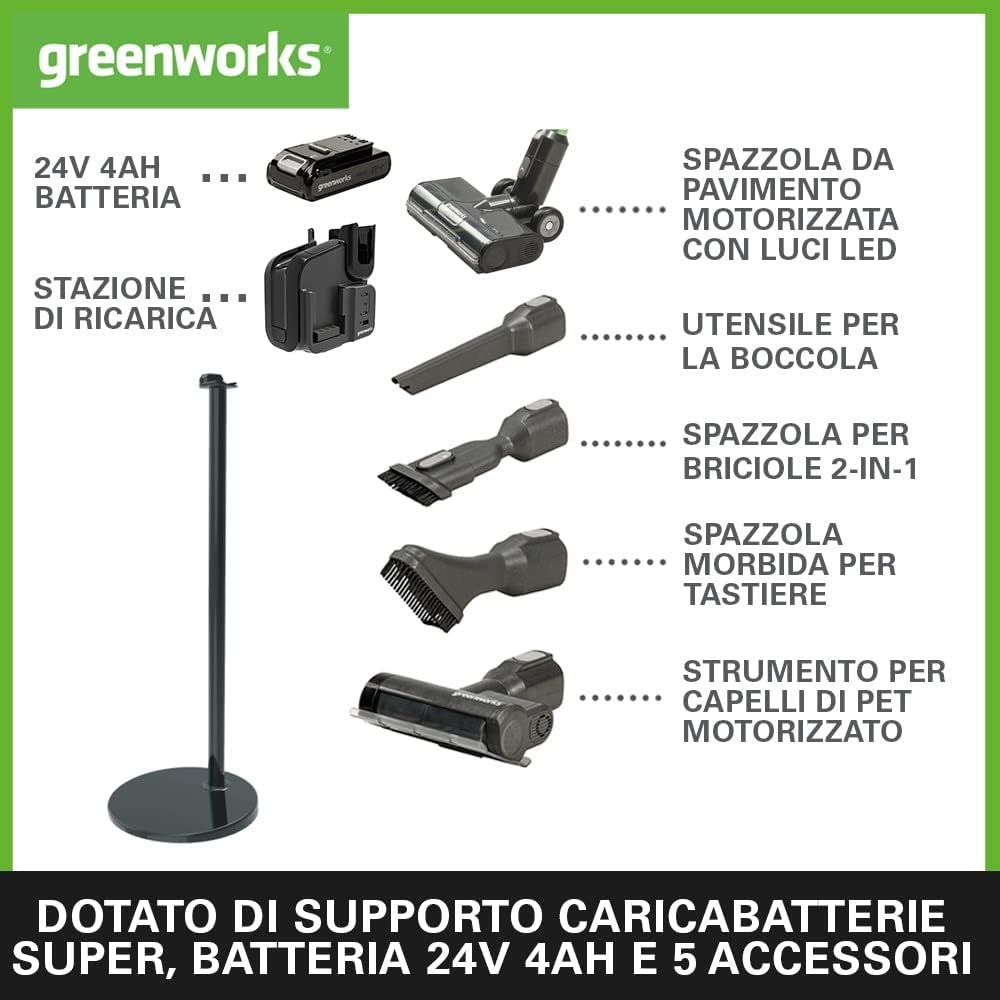
Image: Overview of the Greenworks GD24SVK4S Cordless Vacuum Cleaner and its included accessories. This includes the main vacuum unit, 24V 4Ah battery, charging station, motorized floor brush with LED lights, crevice tool, 2-in-1 brush for crumbs, soft brush for keyboards, and a motorized pet hair attachment.
- Main Unit: Contains the 500W motor, dustbin, and control panel.
- 24V 4Ah Battery: Provides power for up to 45 minutes of operation.
- Charging Station: For convenient charging and storage of the vacuum and accessories.
- Motorized Floor Brush with LED Lights: For effective cleaning on various floor types, with integrated lights to illuminate dark areas.
- Crevice Tool: Ideal for reaching tight spaces and corners.
- 2-in-1 Brush: Combines a brush and a wide nozzle for versatile cleaning of crumbs and other debris.
- Soft Brush: Suitable for delicate surfaces like keyboards.
- Motorized Pet Hair Attachment: Specifically designed to effectively remove pet hair from upholstery and carpets.
3. Setup
3.1 Unboxing and Initial Charge
Video: Unboxing the YISORA Cordless Vacuum Cleaner. This video demonstrates the contents of the package, including the main unit, various attachments, and charging accessories. It provides a visual guide to what you should expect to find upon opening your new vacuum cleaner.
- Unpack: Carefully remove all components from the packaging. Verify that all listed parts are present.
- Assemble Main Unit: Attach the extension tube to the main unit, then connect the desired cleaning head (e.g., motorized floor brush). Ensure all connections click securely into place.
- Charge Battery: Insert the 24V 4Ah battery into the charging station. Connect the charging station to a power outlet. The battery should be fully charged before first use. A full charge takes approximately 30 minutes.
3.2 Wall Mount Installation (Optional)
The charging station can be mounted on a wall for convenient storage and charging.
- Choose Location: Select a suitable wall location near a power outlet, ensuring it is at an appropriate height for easy access.
- Mark Drilling Points: Use the wall mount bracket as a template to mark the drilling points on the wall.
- Drill Holes: Drill holes at the marked points and insert wall plugs if necessary.
- Secure Mount: Attach the wall mount bracket to the wall using the provided screws.
- Place Vacuum: Hang the vacuum cleaner on the mounted bracket.
4. Operating Instructions
4.1 Powering On and Suction Modes
Video: Demonstration of the Greenworks G24SVK4D Cordless Deluxe Vacuum Cleaner in use. This video highlights the vacuum's flexible floor brush, LED headlights for dark areas, and various cleaning applications with different attachments.
- Turn On: Press the power button on the main unit to start the vacuum.
- Select Mode: The vacuum features 3 power levels:
- Eco Mode: Up to 45 minutes runtime, suitable for light cleaning.
- Standard Mode: Up to 25 minutes runtime, for everyday cleaning tasks.
- Turbo Mode: Up to 10 minutes runtime, for maximum suction on stubborn dirt.
- Battery Display: The digital display shows the remaining battery life and current power mode.
4.2 Using Attachments

Image: The Greenworks GD24SVK4S vacuum cleaner being used in handheld mode with different attachments for cleaning a laptop, table, sofa, and floor. This illustrates the versatility of the included tools.
- Motorized Floor Brush: Use for general floor cleaning. The LED lights illuminate dust in dark areas.
- Crevice Tool: Attach directly to the main unit or extension tube for cleaning narrow gaps, corners, and edges.
- 2-in-1 Brush: Switch between brush and wide nozzle for cleaning upholstery, car interiors, or collecting crumbs.
- Soft Brush: Ideal for delicate surfaces like keyboards, shelves, or blinds.
- Motorized Pet Hair Attachment: Connect for efficient removal of pet hair from fabric surfaces.
5. Maintenance
5.1 Emptying the Dustbin

Image: A hand demonstrating the easy one-click emptying mechanism of the Greenworks GD24SVK4S vacuum cleaner's dustbin. The dustbin detaches and opens with a single action for hygienic disposal of collected debris.
Empty the dustbin regularly to maintain optimal suction performance.
- Detach Dustbin: Press the release button to detach the dustbin from the main unit.
- Empty Contents: Position the dustbin over a trash can and press the release lever to open the bottom flap, allowing debris to fall out.
- Reattach: Close the flap and reattach the dustbin to the main unit, ensuring it clicks into place.
5.2 Cleaning Filters
Image: A person cleaning the HEPA filter of the Greenworks GD24SVK4S vacuum cleaner under running water. This shows the washable nature of the filter for prolonged use and effective filtration.
The HEPA filter should be cleaned periodically to ensure efficient air filtration.
- Remove Filter: Twist and pull to remove the filter assembly from the dustbin.
- Wash Filter: Rinse the filter under cold running water until the water runs clear. Do not use detergents.
- Dry Completely: Allow the filter to air dry completely for at least 24 hours before reinserting. Do not use a dryer or other heating devices.
- Reassemble: Once dry, reinsert the filter into the dustbin and reattach the dustbin to the main unit.
5.3 Cleaning the Brush Roll
Regularly check and clean the brush roll in the motorized floor brush to remove tangled hair or debris.
- Remove Brush Roll: Unlock the brush roll cover (usually with a coin or a latch) and remove the brush roll.
- Clean Debris: Use scissors or the provided cleaning tool to cut and remove any tangled hair or fibers.
- Reinsert: Place the clean brush roll back into the cleaning head and secure the cover.
6. Troubleshooting
If you encounter issues with your Greenworks GD24SVK4S, refer to the following table for common problems and solutions.
| Problem | Possible Cause | Solution |
|---|---|---|
| Vacuum does not turn on. | Battery is not charged or not properly inserted. | Ensure battery is fully charged and correctly inserted into the main unit. |
| Low suction power. | Dustbin is full, filter is clogged, or brush roll is tangled. | Empty the dustbin. Clean or replace the HEPA filter. Remove tangled hair from the brush roll. |
| Brush roll stops rotating. | Obstruction in the brush roll or motor protection activated. | Remove any obstructions from the brush roll. Turn off the vacuum, wait a few minutes, then restart. |
| Battery runtime is shorter than expected. | Using high suction mode frequently or battery degradation. | Use Eco or Standard mode for longer runtime. Ensure battery is fully charged. Consider replacing the battery if it's old. |
| Unusual noise during operation. | Obstruction in the air path or damaged component. | Check for blockages in the tube, hose, or cleaning head. If noise persists, contact customer support. |
7. Specifications
| Feature | Detail |
|---|---|
| Model Number | GD24SVK4S |
| Power | 500W |
| Suction Power | 170AW |
| Battery Type | 24V 4Ah Lithium-Ion |
| Max Runtime | Up to 45 minutes (Eco mode) |
| Charging Time | Approx. 30 minutes (for 4Ah battery) |
| Filter Type | HEPA Filter |
| Weight (without packaging) | 3.1 kg |
| Dimensions | 125 x 26 x 26 cm |
| Special Features | Cordless, Portable, Bagless, Charging Support, LED lights on floor brush. |
8. Warranty & Support
Greenworks offers a comprehensive warranty for your GD24SVK4S Cordless Vacuum Cleaner.
- Product Warranty: 3 Years
- Battery Warranty: 2 Years
For warranty claims, technical support, or spare parts, please contact Greenworks customer service. Keep your proof of purchase for warranty validation.
Visit the official Greenworks store for more information and product registration: Greenworks Store


