1. Introduction
The RovyVon Angel Eyes E1 is a compact and versatile Everyday Carry (EDC) flashlight designed for reliability and convenience. It features a unique dual-power system, allowing operation with both an internal LiPo battery and an external AAA battery. With USB-C recharging and a dual-button interface, the E1 offers multiple lighting modes and ease of use for various daily tasks and outdoor activities.
2. Package Contents
- 1 x RovyVon Angel Eyes E1 Keychain Flashlight
- 1 x Key Ring (Small)
- 1 x Key Ring (Large)
- 1 x Pocket Clip
- 1 x User Manual
- 1 x USB-C Charging Cable
3. Product Features
- Dual-Power Supply: Operates with a built-in 300mAh LiPo battery and is compatible with an external AAA battery for extended runtime.
- USB-C Rechargeable: Conveniently charges the internal LiPo battery via a USB-C port.
- Two Buttons & 5 Modes: Features a dual-button interface for intuitive control over Moonlight, Low, Medium, High, Momentary On, and Strobe modes.
- Bright Keychain Size: Compact design (2.6”L x 1.08”W x 0.53”H) with dual 4000K warm white emitters, producing up to 500 lumens. Includes a two-way pocket clip for easy carry.
- Durable Construction: Body made of lightweight and durable polyamide.
- Water Resistant: IPX7 rated for protection against water immersion.
4. Specifications
| Material | Polyamide (Plastic) |
| Weight | 39g (1.38 ounces) |
| Dimensions (L x W x H) | 66.1mm x 27.5mm x 13.5mm (2.6" x 1.08" x 0.53") |
| Emitter | 4000K Warm White, 95 CRI |
| Max Output | 500 Lumens |
| Internal Battery | 300mAh LiPo (Lithium Polymer) |
| External Battery Compatibility | AAA Battery (not included) |
| Charging Port | USB Type-C |
| Water Resistance | IPX7 |
5. Setup
5.1 Charging the Internal LiPo Battery
The RovyVon Angel Eyes E1 features a built-in LiPo battery that can be recharged via the USB-C port. Ensure the flashlight is turned off before charging.
- Locate the USB-C charging port on the side of the flashlight.
- Open the protective rubber cover of the USB-C port.
- Connect the provided USB-C cable to the flashlight and a compatible USB power source (e.g., computer, wall adapter, power bank).
- The charging indicator light will show the charging status:
- Breathing Blue: Indicates the flashlight is currently charging.
- Solid Green: Indicates charging is complete.
- A full charge typically takes approximately 90 minutes.
- Once charging is complete, disconnect the cable and securely close the rubber cover to maintain water resistance.

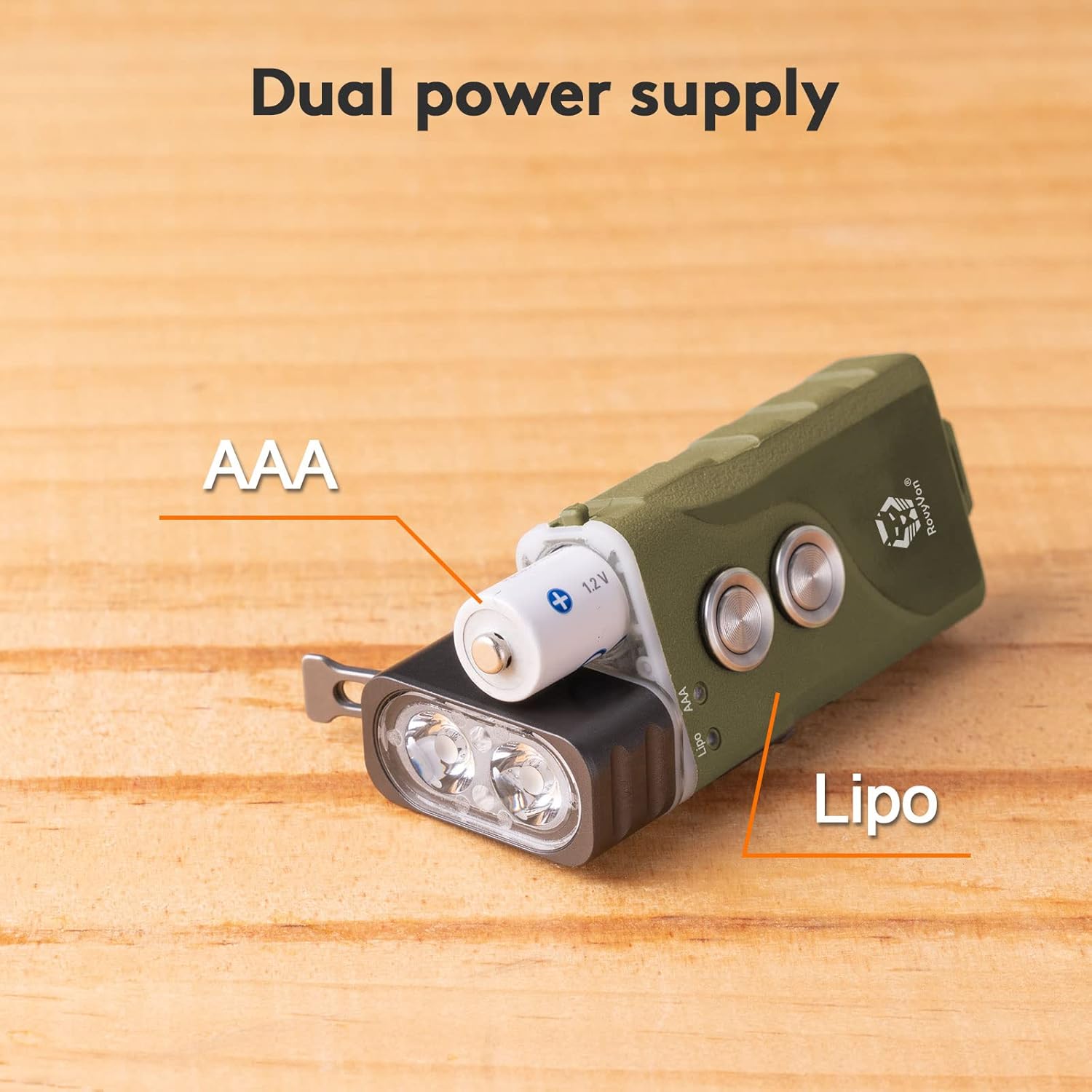
5.2 Installing/Replacing the AAA Battery
The E1 flashlight supports an external AAA battery for additional power or as a backup when the internal LiPo battery is depleted.
- Gently pull the head of the flashlight away from the main body to reveal the battery compartment.
- Insert a standard AAA battery into the compartment, ensuring the positive (+) end faces towards the flashlight head.
- Carefully push the flashlight head back onto the body until it clicks securely into place.
- The flashlight will automatically detect the presence of the AAA battery.

6. Operating Instructions
The RovyVon Angel Eyes E1 features two distinct buttons for operation. Button 1 controls the constant-on modes and lock/unlock function, while Button 2 provides quick access to momentary high and strobe modes.

6.1 Button 1 Operations (Main Button)
- Lock: From the OFF state, rapidly triple-click (or more) Button 1. The blue indicator will flash for 3 seconds to confirm locking. This prevents accidental activation.
- Unlock: From the locked state, rapidly triple-click (or more) Button 1. The green indicator will flash for 2 seconds to confirm unlocking.
- Moonlight Mode: From the OFF state, single-click Button 1 to activate Moonlight mode (0.5 lumens). Click again to turn off.
- Constant On Mode (Low-Medium-High): From the OFF state, rapidly double-click Button 1 to activate the memorized brightness level. Once on, single-click Button 1 to cycle through Low (10 lumens) → Medium (70 lumens) → High (500 lumens).
- Turn Off: When the light is on in any constant mode, press and hold Button 1 for 0.5 seconds to turn off.
6.2 Button 2 Operations (Auxiliary Button)
- Momentary On (Turbo): Press and hold Button 2 for instant access to the highest brightness mode (500 lumens). Release Button 2 to turn off.
- Strobe Mode: Rapidly double-click Button 2 to activate Strobe mode. Single-click Button 2 to turn off Strobe mode.
- Turn Off: When the light is on (from Button 2 activation), press and hold Button 2 for 0.5 seconds to turn off.
6.3 Operational Demonstration Video
Watch this video for a visual guide on operating the RovyVon Angel Eyes E1 flashlight, including button functions and mode cycling.
Video: RovyVon E1 EDC Flashlight Demonstration. This video illustrates the physical features and operational modes of the E1 flashlight, including charging, battery installation, and button controls for various brightness levels and special modes.
7. Maintenance
- Cleaning: Wipe the flashlight body with a soft, damp cloth. Do not use harsh chemicals or abrasive materials.
- USB-C Port: Keep the USB-C port clean and free of debris. Ensure the rubber cover is securely closed when not charging to maintain water resistance.
- Battery Care: If using an external AAA battery, remove it if the flashlight will not be used for an extended period to prevent leakage.
- Storage: Store the flashlight in a cool, dry place away from direct sunlight and extreme temperatures.
8. Troubleshooting
- Light Not Turning On:
- Check if the flashlight is in locked mode (triple-click Button 1 to unlock).
- Ensure the internal LiPo battery is charged.
- If using an external AAA battery, verify it is inserted correctly and has sufficient power.
- Dim Light Output:
- The battery level may be low. Recharge the internal LiPo battery or replace the AAA battery.
- Ensure the flashlight head is fully seated and making proper contact if using the AAA battery.
- Charging Indicator Not Working:
- Verify the USB-C cable is properly connected to both the flashlight and the power source.
- Try a different USB-C cable or power source.
9. Warranty and Support
The RovyVon Angel Eyes E1 flashlight comes with a 2-year warranty from the date of purchase. This warranty covers manufacturing defects and issues arising from normal use.
For warranty claims, technical support, or any questions regarding your product, please contact RovyVon customer service through their official website or the retailer where the product was purchased. Please retain your proof of purchase for warranty validation.


