
1. Introduction
This manual provides essential information for setting up, operating, and maintaining your Acer Aspire C24-1650-UA92 All-in-One Desktop. This system integrates a computer and monitor into a single unit, designed for efficiency and space-saving. It features an 11th Generation Intel Core i5-1135G7 processor, Intel Iris Xe Graphics, 8GB DDR4 memory, and a 512GB NVMe M.2 SSD, running on Windows 11 Home.
For optimal performance and longevity, please read these instructions carefully before use.
2. Package Contents
Verify that all items are present in the package:
- Acer Aspire C24-1650-UA92 All-in-One Desktop Unit
- Wireless Keyboard
- Wireless Mouse
- Power Cord
3. Setup Guide
3.1 Unpacking and Placement
Carefully remove the desktop unit and accessories from the packaging. Place the All-in-One desktop on a stable, flat surface, ensuring adequate ventilation around the unit. Avoid placing it near heat sources or in direct sunlight.

Image: The Acer Aspire C24-1650-UA92 All-in-One Desktop, showcasing the integrated monitor, stand, and included wireless keyboard and mouse.
3.2 Connecting Power
- Connect the power cord to the power input port on the rear of the desktop unit.
- Plug the other end of the power cord into a grounded electrical outlet.
3.3 Connecting Wireless Keyboard and Mouse
The included keyboard and mouse are wireless. Locate the USB dongle, typically found in the mouse or keyboard packaging, and insert it into an available USB 2.0 port on the desktop. Ensure batteries are installed in both the keyboard and mouse.
3.4 Initial Power On
Press the power button, usually located on the bottom right side of the display bezel, to turn on the desktop. Follow the on-screen instructions for the initial Windows 11 Home setup.
4. Operating Instructions
4.1 Windows 11 Home Overview
Your Acer Aspire C24-1650-UA92 comes pre-installed with Windows 11 Home. Familiarize yourself with the new interface, including the centered Start menu, widgets, and Snap Layouts for multitasking.

Image: The Windows 11 Home operating system displayed on the Acer Aspire C24 desktop screen, showing the taskbar and widgets panel.
4.2 Connectivity
The desktop offers various connectivity options:
- Wi-Fi 6 (802.11ax): For high-speed wireless internet connection. Access network settings via the Windows taskbar.
- Bluetooth 5.0: For connecting wireless peripherals like headphones or speakers.
- Ethernet (RJ-45): A Gigabit Ethernet port for wired network connection.
- USB Ports:
- 1 x USB 3.2 (Type A) Gen 1 port (Rear)
- 2 x USB 3.2 (Type A) Gen 2 ports (Rear)
- 1 x USB 2.0 (Type A) port (Bottom, reserved for RF dongle)
- HDMI-out Port: For connecting an external display.
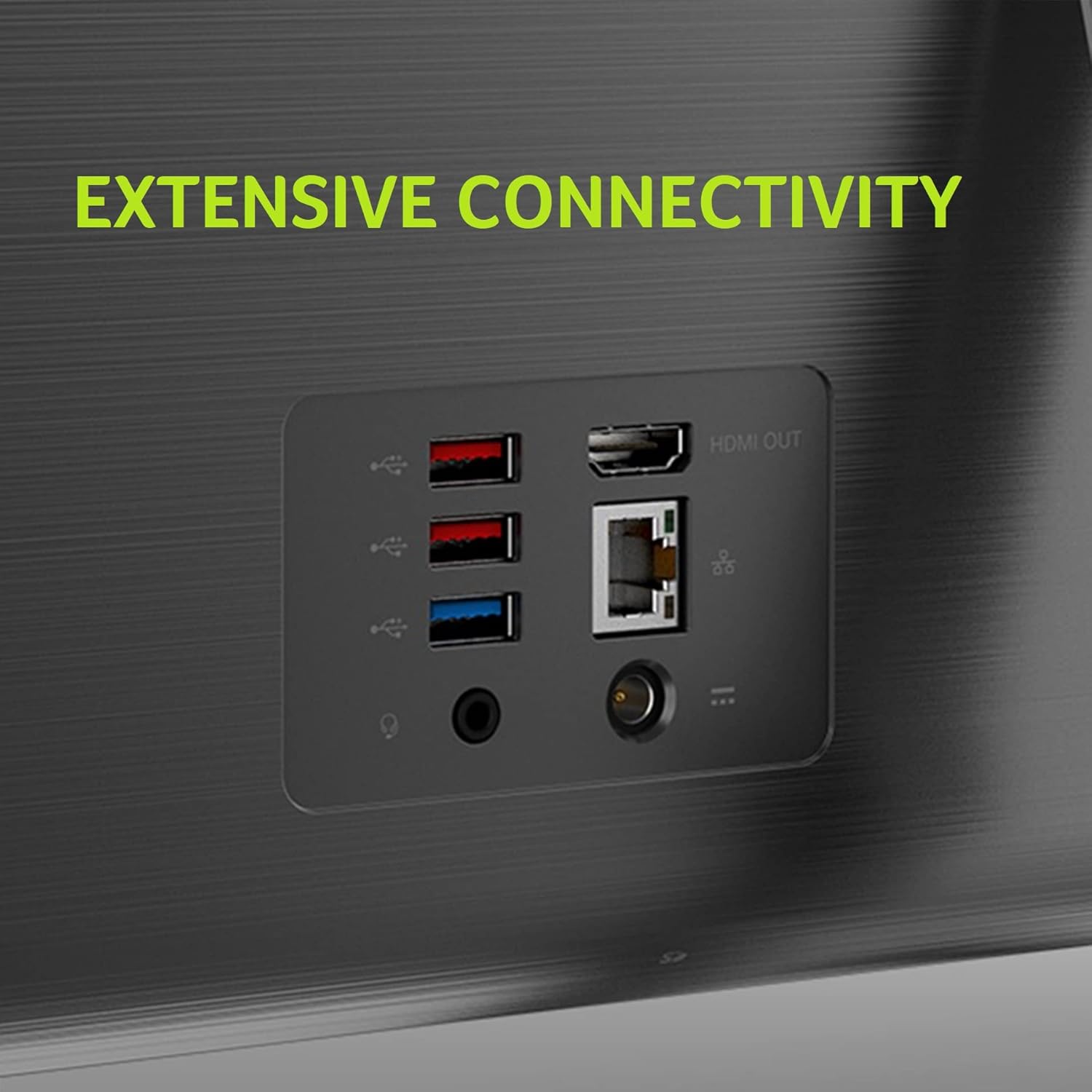
Image: A close-up of the rear panel of the Acer Aspire C24 desktop, highlighting the USB ports, HDMI-out, and Ethernet port for various connections.
4.3 Integrated Webcam and Privacy Shutter
The desktop includes an integrated 1.0 MP HD Webcam with two stereo microphones. For privacy, a physical camera shutter is provided. Slide the shutter to cover the camera lens when not in use.

Image: A detailed view of the integrated webcam on the Acer Aspire C24, showing the sliding privacy shutter mechanism.
4.4 Display Adjustment
The display offers an adjustable tilt from -5° to 25° for ergonomic viewing. Gently adjust the screen to your preferred angle.

Image: Side view of the Acer Aspire C24 desktop demonstrating the adjustable tilt range of the display.
5. Maintenance
- Cleaning: Use a soft, lint-free cloth to clean the screen and exterior surfaces. Avoid abrasive cleaners or solvents.
- Ventilation: Ensure that the ventilation openings on the desktop are not blocked to prevent overheating.
- Software Updates: Regularly update your Windows operating system and drivers to maintain security and performance.
- Data Backup: Periodically back up important data to an external drive or cloud storage.
6. Troubleshooting
| Problem | Possible Solution |
|---|---|
| No Power |
|
| No Display |
|
| Wireless Keyboard/Mouse Not Responding |
|
| No Wi-Fi Connection |
|
| Screen Flickering |
|
7. Specifications
| Feature | Detail |
|---|---|
| Model Number | C24-1650-UA92 (DQ.BFSAA.001) |
| Operating System | Windows 11 Home |
| Processor | 11th Gen Intel Core i5-1135G7 (up to 4.20 GHz, 4 cores, 8 threads, 8 MB Intel Smart Cache) |
| Graphics | Intel Iris Xe Graphics |
| Display | 23.8" Full HD (1920x1080) Widescreen IPS LED Back-lit Screen |
| RAM | 8GB DDR4 3200MHz |
| Storage | 512GB NVMe M.2 SSD |
| Wireless Connectivity | Wi-Fi 6 802.11ax Dual-Band (2.4GHz & 5GHz) with 2x2 MU-MIMO, Bluetooth 5.0 |
| Wired Connectivity | 10/100/1000 Gigabit Ethernet LAN |
| USB Ports | 1x USB 3.2 Gen 1 Type-A (Rear), 2x USB 3.2 Gen 2 Type-A (Rear), 1x USB 2.0 Type-A (Bottom, for RF dongle) |
| Video Output | 1x HDMI-out Port (Rear) |
| Webcam | Integrated 1.0 MP HD Webcam with 2 Stereo Microphones and Privacy Shutter |
| Audio | Two Built-in Stereo Speakers |
| Dimensions (LxWxH) | 21.28 x 1.47 x 15.76 inches |
| Weight | 14.07 pounds (system unit only) |
| Included Peripherals | Wireless Keyboard and Mouse |
8. Warranty and Support
Your Acer Aspire C24-1650-UA92 All-in-One Desktop comes with a 1 Year Parts and Labor Limited Warranty with Toll Free Tech Support (DQ.BFSAA.001).
For warranty claims, technical assistance, or further support, please contact Acer customer service. Refer to the documentation included with your product for specific contact details or visit the official Acer support website.
Additional protection plans may be available for purchase separately.