
1. Introduction
Thank you for choosing the LEPOWER Battery Powered LED Flood Light. This manual provides essential information for the safe and efficient installation, operation, and maintenance of your new security light. This wireless, motion-sensing flood light is designed to provide bright illumination for outdoor areas such as garages, yards, and porches, offering 1500 lumens of 5000K natural white light with IP65 waterproof rating.
Safety Warnings:
- Always handle batteries with care. Do not mix old and new batteries, or different types of batteries.
- Ensure correct polarity when inserting batteries.
- Do not expose the unit to extreme temperatures or open flames.
- Keep out of reach of children.
2. Package Contents
Please verify that all items listed below are included in your package:
- LEPOWER Battery Powered LED Flood Light (Model: YY03E-BL)
- Mounting Hardware (screws and anchors)
- User Manual

Image 2.1: LEPOWER Battery Powered LED Flood Light with its box and manual.
3. Specifications
| Feature | Detail |
|---|---|
| Brand | LEPOWER |
| Model Number | YY03E-BL |
| Light Output | 1500 Lumens |
| Color Temperature | 5000 Kelvin (Natural White) |
| Power Source | 4 x D-size Batteries (not included) |
| Motion Sensor Range | Up to 72 feet |
| Motion Sensor Angle | 180 degrees |
| Water Resistance Level | IP65 Waterproof |
| Product Dimensions | 14.5"L x 9.5"W x 5.1"H |
| Material | Plastic |

Image 3.1: Detailed dimensions of the LEPOWER Battery Powered LED Flood Light.
4. Setup
4.1 Battery Installation
- Unscrew the four fixed screws on the back of the light fixture to detach the battery compartment cover.
- Insert four (4) D-size batteries (not included) into the battery compartment. Ensure correct matching of the positive (+) and negative (-) polarities as indicated inside the compartment.
- Close the battery compartment cover and tighten it securely with the four screws to maintain the IP65 waterproof seal.

Image 4.1: The battery compartment of the light fixture, showing where to insert four D-size batteries.
4.2 Mounting the Light
- Select a suitable mounting location. The recommended installation height is 7.2-10.5 feet.
- Detach the mounting plate from the light fixture.
- Using the provided screws, securely install the mounting plate on the desired surface. If installing on a concrete wall, plastic masonry anchors are required (included).
- Once the mounting plate is secure, snap the light fixture into the mounting plate slot until it clicks firmly into place.
- Adjust the light heads and motion sensor to cover the desired area. The light heads can be rotated and pivoted. The motion sensor can be adjusted up to 45 degrees downward for optimal detection.

Image 4.2: A person installing the LEPOWER LED Flood Light on an exterior wall.
4.3 Installation Video Guide
Video 4.1: A step-by-step guide on how to install the LEPOWER Battery Powered Security Light.
5. Operating Modes
The LEPOWER LED Flood Light features three operational modes, selectable via a switch on the motion sensor unit:
- OFF Mode: The light remains off.
- AUTO Mode: The light turns on at 1500 lumens for 20 seconds when motion is detected, then turns off.
- ECO Mode: The light turns on at 1050 lumens for 20 seconds when motion is detected. If no further motion is detected, it dims to 300 lumens for an additional 40 seconds before turning off. This mode conserves battery life.
5.1 Motion Sensor Adjustment
The motion sensor's detection range can be adjusted using the dial on the sensor unit. You can set the sensitivity from a minimum of 10 feet up to a maximum of 72 feet. Adjust this setting based on your specific coverage needs and to avoid false triggers.

Image 5.1: Illustration of the two lighting modes: AUTO (1500LM for 20s) and ECO (1050LM for 20s, then 300LM for 40s).
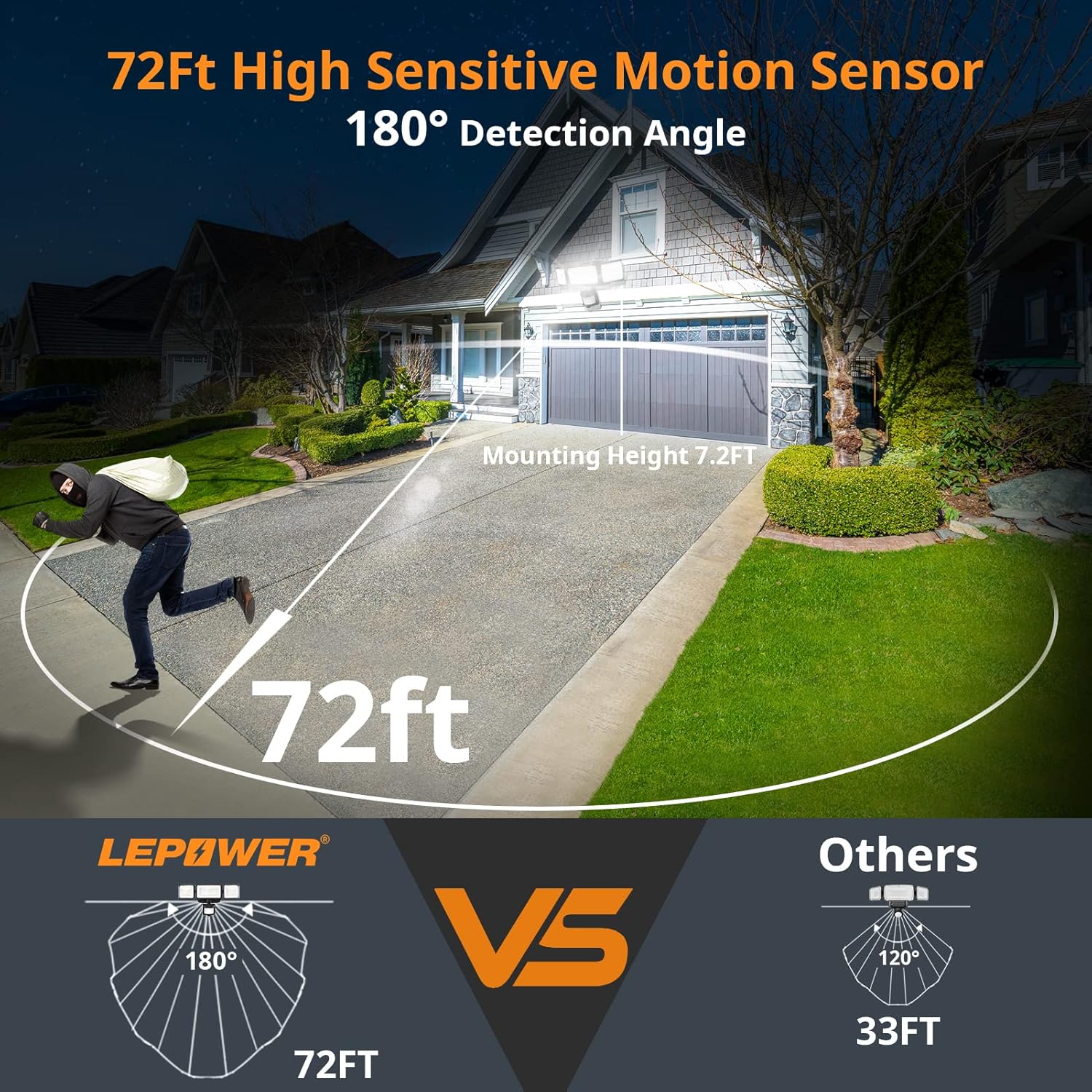
Image 5.2: The motion sensor detects movement up to 72 feet away within a 180-degree angle.
5.2 Product Overview Video
Video 5.1: An overview of the LEPOWER 1500LM Battery Powered LED Flood Light Outdoor, highlighting its features and benefits.
6. Maintenance
6.1 Battery Replacement
When the light output diminishes significantly or the light stops functioning, it is time to replace the D-size batteries. Follow the battery installation steps (Section 4.1) to replace the old batteries with new ones. Dispose of used batteries responsibly according to local regulations.
6.2 Cleaning
To ensure optimal performance, periodically clean the light fixture and motion sensor lens with a soft, damp cloth. Do not use abrasive cleaners or solvents, as these may damage the unit.
7. Troubleshooting
- Light does not turn on:
- Check if batteries are inserted correctly with proper polarity.
- Replace old batteries with new D-size batteries.
- Ensure the mode switch is set to AUTO or ECO, not OFF.
- Verify that the motion sensor is not obstructed.
- Light stays on too long or turns on unnecessarily:
- Adjust the motion sensor sensitivity dial to a lower setting (e.g., 10 or 20 feet) to reduce the detection range.
- Ensure the light is not positioned where it can be triggered by passing traffic, pets, or swaying branches.
- Light is dim:
- Replace batteries with new D-size batteries.
- Ensure the light is not in ECO mode if full brightness is desired.
8. Warranty and Support
LEPOWER products are designed for durability and performance. For warranty information, technical support, or any questions regarding your product, please refer to the contact information provided on the product packaging or visit the official LEPOWER website. Please retain your purchase receipt for warranty claims.
