
1. Product Overview
The Uten Mini Foldable Exercise Bike, Model Uten-DeskBike-X1226, is a compact and portable pedal exerciser designed for both arm and leg workouts. Its foldable design allows for easy storage and transport, making it suitable for use in various settings, including under a desk. The unit features adjustable resistance and an LCD display to monitor exercise metrics.

Image: The Uten Mini Foldable Exercise Bike, showcasing its compact design and green and black color scheme.
Key Features:
- Foldable Design: Allows for easy storage and portability.
- Adjustable Resistance: Tension knob for varying workout intensity.
- LCD Display: Monitors time, revolution count, cycles, RPM, and calories burned.
- Multi-functional Use: Suitable for both arm and leg exercises.
- Non-slip Components: Features non-slip pedals, anti-slip feet, and includes a non-slip mat for stability.
- Durable Construction: Made with a sturdy alloy steel frame.
2. Safety Instructions
Please read all safety instructions before using the Uten Mini Foldable Exercise Bike. Failure to follow these instructions may result in injury or damage to the product.
- Consult a physician before starting any exercise program.
- Ensure the exercise bike is placed on a stable, flat surface. Use the provided non-slip mat to enhance stability.
- The maximum recommended user weight is 220 pounds (approximately 100 kg).
- Keep children and pets away from the equipment during use.
- Wear appropriate athletic footwear during exercise.
- Stop exercising immediately if you feel pain, dizziness, or shortness of breath.
- Regularly inspect the unit for any loose parts or signs of wear. Do not use if damaged.
- Do not stand on the pedals. This device is designed for seated use.
3. Package Contents
Verify that all components are present in the package:
- Uten Mini Foldable Exercise Bike main unit
- Non-slip mat
- Assembly tools (if required for initial setup)
4. Setup and Assembly
The Uten Mini Foldable Exercise Bike is designed for quick and easy assembly. Most components come pre-assembled. Follow these steps to prepare your exercise bike for use:
- Unfold the Unit: Locate the pull ring mechanism, typically found near the base of the main frame. Pull the ring and extend the support legs until they lock into place. Ensure both sets of legs are fully extended and stable.
- Position the Non-slip Mat: Place the included non-slip mat on the floor where you intend to use the exercise bike. This will help prevent the unit from sliding during use and protect your floor.
- Place the Exercise Bike: Position the exercise bike on top of the non-slip mat. Ensure the anti-slip feet on the bike's legs are firmly on the mat.
- Check Stability: Gently push down on the unit to confirm it is stable and does not wobble.

Image: Detailed view of the exercise bike, highlighting the pull ring for folding, non-slip pedals, adjustable resistance knob, non-slip mat, and anti-slip feet.
To fold the unit for storage, reverse step 1 by pulling the ring and collapsing the legs. The compact design allows it to be easily stored in small spaces.

Image: The Uten Mini Exercise Bike shown in its folded configuration, demonstrating its space-saving design for storage.
5. Operating Instructions
5.1 Using the Exercise Bike
The Uten Mini Foldable Exercise Bike can be used for both arm and leg exercises:
- For Leg Exercise: Place the unit on the floor in front of your chair or under your desk. Sit comfortably and place your feet into the pedal straps. Adjust the straps for a secure fit. Begin pedaling in a forward or backward motion.
- For Arm Exercise: Place the unit on a stable table or desk. Sit comfortably and grasp the pedals with your hands. Begin rotating the pedals in a forward or backward motion.

Image: Demonstrations of the exercise bike in use for arm exercises on a table, leg exercises while seated at a desk, and leg exercises while lying down.
5.2 Adjusting Resistance
The exercise bike features an adjustable tension knob. Turn the knob clockwise to increase resistance for a more challenging workout, and counter-clockwise to decrease resistance for an easier workout. Adjust the resistance to a level that is comfortable and appropriate for your fitness level.
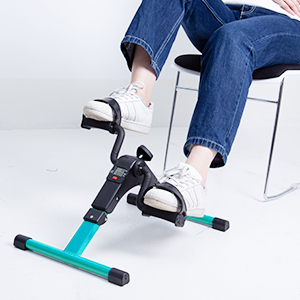
Image: Close-up view of the resistance adjustment knob, used to control workout intensity.
5.3 LCD Display Functions
The integrated LCD display provides real-time feedback on your workout. Press the red button to cycle through the different display modes:
- TIME: Displays the duration of your current workout session.
- CNT (Count): Shows the total number of revolutions during the current session.
- SCAN: Automatically cycles through all display functions every few seconds.
- R.P.M (Revolutions Per Minute): Indicates your current pedaling speed.
- CAL (Calories): Estimates the calories burned during the workout.

Image: The LCD digital screen displaying various workout metrics, including time, count, RPM, and estimated calories burned.
To reset the display, press and hold the red button for a few seconds.
6. Maintenance
Proper maintenance ensures the longevity and optimal performance of your Uten Mini Foldable Exercise Bike.
- Cleaning: Wipe down the unit with a damp cloth after each use to remove sweat and dust. Avoid using abrasive cleaners or solvents.
- Inspection: Periodically check all bolts, nuts, and moving parts to ensure they are secure. Tighten any loose fasteners.
- Storage: When not in use, fold the exercise bike and store it in a cool, dry place away from direct sunlight and extreme temperatures.
7. Troubleshooting
If you encounter any issues with your exercise bike, refer to the following common problems and solutions:
- Unit slides during use:
- Ensure the exercise bike is placed on the provided non-slip mat.
- Verify that the anti-slip feet are intact and making full contact with the surface.
- Ensure the support legs are fully extended and locked.
- Resistance is too easy or too hard:
- Adjust the tension knob. Turn clockwise to increase resistance, counter-clockwise to decrease.
- LCD display is not working:
- Check if the battery needs replacement. The unit is powered by a battery (not included).
- Ensure the sensor cable is securely connected.
- Unusual noise during operation:
- Inspect for any loose parts and tighten them.
- Ensure the unit is on a flat, stable surface.
The exercise bike features updated technology to prevent overheating, which is a common issue with some pedal exercisers. If you experience any unusual heat, discontinue use and allow the unit to cool down.
8. Specifications
| Feature | Specification |
|---|---|
| Model Number | Uten-DeskBike-X1226 |
| Dimensions (L x W x H) | 48.5 x 35.5 x 32 cm (19.09 x 13.98 x 12.6 inches) |
| Weight | 2.45 kg (5.4 lbs) |
| Maximum Weight Recommendation | 220 lbs (approx. 100 kg) |
| Material | Alloy Steel, Rubber |
| Control Type | Knob (for resistance) |
| Display Type | LCD |
| Resistance Levels | Adjustable via tension knob |
| Operation Mode | Manual |
| Power Source | Battery (for LCD display) |
| GTIN (UPC) | 841834139333 |

Image: The exercise bike with key dimensions indicated, illustrating its compact size.
9. Warranty and Support
Uten offers a 30-day return policy for this product. For specific warranty details, technical support, or replacement parts, please refer to the contact information provided at the point of purchase or visit the official Uten website.
Always retain your proof of purchase for warranty claims.
