
Introduction
This manual provides instructions for the NKF NH305UD Universal Remote Control, designed for use with various Emerson TV models. This remote control is a direct replacement and requires no programming or pairing for most compatible Emerson TV models. Please read this manual thoroughly before use to ensure proper operation and longevity of your device.
Product Overview
The NH305UD remote control is designed for ease of use and broad compatibility with Emerson televisions. It features a standard layout for intuitive navigation and control.
Compatible Emerson TV Models:
- LF501EM4, LF501EM4F, LF501EM5, LF501EM5F, LF501EM6F
- LF402EM6, LF402EM6F, LF461EM4, LF461EM4A
- LF391EM4, LF290EM4, LF240EM4, LF320EM4
- LE240EM4, LE290EM4, LE320EM4, LE391EM4
- LC320EM3FA
- And other compatible Emerson TV models.

Image: The NKF NH305UD remote control displayed alongside a list of compatible Emerson TV models, highlighting its broad compatibility.
Setup Instructions
The NH305UD remote control is designed for immediate use with compatible Emerson TVs without the need for programming. Simply install the batteries.
Battery Installation:
- Locate the battery compartment on the back of the remote control.
- Press the small tab and slide the battery cover downwards to open it.
- Insert two (2) new AAA 1.5V alkaline batteries, ensuring the positive (+) and negative (-) terminals match the markings inside the compartment.
- Slide the battery cover back into place until it clicks securely.
Note: Batteries are not included with the remote control. Do not mix old and new batteries, or different types of batteries.

Image: A visual guide demonstrating the correct orientation for inserting two AAA batteries into the remote control's battery compartment.
Video: A demonstration of installing batteries into the NH305UD remote control and basic button functionality.
Operating Instructions
The NH305UD remote control provides full functionality for your Emerson TV. Below is a guide to the main buttons and their functions.

Image: An annotated diagram of the NH305UD remote control, labeling key buttons such as TV power, number keys, volume, channel, mute, and navigation controls.
Key Button Functions:
| Button | Function |
|---|---|
| Power (Red Button) | Turns the TV on or off. |
| Number Keys (0-9) | Direct channel selection. |
| VOL +/- | Adjusts the volume level. |
| CH +/- | Changes TV channels sequentially. |
| Mute | Mutes or unmutes the TV audio. |
| SOURCE | Selects input sources (e.g., HDMI, AV). |
| MENU | Accesses the TV's main menu. |
| OK / Navigation Arrows | Navigates menus and confirms selections. |
| BACK | Returns to the previous screen or menu. |
| INFO | Displays program information. |
| PIC/SOUND MODE | Adjusts picture and sound modes. |
| FREEZE | Pauses the current image on screen. |
| SLEEP | Sets a sleep timer for the TV. |
| PICTURE SIZE | Adjusts the aspect ratio or picture size. |

Image: A hand operating the NH305UD remote control, demonstrating its use for channel selection and general TV control.
Specifications
| Feature | Detail |
|---|---|
| Model Number | NH305UD |
| Brand | NKF |
| Compatible Devices | Emerson Televisions |
| Connectivity Technology | Infrared (IR) |
| Special Feature | No Programming Required |
| Maximum Range | Up to 10 meters (33 feet) |
| Power Source | 2 x AAA 1.5V Alkaline Batteries (not included) |
| Material | ABS Plastic |
| Dimensions (L x W x H) | 6.46" x 1.9" x 0.96" (approximately 16.4 cm x 4.8 cm x 2.4 cm) |
| Button Quantity | 32 |
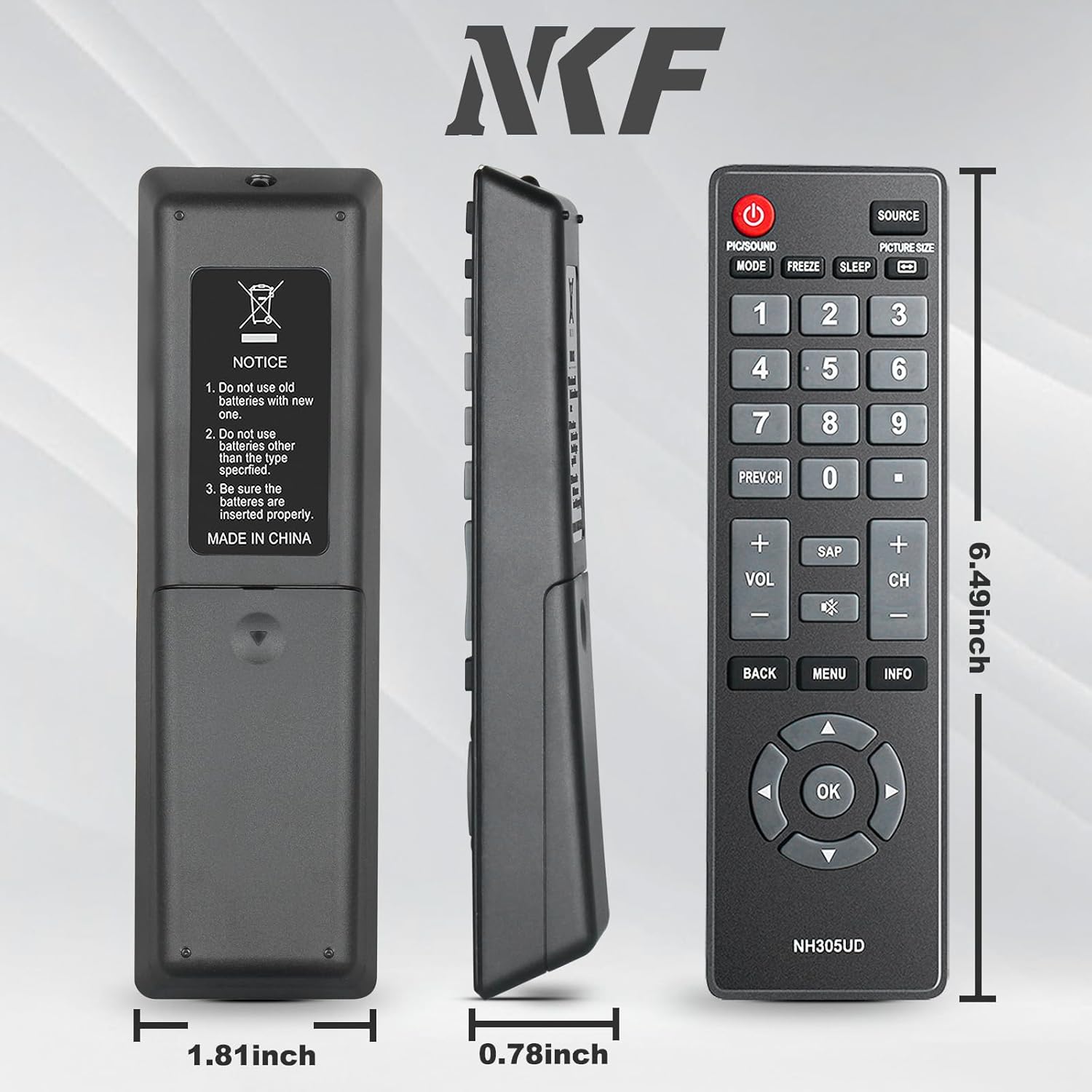
Image: Views of the NH305UD remote control from the front, back, and side, with its physical dimensions clearly indicated.

Image: An illustration depicting the maximum effective control distance of the remote control, which is up to 10 meters (33 feet).
Troubleshooting
- Remote not responding:
- Ensure batteries are inserted correctly with the proper polarity (+/-).
- Replace old batteries with new AAA alkaline batteries.
- Check for any obstructions between the remote control and the TV's IR sensor.
- Ensure the remote is pointed directly at the TV.
- Limited functionality:
- Verify your TV model is listed as compatible. While designed for broad compatibility, some specific TV functions might vary.
- Ensure the remote is clean and free from debris that might obstruct button presses.
Maintenance
- Clean the remote control regularly with a soft, dry cloth. Do not use liquid cleaners or abrasive materials.
- Avoid exposing the remote control to extreme temperatures, direct sunlight, or moisture.
- If the remote control will not be used for an extended period, remove the batteries to prevent leakage.
- Handle the remote control with care to prevent physical damage.

Image: A close-up view emphasizing the durable ABS material used in the construction of the remote control.
Warranty and Support
For warranty information or technical support, please refer to the product packaging or contact NKF customer service directly. Keep your purchase receipt for warranty claims.
Manufacturer: NKF