
Introduction
Thank you for choosing BENEWY USB C Headphones. These wired earbuds are designed to deliver clear stereo audio and convenient control for a wide range of USB-C enabled devices. Featuring a built-in DAC chip and an in-line remote with microphone, they offer a reliable audio solution for daily use, calls, and media consumption.

An overview of the BENEWY USB C Headphones, highlighting the earbuds, USB-C connector, and the integrated remote control.
Package Contents
Please verify that all items are present in your package:
- 1x BENEWY USB C Earphones
- 1x Pair of Eartips (Anti Drop Earplugs)
- 1x Protective Case (Customization Leather Bag black)
- 1x User Manual
Setup
Connecting the Headphones
- Locate the USB-C port on your compatible device (smartphone, tablet, laptop).
- Insert the USB-C connector of the headphones firmly into the device's USB-C port.
- Your device should automatically recognize the headphones.
Initial Audio Settings (for iPhone 15/16/17 series)
For iPhone 15, 16, or 17 series devices, ensure the audio output is correctly configured:
- Go to your device's Settings.
- Navigate to Audio Output.
- CLOSE the option labeled “Disable Audio Output” if it is enabled.
- Select "Headphones" as the audio output option if prompted.
Operating Instructions
Remote Control Functions
The in-line remote control provides convenient access to various functions without needing to interact directly with your device:

Detailed diagram illustrating the functions of each button on the in-line remote control.
- Volume Up: Press the '+' button.
- Volume Down: Press the '-' button.
- Play/Pause: Press the center button once.
- Answer Call: Press the center button once.
- End Call: Press the center button once.
- Reject Call: Long press the center button.
- Next Track: Press the center button twice.
- Previous Track: Press the center button three times.
- Voice Assistant: Long press the center button (functionality may vary by device).
Comfortable Wearing
The headphones are designed for comfortable, extended wear:

Visual representation of the ergonomic design ensuring a comfortable and secure fit within the ear.
- The half-in-ear ergonomic shape ensures a snug fit without fully blocking ambient noise.
- Lightweight construction and skin-friendly materials contribute to comfort during prolonged use.
- The included anti-drop earplugs provide additional security for active users.
Compatibility
These USB C headphones are compatible with a wide range of devices that feature a USB-C port and do not have a 3.5mm audio jack. This includes, but is not limited to, the following:
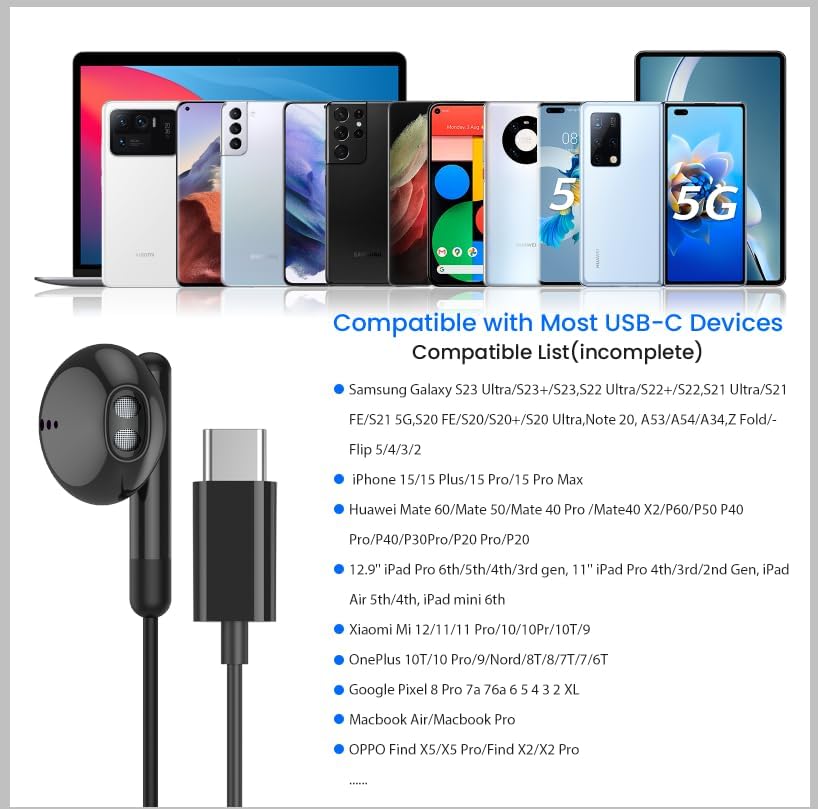
A visual guide to the broad compatibility of the USB C headphones with various modern devices.
- iPhone: 17 Air/17/17 Pro/17 Pro Max, 16 Pro/16 Pro Max/16/16 Plus, 15/15 Plus/15 Pro/15 Pro Max
- iPad: iPad Pro (M4), 10.9" iPad 10th Gen, 12.9'' iPad Pro 6th/5th/4th/3rd gen, 11'' iPad Pro 4th/3rd/2nd gen, iPad Air M2/5th/4th, iPad mini 6th
- Google Pixel: 9, 8, 8 Pro, 7, 7 Pro, 6 Pro, 6a, 6, 5, 4XL
- Samsung Galaxy: S25/S24 Ultra/S24+/S24, S23 FE/S23 Ultra/S23+/S23, S22, S21, S20 Ultra FE, Note 20 Ultra/20/10+, A55/A54/53, Tablet A9+, Z Fold5/4/3/2, Flip5/4/3/2
- OnePlus: 10T/10 Pro, 9 Pro 5G, 9 5G, 8T, 8 Pro, 8, 7T Pro, 7T, 7, 6T, Nord 2 5G, Nord
- MacBook: MacBook/Air/Pro, iMac/Air
- And other USB-C devices without a 3.5mm jack.
Audio Features
The BENEWY USB C Headphones are engineered for a high-quality listening experience:

An exploded view illustrating the precision components within the earbud that contribute to high-fidelity stereo sound.
- DAC Chip: Built-in latest DAC (Digital-to-Analog Converter) chip ensures high-resolution audio performance, maintaining sound clarity and depth.
- Dynamic Driver: Equipped with a 14.2MM dynamic driver for crisp stereo audio, clearer mid-range frequencies, and deeper bass response.
- HiFi Sound Quality: Designed to deliver a high-fidelity sound experience with minimal noise interference.
Maintenance
To ensure the longevity and optimal performance of your BENEWY USB C Headphones, follow these maintenance guidelines:
- Cleaning: Gently wipe the earbuds and cable with a soft, dry, lint-free cloth. Avoid using harsh chemicals or abrasive materials.
- Storage: When not in use, store the headphones in the provided protective case to prevent tangling and damage. Avoid extreme temperatures and humidity.
- Cable Care: The anti-wrap oxygen-free copper wire is designed to be flexible. Avoid sharp bends or excessive pulling on the cable to prevent internal damage.
- Water Resistance: The headphones are water-resistant, meaning they can withstand light splashes or sweat. They are not designed for submersion in water.
Troubleshooting
If you encounter any issues with your BENEWY USB C Headphones, please refer to the following common solutions:
- No Sound or Intermittent Audio:
- Ensure the USB-C connector is fully inserted into your device.
- Check your device's volume settings.
- For iPhone 15/16/17 series, verify that the "Disable Audio Output" option in Settings > Audio Output is CLOSED.
- Test the headphones with another compatible USB-C device to rule out a device-specific issue.
- Microphone Not Working:
- Ensure the headphones are fully connected.
- Check your device's privacy settings to ensure the application you are using has permission to access the microphone.
- Clean any debris from the microphone opening.
- Remote Control Buttons Not Responding:
- Ensure the headphones are securely connected.
- Some functions may be device-dependent. Verify compatibility with your specific device model.
- Uncomfortable Fit:
- Adjust the position of the earbuds in your ear. The ergonomic design is intended for a comfortable fit.
- Ensure the anti-drop earplugs are correctly attached and positioned.
If problems persist after attempting these solutions, please contact customer support.
Specifications
| Feature | Detail |
|---|---|
| Model Name | ME540 USB C Headphones |
| Connectivity Technology | Wired (USB C) |
| Headphones Jack | USB C |
| Ear Placement | In Ear |
| Form Factor | In Ear |
| Control Type | Volume Control, Remote |
| Microphone | Included |
| Noise Control | Sound Isolation |
| Audio Driver Type | Electrostatic Driver |
| Audio Driver Size | 14.2 Millimeters |
| Frequency Response | 1 KHz |
| Sensitivity | 110 dB |
| Impedance | 32 Ohm |
| Cable Feature | Tangle Free |
| Water Resistance Level | Water Resistant |
| Item Weight | 0.17 Ounces |
| Product Dimensions | 5.2 x 4.57 x 0.79 inches |
| Material | Aluminum, Metal, Plastic, Rubber, Stainless Steel, Thermoplastic Elastomer (TPE) |
Warranty and Support
Limited Warranty
BENEWY products are designed for quality and durability. Based on customer feedback, these headphones may come with an 18-month warranty. Please retain your proof of purchase for any warranty claims.
Customer Support
For any questions, concerns, or technical assistance, please contact BENEWY customer service through the retailer's platform where the product was purchased. We are committed to resolving any issues you may encounter as quickly as possible.