
Plugable USB4-HUB3A
Plugable 5-in-1 Thunderbolt 4 Hub
Model: USB4-HUB3A
Introduction
This manual provides detailed instructions for the setup, operation, and maintenance of your Plugable 5-in-1 Thunderbolt 4 Hub. This device is designed to expand the connectivity of modern Mac and Windows systems, offering Thunderbolt 4, USB4, and USB-C expansion capabilities, including support for single 8K or dual 4K displays.
What's in the Box
Verify that all components are present in the packaging:
- Plugable USB4-HUB3A Hub
- USB-C to HDMI Adapter
- Power Cord and Adapter
- 0.8m Thunderbolt 4 Cable

Image: The retail packaging of the Plugable USB4-HUB3A Hub, showing the hub, USB-C to HDMI adapter, power cord and adapter, and a 0.8m Thunderbolt 4 cable.
Product Overview
The Plugable Thunderbolt 4 Hub is built on the Intel Goshen Ridge Chipset, ensuring maximum compatibility and functionality across Thunderbolt 4, USB4, and USB-C standards. It features multiple ports for versatile connectivity.

Image: A detailed view of the Plugable Thunderbolt 4 Hub, highlighting the front port with Thunderbolt 60W Host Charging and USB 3.2 Gen 2 10Gbps Data Bandwidth, and the rear ports with Power Input (20V/5A) and three Thunderbolt ports (15W Power Delivery).
Port Functions:
- Host Port (Front, Thunderbolt 4): Connects to your computer, providing up to 60W of power delivery for laptop charging.
- USB 3.2 Gen 2 Port (Front, USB-A): Offers 10Gbps data bandwidth for legacy USB devices.
- Power Input (Rear): Connects to the included power adapter (20V/5A).
- Downstream Thunderbolt 4 Ports (Rear, 3x): Each port is compatible with Thunderbolt 4, USB4, Thunderbolt 3, or USB-C devices. These ports provide 15W power delivery and support high-resolution displays and high-speed data transfer up to 40Gbps.

Image: A graphic illustrating the maximum port potential of the hub, detailing support for up to two Thunderbolt or USB-C displays, 3x Thunderbolt or USB-C devices with up to 40Gbps bandwidth, and 15W power delivery to devices.
Setup Instructions
- Connect Power: Plug the included power adapter into the Power Input port on the rear of the hub, then connect the power cord to a wall outlet.
- Connect to Host Computer: Use the provided 0.8m Thunderbolt 4 cable to connect the host port (front) of the hub to a Thunderbolt 4, USB4, or compatible USB-C port on your computer.
- Connect Peripherals:
- For displays, use the downstream Thunderbolt 4 ports. The included USB-C to HDMI adapter can be used for HDMI displays.
- Connect high-speed storage devices (e.g., NVMe SSDs) to the downstream Thunderbolt 4 ports for optimal performance.
- Connect legacy USB devices (e.g., keyboards, mice, USB drives) to the USB 3.2 Gen 2 (USB-A) port on the front.
- System Recognition: Your computer should automatically detect and configure the hub. No drivers are typically required for basic functionality.
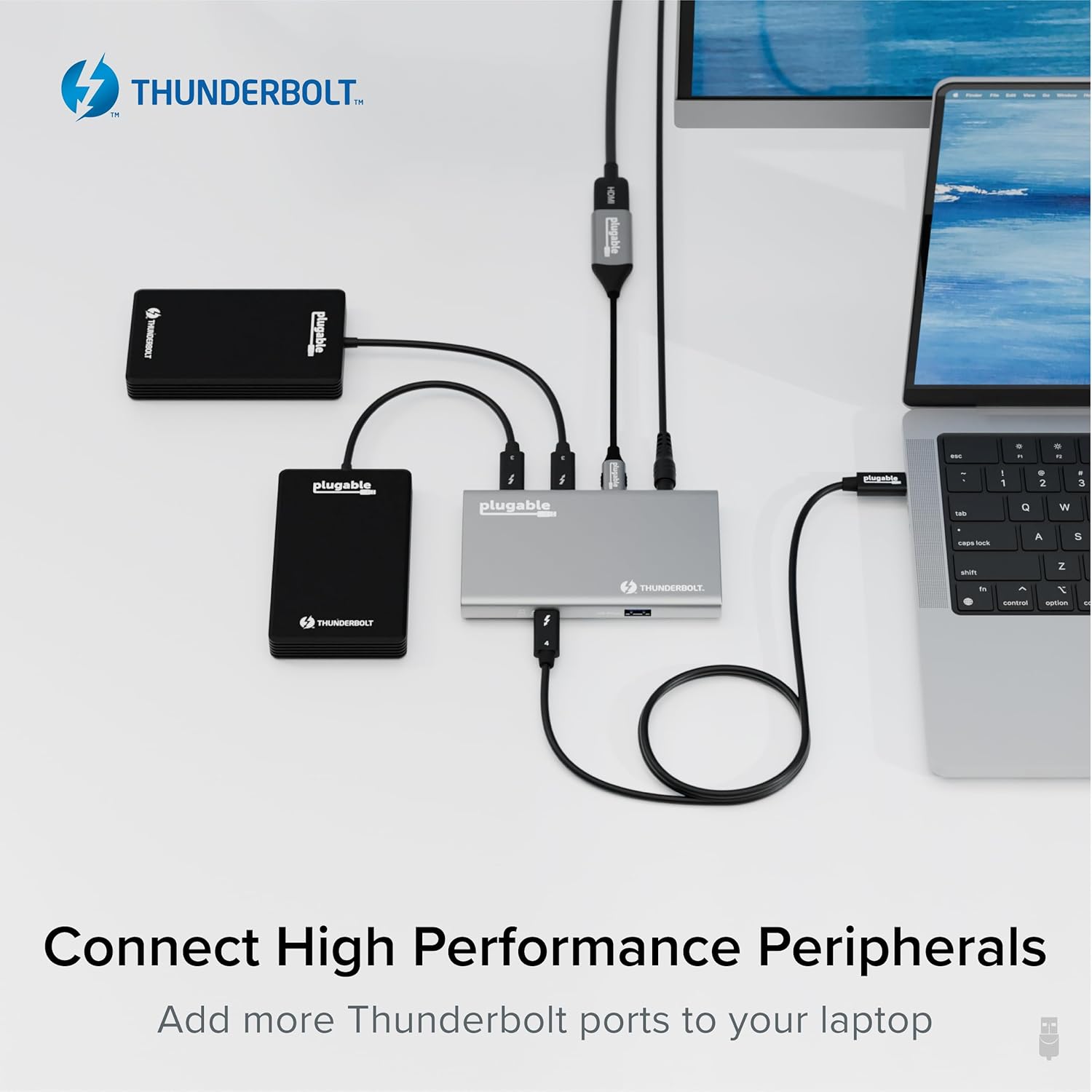
Image: An illustration demonstrating the connection of various high-performance peripherals, including external SSDs and displays, to the Plugable Thunderbolt 4 Hub, which is connected to a laptop.
Operating Instructions
Display Configuration:
The hub supports various display configurations depending on your host system:
| System Type | Number of Displays | Resolution |
|---|---|---|
| Thunderbolt 4 Windows Systems (Windows 10+) | 1 | 8K@30Hz |
| 2 | 4K@60Hz | |
| Thunderbolt 4 Macs with Apple Pro/Max Chips, M4 Macs, and M3 MacBook Air (macOS 11+) | 1 | 6K@60Hz |
| 2 | 4K@60Hz | |
| USB4 Macs with base M1/M2/M3 Chips | 1 | 6K@60Hz |
Note: M3 MacBook Air requires clamshell mode for dual extended displays. Thunderbolt 3 Windows systems are not recommended for optimal performance.

Image: A visual representation of the display compatibility and performance, showing how different Mac and Windows systems support various resolutions and numbers of displays when connected to the hub.
Charging Capabilities:
The hub provides up to 60W of power delivery to the connected host laptop and up to 15W of power to downstream devices, allowing you to charge your devices while working.

Image: A laptop and a smartphone are shown connected to the Plugable Thunderbolt 4 Hub, illustrating the hub's ability to charge both the laptop (60W) and additional downstream devices (15W).
Compatibility
The Plugable Thunderbolt 4 Hub is designed for broad compatibility with modern computing systems:
- Operating Systems:
- Windows 10 and later (with Thunderbolt 4 / USB4 ports)
- macOS 11 (Big Sur) and later (including Apple M1, M2, M3, M4 Pro/Max, and Thunderbolt 3 or USB4 Macs)
- Host Port Requirements: A Thunderbolt 4, USB4, or compatible USB-C port on your computer.
- Display Compatibility: Supports a wide range of monitors via Thunderbolt or USB-C video adapters (one HDMI adapter included).
Maintenance
To ensure the longevity and optimal performance of your Plugable Thunderbolt 4 Hub, follow these simple maintenance guidelines:
- Cleaning: Use a soft, dry, lint-free cloth to wipe the exterior of the hub. Avoid using liquid cleaners, aerosols, or solvents.
- Ventilation: Ensure the hub is placed in a well-ventilated area to prevent overheating. Do not block any ventilation openings.
- Storage: When not in use for extended periods, store the hub in a cool, dry place away from direct sunlight and extreme temperatures.
- Cable Management: Avoid sharp bends or excessive tension on the cables connected to the hub to prevent damage.
Troubleshooting
If you encounter issues with your Plugable Thunderbolt 4 Hub, refer to the following common solutions:
- No Power/Not Functioning:
- Ensure the power adapter is securely connected to both the hub and a working wall outlet.
- Verify the Thunderbolt 4 cable is firmly connected to both the hub and your computer's host port.
- Display Issues (No Signal, Flickering):
- Confirm that your display cables (e.g., HDMI, DisplayPort) are securely connected to both the hub and the monitor.
- Check your computer's display settings to ensure the external monitor is detected and configured correctly (e.g., extended or mirrored mode).
- Ensure your system meets the compatibility requirements for the desired display resolution and refresh rate (refer to the "Operating Instructions" section).
- Try connecting the display directly to your computer (if possible) to rule out monitor or cable issues.
- Peripheral Not Detected:
- Ensure the peripheral is properly connected to the correct port on the hub (Thunderbolt for high-speed, USB-A for legacy).
- Test the peripheral by connecting it directly to your computer to confirm it is functional.
- Restart your computer and reconnect the hub.
- Slow Data Transfer Speeds:
- Ensure you are using a certified Thunderbolt 4 cable for the host connection.
- Verify that the connected device supports the expected speeds (e.g., NVMe SSDs for 40Gbps, USB 3.2 Gen 2 devices for 10Gbps).
- Avoid connecting multiple high-bandwidth devices simultaneously if you experience slowdowns.
If these steps do not resolve your issue, please contact Plugable Support as detailed in the "Warranty and Support" section.
Specifications
| Feature | Detail |
|---|---|
| Brand | Plugable |
| Model Number | USB4-HUB3A |
| Hardware Interface | Thunderbolt 4, USB4, USB-C, USB-A |
| Host Connectivity | 1x Thunderbolt 4 (60W Power Delivery) |
| Downstream Ports | 3x Thunderbolt 4 (15W Power Delivery), 1x USB 3.2 Gen 2 (10Gbps USB-A) |
| Data Bandwidth | Up to 40Gbps (Thunderbolt ports), 10Gbps (USB-A port) |
| Display Support | Single 8K@30Hz or Dual 4K@60Hz (Windows), Single 6K@60Hz or Dual 4K@60Hz (Mac) |
| Operating System Compatibility | Windows 10+, macOS 11+ |
| Dimensions (LxWxH) | 8.35 x 5.59 x 2.17 inches |
| Weight | 1.94 pounds |
| Color | Grey |
| Special Feature | Powered |
Warranty and Support
Every Plugable product, including the USB4-HUB3A, is covered by a 2-Year Coverage against defects and comes with Lifetime Support.
If you have any questions, require assistance, or need to troubleshoot an issue, please contact our North American-based support team. You can find contact information on the official Plugable website or through your purchase platform.
For more information, visit: Plugable Support
Related documentsUSB4-HUB3A


Ask a question about this manual
Ask about setup, troubleshooting, compatibility, parts, safety, or missing instructions. Manuals+ will review the question and use this page’s manual context to help answer it.