
1. Introduction
This manual provides essential instructions for the proper installation, operation, and maintenance of the Notifier DR-C4 Door and Chassis Lock. The DR-C4 is designed to secure access to equipment chassis, specifically accommodating up to three chassis. Please read this manual thoroughly before attempting any installation or operation to ensure safe and correct usage.
2. Safety Information
Always adhere to local and national electrical codes and safety regulations during installation and maintenance. Only qualified personnel should perform installation and servicing. Disconnect all power before servicing. This device is intended for security purposes and should be installed in a manner that prevents unauthorized access to the secured chassis.
3. Product Overview
The Notifier DR-C4 is a key-operated door lock system designed for securing equipment enclosures. It is constructed from alloy steel, ensuring durability and robust security. The unit is designed to accept up to three chassis, providing a centralized locking solution.
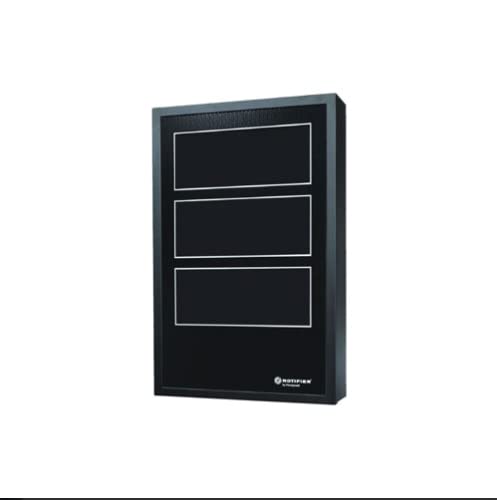
Image showing the Notifier DR-C4 door and chassis lock, designed to secure up to three chassis.
Included Components:
- DR-C4 Door and Chassis Lock Unit
- Keys (for lock operation)
4. Setup
The DR-C4 is designed for freestanding or tabletop mounting. Ensure the mounting surface is stable and capable of supporting the unit and any installed chassis. The lock mechanism is integrated into the door designed to cover the chassis bays.
Installation Steps:
- Position the DR-C4 unit on a stable, level surface (freestanding or tabletop).
- Ensure adequate clearance around the unit for proper ventilation and access.
- Insert up to three compatible chassis into the designated bays within the unit.
- Close the door of the DR-C4 unit, aligning it properly with the chassis enclosure.
5. Operating Instructions
The Notifier DR-C4 operates via a key lock mechanism. Use the provided keys to secure and unsecure the door.
Locking the Door:
- Ensure the door is fully closed and aligned with the chassis enclosure.
- Insert the key into the lock cylinder.
- Turn the key clockwise until the lock mechanism engages.
- Remove the key and store it in a secure location.
Unlocking the Door:
- Insert the correct key into the lock cylinder.
- Turn the key counter-clockwise until the lock mechanism disengages.
- Open the door to access the chassis.
6. Maintenance
The Notifier DR-C4 requires minimal maintenance. Regular inspection can help ensure its continued functionality.
Maintenance Tips:
- Cleaning: Wipe the exterior surfaces with a soft, dry cloth. Avoid abrasive cleaners or solvents.
- Lock Mechanism: Periodically check the lock for smooth operation. If the lock becomes stiff, a small amount of graphite lubricant can be applied to the keyhole. Do not use oil-based lubricants.
- Key Management: Keep spare keys in a secure, accessible location separate from the primary key.
7. Troubleshooting
This section addresses common issues you might encounter with the DR-C4 lock.
Common Issues and Solutions:
- Door will not close properly:
- Check for obstructions within the chassis bays or around the door frame.
- Ensure all chassis are fully inserted and correctly seated.
- Verify the unit is on a level surface.
- Key is difficult to turn or remove:
- Ensure you are using the correct key.
- Apply a small amount of graphite lubricant to the keyhole.
- Do not force the key, as this may damage the lock or key.
- Lock does not engage/disengage:
- Confirm the door is fully closed and aligned before attempting to lock.
- If the issue persists after lubrication, the lock mechanism may require professional inspection or replacement.
8. Specifications
| Feature | Detail |
|---|---|
| Brand | Notifier |
| Model Number | DR C4 |
| Lock Type | Key |
| Material | Alloy Steel |
| Mounting Type | Freestanding, Tabletop |
| Chassis Capacity | Accepts 3 Chassis |
| Included Components | Key |
| Power Source | Manual |
| Water Resistance Level | Not Water Resistant |
9. Warranty and Support
For specific warranty information and technical support, please refer to the official Notifier website or contact your authorized Notifier distributor. Keep your purchase receipt for warranty claims. This manual is for informational purposes only and does not constitute a warranty.
