
Introduction
The BLACK DIAMOND Storm 500-R is a high-performance, rechargeable LED headlamp designed for various outdoor activities and work environments. It features a powerful 500-lumen output, multiple light modes including red, green, and blue night vision, PowerTap Technology for instant brightness adjustments, and a waterproof, dustproof design. This manual provides detailed instructions for the proper use, maintenance, and troubleshooting of your Storm 500-R headlamp to ensure optimal performance and longevity.
Safety Information
- Eye Safety: Do not look directly into the LED light or shine it directly into the eyes of others. The intense light can cause temporary vision impairment or permanent eye damage.
- Battery Handling: The headlamp contains an integrated rechargeable lithium-ion battery. Do not attempt to replace the battery. Do not expose the headlamp to extreme temperatures, puncture, or disassemble it. Dispose of the product responsibly according to local regulations.
- Water Immersion: While the headlamp is waterproof (IPX67), ensure the charging port cover is securely closed before exposure to water to maintain its integrity.
- Children: Keep out of reach of children. This product is not a toy.
- Charging: Only use the provided USB charging cable or a certified equivalent. Do not charge if the headlamp or cable is wet or damaged.
Package Contents
Verify that all items are present in your package:
- BLACK DIAMOND Storm 500-R Headlamp
- Micro-USB Charging Cable
- User Manual (this document)
Setup
Charging the Headlamp
Before first use, fully charge the headlamp. The Storm 500-R features an integrated rechargeable lithium battery.
- Locate the micro-USB charging port on the side of the headlamp. It is protected by a rubber cover.
- Carefully open the rubber cover to expose the port.
- Insert the micro-USB end of the provided charging cable into the headlamp's port.
- Connect the USB-A end of the cable to a standard USB power source (e.g., wall adapter, computer USB port, power bank).
- The battery indicator lights on top of the headlamp will illuminate to show charging status. Three blue LEDs indicate a full charge.
- Once fully charged, disconnect the cable and securely close the rubber cover to maintain the headlamp's waterproof rating.

Image: Side view of the headlamp showing the micro-USB charging port.

Image: Headlamp connected to its charging cable.

Image: Top view of the headlamp showing battery indicator lights.
Adjusting the Headband
The headlamp comes with a recycled elastic headband featuring comfortable Repreve fiber construction. Adjust the strap to ensure a snug yet comfortable fit on your head or over a hat/helmet.
- Slide the plastic buckles on either side of the headband to tighten or loosen the strap.
- Ensure the headlamp is centered on your forehead and stable during movement.

Image: The Black Diamond Storm 500-R headlamp with its adjustable headband.
Operating Instructions
The Storm 500-R features intuitive controls for various lighting modes and functions. Familiarize yourself with the two main buttons on top of the headlamp: the large power button and the smaller mode button.

Image: Top view of the headlamp showing control buttons.
Power On/Off
- To turn on: Press the large power button once. The headlamp will turn on in the last used white light mode.
- To turn off: Press the large power button once.
Switching White Light Modes (Proximity/Distance)
- With the headlamp on, press the smaller mode button to cycle between proximity (wide beam) and distance (spot beam) white light modes.
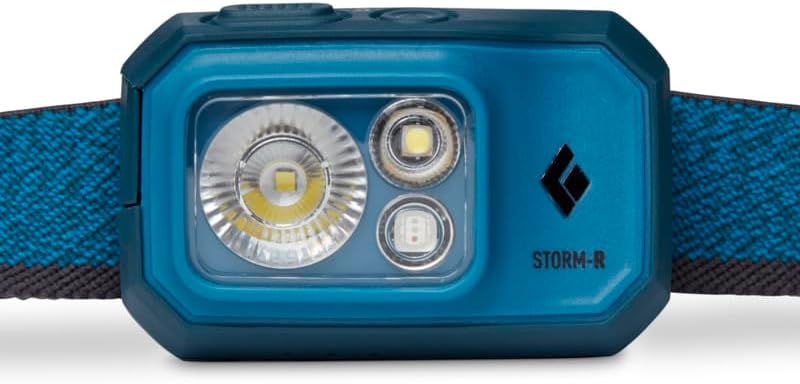
Image: Front view of the headlamp's light array.
Dimming
- While in any white light mode, press and hold the large power button to dim the light. Release the button at the desired brightness level.
PowerTap Technology
- To instantly transition between full and dimmed power in white light modes, simply tap the right side of the headlamp body (where the PowerTap icon is located). Tap again to return to the previously dimmed setting.
Strobe Mode
- From any white light mode, quickly press the smaller mode button three times to activate the strobe mode. Press the mode button again to return to the previous steady white light mode.
Night Vision Modes (Red, Green, Blue)
The Storm 500-R offers red, green, and blue night vision modes, useful for preserving night adaptation or specific tasks.
- To activate: From the off position, press and hold the smaller mode button for approximately 2 seconds. The headlamp will turn on in red night vision mode.
- To cycle colors: Once in night vision mode, press the smaller mode button to cycle through red, green, and blue.
- To dim night vision: While in any night vision mode, press and hold the large power button to dim the light.
- To turn off night vision: Press the large power button once.

Image: Headlamp operating in red light mode.
Lock Mode
Lock mode prevents accidental activation of the headlamp, saving battery life during transport or storage.
- To activate: From the off position, press and hold both the large power button and the smaller mode button simultaneously for approximately 3 seconds. The headlamp will flash briefly to indicate it is locked.
- To deactivate: Press and hold both buttons simultaneously for approximately 3 seconds. The headlamp will flash and then turn on, indicating it is unlocked.
Maintenance
Cleaning
- Wipe the headlamp body with a damp cloth. Do not use harsh chemicals or abrasive cleaners.
- Ensure the charging port cover is free of debris before closing to maintain the waterproof seal.
Storage
- Store the headlamp in a cool, dry place away from direct sunlight and extreme temperatures.
- For long-term storage, activate the lock mode to prevent accidental battery drain.
- Charge the battery every 3-6 months during long-term storage to maintain battery health.
Troubleshooting
| Problem | Possible Cause | Solution |
|---|---|---|
| Headlamp does not turn on. | Battery is depleted. Headlamp is in lock mode. | Charge the headlamp fully. Deactivate lock mode (press and hold both buttons for 3 seconds). |
| Light is dim or flickers. | Low battery. Dirt or debris on lens. | Recharge the headlamp. Clean the lens with a soft, clean cloth. |
| Headlamp not charging. | Cable not properly connected. Faulty cable or power source. Charging port cover not fully open. | Ensure cable is securely plugged into headlamp and power source. Try a different USB cable or power source. Ensure the rubber cover is fully open to allow proper connection. |
| Water inside the headlamp. | Charging port cover not sealed. Exceeded IPX67 rating. | Ensure the charging port cover is securely closed before water exposure. The headlamp is waterproof up to 1m for 30 minutes. Do not exceed this. If water ingress occurs, contact support. |
Specifications
| Feature | Detail |
|---|---|
| Model | Storm 500-R (BD620675) |
| Light Source | LED |
| Max Brightness | 500 Lumens |
| Power Source | Integrated Rechargeable Lithium Battery |
| Special Features | Dimmable, Rechargeable, Waterproof (IPX67), PowerTap Technology, Red/Green/Blue Night Vision, Lock Mode |
| Water Resistance Level | IPX67 (withstands immersion up to 1m for 30 minutes) |
| Material | Fiberglass (housing), Repreve fiber (headband) |
| Item Weight | 120 Grams (approx. 4.2 ounces) |
| Product Dimensions | Approx. 1.5"D x 2.5"W x 1.5"H (3.8cm D x 6.35cm W x 3.8cm H) |
| Included Components | USB Charging Cable |
Warranty and Support
The BLACK DIAMOND Storm 500-R Headlamp comes with a 3-Year Warranty from the date of purchase, covering defects in materials and workmanship.
For warranty claims, technical support, or further assistance, please contact BLACK DIAMOND customer service or visit their official website:
Official Website: www.blackdiamondequipment.com
Please have your product model number (Storm 500-R or BD620675) and proof of purchase ready when contacting support.