
1. Introduction
Thank you for choosing the Rdideal 20V 2000mAh Li-ion Power Tool Battery. This manual provides essential information for the safe and effective use, maintenance, and troubleshooting of your new battery. Please read this manual thoroughly before first use and retain it for future reference. This battery is designed for compatibility with Stanley power tools requiring FMC680L and FMC620 battery models.
2. Important Safety Information
To prevent personal injury or damage to the battery and tool, always observe the following safety precautions:
- Warranty Void: The product warranty is void if the label is removed.
- No Disassembly: Do not attempt to disassemble, open, or service the battery pack. Internal components are not user-serviceable.
- Correct Replacement: Replace only with the battery pack designated for this specific product and compatible tools.
- Physical Damage: Do not crush, puncture, or subject the battery to short external contacts.
- Environmental Hazards: Do not dispose of the battery in fire or water.
- Temperature Limits: Do not store the battery above 60°C (140°F). High temperatures can lead to reduced performance or safety hazards.
- Initial Charge: A new battery pack must be fully charged before its first use to reduce the risk of fire or burns. Always read the operating guide for your specific tool and charger before using the battery.

3. Product Overview
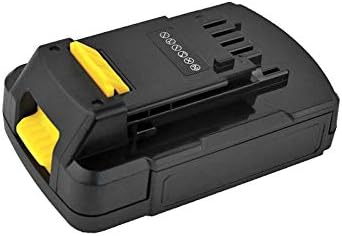
The Rdideal 20V 2000mAh Li-ion Power Tool Battery is a high-performance replacement or spare battery designed for specific Stanley power tools. It provides reliable power for various applications.
- Voltage: 20 Volts
- System: Lithium-ion (Li-ion)
- Capacity: 2000 mAh (Milliampere-hour)
- Part Number: FMC680L
- Compatible Models: FMC620

4. Setup and Installation
Follow these steps to properly install the battery into your compatible Stanley power tool:
- Ensure Tool is Off: Before installing or removing the battery, always ensure the power tool is switched off and disconnected from any power source if applicable.
- Align Battery: Align the battery pack with the battery port on your power tool. The battery typically slides into a designated slot.
- Secure Battery: Push the battery firmly into the tool until it clicks into place. A click indicates that the battery is securely latched.
- Initial Charge: If this is the first use, or if the battery has been stored for an extended period, fully charge the battery before use. Refer to your charger's instruction manual for proper charging procedures.
5. Operating Instructions
Once installed, the battery powers your compatible Stanley tool. Always refer to your power tool's specific instruction manual for detailed operating procedures.
Charging the Battery
Use only chargers specified for 20V Li-ion batteries compatible with Stanley FMC680L/FMC620 series. Incorrect chargers can damage the battery or cause safety hazards.
- Connect Charger: Plug the charger into a standard electrical outlet.
- Insert Battery: Slide the battery pack into the charger until it clicks into place.
- Monitor Indicator: Observe the charger's indicator lights. These lights typically show charging status (e.g., charging, fully charged, error).
- Remove When Charged: Once fully charged, remove the battery from the charger. Do not leave batteries on the charger indefinitely after they are fully charged.
Battery Removal
To remove the battery from the tool or charger, press the yellow release tabs on the sides of the battery and slide it out.
6. Maintenance and Storage
Proper maintenance and storage extend the life of your battery.
- Cleaning: Keep battery terminals clean and free of dirt or grease. Use a clean, dry cloth to wipe the battery. Do not use solvents or harsh chemicals.
- Storage Temperature: Store the battery in a cool, dry place, away from direct sunlight and extreme temperatures. As noted in safety, do not store above 60°C (140°F).
- Long-Term Storage: For long-term storage, it is recommended to store Li-ion batteries at approximately 50% charge. Fully discharge and recharge the battery every 6 months if stored for extended periods to maintain optimal performance.
- Avoid Moisture: Do not expose the battery to rain or wet conditions.
7. Troubleshooting
If you encounter issues with your battery, consider the following common troubleshooting steps:
- Battery Not Charging:
- Ensure the charger is properly plugged into a working outlet.
- Verify the battery is correctly seated in the charger.
- Check the charger's indicator lights for any error codes.
- Ensure the battery and charger terminals are clean.
- Tool Not Powering On:
- Confirm the battery is fully charged and securely installed in the tool.
- Test the battery in another compatible tool if available.
- Refer to your power tool's instruction manual for tool-specific troubleshooting.
- Reduced Run Time:
- Ensure the battery is fully charged before each use.
- Battery capacity naturally degrades over time and with usage cycles.
- Operating the tool in extreme temperatures can affect performance.
If problems persist after attempting these steps, contact customer support for further assistance.
8. Specifications
| Feature | Specification |
|---|---|
| Brand | Rdideal |
| Manufacturer | RUNWU |
| Model Numbers | FMC680L, FMC620 |
| Battery Type | Lithium-ion (Li-ion) |
| Voltage | 20V |
| Capacity | 2000 mAh |
| Recommended Use | Power Tool |
9. Warranty and Support
This Rdideal battery is manufactured by RUNWU. Please note that the product warranty is void if the original label is removed from the battery pack. For specific warranty details, return policies, or technical support, please refer to the retailer or the original point of purchase. Keep your purchase receipt as proof of purchase.
For further assistance, you may contact the seller directly through the platform where the purchase was made.