
1. Introduction
Thank you for choosing the Kassionel X96 Mini Remote Control. This remote is designed as a replacement for various Android TV Boxes, offering a convenient and straightforward user experience. It comes pre-programmed and requires no setup, allowing you to use it immediately after inserting batteries.
2. Product Overview
The X96 Mini Remote Control features a standard layout for easy navigation and control of your compatible Android TV Box.
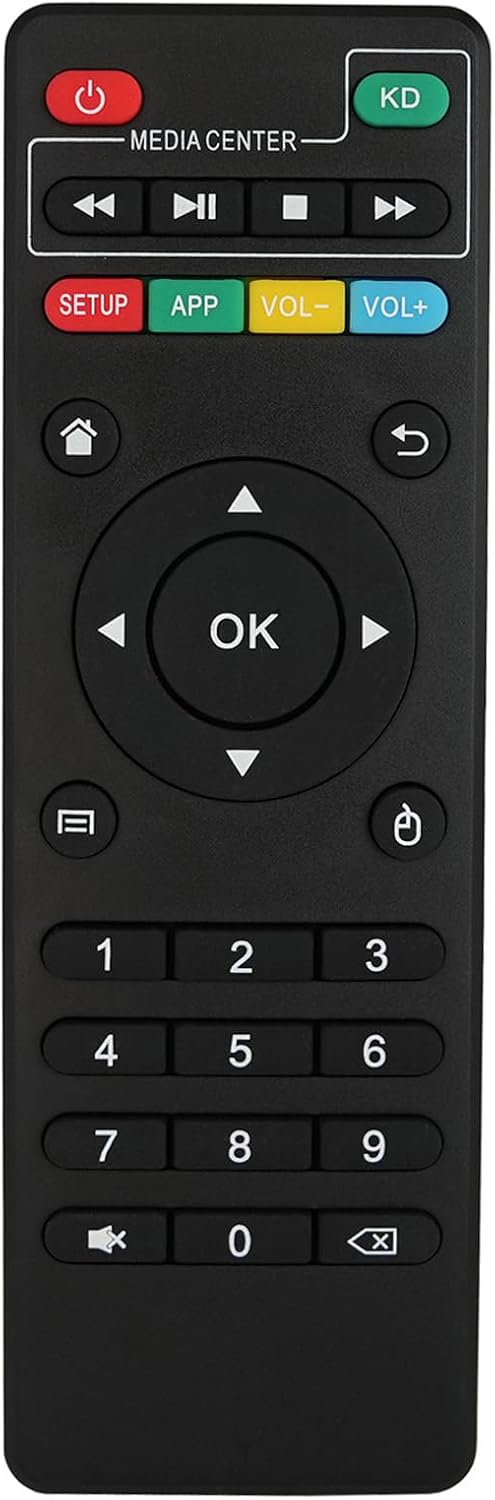
Figure 2.1: Front View of the Remote Control. This image displays the front of the black remote control, showing all its buttons including power, media playback controls, navigation pad with OK button, volume controls, app and setup buttons, and a numeric keypad.
Key Features:
- Durable: Constructed with robust materials for longevity.
- Strong Signal: Ensures reliable communication with your device.
- Soft Button: Provides a comfortable tactile experience.
- ABS Material: Made from high-quality ABS plastic.

Figure 2.2: Remote Control Features. This graphic highlights the main features of the remote: Durable, Strong Signal, Soft Button, and ABS Material, with corresponding icons.
3. Setup
3.1 Battery Installation
The remote control requires two AAA batteries (not included) for operation. Follow these steps to install them:
- Locate the battery compartment on the back of the remote control.
- Slide the battery cover downwards to open it.
- Insert two AAA batteries, ensuring the positive (+) and negative (-) terminals align correctly with the markings inside the compartment.
- Slide the battery cover back into place until it clicks securely.

Figure 3.1: Back View with Battery Compartment. This image shows the rear of the remote control, highlighting the battery compartment cover with an "OPEN" indicator.

Figure 3.2: Battery Installation. This image illustrates the open battery compartment with two AAA batteries being inserted, showing the correct polarity markings.
3.2 Initial Use
This remote control is pre-programmed and does not require any additional setup or pairing for compatible devices. Once batteries are installed, it is ready for immediate use.

Figure 3.3: Ready for Use. A hand holds the remote control, with a graphic overlay indicating a strong signal, signifying that no programming is needed.
4. Operating Instructions
Point the remote control directly at your Android TV Box. Ensure there are no obstructions between the remote and the device for optimal performance.
4.1 Button Functions
| Button | Function |
|---|---|
| Power (Red) | Turns the Android TV Box on or off. |
| KD (Green) | Launches the KODI application. |
| Media Center Controls | Play, Pause, Stop, Fast Forward, Rewind. |
| SETUP (Red) | Accesses device settings. |
| APP (Green) | Opens the applications menu. |
| VOL- / VOL+ (Yellow/Blue) | Adjusts volume down or up. |
| Home | Returns to the home screen. |
| Return | Goes back to the previous screen or menu. |
| Navigation Pad (Up, Down, Left, Right) | Navigates through menus and selections. |
| OK | Confirms selection. |
| Menu | Opens context-sensitive menus. |
| Mouse Cursor | Activates/deactivates mouse cursor mode (if supported by device). |
| Numeric Keypad (0-9) | Enters numbers or selects channels. |
| Mute | Mutes or unmutes audio. |
| Delete/Back | Deletes characters or acts as a backspace. |
5. Compatibility
This remote control is compatible with a range of Android TV Boxes featuring Amlogic S805 & S905 chipsets. Compatible models include:
- MXQ
- MXQ PRO
- MXQ-4K
- MBOX
- X96
- X96 Mini
- H96
- H96 PRO+
- M8
- M8C
- M8N
- M9C
- M10
- T95M
- T95N
- T95X
- MX9
Important Note: This remote control is NOT compatible with H96 Plus or other TV Box models using chipsets such as RK3368, S812, etc. It is also not compatible with other MXQ boxes not listed above.
6. Maintenance
- Keep the remote control clean by wiping it with a soft, dry cloth.
- Avoid exposing the remote to extreme temperatures, humidity, or direct sunlight.
- Do not drop or subject the remote to strong impacts.
- If the remote will not be used for an extended period, remove the batteries to prevent leakage.
7. Troubleshooting
| Problem | Possible Cause / Solution |
|---|---|
| Remote not responding. |
|
| Some buttons not working. |
|
| Remote works intermittently. |
|
8. Specifications
| Feature | Detail |
|---|---|
| Brand | Kassionel |
| Model Name | X96 |
| Color | Black |
| Connectivity Technology | Infrared (IR) |
| Number of Buttons | 25 |
| Maximum Range | 10 Meters |
| Battery Type | 2 x AAA batteries (not included) |
| Item Weight | 40 Grams |
| Dimensions (L x W x H) | 5.47"L x 1.73"W x 0.6"H |
| Special Feature | No programming needed, works out of the package |
9. Product Video
Watch this official product video for a visual overview of the Kassionel X96 Mini Remote Control, demonstrating its design and features.
Video 9.1: Replacement X96 Mini Remote for MXQ Pro Android TV Box. This video provides a detailed look at the remote control, showcasing its physical appearance, button layout, and battery compartment. It highlights the ease of use and ready-to-work functionality.
10. Warranty and Support
The Kassionel X96 Mini Remote Control comes with a 1-year warranty from the date of purchase. This warranty covers manufacturing defects and malfunctions under normal use.
For technical support, troubleshooting assistance, or warranty claims, please contact Kassionel customer service through the retailer where the product was purchased. Please have your purchase receipt and product model information ready.