
1. Introduction
Thank you for choosing the FLYLINKTECH CF800 Car Jump Starter. This device is a powerful and versatile portable power solution designed to jump start 12V vehicles, charge electronic devices, and provide emergency lighting. With a 3000A peak current and 20000mAh capacity, it can start gasoline engines up to 10.0L and diesel engines up to 9.0L, making it suitable for cars, trucks, SUVs, motorcycles, and more.
Please read this manual carefully before using the product to ensure safe and effective operation. Keep this manual for future reference.
2. Safety Instructions
Always observe the following safety precautions to prevent injury or damage to the device and vehicle.
- Do not attempt to jump start a vehicle if the jump starter's battery level is below 25%.
- Do not use the jump starter if the cables or clamps are damaged.
- Do not connect the positive and negative clamps together.
- Do not expose the product to extreme temperatures (above 60°C or below -20°C) or direct sunlight for extended periods.
- Keep out of reach of children.
- Remove the jump starter from the vehicle battery within 30 seconds after the vehicle starts.
- Ensure proper ventilation during use.
Integrated Safety Protections:
The smart jumper cables are equipped with an LCD display and multiple safety features to ensure safe operation:
- Low Voltage Protection: Activates if voltage drops below 14.0V ± 0.5V.
- Reverse Polarity Protection: Prevents damage if clamps are connected incorrectly.
- Reverse Charge Protection: Protects against current flowing back into the jump starter.
- Short Circuit Protection: Automatically shuts off in case of a short circuit.
- Overheat Protection: Prevents damage from excessive temperature.
- High Voltage Protection: Activates if voltage exceeds 17.5V ± 0.5V.
- Overcharge Protection: Prevents battery damage from overcharging.
- Over-discharge Protection: Protects the battery from being fully drained.
- Reverse Connection Protection: Visual and audible warnings for incorrect connections.

Image: Smart clamp with digital display illustrating various safety protections like low voltage, reverse polarity, short circuit, and overheat protection.
3. Package Contents
Please check the package for the following items:
- FLYLINKTECH CF800 Lithium Jump Starter
- Smart Jumper Cables with LCD Display
- USB to Type-C Charging Cable
- 12V DC Car Charger Cable
- User Guide
- EVA Carrying Case

Image: An illustration of the FLYLINKTECH CF800 jump starter, smart clamps, USB-C cable, DC cable, user manual, and EVA carrying case.
4. Product Overview
The FLYLINKTECH CF800 features a compact design with multiple functionalities:
- Main Unit: Houses the 20000mAh battery, power button, LED indicator lights, and various ports.
- Smart Jumper Cables: Connects to the main unit and vehicle battery. Features an integrated LCD display for real-time voltage readings and safety status.
- Type-C Input Port: For charging the jump starter.
- USB Output Ports (x2): For charging external electronic devices (one with Quick Charge 3.0).
- 12V DC Output Port: For connecting 12V accessories.
- LED Flashlight: Multi-mode flashlight for illumination and emergency signaling.

Image: The FLYLINKTECH CF800 jump starter unit with its smart clamps connected to a car battery, highlighting its powerful 3000A capability and compatibility with various engine types.
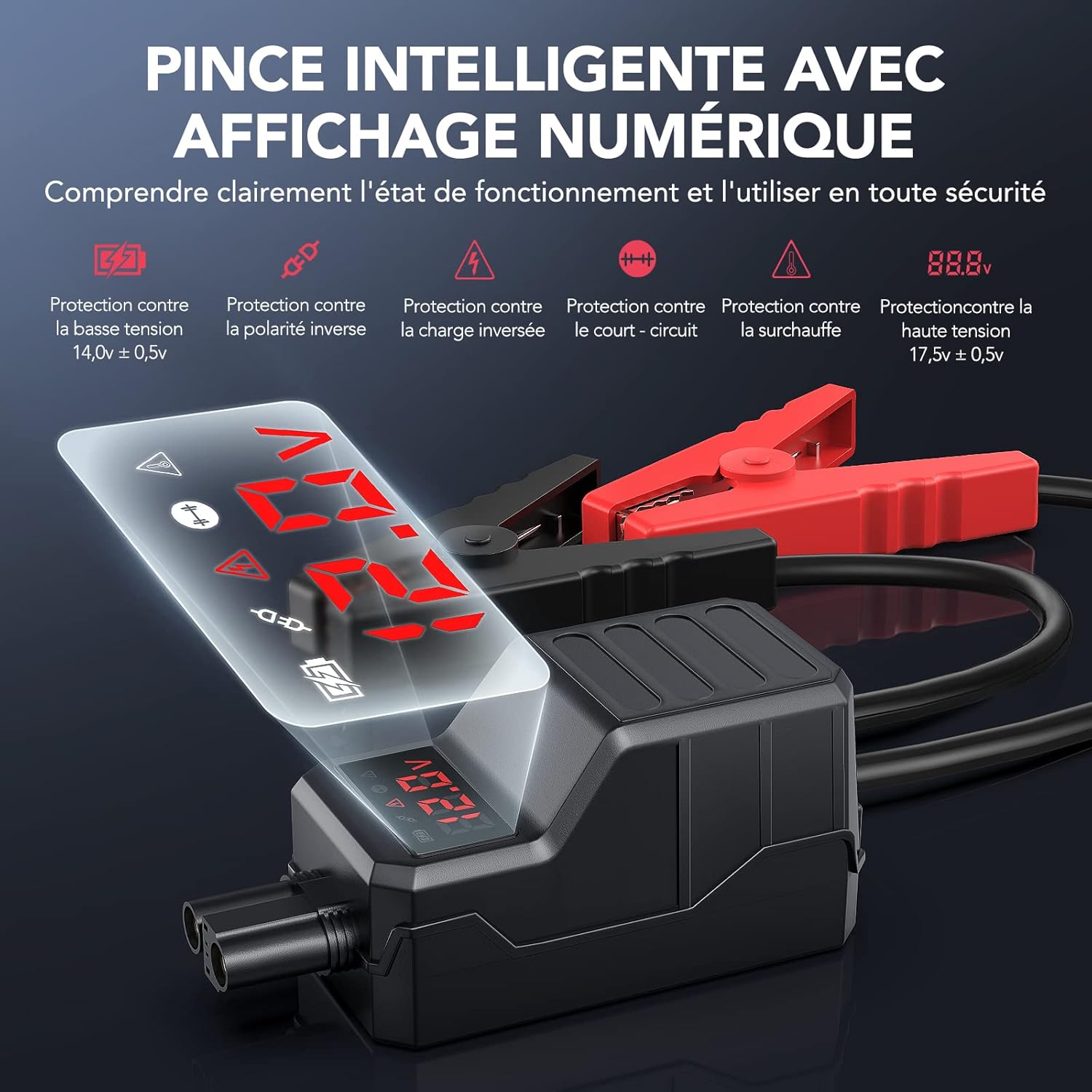
Image: A detailed view of the smart jumper cable clamp, featuring an LCD screen that displays real-time voltage and protection status indicators.
5. Charging the Jump Starter
Before first use, fully charge the jump starter. It is recommended to recharge the unit every 3-6 months to maintain battery health, even if not used.
- Connect the provided USB to Type-C charging cable to the Type-C input port on the jump starter.
- Connect the other end of the USB cable to a 5V/2A or 9V/2A USB wall adapter (not included) or a car charger.
- The LED indicator lights on the jump starter will illuminate to show the charging progress. All four lights will be solid when fully charged.
- A full charge typically takes 3-4 hours.
6. Setup: Connecting to Vehicle Battery
Follow these steps to safely connect the jump starter to your vehicle's battery:
- Ensure the jump starter is sufficiently charged (at least 25% indicated by LED lights).
- Turn off your vehicle's ignition and all accessories (headlights, radio, etc.).
- Open the hood and locate your vehicle's battery.
- Insert the blue plug of the smart jumper cables into the jump starter's 12V output port. Ensure it is fully seated.
- Connect the red (+) positive clamp to the vehicle battery's positive (+) terminal.
- Connect the black (-) negative clamp to the vehicle battery's negative (-) terminal.
- Check the LCD display on the smart clamps. It should show the battery voltage and indicate a correct connection. If an error message or warning appears, disconnect the clamps and re-check the connections.

Image: A visual guide demonstrating the four steps to jump start a car: 1. Plug in the cable, 2. Connect clamps to the battery, 3. Start the engine, 4. Remove clamps.
7. Operating: Jump Starting Your Vehicle
Once the smart clamps are correctly connected and indicate a safe connection:
- Return to your vehicle and start the engine.
- If the engine does not start on the first attempt, wait for at least 30 seconds before trying again. Do not attempt more than three consecutive starts.
- Once the vehicle engine starts, immediately disconnect the black (-) negative clamp from the vehicle battery.
- Then, disconnect the red (+) positive clamp from the vehicle battery.
- Finally, unplug the smart jumper cables from the jump starter unit.
It is recommended to drive your vehicle for at least 15-20 minutes to allow the car's alternator to recharge its battery.
8. Using as a Portable Power Bank
The FLYLINKTECH CF800 can also serve as a portable power bank to charge your electronic devices.
- Connect your device's USB charging cable to one of the USB output ports on the jump starter. One port supports Quick Charge 3.0 for faster charging.
- The jump starter will automatically begin charging your device.
- The 20000mAh capacity allows for multiple charges of smartphones, tablets, cameras, and other USB-powered devices.

Image: The FLYLINKTECH CF800 unit connected via USB cables to a smartphone and a tablet, demonstrating its function as a 20000mAh portable power bank with Quick Charge 3.0 capability.
9. LED Flashlight Modes
The integrated LED flashlight offers multiple modes for various situations:
- Illumination Mode: Press and hold the power button for 3 seconds to turn on the flashlight.
- Strobe Mode: Briefly press the power button again to switch to strobe mode.
- SOS Mode: Briefly press the power button a third time to activate SOS signaling.
- Red/Blue Warning Strobe: Briefly press the power button a fourth time to activate the red/blue warning strobe.
- To turn off the flashlight, briefly press the power button again after the red/blue warning strobe, or press and hold the power button for 3 seconds in any mode.

Image: The FLYLINKTECH CF800 jump starter with its powerful LED flashlight active, illuminating a car's engine compartment, demonstrating its utility in low-light conditions.
Image: A graphic detailing the four LED lighting modes: Illumination (steady light), Strobe (flashing light), SOS (Morse code signal), and Warning Lights (alternating red/blue flash), along with instructions on how to activate each.
10. Maintenance
Proper maintenance ensures the longevity and performance of your jump starter.
- Storage: Store the jump starter in its EVA carrying case in a cool, dry place, away from direct sunlight and moisture.
- Charging: Recharge the unit every 3-6 months, even if not used, to prevent deep discharge and extend battery life.
- Cleaning: Wipe the unit with a soft, dry cloth. Do not use harsh chemicals or abrasive cleaners.
- Temperature: The device is designed to operate in extreme temperatures from -20°C to 50°C. However, for optimal battery life, avoid prolonged exposure to these extremes when not in use.
- Durability: The robust design provides resistance against drops and impacts, but avoid unnecessary rough handling.
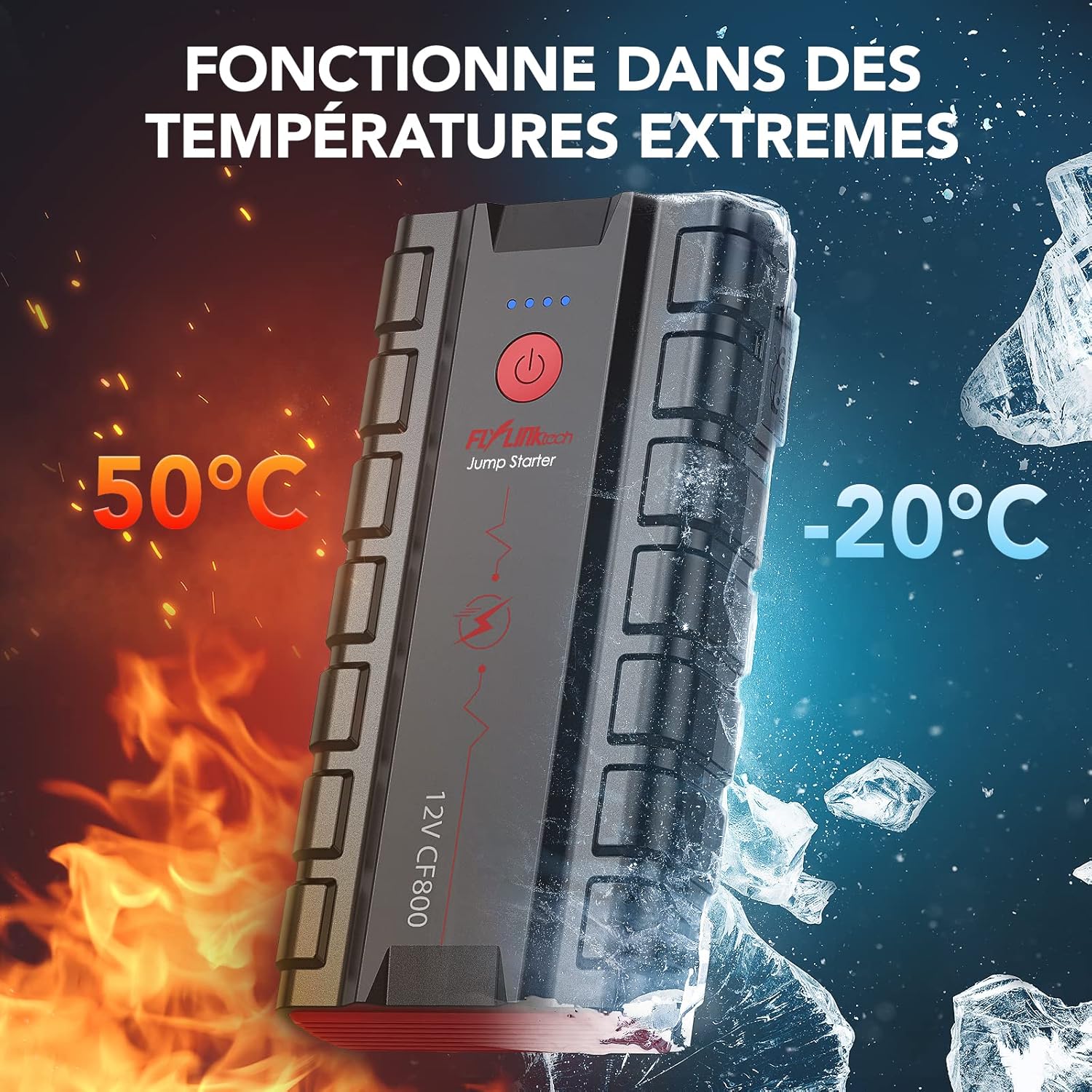
Image: The FLYLINKTECH CF800 jump starter depicted functioning reliably in both high heat (50°C) and extreme cold (-20°C) environments, highlighting its robust performance across various climates.

Image: The FLYLINKTECH CF800 jump starter is shown against a backdrop of cracked earth, illustrating its durable construction and resistance to drops and impacts.
11. Troubleshooting
If you encounter issues with your FLYLINKTECH CF800, refer to the following common problems and solutions:
- Jump Starter does not turn on:
Ensure the power button is pressed and held for a few seconds. If the battery is completely drained, charge the unit. - Vehicle does not start after connecting:
Check that the smart clamps are securely connected to the correct battery terminals (red to +, black to -). Ensure the jump starter has sufficient charge. Wait 30 seconds between attempts. If the vehicle battery is severely damaged, the jump starter may not be able to start it. - LCD display on clamps shows an error:
Refer to the specific error code or indicator on the LCD. Common errors include reverse polarity (reconnect clamps), low voltage (charge jump starter), or short circuit (check for damaged cables or incorrect connections). - Jump Starter is not charging:
Ensure the Type-C cable and wall adapter are working correctly. Try a different cable or adapter. Check that the Type-C cable is fully inserted into the jump starter's input port. - Electronic devices are not charging from USB ports:
Ensure the jump starter is turned on. Try a different USB cable or device.
If the problem persists, please contact customer support.
12. Specifications
| Feature | Specification |
|---|---|
| Brand | FLYLINKTECH |
| Model | CF800 |
| Peak Current | 3000A |
| Battery Capacity | 20000mAh |
| Vehicle Service Voltage | 12 Volts |
| Engine Compatibility (Gasoline) | Up to 10.0L |
| Engine Compatibility (Diesel) | Up to 9.0L |
| Battery Type | Lithium-ion Polymer |
| Type-C Input | 15W (5V/3A, 9V/2A) |
| USB Output 1 | QC3.0 (5V/3A, 9V/2A, 12V/1.5A) |
| USB Output 2 | 5V/2.4A |
| Operating Temperature | -20°C to 50°C (-4°F to 122°F) |
| Dimensions (L x W x H) | 17.8 x 8.8 x 3.8 cm (7.0 x 3.5 x 1.5 inches) |
| Weight | 1.14 kg (2.5 lbs) |

Image: The FLYLINKTECH CF800 jump starter displayed with its core specifications, including 3000A peak current, 20000mAh capacity, and compatibility with 10L gasoline and 9L diesel engines.
13. Warranty and Support
FLYLINKTECH provides professional after-sales service for its products. Your FLYLINKTECH CF800 jump starter comes with a standard warranty against manufacturing defects.
If you encounter any problems or have questions regarding the product, please do not hesitate to contact our customer service team. We are available 24/7 to assist you and resolve any issues as quickly as possible.
For support, please refer to the contact information provided in your product packaging or on the official FLYLINKTECH website.


