
1. Introduction
Thank you for choosing the CREWORKS Electric PCP Air Compressor Pump. This manual provides essential information for the safe and efficient operation, setup, and maintenance of your compressor. Please read this manual thoroughly before using the product and retain it for future reference.
This portable electric air compressor is designed to produce high pressures up to 4500 PSI (30 MPa / 300 BAR), featuring an adjustable auto-stop function for precise pressure control. It is suitable for various applications including filling PCP air rifles, paintball tanks, airsoft equipment, and for pressure leakage testing.
2. Safety Instructions
WARNING: Failure to follow these safety instructions may result in serious injury, property damage, or death.
- Cooling System: ALWAYS ensure the water cooling system is properly set up and functioning before starting the compressor. An external bucket of cooling water is required. NEVER operate the machine without adequate cooling water. Monitor the digital thermometer to prevent overheating.
- High Pressure: This compressor generates extremely high pressure. Always wear appropriate eye protection and ensure all connections are secure before operation. Never point the air outlet at yourself or others.
- Electrical Safety: Connect the compressor to a standard 110V 60Hz single-phase grounded outlet. Do not operate with damaged cords or plugs. Keep the compressor away from water and damp environments.
- Ventilation: Operate the compressor in a well-ventilated area to prevent heat buildup and ensure proper air intake.
- Children and Pets: Keep children and pets away from the compressor during operation.
- Maintenance: Perform maintenance only when the compressor is unplugged and depressurized. Refer to the maintenance section for proper procedures.
- Oil Level: Regularly check the oil level. Refill immediately if the level is low, using ISO VG46 or AW 46 lubricating oil.
3. Product Components
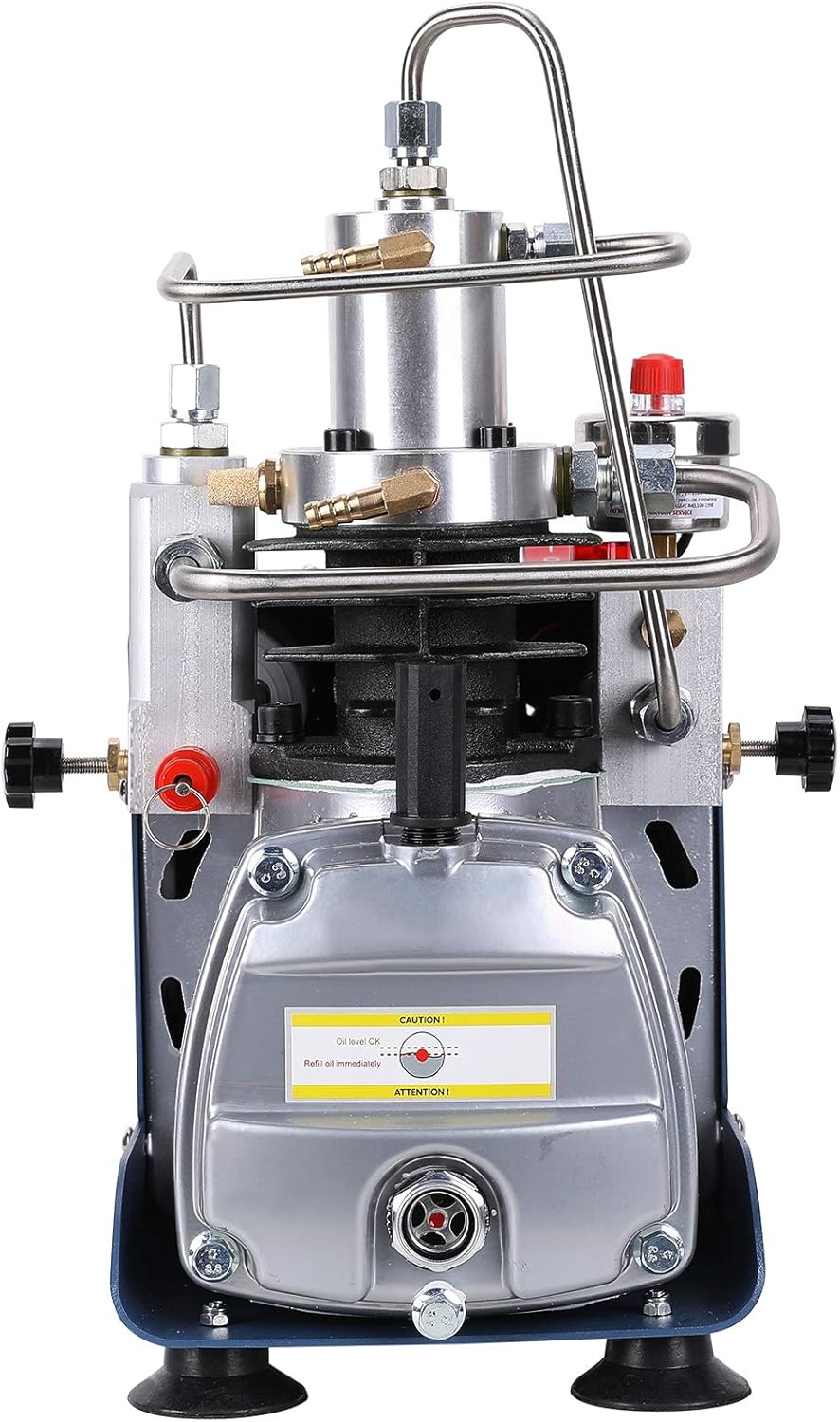
Familiarize yourself with the main components of your CREWORKS Electric PCP Air Compressor Pump:



4. Setup
Follow these steps for initial setup before operating the compressor:
- Unpacking and Inspection: Carefully remove the compressor from its packaging. Inspect for any visible damage during transit. Ensure all accessories (air hose, nozzles) are present.
- Cooling System Connection:
- Place an external bucket of clean water near the compressor.
- Connect the water inlet hose to the compressor's water inlet port and submerge the other end into the bucket.
- Connect the water outlet hose to the compressor's water outlet port and submerge the other end into the bucket, ensuring proper circulation.
- Ensure the water pump (if external) is ready for operation or that the self-contained cooling system is filled and ready.
- Check Oil Level: Locate the oil level sight glass (refer to Figure 3.2). The oil level should be between the minimum and maximum marks. If low, add ISO VG46 or AW 46 lubricating oil through the respirator (refueling hole) until the correct level is reached.
- Connect Air Hose: Attach the 8mm air hose connector with the quick-connect fitting to the desired tank or device you intend to fill. Ensure a secure, leak-free connection.
- Power Connection: Plug the compressor's power cord into a standard 110V 60Hz grounded electrical outlet.
5. Operating Instructions
Once setup is complete, follow these steps to operate your compressor:
- Set Desired Pressure: Rotate the knob on the adjustable pressure gauge (Figure 3.4) to set your target pressure. The compressor will automatically stop when this pressure is reached. The maximum pre-set pressure is 30 MPa (4500 PSI).
- Start Cooling System: If using an external water pump, activate it to ensure water circulation. If the system is self-contained, ensure it is ready.
- Start Compressor: Flip the power switch to the 'ON' position. The compressor will begin to fill the connected tank.
- Monitor Operation:
- Continuously monitor the pressure gauge to observe the filling progress.
- Observe the digital thermometer to ensure the compressor's temperature remains within safe operating limits. If the temperature rises too high, stop the compressor immediately and allow it to cool.
- Listen for any unusual noises or signs of leakage.
- Auto-Stop Function: The compressor will automatically shut off once the pre-set pressure is achieved.
- Shut Down:
- Turn off the compressor power switch.
- Depressurize the system by slowly opening the pressure relief screw.
- Disconnect the air hose from the tank.
- Turn off the cooling system.
6. Maintenance
Regular maintenance ensures the longevity and optimal performance of your compressor.
- Oil Change/Refill: Check the oil level before each use. Change the oil every 20-30 hours of operation or every 3 months, whichever comes first. Use ISO VG46 or AW 46 lubricating oil. To change, drain old oil from the oil outlet and refill through the respirator.
- Cooling Water: Replace cooling water regularly, especially if it appears dirty or discolored. Ensure the cooling system is free from blockages.
- Cleaning: Keep the exterior of the compressor clean and free of dust and debris. Use a dry cloth. Do not use harsh chemicals or solvents.
- Air Filter: Inspect and clean or replace the air filter as needed to ensure clean air intake.
- Storage: When not in use, store the compressor in a dry, cool place, away from direct sunlight and moisture.
7. Troubleshooting
Refer to this section for common issues and their solutions.
| Problem | Possible Cause | Solution |
|---|---|---|
| Compressor does not start | No power; Power switch off; Thermal overload activated | Check power connection; Turn on power switch; Allow compressor to cool down and reset. |
| Compressor overheats | Insufficient cooling water; Blocked water circulation; Prolonged operation | Ensure adequate cooling water and circulation; Check for blockages; Allow compressor to cool; Do not operate continuously for extended periods. |
| Not reaching desired pressure | Air leak in connections; Pressure gauge setting too low; Worn piston rings | Check all hose connections for leaks; Adjust pressure gauge setting; Contact customer support for service. |
| Excessive noise or vibration | Loose components; Insufficient oil; Unit not on a stable surface | Inspect and tighten all fasteners; Check and refill oil; Place compressor on a firm, level surface. |
8. Specifications
Key technical specifications for the CREWORKS Electric PCP Air Compressor Pump (Model SX-HPA3LSPUS):
| Feature | Specification |
|---|---|
| Brand | CREWORKS |
| Model Number | SX-HPA3LSPUS |
| Voltage | 110 Volts |
| Power Source | Corded Electric |
| Power | 1.80 KW |
| Max Pressure | 4500 PSI / 30 MPa / 300 BAR |
| Working Capacity | 50 L/min |
| Charging Rate | 40-50 L/min (1.5 - 1.8 CFM) |
| Noise Level | Under 78 dB |
| Lubricating Oil | ISO VG46 or AW 46 |
| Item Weight | 45.6 pounds (approx. 18 kg) |
| Package Dimensions | 19 x 18.5 x 12 inches |
| Special Feature | Adjustable Control with Auto-Stop |
| Included Components | Air Hose, Nozzles |
9. Warranty and Support
This CREWORKS Electric PCP Air Compressor Pump comes with a 1-Year Warranty from the date of purchase, covering manufacturing defects.
For technical support, warranty claims, or replacement parts, please contact CREWORKS customer service. Please have your model number (SX-HPA3LSPUS) and purchase information ready when contacting support.
Contact Information:
Please refer to the contact details provided with your product packaging or visit the official CREWORKS website for the most up-to-date support information.