
UNIWEIGH P-200
Contents
UNIWEIGH Digital Pocket Scale P-200 User Manual
Model: P-200
Brand: UNIWEIGH
Introduction
This user manual provides detailed instructions for the UNIWEIGH Digital Pocket Scale P-200. This precision instrument is designed for accurate weighing of small items, offering multiple units of measurement and convenient features for various applications.
Product Features
- Precise & Accurate: Equipped with high-precision sensors, providing instant and accurate weight readings from 0.03g to 200g.
- Multiple Units: Supports 6 measurement units: Grams (g), Ounces (oz), Grains (gn), Carats (ct), Pennyweight (dwt), and Troy ounces (ozt).
- Portable Mini Design: Features a rubberized clamshell case for durability and protection, making it ideal for travel and on-the-go use.
- Clear LCD Display: An orange backlight ensures digits are easy to read in various lighting conditions.
- Smart Functions: Includes Tare function for container weight subtraction, one-click calibration, smart auto-off after 180 seconds of inactivity, overload protection, and low battery indication.
- Versatile Use: Suitable for weighing a wide range of items such as food ingredients, nutrition supplements, baking spices, tea leaves, pills, gold, jewelry, coins, and other small items.

Image: Key features of the UNIWEIGH Digital Pocket Scale, including its protective flip case, magnetic closure, easy-to-clean surface, clear LCD display, and simple controls.
Setup
Battery Installation
The scale requires 2 AAA batteries (included). To install:
- Open the battery compartment located on the underside of the scale.
- Insert the 2 AAA batteries, ensuring correct polarity (+/-).
- Close the battery compartment securely.
Initial Power On
Place the scale on a flat, stable surface. Press the ON/OFF button to turn on the scale. The display will show "88888" and then "0.00g" when ready for use.
Operating Instructions
Weighing
- Place the scale on a hard, flat, and stable surface.
- Press the ON/OFF button to turn on the scale.
- Wait for the display to show "0.00g".
- Gently place the item(s) to be weighed onto the center of the weighing platform.
- Read the stable weight displayed on the LCD screen.
Tare Function (Zeroing a Container)
The Tare function allows you to subtract the weight of a container, so you only measure the net weight of its contents.
- Place an empty container on the weighing platform.
- Press the TARE button. The display will reset to "0.00g".
- Add the items you wish to weigh into the container. The display will show only the weight of the added items.

Image: Step-by-step guide on using the tare function to measure items within a container, ensuring only the net weight is displayed.
Unit Conversion
To switch between the 6 available measurement units:
- With the scale on, press the MODE button repeatedly.
- The display will cycle through the units: g (grams), oz (ounces), ozt (troy ounces), dwt (pennyweight), ct (carats), gn (grains).
- Stop pressing the button when your desired unit is displayed.

Image: Visual representation of the six measurement units available on the scale and how they are displayed on the LCD.
Calibration
Calibration ensures the accuracy of your scale. It is recommended to calibrate the scale regularly or if you notice inconsistencies in readings. A 50g calibration weight is included.
- Turn the scale ON and wait for "0.00g" to appear.
- Press and hold the MODE button until "CAL" appears, then release.
- The display will then flash the required calibration weight (e.g., "50.00g").
- Place the included 50g calibration weight onto the center of the weighing platform.
- The display will show "PASS" and then return to normal weighing mode ("0.00g"). Calibration is complete.
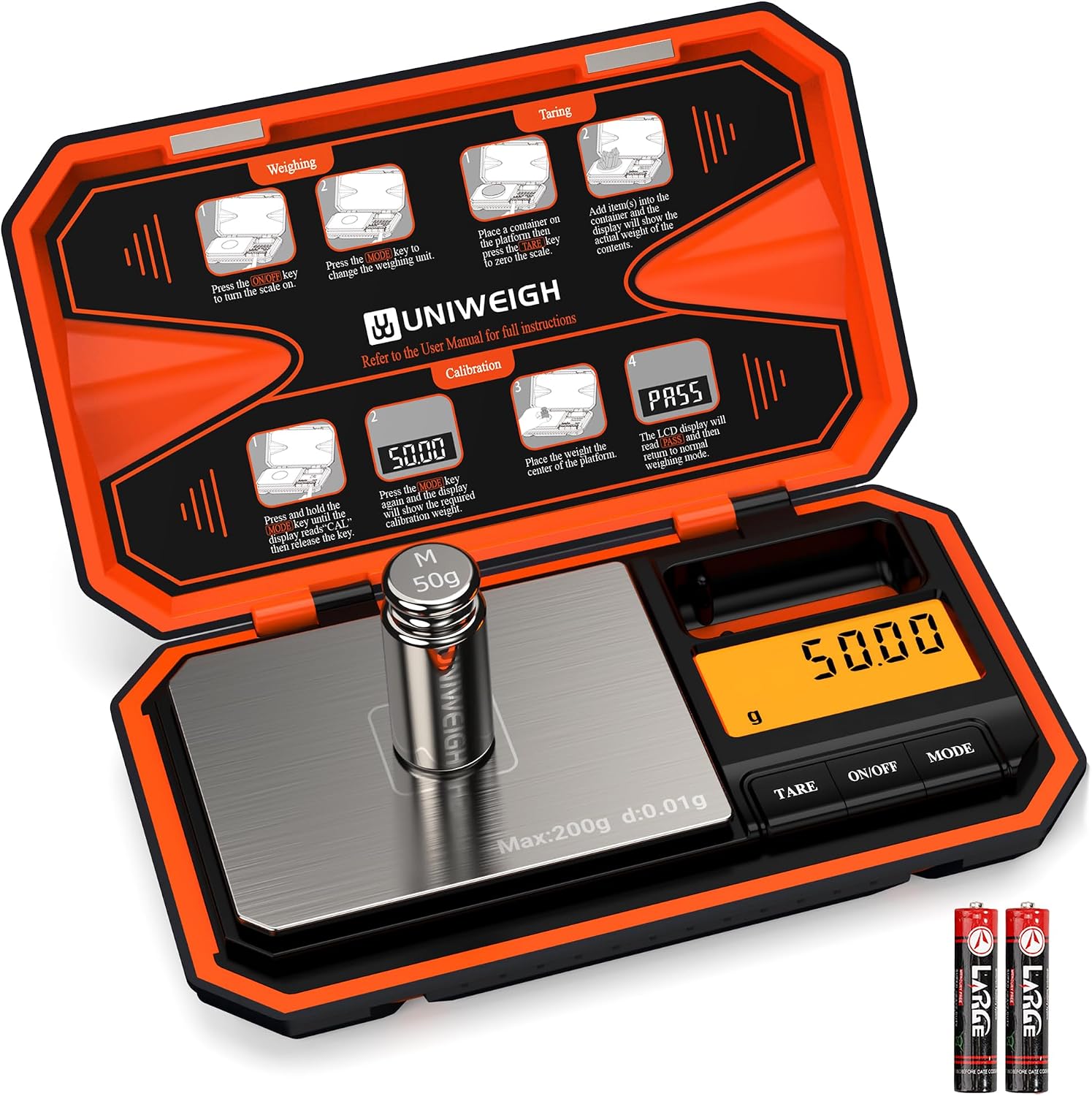
Image: The UNIWEIGH scale with its 50g calibration weight, illustrating the process of calibration as shown on the scale's protective lid.
Video: An official product video demonstrating the features and operation of the UNIWEIGH Digital Pocket Scale, including unit conversion and calibration.
Maintenance
- Cleaning: Wipe the scale with a slightly damp cloth. Do not immerse the scale in water or use abrasive cleaners.
- Storage: Store the scale in a clean, dry place. The protective clamshell case helps prevent damage. Avoid extreme temperatures and humidity.
- Battery Replacement: Replace batteries when the low battery indicator appears on the display to ensure accurate readings.
Troubleshooting
| Problem | Possible Cause | Solution |
|---|---|---|
| Display shows "Lo" | Low battery. | Replace the 2 AAA batteries. |
| Display shows "O-Ld" | Overload. Weight exceeds maximum capacity. | Remove the item immediately to prevent damage. Do not exceed 200g. |
| Inaccurate readings | Scale not on a stable surface, needs calibration, or temperature fluctuations. | Place on a flat, stable surface. Perform calibration. Allow scale to acclimate to room temperature. |
| Scale does not turn on | Batteries incorrectly installed or dead. | Check battery polarity or replace batteries. |
Specifications
| Attribute | Detail |
|---|---|
| Brand | UNIWEIGH |
| Model Number | P-200 |
| Color | Orange |
| Weight Limit | 200 Grams |
| Readout Accuracy | 0.01 Grams |
| Measurement Units | g, oz, gn, ct, dwt, ozt |
| Display Type | LCD with Backlight |
| Special Features | Auto Shut Off, Tare Function, Easy Calibration, Portable |
| Material | Stainless Steel, Acrylonitrile Butadiene Styrene (ABS), Rubber |
| Product Dimensions | 5.71 x 3.43 x 0.94 inches |
| Item Weight | 7.9 ounces (225 Grams) |
| Batteries | 2 x AAA batteries (included) |
| Recommended Uses | Food, Coins, Jewelry, Herbs, Powder, Small Items |

Image: Dimensions of the UNIWEIGH Digital Pocket Scale, emphasizing its compact and portable design.

Image: Examples of diverse items that can be accurately weighed using the UNIWEIGH Digital Pocket Scale, from culinary ingredients to precious metals and collectibles.
Warranty and Support
For specific warranty information and customer support, please refer to the documentation included with your product or visit the official UNIWEIGH website. The product typically includes a user manual with detailed warranty terms.
Ask a question about this manual
Ask about setup, troubleshooting, compatibility, parts, safety, or missing instructions. Manuals+ will review the question and use this page’s manual context to help answer it.