
Introduction
The Garmin Fenix 7 is a rugged multisport GPS smartwatch designed for athletic and outdoor challenges. It features advanced training tools, comprehensive health monitoring, and robust navigation capabilities. This manual provides essential information for setting up, operating, and maintaining your device.
What's in the Box
- Garmin Fenix 7 series watch
- Charging/data cable
- Documentation
Device Overview
The Fenix 7 features a durable design with a 1.3-inch display, combining traditional button controls with a responsive touchscreen interface.
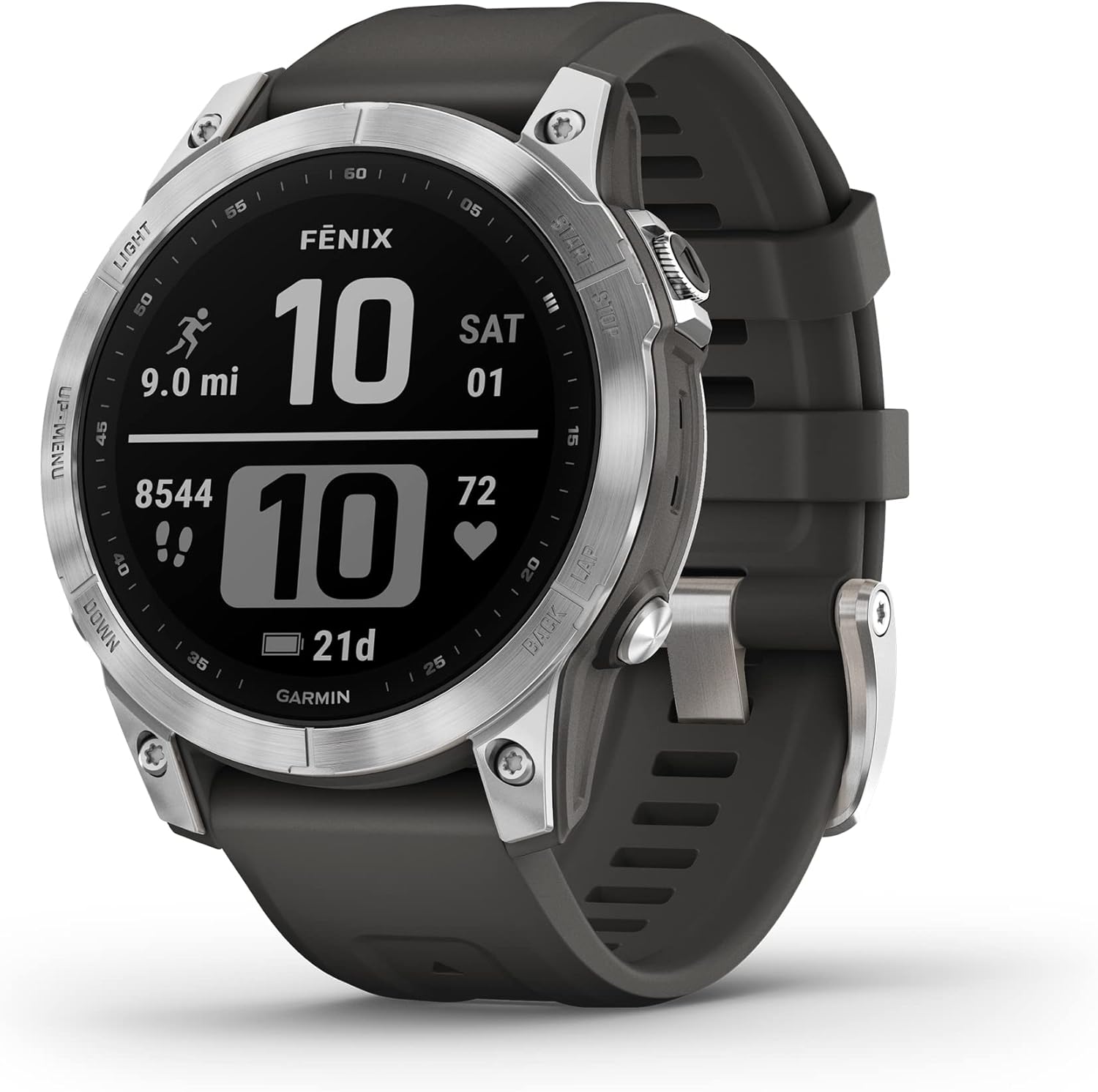
Image: Front view of the Garmin Fenix 7 smartwatch, displaying current time, distance, steps, and heart rate data.
Buttons and Touchscreen
The Fenix 7 offers dual interaction methods for navigation and control:
- LIGHT: Press to turn the backlight on or off. Hold to access the controls menu.
- UP/MENU: Press to scroll through widgets and data screens. Hold to access the main menu.
- DOWN: Press to scroll through widgets and data screens. Hold to access music controls.
- START/STOP: Press to initiate or conclude an activity. Press to select an option within a menu.
- BACK/LAP: Press to return to the previous screen. Press to record a lap during an active session.
Setup
Charging the Device
Connect the charging/data cable to the charging port located on the back of the watch and then to a USB power source. The battery icon on the display will indicate the charging status.
Initial Device Setup
- Power on the device by holding the LIGHT button.
- Follow the on-screen instructions to configure your language, units of measure, and personal data.
- Pair your device with the Garmin Connect app on your compatible smartphone to enable full functionality.
Pairing with a Smartphone
To pair your Fenix 7 with the Garmin Connect app, follow these steps:
- Download and install the Garmin Connect app from your smartphone's app store.
- Open the Garmin Connect app and either create an account or sign in.
- In the app, select Garmin Devices, then Add Device.
- On your Fenix 7, hold the UP/MENU button, then navigate to Settings > Phone > Pair Phone.
- Follow the on-screen instructions on both your watch and smartphone to complete the pairing process.
Operating Instructions
Activity Tracking
The Fenix 7 tracks various activities and performance metrics.

Image: The Fenix 7 display showing 'Training Status: Productive,' a 5k goal with a time, and sleep duration.
Starting an Activity
- From the watch face, press the START/STOP button.
- Select an activity from the displayed list (e.g., Run, Bike, Swim).
- Wait for GPS signal acquisition, if the activity requires it.
- Press START/STOP again to commence the activity.
Ending an Activity
- During an activity, press the START/STOP button.
- Select Save to store the activity data, or Discard to delete it.
Health and Wellness Monitoring
The device provides continuous health monitoring features:
- Wrist-based Heart Rate: Monitors your heart rate throughout the day and during activities.
- Pulse Ox: Measures blood oxygen saturation levels (availability may vary by region).
- Stress Tracking: Analyzes heart rate variability to provide an estimation of your current stress levels.
- Sleep Tracking: Monitors sleep stages and provides a comprehensive sleep score.
Note: This device is intended to provide an estimation of your activity and metrics; it is not a medical device.
GPS and Navigation
The Fenix 7 supports multi-GNSS satellite systems (GPS, GLONASS, and Galileo) for enhanced tracking accuracy.
- ABC Sensors: Includes an altimeter for elevation data, a barometer to monitor weather changes, and a 3-axis electronic compass for orientation.
- Maps: Features preloaded maps for thousands of golf courses and ski resorts. TopoActive maps can be downloaded for various regions to aid exploration.
- Up Ahead Feature: Provides awareness of selected points of interest (POIs) ahead, including performance metrics and key trail points.
Smart Features
- Smart Notifications: Receive emails, text messages, and alerts directly on your watch when paired with a compatible smartphone.
- Music Storage: Download songs and playlists from compatible music services (a subscription may be required).
- Garmin Pay: Utilize the contactless payment solution through participating providers.
- Connect IQ Store: Customize your watch with downloadable watch faces, data fields, applications, and widgets.
Maintenance
Device Care
- Clean the device regularly using a soft, damp cloth.
- Avoid the use of harsh chemicals or abrasive cleaning agents.
- Rinse the device with fresh water after exposure to chlorine, saltwater, sunscreen, cosmetics, alcohol, or other harsh chemicals.
- Ensure the device is completely dry before charging or connecting it to a computer.
Battery Information
The Fenix 7 offers extended battery life, varying by usage mode:
- Up to 18 days in smartwatch mode.
- Up to 57 hours in GPS mode.
- Up to 40 days in Expedition mode.

Image: The Fenix 7 display showing 'Power Modes' with options like 'Max. Battery' (33 hours full charge, Multi-GNSS) and 'Jacket Mode' (29 hours full charge, GNSS).
Troubleshooting
Device Not Turning On
Ensure the device is fully charged. Connect it to the charging cable and a power source for at least 30 minutes.
GPS Signal Issues
Ensure you are in an open area with a clear view of the sky. Sync your device with the Garmin Connect app to update satellite data.
Inaccurate Heart Rate Data
Ensure the watch is worn snugly but comfortably above your wrist bone. Clean the optical heart rate sensor on the back of the device.
Touchscreen Unresponsive
Ensure the screen is clean and dry. If the issue persists, try restarting the device.
Device Not Connecting to Phone
Ensure Bluetooth is enabled on both your phone and the Fenix 7. Try unpairing and re-pairing the device through the Garmin Connect app.
Specifications
| Feature | Detail |
|---|---|
| Product Dimensions | 1.85 x 1.85 x 0.57 inches |
| Item Weight | 10.4 ounces |
| Model Number | 010-02540-00 |
| Batteries | 1 Lithium Ion battery (included) |
| Operating System | Android (compatible) |
| Connectivity | Bluetooth, USB |
| GPS | GPS Enabled (Multi-GNSS) |
| Display Size | 1.3 Inches |
| Display Resolution | 260 x 260 pixels |
| Human Interface Input | Buttons, Touchscreen |
| Water Resistance | Tested to U.S. military standards for thermal, shock and water resistance |
Warranty and Support
Warranty Information
Garmin products are typically covered by a limited warranty. For specific warranty terms and conditions, please refer to the documentation included with your device or visit the official Garmin website.
Customer Support
For additional assistance, product registration, or to access FAQs and support resources, please visit the Garmin support website or contact Garmin customer service.
You can find more information and support at the official Garmin website: www.garmin.com/support