
Introduction
The CoComelon Learning Steering Wheel is an interactive toy designed to engage young children in a fun learning adventure. Inspired by the popular CoComelon series, this toy helps preschoolers develop essential skills through pretend play, sounds, lights, and music. It features multiple learning modes to introduce letters, numbers, fine motor skills, color recognition, and imaginative play.
What's in the Box
- CoComelon Learning Steering Wheel Console
- 2 x AA Batteries (pre-installed)
Setup
Battery Installation
The CoComelon Learning Steering Wheel requires 2 x AA batteries. These batteries are included and pre-installed. If replacement is needed:
- Locate the battery compartment on the underside of the toy.
- Using a Phillips head screwdriver, loosen the screw and open the battery compartment cover.
- Remove the old batteries and insert 2 new AA batteries, ensuring correct polarity (+/-).
- Replace the cover and tighten the screw.

Image: Underside of the CoComelon Learning Steering Wheel, highlighting the battery compartment.
Powering On/Off
To turn the toy on or off, locate the key switch on the right side of the steering wheel console. Turn the key to the 'ON' position to activate the toy and to the 'OFF' position to conserve battery life.
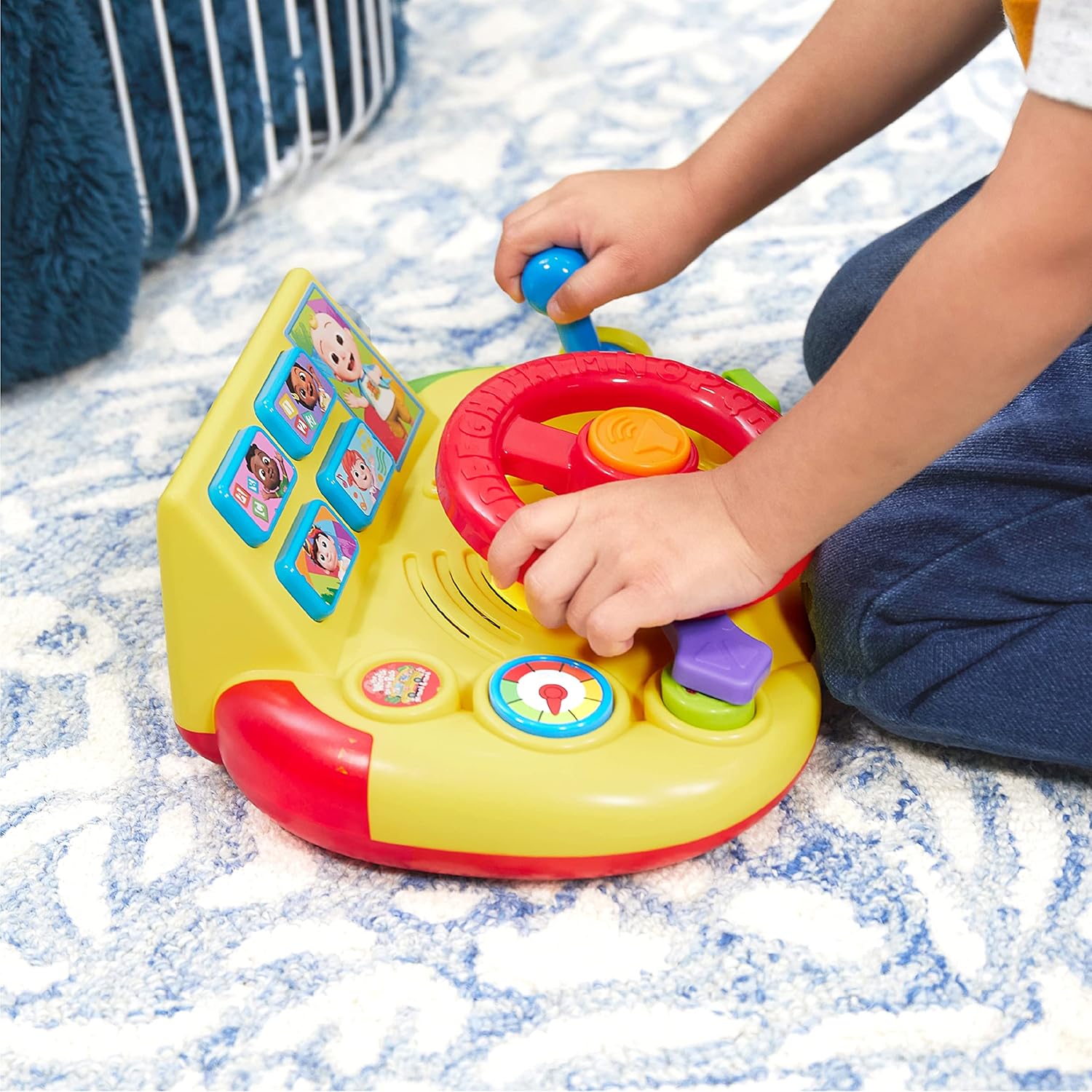
Image: A child's hands interacting with the CoComelon Learning Steering Wheel, demonstrating its use.
Operating Instructions
The CoComelon Learning Steering Wheel offers various interactive features and learning modes:
Controls Overview
- Steering Wheel: Twist the red steering wheel to activate driving sounds and phrases.
- Horn Button: Press the orange button in the center of the steering wheel to honk the horn.
- Gear Shift: Move the blue gear shift lever up and down to hear engine sounds and phrases.
- Turn Signals: Use the purple and green levers on either side of the steering wheel to activate left and right turn signal sounds and lights.
- Character Buttons: Press the four character buttons at the top of the console to switch between learning modes and hear specific phrases.
- Music Button: Press the button with musical notes to play the 'Wheels on the Bus' song.

Image: The CoComelon Learning Steering Wheel with lights flashing and musical notes indicating the 'Wheels on the Bus' song.
Learning Modes
Select from 4 interactive learning modes by pressing the character buttons:
- ABC Mode: Learn letters and phonics.
- 1-2-3 Mode: Practice counting and number recognition.
- Music Mode: Enjoy melodies and songs, including 'Wheels on the Bus'.
- Eye Spy Mode: Engage in interactive games that encourage color recognition and observation skills.

Image: A close-up view of the toy's display area, highlighting the four character buttons that activate different learning modes.
Lights and Sounds
The toy features over 60 learning phrases, sounds, and music. Red and green lights flash in sync with the audio, enhancing the interactive experience.
Video: Official product video demonstrating the various interactive features, sounds, and lights of the CoComelon Learning Steering Wheel.
Maintenance
Cleaning
To clean the toy, wipe it with a slightly damp cloth. Do not immerse the toy in water or use harsh cleaning agents.
Storage
Store the toy in a cool, dry place away from direct sunlight when not in use. Remove batteries if the toy will not be used for an extended period to prevent leakage.
Troubleshooting
No Sound or Lights
- Ensure the power switch is in the 'ON' position.
- Check the batteries. If they are low or depleted, replace them with fresh AA batteries.
- If the issue persists, try turning the toy off and then on again to reset it.
Safety Information
- May contain small pieces. Adult supervision is recommended.
- Recommended for children ages 18 months and up.
- Do not mix old and new batteries. Do not mix alkaline, standard (carbon-zinc), or rechargeable (nickel-cadmium) batteries.
Specifications
| Feature | Detail |
|---|---|
| Product Dimensions | 11 x 4.5 x 8.5 inches |
| Item Weight | 1.8 pounds |
| Batteries | 2 AA batteries (included) |
| Manufacturer Recommended Age | 18 months and up |
| Language | English |

Image: The CoComelon Learning Steering Wheel with a visual representation of its approximate 10-inch width.
Warranty and Support
For warranty information or customer support, please refer to the packaging or contact Just Play customer service directly. Contact details can typically be found on the product packaging or the manufacturer's official website.