
Introduction
This user manual provides essential information for the safe and effective operation of your Hubble Nursery Pal Essentials 2.8 inch Video Baby Monitor. Please read this manual thoroughly before using the product and retain it for future reference.
The Hubble Nursery Pal Essentials is designed to help you monitor your baby with a secure and private connection, offering features such as room temperature sensing, digital zoom, and two-way communication.
Product Components
The Hubble Nursery Pal Essentials 2.8 inch Video Baby Monitor system typically includes the following components:
- Parent Unit (2.8-inch color screen video monitor)
- Baby Unit (Camera with remote zoom, pan, and tilt)
- Power Adapters for Parent Unit and Baby Unit
- Quick Start Guide (not included in this manual)

Image: The Hubble Nursery Pal Essentials system, showing the parent unit (monitor), the baby unit (camera), and a smartphone screen displaying the HubbleClub app interface. This illustrates the complete monitoring solution.
Setup
1. Powering On the Units
- Connect the power adapter to the Baby Unit (camera) and plug it into a wall outlet.
- Connect the power adapter to the Parent Unit (monitor) and plug it into a wall outlet. The Parent Unit has an extended battery for portable use, but it should be charged before first use.
2. Positioning the Baby Unit (Camera)
Place the Baby Unit in a location that provides a clear view of your baby's crib or sleeping area. Ensure it is at least 1 meter (3 feet) away from the baby to prevent any cord hazards. The camera features remote zoom, pan, and tilt capabilities, allowing for flexible positioning.

Image: The 2.8-inch color screen parent unit and the baby unit (camera) positioned on a surface, demonstrating their compact size and design. The parent unit is shown displaying a live feed of a baby.
3. Initial Pairing (if necessary)
The Parent Unit and Baby Unit are typically pre-paired at the factory. If they do not connect automatically, refer to the troubleshooting section or the quick start guide for manual pairing instructions.
4. HubbleClub App Connection (Optional)
For enhanced features and remote monitoring, download the HubbleClub app on your smartphone. The app allows for secure Wi-Fi connection to the camera, enabling features like baby growth and development tracking, expert sleep advice, and parenting tips.
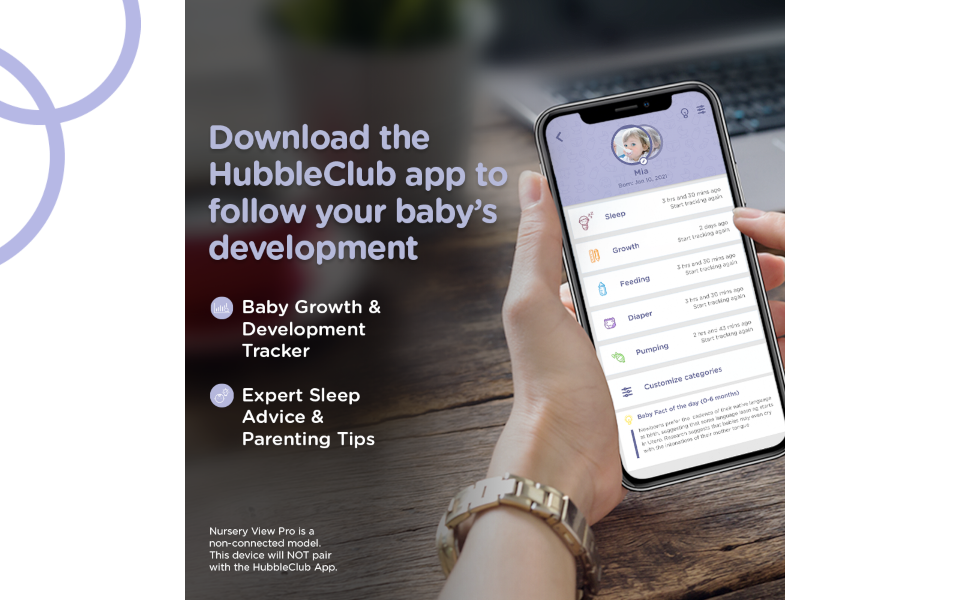
Image: A smartphone screen displaying the HubbleClub app interface, highlighting features such as Sleep, Growth, Feeding, and Diaper tracking. This image encourages users to download the app for comprehensive baby development tracking.
Operating Instructions
1. Parent Unit Overview
The 2.8-inch color screen on the Parent Unit displays the live video feed from the Baby Unit. Controls on the Parent Unit allow you to manage various functions.
- Volume Control: Adjust the audio level of your baby's sounds.
- Digital Zoom: Magnify the image on the screen for a closer look.
- Two-Way Talk: Press and hold the talk button to speak to your baby through the Baby Unit.
- Menu Navigation: Access settings for brightness, lullabies, and other features.

Image: An infographic displaying key features of the Hubble Nursery Pal Essentials, including visual sound level indicator, digital zoom, 300m (1000ft) range, inbuilt lullabies, and baby growth & development tracker with HubbleClub App. The parent unit and baby unit are shown in the background.
2. Monitoring Features
- Room Temperature Display: The Parent Unit displays the current room temperature detected by the Baby Unit, helping you ensure a comfortable environment for your baby.
- Infrared Night Vision: The Baby Unit automatically activates infrared night vision in low-light conditions, providing a clear black-and-white video feed of your baby even in complete darkness.
- Visual Sound Level Indicator: LED lights on the Parent Unit indicate the level of sound detected in your baby's room, even if the volume is turned down.
- Soothing Nature Sounds/Lullabies: The Baby Unit can play pre-programmed soothing nature sounds or lullabies to help calm your baby. These can be controlled from the Parent Unit or the HubbleClub app.
- 7-Color Night Light: The Baby Unit features an integrated 7-color night light, which can be adjusted to provide a gentle glow in the nursery.

Image: Hands holding the parent unit, which displays a live feed of a baby and an overlay showing the room temperature (21°C). This highlights the integrated room temperature sensor feature.

Image: The parent unit screen split into two halves, demonstrating the difference between daytime and infrared night vision. One side shows a baby in a well-lit room, and the other shows the same baby in a dark room using night vision.

Image: The baby unit (camera) with its base illuminated by a multi-colored light, indicating the 7-color night light feature. The camera is placed on a surface in a nursery setting.
Maintenance
Proper maintenance ensures the longevity and optimal performance of your baby monitor.
- Cleaning: Use a soft, dry cloth to clean the surfaces of the Parent Unit and Baby Unit. Do not use cleaning sprays or liquid cleaners.
- Battery Care: For the Parent Unit's rechargeable battery, avoid extreme temperatures. Fully charge the unit before long periods of inactivity.
- Storage: Store the monitor in a cool, dry place away from direct sunlight when not in use.
Troubleshooting
If you encounter issues with your Hubble Nursery Pal Essentials, refer to the following common problems and solutions:
| Problem | Possible Solution |
|---|---|
| No picture or sound on Parent Unit. |
|
| Picture is black and white. | This indicates that the infrared night vision is active due to low light conditions. This is normal operation. |
| Static or interference. |
|
| Cannot connect to HubbleClub App. |
|
Specifications
| Feature | Detail |
|---|---|
| Model Number | 5012786050716 |
| Parent Unit Screen Size | 2.8 inches (diagonal) |
| Wireless Technology | 2.4GHz FHSS (for local connection), Wi-Fi (for app connection) |
| Range | Up to 300m (1000ft) in open space |
| Power Source | Corded Electric |
| Wattage | 5 watts |
| Special Features | Infrared Night Vision, Room Temperature Sensor, Digital Zoom, Two-Way Talk, Soothing Sounds/Lullabies, 7-Color Night Light |
| Included Components | Camera, 2.8-inch Screen Video Monitor, Power Adapters |
| Dimensions (Product) | 18 x 7.2 x 11.5 cm |
| Weight (Item) | 258 g |
| Material | Plastic |
| Color | White |
Warranty and Support
Specific warranty information for the Hubble Nursery Pal Essentials 2.8 inch Video Baby Monitor is not provided within this manual. Please refer to the product packaging, the manufacturer's official website, or your point of purchase for detailed warranty terms and conditions.
For technical support, product registration, or further assistance, please visit the official HUBBLE CONNECTED website or contact their customer service department. Contact details are typically found on the product packaging or the manufacturer's website.