
1. Introduction
This instruction manual provides essential information for the safe and efficient operation, maintenance, and troubleshooting of your Havells Fresco-i 32L Personal Air Cooler. Please read this manual thoroughly before using the appliance and retain it for future reference.
2. Safety Instructions
Always follow basic safety precautions when using electrical appliances to reduce the risk of fire, electric shock, and personal injury.
- Ensure the power supply voltage matches the rating specified on the cooler.
- Do not operate the cooler with a damaged cord or plug. Contact authorized service personnel for repairs.
- Place the cooler on a stable, level surface to prevent tipping and water spillage.
- Do not immerse the cooler, cord, or plug in water or other liquids.
- Keep the cooler away from heat sources, direct sunlight, and flammable materials.
- Always unplug the cooler before filling or draining water, cleaning, or performing any maintenance.
- Do not allow children to operate the cooler unsupervised.
- Ensure adequate ventilation around the cooler for optimal performance and safety.
- Do not block the air inlet or outlet grilles.
3. Product Overview
The Havells Fresco-i 32L Personal Air Cooler is designed to provide efficient cooling for personal spaces. It features a 32-liter water tank, electronic control panel with remote, and high-density honeycomb pads for enhanced cooling.
3.1 Components Included
- 1 N Personal Air Cooler Unit
- 1 N Instruction Manual
- 1 N Remote Control
- 4 N Castor Wheels
3.2 Key Features
- Air Delivery: 1500 m³/hr
- Electronic Panel with Remote: Convenient control of all functions.
- Temperature Display: Shows temperature at the grill area.
- Auto Drain: Automatically drains water from the tank.
- Humidity Control: Manages humidity levels for comfort.
- High Density Honeycomb Pads: For efficient cooling.
- Dust Filter Net: Helps filter dust particles from the air.
- Water Tank Cover: Protects the water tank.
- Completely Collapsible Louvers: For dust protection when not in use.

Image 1: Havells Fresco-i 32L Personal Air Cooler showing its overall dimensions (Height: 94cm, Width: 48.3cm, Depth: 41cm).
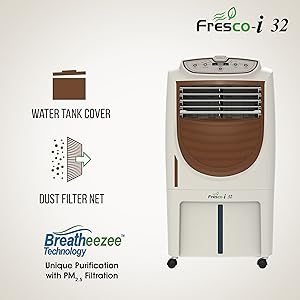
Image 2: Illustration of the honeycomb pad for cooling and the completely collapsible louvers for dust protection.
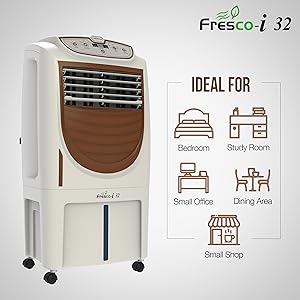
Image 3: Depiction of the water tank cover and the dust filter net, highlighting the Breatheezee Technology for air purification.
4. Setup
4.1 Unpacking
- Carefully remove the cooler from its packaging.
- Check for any damage during transit. If damaged, do not operate and contact customer service.
- Remove all packing materials, including any protective films or tapes.
4.2 Attaching Castor Wheels
The cooler comes with four castor wheels for easy mobility. Insert each wheel firmly into the designated slots at the bottom of the cooler until it clicks into place.
4.3 Placement
- Place the cooler on a firm, level surface.
- Ensure there is sufficient space (at least 15-20 cm) around the cooler for proper air circulation.
- For optimal cooling, position the cooler near an open window or door to draw in fresh air.
4.4 Filling the Water Tank
- Ensure the cooler is unplugged from the power outlet.
- Open the water tank cover located on the top of the unit.
- Pour clean, fresh water into the tank. Do not exceed the 'MAX' water level indicator.
- Close the water tank cover securely.
4.5 Power Connection
Plug the power cord into a suitable electrical outlet. Ensure the outlet is properly grounded.
5. Operating Instructions
The Havells Fresco-i 32L Air Cooler can be operated using the electronic control panel on the unit or the provided remote control.
5.1 Control Panel and Remote Functions
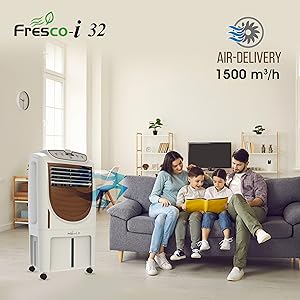
Image 4: The full-function remote control and the digital temperature display on the cooler's grill area.
- Power Button: Turns the cooler ON or OFF.
- Fan Speed Button: Selects between 3 fan speeds (Low, Medium, High).
- Swing Button: Activates or deactivates the automatic oscillation of the louvers for wider air distribution.
- Cool/Pump Button: Activates or deactivates the water pump for evaporative cooling. When activated, water is circulated over the honeycomb pads.
- Humidity Control: Adjusts the humidity level. Refer to the specific settings on your control panel for details.
- Auto Drain Button: Initiates the automatic water draining process from the tank.
- Timer Button: Sets the operating time after which the cooler will automatically turn off.
- Temperature Display: Shows the ambient temperature at the air outlet grill.
5.2 Water Level Indicator
The cooler features a transparent water level indicator on the front. Monitor this indicator to ensure the water level is always above the 'MIN' mark for continuous cooling. Refill the tank when the water level is low.
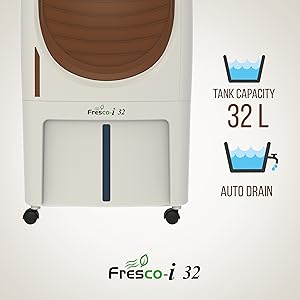
Image 5: Visual representation of the 32-liter tank capacity and the auto drain function.
6. Maintenance
Regular maintenance ensures optimal performance and extends the life of your air cooler. Always unplug the cooler before cleaning or maintenance.
6.1 Cleaning the Exterior
- Wipe the exterior surfaces with a soft, damp cloth.
- Do not use abrasive cleaners, solvents, or harsh chemicals.
6.2 Cleaning Honeycomb Pads
The honeycomb pads should be cleaned periodically, especially if you notice reduced cooling efficiency or unpleasant odors.
- Unplug the cooler and drain all water from the tank using the auto drain function or manually.
- Carefully remove the back panel to access the honeycomb pads.
- Gently remove the pads and rinse them under running water to remove dust and mineral deposits.
- For stubborn deposits, soak the pads in a mild detergent solution for a short period, then rinse thoroughly.
- Allow the pads to dry completely before reinserting them.
6.3 Cleaning the Dust Filter Net
The dust filter net, located at the back, should be cleaned regularly to maintain air quality and cooler efficiency.
- Remove the dust filter net from its slot.
- Wash it with water and a soft brush to remove accumulated dust.
- Allow it to dry completely before reattaching.
6.4 Draining the Water Tank
Regularly drain and clean the water tank to prevent the growth of mold, mildew, and bacteria.
- Use the Auto Drain function for convenient draining.
- Alternatively, manually drain the tank by opening the drain plug (if available) or tilting the unit carefully (ensure it's unplugged).
- Wipe the inside of the tank with a clean cloth.
6.5 Seasonal Storage
If the cooler will not be used for an extended period:
- Drain and thoroughly clean the water tank and honeycomb pads.
- Ensure all components are dry.
- Store the cooler in a dry, dust-free place, preferably in its original packaging.
7. Troubleshooting
Before contacting customer service, refer to the following table for common issues and their solutions.
| Problem | Possible Cause | Solution |
|---|---|---|
| Cooler does not turn ON | No power supply Power cord not properly plugged in | Check power outlet and plug connection Ensure main power switch is ON |
| No cooling effect | Water tank empty Water pump not activated Honeycomb pads clogged | Fill water tank Press the 'Cool/Pump' button Clean honeycomb pads (refer to Section 6.2) |
| Weak airflow | Dust filter net clogged Air inlets/outlets blocked | Clean dust filter net (refer to Section 6.3) Ensure clear space around the cooler |
| Unusual noise | Low water level Foreign object in fan Unit not on a level surface | Refill water tank Unplug and check for obstructions (contact service if unsure) Place on a stable, level surface |
| Water leakage | Overfilled water tank Drain plug not secured | Do not exceed 'MAX' water level Ensure drain plug is tightly closed |
8. Specifications
| Feature | Specification |
|---|---|
| Brand | Havells |
| Model Name | Fresco - i 32 |
| Model Number | GHRACFSW190 |
| Material | Plastic |
| Mounting Type | Freestanding |
| Colour | White - Brown |
| Controls Type | Remote |
| Reservoir Capacity | 32 Liters |
| Item Weight | 12500 Grams (12.5 kg) |
| Form Factor | Personal |
| Wattage | 180 Watts |
| Number Of Speeds | 3 |
| Item Dimensions (D x W x H) | 41D x 48.3W x 94H Centimeters |
| Special Features | Tank Cover, Auto Drain, Humidity Control, Dust Filter Net |
9. Warranty and Support
9.1 Warranty Information
Your Havells Fresco-i 32L Personal Air Cooler comes with a 1 Year Manufacturer Warranty from the date of purchase. This warranty covers manufacturing defects under normal use. Please retain your purchase receipt for warranty claims.
9.2 Customer Support
For any queries, service requests, or technical assistance, please contact Havells customer support. You can find contact details on the Havells official website or through your retailer.
Manufacturer: Havells India Limited
Address: Plot No. SP 181-189 & 191 (A), Industrial Area, Phase-II, Neemrana, Distt. Alwar, Rajasthan-301705. (INDIA)