
1. Introduction
Thank you for choosing the One Fire Baby Night Light. This versatile device combines a night light, white noise machine, and nursing light, designed to create a soothing environment for babies and assist parents. It features multiple light modes, white noise sounds, dimmable brightness, and convenient remote control operation. Please read this manual carefully to ensure proper use and maintenance of your product.

Image: The One Fire Baby Night Light, a compact and portable device, shown on a bedside table, emitting a soft glow.
2. Product Overview
The One Fire Baby Night Light is designed with functionality and ease of use in mind. Key features include:
- 35 Light Modes: Offers 7 colors with 5 brightness levels each, including a rainbow effect.
- 12 White Noise & Lullaby Sounds: Helps calm and soothe babies to sleep.
- Dimmable Brightness: Adjustable light intensity for various needs, from soft sleep light to brighter nursing light.
- Remote Control: Convenient operation from a distance.
- Touch Control: Intuitive control directly on the device.
- Auto Timer Settings: 15, 30, or 60-minute options for automatic shut-off.
- Rechargeable & Portable: Built-in 1800mAh battery for cordless use and easy portability with a kid-friendly handle.
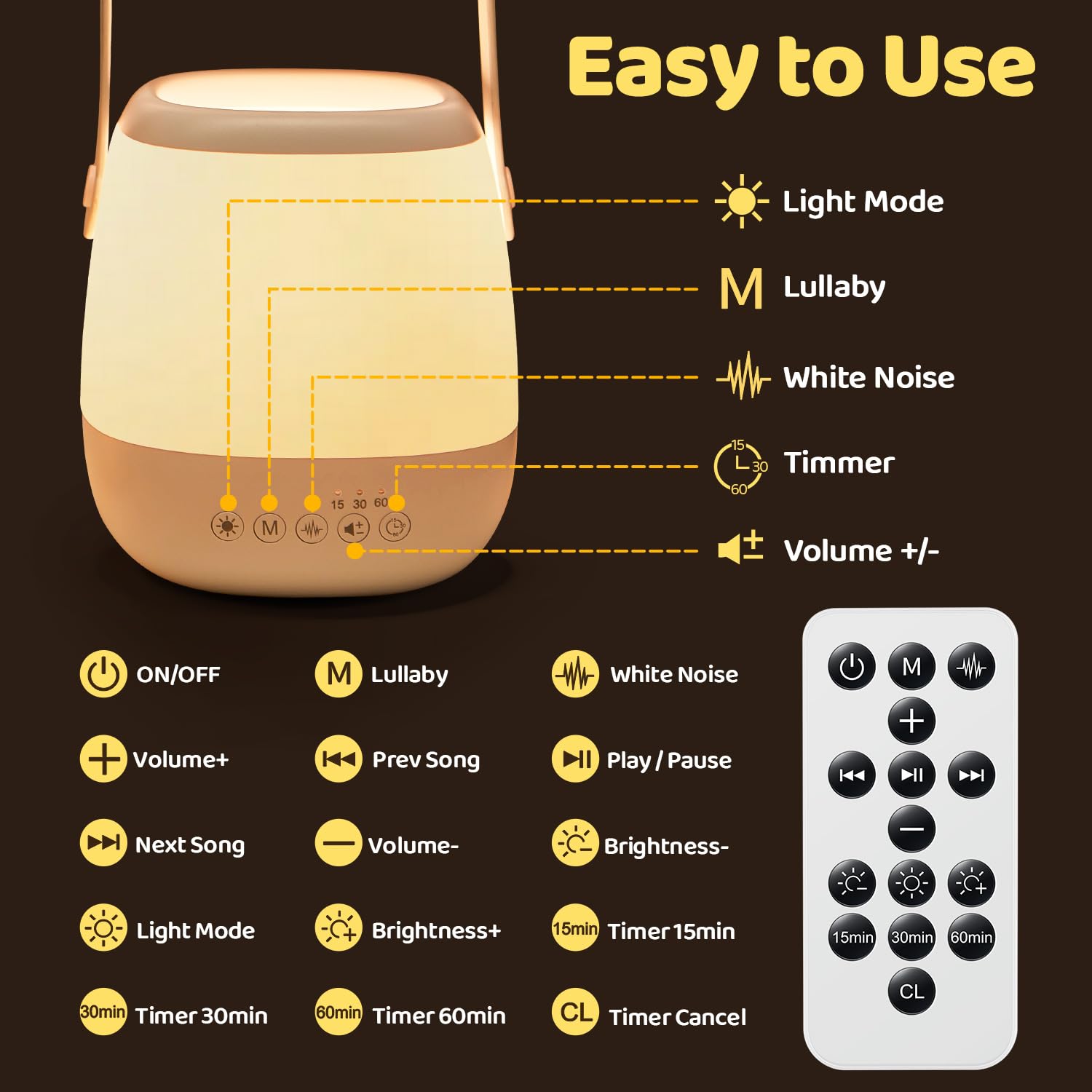
Image: The night light in various use scenarios: assisting with night feeding, diaper changes, as a sleeping companion for a child, and during a family camping trip.
3. Package Contents
Please check the box for the following items:
- One Fire Baby Night Light
- Remote Control
- USB Charging Cable

Image: A diagram illustrating the touch controls on the night light base (ON/OFF, Lullaby, White Noise, Timer, Volume) and the full remote control layout with corresponding functions.
4. Setup
4.1 Initial Charging
- Before first use, fully charge the night light.
- Connect the provided USB cable to the charging port on the night light and to a standard USB power adapter (not included) or a computer USB port.
- The charging indicator light will show the charging status. Once fully charged, the indicator will change or turn off.
- A full charge provides approximately 12 hours of use on minimum brightness.
4.2 Placement
Place the night light on a stable, flat surface such as a bedside table, or use its integrated handle to hang it securely. Ensure it is out of reach of infants to prevent accidental pulling or dropping.

Image: The night light demonstrating its portability with a kid-safe handle, its ability to be hung anywhere (e.g., on a crib), and its stable bucket design for tabletop use.
5. Operating Instructions
5.1 Power On/Off
- Touch Control: Press and hold the power button on the base of the night light to turn it on or off.
- Remote Control: Press the ON/OFF button on the remote control.
5.2 Light Modes
The night light offers 35 light effects (7 colors x 5 brightness levels).
- Changing Colors: Press the Light Mode button on the night light base or remote to cycle through colors.
- Adjusting Brightness: Use the Brightness+ and Brightness- buttons on the remote to adjust the light intensity. The light is dimmable to suit various needs.

Image: A young child holding the night light, which is glowing red, alongside a visual representation of 16 different RGB light colors available.
5.3 White Noise & Lullabies
The device includes 12 soothing sounds to aid sleep.
- Activating Sounds: Press the White Noise button or Lullaby button on the night light base or remote to start playing sounds.
- Changing Sounds: Use the Prev Song and Next Song buttons on the remote to cycle through the 12 sounds.
- Adjusting Volume: Use the Volume+ and Volume- buttons on the night light base or remote.
- Play/Pause: Press the Play/Pause button on the remote to pause or resume sound playback.

Image: The night light emitting a purple glow, with a sleeping baby in the background. Icons below illustrate the 12 soothing sounds, including 6 lullabies and sounds like campfire, rain, birds, white noise, wave, and piano.
5.4 Auto Timer Settings
Set the night light to automatically turn off after a specified duration.
- Setting Timer: Press the 15min, 30min, or 60min buttons on the remote control to activate the respective timer.
- Canceling Timer: Press the CL (Timer Cancel) button on the remote.
6. Charging
The One Fire Baby Night Light is equipped with a built-in 1800mAh rechargeable battery.
- Connect the USB cable to the device and a power source.
- A full charge typically provides up to 12 hours of operation at minimum brightness.
- It is recommended to charge the device when the light dims significantly or the sound quality degrades.

Image: The night light on a bedside table, highlighting its 1800mAh battery capacity, three auto-timer options (15, 30, 60 minutes), and a battery life of 12 hours on minimum brightness.
7. Maintenance
- Cleaning: Wipe the surface of the night light with a soft, dry cloth. Do not use abrasive cleaners or immerse the device in water.
- Storage: When not in use for extended periods, store the night light in a cool, dry place. Ensure it is fully charged before storing and recharge every few months to maintain battery health.
- Battery Care: Avoid completely draining the battery frequently to prolong its lifespan.
8. Troubleshooting
| Problem | Possible Cause | Solution |
|---|---|---|
| Night light does not turn on. | Battery is depleted. | Charge the device using the USB cable. |
| Remote control is not working. | Remote battery is low or depleted; Obstruction between remote and device. | Replace the remote control battery; Ensure clear line of sight to the device. |
| Sound is distorted or too low. | Volume setting is too low; Battery is low. | Increase volume using the remote or touch controls; Charge the device. |
| Light modes are not changing. | Incorrect button pressed; Device malfunction. | Ensure you are pressing the 'Light Mode' button; Try resetting the device by turning it off and on. |
9. Specifications
| Brand | One Fire |
| Model | Baby Night Light |
| Product Dimensions | 14D x 12W x 13H Centimeters |
| Material | Plastic |
| Color | White |
| Light Source Type | LED |
| Wattage | 3 Watts |
| Voltage | 3 Volts |
| Power Source | Battery Powered (1800mAh) |
| Connectivity Technology | USB |
| Control Method | Touch, Remote |
| Number of Light Modes | 35 (7 colors x 5 brightness) |
| Number of White Noise Sounds | 12 |
| Timer Settings | 15, 30, 60 minutes |
| Indoor/Outdoor Usage | Indoor |
| Waterproof | No |
10. Safety Information
- Keep the device away from water and moisture.
- Do not attempt to disassemble or repair the device yourself. Contact customer support for assistance.
- Keep the remote control and small parts out of reach of children to prevent choking hazards.
- Use only the provided USB cable for charging.
- Avoid exposing the device to extreme temperatures or direct sunlight.
11. Warranty and Support
For warranty information or technical support, please refer to the documentation provided with your purchase or contact One Fire customer service directly. Details for contacting support are typically found on the product packaging or the manufacturer's official website.

