
Introduction
This manual provides instructions for the proper setup, operation, and maintenance of your Kassionel RAV533 Replacement Remote Control. This remote is designed to be compatible with various Yamaha AV Receiver models, including HTR-4068, TSR-5790, RXV581BL, RX-V581BL, RX-V583, and RXV583BL. It requires no programming and is ready for use upon battery installation.
Setup
Battery Installation
The remote control requires two (2) AAA 1.5V batteries (not included). Follow these steps to install the batteries:
- Locate the battery compartment on the back of the remote control.
- Slide the battery compartment cover downwards and lift it off.
- Insert two AAA batteries, ensuring the positive (+) and negative (-) terminals align correctly with the markings inside the compartment.
- Replace the battery compartment cover by sliding it back into place until it clicks securely.

Figure 1: Battery Installation. This image displays the rear of the remote control with the battery cover removed, showing the two AAA batteries correctly inserted into their respective slots. The positive and negative terminals are visible, indicating proper orientation.
Initial Use
This replacement remote control is designed for immediate use with compatible Yamaha AV receivers. No programming or pairing is required. Once batteries are installed, the remote is ready to operate your device.
Video 1: Remote Control Overview and Battery Installation. This video demonstrates the physical features of the remote control and provides a visual guide for installing the AAA batteries into the battery compartment. It also highlights the 'no programming needed' feature.
Operating Instructions
To operate your Yamaha AV receiver, point the remote control directly at the receiver's infrared sensor and press the desired function button. Ensure there are no obstructions between the remote and the receiver.
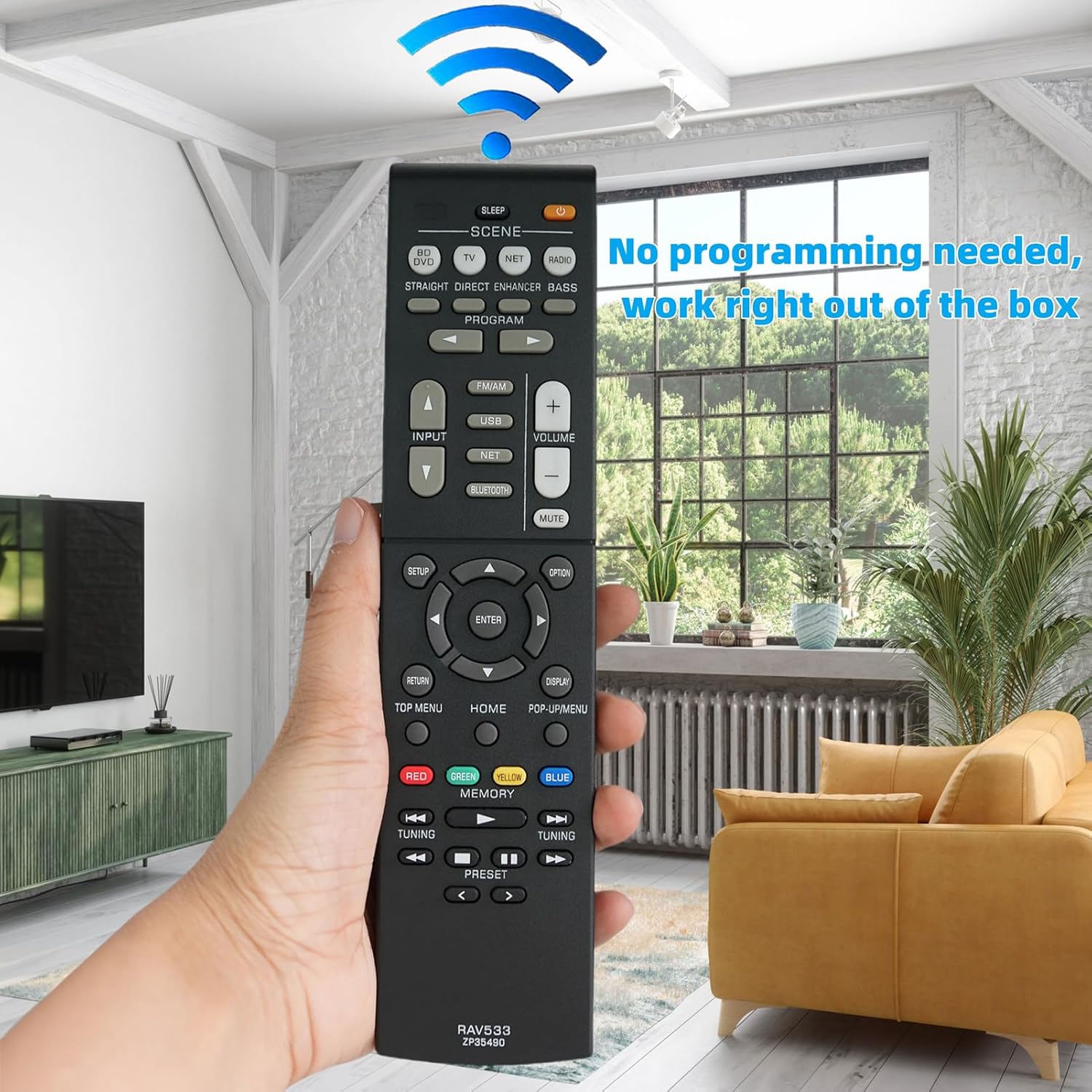
Figure 2: Remote in Use. This image shows a hand holding the remote control, demonstrating how to point it towards an AV receiver. A graphic overlay indicates a strong, clear signal transmission, emphasizing the remote's direct functionality.
Key Functions
- Power Button: Turns the AV receiver on or off.
- Input Selectors (BD/DVD, TV, NET, RADIO, USB, BLUETOOTH): Switches between different audio/video input sources.
- Volume Up/Down: Adjusts the master volume level.
- Mute: Silences the audio output.
- Navigation Pad (SETUP, OPTION, RETURN, TOP MENU, HOME, POP-UP/MENU, ENTER): Used to navigate menus and confirm selections on your receiver's display.
- Scene Buttons: Allows for quick recall of preset scene settings on your receiver.
- Tuning/Preset Buttons: Used for radio tuning and navigating stored presets.
- Memory Buttons (RED, GREEN, YELLOW, BLUE): These colored buttons may correspond to specific functions or shortcuts depending on your receiver model and current menu.

Figure 3: Remote Control Features. This image showcases the remote control with callouts pointing to its key attributes, including its durable construction, strong signal transmission capability, soft-touch buttons for comfortable use, and the use of ABS material for longevity.
Maintenance
Cleaning
To clean the remote control, use a soft, dry cloth. For stubborn dirt, slightly dampen the cloth with water or a mild, non-abrasive cleaner. Do not use harsh chemicals or abrasive materials, as these can damage the remote's surface or buttons.
Battery Replacement
Replace batteries when the remote's performance degrades or it stops responding. Always replace both batteries at the same time with new AAA batteries. Do not mix old and new batteries, or different types of batteries.
Storage
When not in use for extended periods, remove the batteries to prevent leakage, which can damage the remote control. Store the remote in a cool, dry place away from direct sunlight and extreme temperatures.
Troubleshooting
- Remote not responding:
- Check if the batteries are correctly installed with the proper polarity (+/-).
- Replace the batteries with new ones.
- Ensure there are no obstructions between the remote control and the AV receiver's infrared sensor.
- Verify that the remote is pointed directly at the receiver.
- Limited operating range:
- Ensure batteries are fresh. Low battery power can reduce the remote's effective range.
- Remove any potential interference sources, such as bright lights or other electronic devices, that might be affecting the infrared signal.
Specifications
| Feature | Detail |
|---|---|
| Brand | Kassionel |
| Model Name | RAV533 |
| Model Number | RAV533 |
| Connectivity Technology | Infrared |
| Max Number of Supported Devices | 1 |
| Compatible Devices | Home Theater (Yamaha AV Receivers) |
| Battery Type | 2 AAA batteries (Alkaline recommended) |
| Item Weight | 88.6 Grams |
| Item Dimensions (L x W x H) | 8.39" x 1.97" x 0.83" |
| Maximum Range | 10 Meters |
| Special Feature | No programming needed, work right out of the package |
Warranty and Support
Warranty Information
This product comes with a 1-year warranty. Please retain your proof of purchase for warranty claims.
Customer Support
If you encounter any issues or have questions regarding your Kassionel RAV533 Replacement Remote Control, please contact the seller or manufacturer's customer support for assistance. Refer to your purchase documentation for specific contact details.